How to prompt (the new) Claude Fable 5:
1. Task
☑ Give the goal + the why, not the steps:
"I'm working on [LARGER GOAL] for [WHO IT'S FOR]. They need [WHAT THE OUTPUT ENABLES]. With that in mind: [TASK]."
No "write me a follow-up email."
↳ That's a task. Claude 5 works well on goals.
2. Context
☑ The Project knows, the chat forgets:
"Use everything in this Project first: my about-me doc, instructions, uploaded examples. If it's not there, pull it from my connectors - don't guess."
Stop re-explaining who you are every single chat. Put it in a Project once.
3. Skill
☑ Saved once, loaded in one word:
"/[skill-name] — apply it fully."
Anything you've explained to Claude twice should become a skill. That's the rule.
4. Effort
☑ Don't let it undersell itself:
"This is a [routine / hard / hardest-unsolved] problem. Scope it like it's at the top of your range."
Claude 5 is built for your hardest problems.
Testing it on easy ones undersells it.
5. Act
☑ Stop it from overplanning:
"When you have enough information to act, act. Weighing a choice? Give a recommendation."
No more 4 paragraphs of options it won't pursue.
6. Scope
☑ The simplest thing that works:
"No extra features, refactors, or abstractions. If I'm describing a problem, the deliverable is your assessment."
Smart models love to over-deliver. Cut it off.
7. Delegate
☑ Subagents do the boring work:
"Split independent sub-tasks across subagents & keep working. Verify with a fresh-context subagent."
Claude 5 manages its own team now. Let it.
8. Evidence
☑ Audit before reporting:
"Before reporting, audit every claim against a real result from this session. Unverified? Say so."
This one line nearly eliminates made-up progress reports. Anthropic tested it themselves.
9. Memory
☑ Promote lessons into the Project:
"When you learn something about me that will matter next time, tell me at the end."
You paste it into the Project instructions.
Claude gets smarter every week.
10. Checkpoint
☑ Pause only when it must:
"Pause only for: destructive actions, real scope changes, or input only I can provide. Never end your turn on a promise."
No more "Shall I proceed?" every 3 minutes.
11. Report
☑ The TLDR comes first:
"Open with the outcome. Complete sentences, no shorthand I never saw. Clear beats short."
You get the answer, not the long journal.
Copy the full template here:
Step 1. Subscribe for free → https://t.co/psB7XxB2Y4.
Step 2. You will have two choices: free or paid.
Step 3. Choose the free tier. Don't pay for anything.
Step 4. Open your welcoming email (wait 30 sec).
Step 5. Access my entire prompt library & skills.
♻️ Repost this to help others.
That's the full system.
8 prompts. Two AI tools. A research workflow that would cost $20,000+ from a real analyst
team.
NotebookLM gives you the library. Claude turns it into the thesis.
Most knowledge workers stop at consumption.
20 NotebookLM Prompts
To Learn Faster, Think Deeper & Research Smarter
01. Instant Summary
Turn long documents into digestible insights.
Prompt: “Summarize this source into the 10 most important ideas, key arguments, and practical takeaways in plain English.”
02. Beginner Explanation
Make complex topics easy to understand.
Prompt: “Explain this material as if I am a complete beginner. Use simple analogies, step-by-step logic, and avoid jargon.”
03. Deep Dive Breakdown
Understand the topic layer by layer.
Prompt: “Break this source into core concepts, hidden assumptions, expert-level nuances, and what most readers usually miss.”
04. Compare Sources
Spot agreements and contradictions.
Prompt: “Compare all uploaded sources. Show where they agree, where they conflict, and what unique insights each source contributes.”
05. Study Notes Builder
Create clean notes instantly.
Prompt: “Turn this content into structured study notes with headings, bullet points, definitions, and memorable examples.”
06. Flashcards Generator
Convert information into active recall.
Prompt: “Generate 25 high-quality flashcards from this material with question on front and concise answer on back.”
07. Quiz Me
Test your understanding.
Prompt: “Create a progressive quiz from easy to difficult based only on this source. Wait for my answers and grade me.”
08. Memory Hooks
Make information stick.
Prompt: “Create mnemonics, analogies, and memory anchors that help me retain the most important parts of this content.”
09. Timeline Extraction
Organize events chronologically.
Prompt: “Extract every important event, milestone, or development from these sources and arrange them into a clean timeline.”
10. Key Quotes Finder
Find the strongest supporting evidence.
Prompt: “Pull out the most impactful quotes, data points, and evidence from these sources that I can cite in writing or presentations.”
11. Research Gaps
See what’s missing.
Prompt: “Identify unanswered questions, weak arguments, missing evidence, and research gaps across these materials.”
12. Debate Both Sides
Sharpen critical thinking.
Prompt: “Present the strongest arguments for and against the main thesis of these sources as if two experts were debating.”
13. Turn Into Framework
Extract repeatable systems.
Prompt: “Convert the ideas in these sources into a practical framework, checklist, or repeatable system I can apply.”
14. Content Repurposing
Turn research into publishable content.
Prompt: “Use these sources to generate a LinkedIn post, article outline, tweet thread, and newsletter idea.”
15. Expert Interview Mode
Ask the notebook questions.
Prompt: “Act as the world’s top expert on these uploaded materials. I will ask questions answer only from the sources.”
16. Executive Briefing
Condense for busy decision making.
Prompt: “Create a 5-minute executive briefing with only the most strategic insights, implications, and action points.”
17. Lesson Plan Creator
Transform notes into a curriculum.
Prompt: “Turn this notebook into a 7-day learning plan with daily lessons, exercises, and checkpoints.”
18. Idea Generator
Use sources for new thinking.
Prompt: “Generate 20 original ideas, opportunities, or applications inspired by the uploaded materials.”
19. Simplify for Teaching
Prepare to explain to others.
Prompt: “Rewrite the key ideas from these sources into a teaching script that I can explain to someone in 5 minutes.”
20. Action Plan
Move from knowledge to execution.
Prompt: “Based on everything in these sources, create a practical action plan with first steps, priorities, and deadlines.”
❤️ Like
🔁 Retweet
🔖 Bookmark
Followv Nadia -with-Ai for more such posts
Save this before your next Claude session:
(99 prompt commands nobody told you about)
1 - Download this infographic. Send it to your team.
2 - Type these at the very start of your prompt.
3 - Pro tip:
Use /TLDR for long articles.
/ELI10 for confusing concepts.
/STEPS for any task you're stuck on.
To (actually) learn how to prompt Claude properly.
Read my free guide here: https://t.co/Sw2tg2QkBK
To copy-paste all 99 of these commands:
Step 1. Go to https://t.co/psB7XxB2Y4.
Step 2. Subscribe for free. Don't pay anything.
Step 3. Open my welcome email (most skip this).
Step 4. Hit the automatic reply button inside.
Step 5. Go to the Notion link.
Step 6. Open the "Claude cowork" folder.
Step 7. Locate "PROMPT SHORTCUTS" toggle list.
♻️ Repost this to save your team 10 hours a week.
Anthropic just dropped a 31-page prompting guide.
Here's everything you actually need (in 10 rules):
1. You write "review this contract" and pray.
Fix: Name every output. "Review this contract. Flag risks per clause. Rate severity 1-5. Return as a table."
2: You say "summarize this" on a 40-page report.
Fix: 4.7 sizes the answer to the input. Cap it: "5 bullets. Each under 15 words. Start each with an action verb."
3: You write "don't use jargon. don't be salesy."
Fix: Negative instructions don't stick.
Flip them: "Write in plain English a 16-year-old could read aloud."
4: You type "can you help me with the email?"
Fix: Each verb ships something. For example: "Go to Gmail. Find [contact]. Write the send-ready reply. Under 90 words. Tone: confident, casual."
5: You wait for Claude to web search on its own.
Fix: Claude opus 4.7 calls fewer tools than 4.6.
Force it: "Use web search aggressively. Verify every claim with at least 2 sources."
6: You miss the warm tone from old Claude.
Fix: Claude opus 4.7 is direct. Almost zero emojis. Paste 2-3 sentences in the voice you want.
Tell Claude to match the rhythm.
7: You ask for "a landing page" & get bare minimum.
Fix: Drop this one line on every creative task
→ "Go beyond the basics."
It's from Anthropic's own doc.
8: You forget Claude 4.7 doesn't reason by default.
Fix: They call it "adaptive thinking."
Add this at the end: "Think before answering (maximum reasoning)." Free upgrade. Every time.
9: You rewrite the same prompt 14 times a week.
Fix: A skill is a command with instructions pre-built.
Write the same prompt twice? Make it a skill.
10: You assume Claude knows what you meant.
Fix: Old Claude 4.6 guessed.
New Claude 4.7 does exactly what you typed.
Spell it out. Output. Order. Length. Tone. Format.
If you don't say it, you don't get it.
To go even further & download my .md files directly:
Step 1. Go to https://t.co/psB7XxB2Y4.
Step 2. Subscribe for free. Don't pay anything.
Step 3. Open my welcome email (most skip this).
Step 4. Hit the automatic reply button inside.
Step 5. Download my .md files from my Notion.
Bonus. Enjoy my best copy-paste prompts, too.
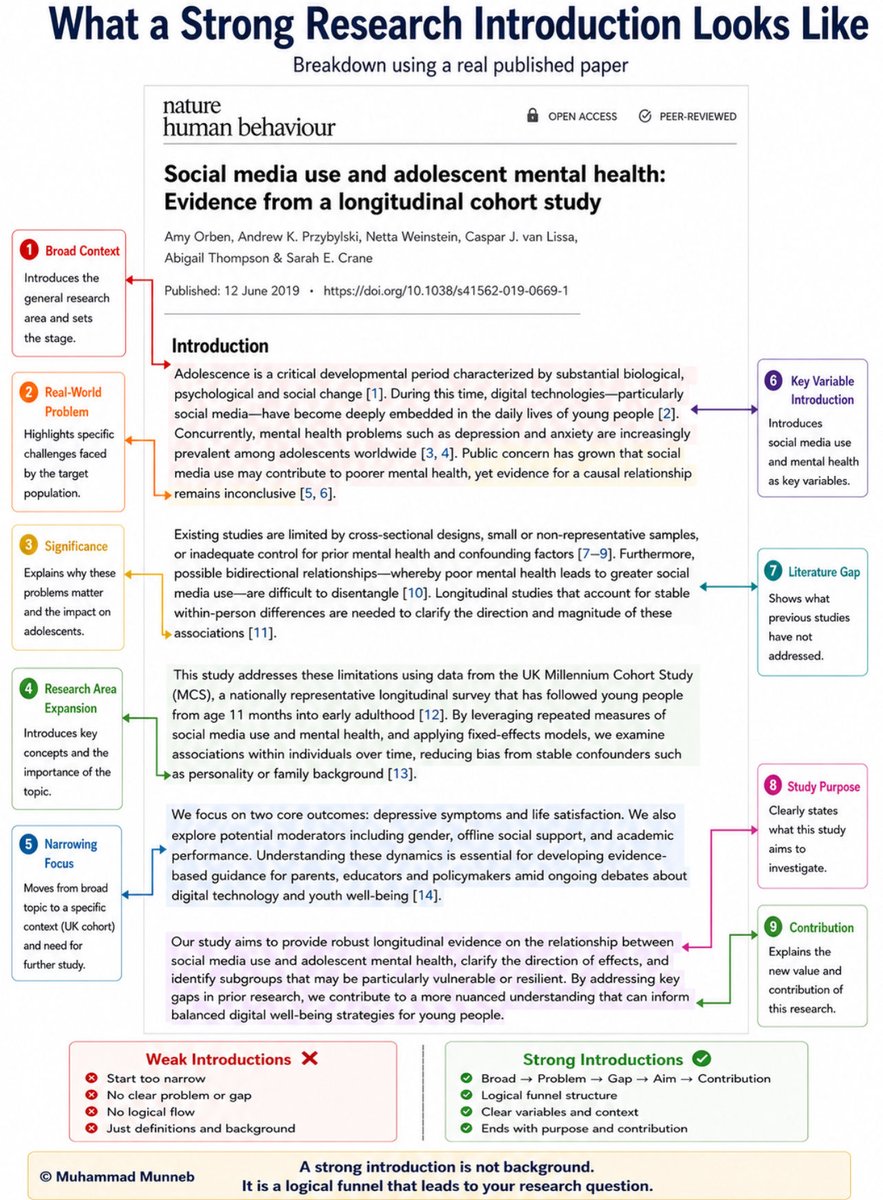
Google has one of the most powerful study tools available right now.
It’s free, has been around for months, and most people still don’t use it properly.
Here are 8 smart ways to use NotebookLM that can save you hours of work.
🔖 Save this — you’ll thank yourself later.
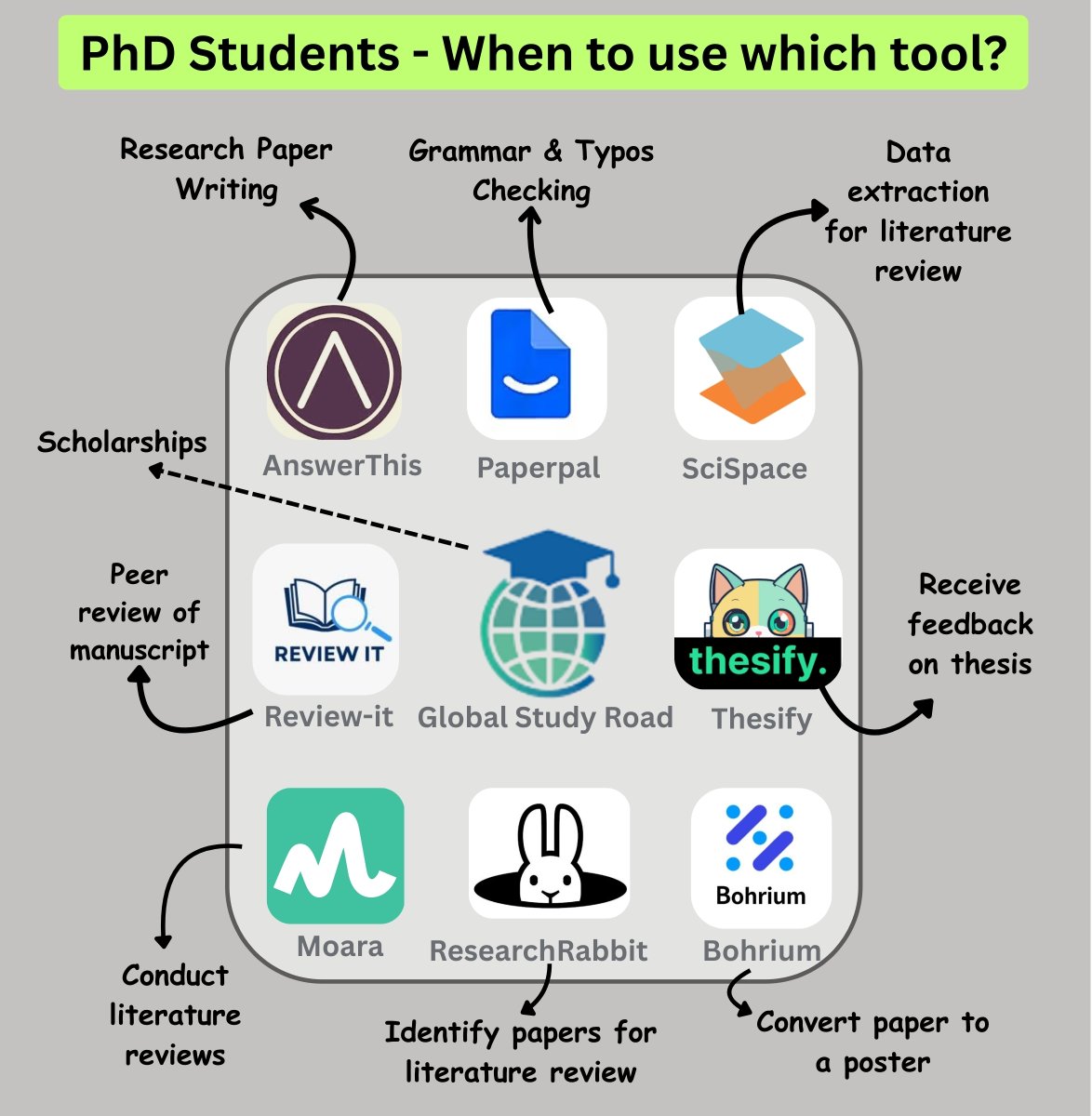
PhD Students - When to use which tool?
1. Writing research papers ➝ 𝐀𝐧𝐬𝐰𝐞𝐫𝐓𝐡𝐢𝐬
Link: https://t.co/EagIhCGWn4
2. Grammar and typos checking ➝ 𝐏𝐚𝐩𝐞𝐫𝐩𝐚𝐥
Link: https://t.co/jLDR3VwrSL
3. Data extraction for literature review ➝ 𝐒𝐜𝐢𝐒𝐩𝐚𝐜𝐞
Link: https://t.co/8Kg056Opce
4. Peer review of manuscript ➝ 𝐑𝐞𝐯𝐢𝐞𝐰-𝐢𝐭
Link: https://t.co/PMrNAhnkJM
5. Scholarships ➝ 𝐆𝐥𝐨𝐛𝐚𝐥 𝐒𝐭𝐮𝐝𝐲 𝐑𝐨𝐚𝐝
Link: https://t.co/1nDbIUmRK1
6. Receive feedback on thesis ➝ 𝐓𝐡𝐞𝐬𝐢𝐟𝐲
Link: https://t.co/dkmQJWRdlC
7. Conduct literature reviews ➝ 𝐌𝐨𝐚𝐫𝐚
Link: https://t.co/MlJOSIZgTy
8. Identify papers for review ➝ 𝐑𝐞𝐬𝐞𝐚𝐫𝐜𝐡𝐑𝐚𝐛𝐛𝐢𝐭
Link: https://t.co/S1BaWRcb8u
9. Convert paper to a poster ➝ 𝐁𝐨𝐡𝐫𝐢𝐮𝐦
Link: https://t.co/rNB7rdA0RT
Any other tool you'd like to add?
Academic writing isn't about sounding smart. It's about being understood.
My PhD chapter took 3 weeks. Read everything. Cited everyone. Fancy academic words.
Supervisor's summary: "I can't follow your argument."
She gave me 17 rules that transformed my writing:
Difference: Discussion vs. Conclusion
# Discussion:
Meaning of Results → Research Question → Prior Work.
Strengths of Findings → Limitations → Next Steps.
Implications → Theoretical → Practical.
Where do results generalize?
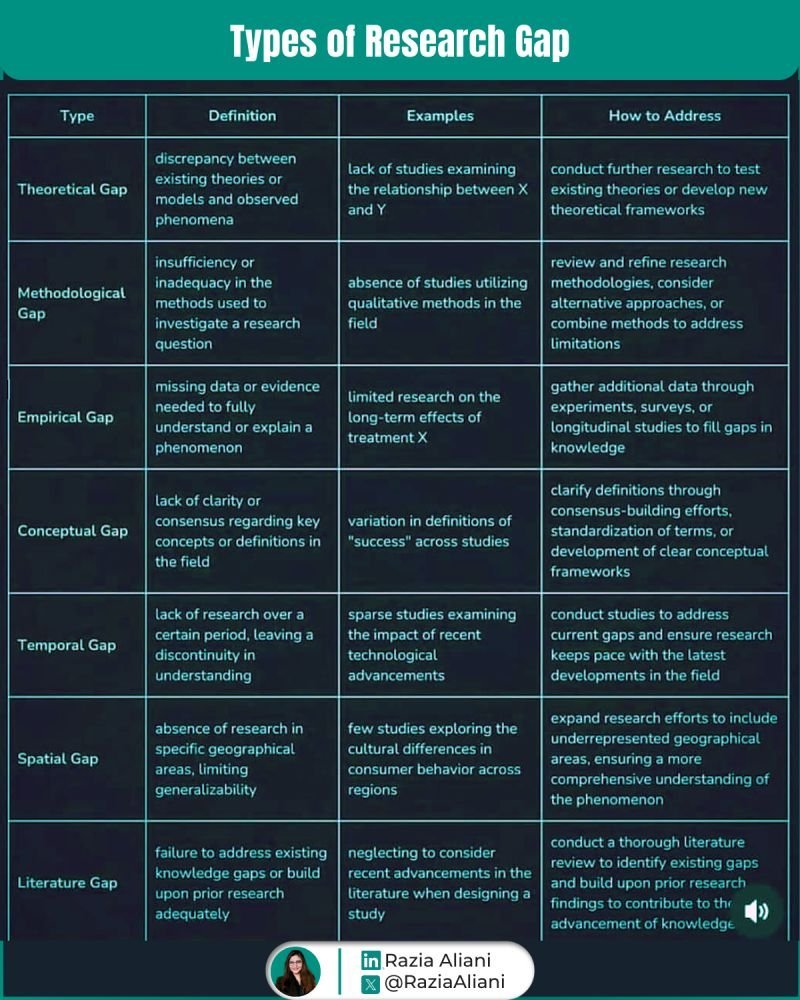
You know that feeling when your advisor says 'but what's the gap?' & your mind goes blank Here's your rescue!
Learn your Gap types & how to address them ⤵️
— Theoretical: when theories fail to explain reality
— Methodological: when current methods fall short
— Empirical: when we lack evidence to explain something
— Conceptual: when key definitions are muddy
— Temporal: when research hasn't kept up with changes
— Spatial: when studies ignore geographic differences
— Literature: when studies fail to build on existing knowledge
Each has distinct ways to address them.
What most miss?
Connecting MULTIPLE gap types creates the strongest research justification.
💬 Reweet & 𝘊𝘰𝘮𝘮𝘦𝘯𝘵 𝑹𝒆𝒔𝒆𝒂𝒓𝒄𝒉 𝑮𝒂𝒑 𝑷𝑫𝑭 𝘪𝘧 𝘺𝘰𝘶 𝘸𝘢𝘯𝘵 𝘵𝘩𝘦 𝘳𝘦𝘴𝘦𝘢𝘳𝘤𝘩 𝘨𝘢𝘱 𝘸𝘳𝘪𝘵𝘪𝘯𝘨 𝘵𝘦𝘮𝘱𝘭𝘢𝘵𝘦𝘴
------------------------------
Follow @RaziaAliani to get more useful AI in Research content (no clickbait stuff!) in your feed.
& join 16K+ researchers & get FREE exclusive tips on using AI in research
🔗 in bio




![rubenhassid's tweet photo. How to prompt (the new) Claude Fable 5:
1. Task
☑ Give the goal + the why, not the steps:
"I'm working on [LARGER GOAL] for [WHO IT'S FOR]. They need [WHAT THE OUTPUT ENABLES]. With that in mind: [TASK]."
No "write me a follow-up email."
↳ That's a task. Claude 5 works well on goals.
2. Context
☑ The Project knows, the chat forgets:
"Use everything in this Project first: my about-me doc, instructions, uploaded examples. If it's not there, pull it from my connectors - don't guess."
Stop re-explaining who you are every single chat. Put it in a Project once.
3. Skill
☑ Saved once, loaded in one word:
"/[skill-name] — apply it fully."
Anything you've explained to Claude twice should become a skill. That's the rule.
4. Effort
☑ Don't let it undersell itself:
"This is a [routine / hard / hardest-unsolved] problem. Scope it like it's at the top of your range."
Claude 5 is built for your hardest problems.
Testing it on easy ones undersells it.
5. Act
☑ Stop it from overplanning:
"When you have enough information to act, act. Weighing a choice? Give a recommendation."
No more 4 paragraphs of options it won't pursue.
6. Scope
☑ The simplest thing that works:
"No extra features, refactors, or abstractions. If I'm describing a problem, the deliverable is your assessment."
Smart models love to over-deliver. Cut it off.
7. Delegate
☑ Subagents do the boring work:
"Split independent sub-tasks across subagents & keep working. Verify with a fresh-context subagent."
Claude 5 manages its own team now. Let it.
8. Evidence
☑ Audit before reporting:
"Before reporting, audit every claim against a real result from this session. Unverified? Say so."
This one line nearly eliminates made-up progress reports. Anthropic tested it themselves.
9. Memory
☑ Promote lessons into the Project:
"When you learn something about me that will matter next time, tell me at the end."
You paste it into the Project instructions.
Claude gets smarter every week.
10. Checkpoint
☑ Pause only when it must:
"Pause only for: destructive actions, real scope changes, or input only I can provide. Never end your turn on a promise."
No more "Shall I proceed?" every 3 minutes.
11. Report
☑ The TLDR comes first:
"Open with the outcome. Complete sentences, no shorthand I never saw. Clear beats short."
You get the answer, not the long journal.
Copy the full template here:
Step 1. Subscribe for free → https://t.co/psB7XxB2Y4.
Step 2. You will have two choices: free or paid.
Step 3. Choose the free tier. Don't pay for anything.
Step 4. Open your welcoming email (wait 30 sec).
Step 5. Access my entire prompt library & skills.
♻️ Repost this to help others.](https://pbs.twimg.com/media/HMTYBiiacAEyHKz.png)


![rubenhassid's tweet photo. Anthropic just dropped a 31-page prompting guide.
Here's everything you actually need (in 10 rules):
1. You write "review this contract" and pray.
Fix: Name every output. "Review this contract. Flag risks per clause. Rate severity 1-5. Return as a table."
2: You say "summarize this" on a 40-page report.
Fix: 4.7 sizes the answer to the input. Cap it: "5 bullets. Each under 15 words. Start each with an action verb."
3: You write "don't use jargon. don't be salesy."
Fix: Negative instructions don't stick.
Flip them: "Write in plain English a 16-year-old could read aloud."
4: You type "can you help me with the email?"
Fix: Each verb ships something. For example: "Go to Gmail. Find [contact]. Write the send-ready reply. Under 90 words. Tone: confident, casual."
5: You wait for Claude to web search on its own.
Fix: Claude opus 4.7 calls fewer tools than 4.6.
Force it: "Use web search aggressively. Verify every claim with at least 2 sources."
6: You miss the warm tone from old Claude.
Fix: Claude opus 4.7 is direct. Almost zero emojis. Paste 2-3 sentences in the voice you want.
Tell Claude to match the rhythm.
7: You ask for "a landing page" & get bare minimum.
Fix: Drop this one line on every creative task
→ "Go beyond the basics."
It's from Anthropic's own doc.
8: You forget Claude 4.7 doesn't reason by default.
Fix: They call it "adaptive thinking."
Add this at the end: "Think before answering (maximum reasoning)." Free upgrade. Every time.
9: You rewrite the same prompt 14 times a week.
Fix: A skill is a command with instructions pre-built.
Write the same prompt twice? Make it a skill.
10: You assume Claude knows what you meant.
Fix: Old Claude 4.6 guessed.
New Claude 4.7 does exactly what you typed.
Spell it out. Output. Order. Length. Tone. Format.
If you don't say it, you don't get it.
To go even further & download my .md files directly:
Step 1. Go to https://t.co/psB7XxB2Y4.
Step 2. Subscribe for free. Don't pay anything.
Step 3. Open my welcome email (most skip this).
Step 4. Hit the automatic reply button inside.
Step 5. Download my .md files from my Notion.
Bonus. Enjoy my best copy-paste prompts, too.](https://pbs.twimg.com/media/HI_cEF9aAAA3A4K.jpg)