Every RunsOn job ends with its own charts: CPU load, CPU per core and memory, drawn in the last step of the log.
Nothing to enable.
https://t.co/KE6qwesef9
Also check out https://t.co/K80IMpHESG if you've been curious or fed up with large bills and don't have a proper way to investigate where your Actions minutes are going
Its a free tool that takes in 4 CSVs and gives out a dashboard of the state of your CI with a lot of granularity and shareable views
Do you have an open source repo with slow & flaky CI?
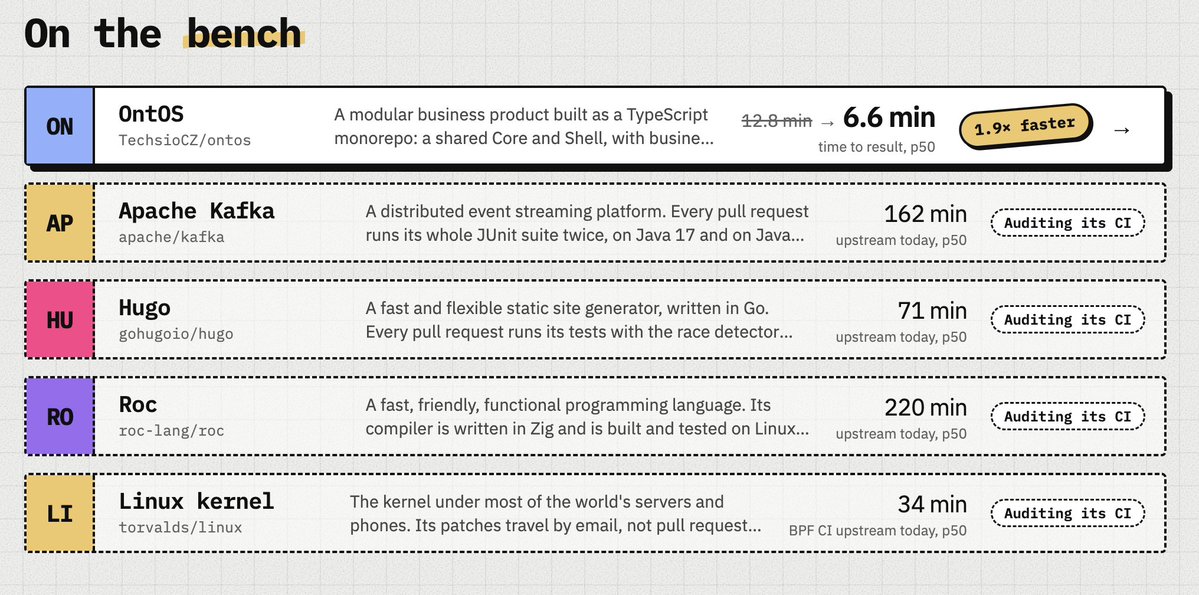
Send us your repo links and we'll publish our optimisations and benchmarks using RunsOn on https://t.co/O9mJ2EFfsu.
We're always on the lookout for open source repos that we can speed up but this time we want to do it properly.
We'll audit your last 150 PR runs, pick 2-3 of them that look like daily work: a small change, a deps change, a large change etc and replay them on our fork with RunsOn and publish our results.
If you're interested in seeing how your CI would look like on RunsOn, send us your repo links!
@flybayer@crohr@ibuildthecloud right, so thats exactly what we've been doing with our RunsOn benchmarks as well and we share which repos we're using as well on the page
what makes you say they're isolated?
@flybayer@crohr@ibuildthecloud might be missing something here but
what's a "live workload migration" if not taking a real CI workflow and swapping out it's runners (and caching etc) with RunsOn, Ravion or whatever?
And if you're curious about where your CI's minutes are going and want a clear and granular picture of its cost and performance, check out our free tool: https://t.co/UrMUoAyMcw
Is it possible to make your CI faster without ever moving away from GitHub-hosted runners?
Yes, absolutely. It's a "throw as many tokens at it" problem but yes you can.
Between Oct 29 and Nov 24, the TechsioCZ/ontos maintainers made about 100 commits to their CI just to optimise the shit out of it.
And optimise they did. To the max.
They have a 2500+ line workflow.yml file that does a ton of things to make their CI as fast as possible while still being on Github machines:
- stop running work that isn't needed
- cache more, and cache it correctly
- split long jobs so they can run parallelly
- pack jobs tightly into GitHub's 20 concurrent job limit
- give each test group its own database cluster
- waste runners less by failing early and cancelling old jobs
and much much much more.
This essentially brought down their median CI run time from 34m to about 14m.
Now, this is a brilliant case study to demonstrate how intelligent agents, a lot of token spend and massive persistence can solve near any problem or bottleneck you face today - with slow/flaky CI being one of the major one these days.
So when we stumbled upon this repo and decided to benchmark/optimise with RunsOn, there was nothing left to optimise except swapping out the GitHub machines with RunsOn machines on AWS.
This further reduced the median time from 14m to 7m but at a cost of $0.46/run (vs free GitHub hosted runners on public repos)
We further reduced that cost by segregating the jobs into big, medium and small and choosing the right machine for each type. Got to $0.33/run while keeping the median time at 7m.
But this got me thinking: if this were you, would you prefer to pay for better CI machines and save a lot of time very quickly? Or would you rather keep optimising till you can't but never pay for CI machines?
Something to think about perhaps.
Here's the full report of the speed up if you're interested: https://t.co/L4l7P6rEPE
@DanielLockyer would love to see @RunsOnRunsOn!
we have a free non-commercial licence so you only pay for the compute and control plane you self-host on AWS
@waldobroodryk if you're already on AWS, you can fully self-host your runners and control plane with @RunsOnRunsOn and save upto 80-90% on costs + at least 60% faster runners which will also bring down the overall minutes and bill
hey Petr, we took your ontos repo and sped it up using RunsOn runners
we ran a bunch of tests but since you've been optimising the CI heavily over the month, the only win left was to use better overall machines and also the right sized machine for the job to save on costs
full report here: https://t.co/L4l7P6rEPE
lmk your thoughts or any feedback, DMs open!
@sdogruyol@DanielLockyer@iyi_lang thats significant, and im assuming its higher than that since you've selected the period as 'current month' and we're only halfway through nov
if you've been curious to drill down further on how your CI is doing, we made a free tool just for that: https://t.co/UrMUoAyMcw
@rafalwilinski yessirr we've got a lot of happy customers running their CI on fully self-hosted compute and control plane on AWS with @RunsOnRunsOn
crossed 6M jobs a day across all customers and the best cost-perf ratio out there
self-hosted is def the way to go