@smartics we are working with @atlassian tools for more than a decade to create innovative solutions for our customers. Hear our story and views on team collaboration in the new #CodeCampfire blog. #AtlassianDev https://t.co/RNEkJv94U6
Tip: "Search Functions" with the #projectdoc Toolbox for #Confluence. Using context values like the name of the current user or the current date for your queries: https://t.co/mNbQIHENur
Tip: "Changing Names" with the #projectdoc Toolbox for #Confluence. Using name and document references and changing names using the Web API Extension: https://t.co/ZKlp4yRgyc
New version of the #projectdoc Toolbox for #Confluence released! Version 4.0 is available on the Atlassian Marketplace with new features like Aspects and Autocomplete. It also supports Confluence 7.0.x!
Release notes at https://t.co/TkctilgBkj
New version of the smartics #JIRA#Maven Plugin released! Version 0.2.4 - minor improvements and bugfixes to make bulk clone issue creation easier: https://t.co/CsKGWoTOee
Tip: "Aspects light" with the #projectdoc Toolbox for #Confluence. Provide additional properties to a document by adding documents as children: https://t.co/TfRxoLXj8A
New version of the #projectdoc Toolbox for #Confluence released! Version 3.2 is available on the Atlassian Marketplace with new features like Supplier Documents and Search Functions.
Release notes at https://t.co/L3FK5FF7vh
Tip: "Search Filter based on Properties" (https://t.co/SDOlxJ1sqs): Use document properties to put constraints on your queries with the #projectdoc Toolbox for #Confluence.
Tip: "Linking to Glossary Terms" (https://t.co/vACwCQ0GLl) lists your options setting links with the #projectdoc Toolbox for #Confluence and shows how one of the options can be used to render links to existing and non-existing glossary items.
New version of the #projectdoc Toolbox for #Confluence released! Version 3.1 is available on the Atlassian Marketplace with new features like Context Controlled Macros, Deep Link Support for more Macros, Tooltips, and many more.
More https://t.co/42DkuthrMK
Tip: "Use Context Controlled Macros" (https://t.co/wgF45pUCT1) - shows how to override macro parameters by document or space properties using the #projectdoc Toolbox for #Confluence
Tip: "Transclusion References" (https://t.co/4UNQo4zK9S) - shows how to use artificial properties provided by the #projectdoc Toolbox for #Confluence to list transcluding and transcluded documents.
New version of the #projectdoc Toolbox for #Confluence released! Version 3.0 is available on the Atlassian Marketplace with new features, improvements, and bugfixes. Find more information in the release notes at https://t.co/mAysS7LH0h
The Changelog Macro of the #projectdoc Toolbox for #Confluence renders the changes of a given page as a table. Moreover it is possible to change the information to show. https://t.co/N1foQeCgWJ
The properties of the #projectdoc Toolbox for #Confluence may represent an editable boolean value. Use Confluence tasks to define the value for those properties. Read our tip: https://t.co/IoJV6ag23L
The Action Button Macro of the #projectdoc Toolbox for #Confluence renders an action button in a page. It provides parameters to control the visual representation by the use of CSS selectors and styles. https://t.co/GZiV5bxN6B
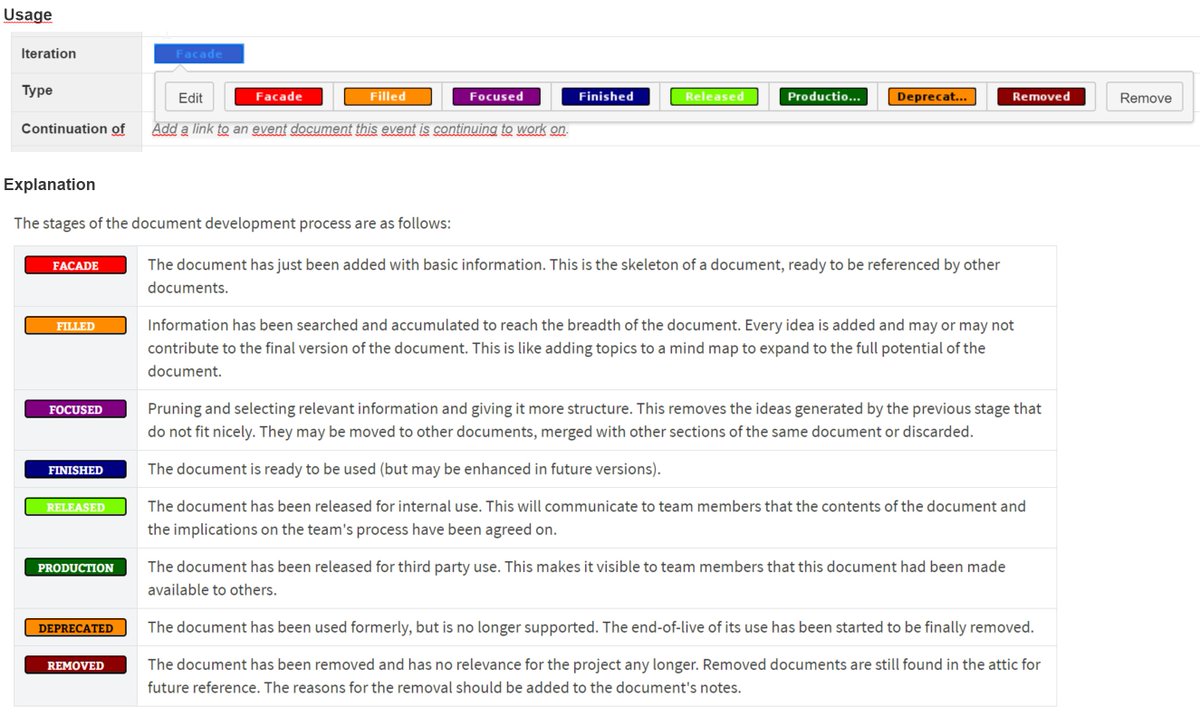
The #projectdoc Toolbox for #Confluence provides the iteration property. It is a tool for the author to communicate the status of the document within its creation process. Readers get aware, what to expect from a given document. https://t.co/5cIapIcaFn