Engineering leader, 10+ yrs. Building SplitNest, an open-source terminal for running AI coding agents. I test Claude Code vs Codex and share what I learn.
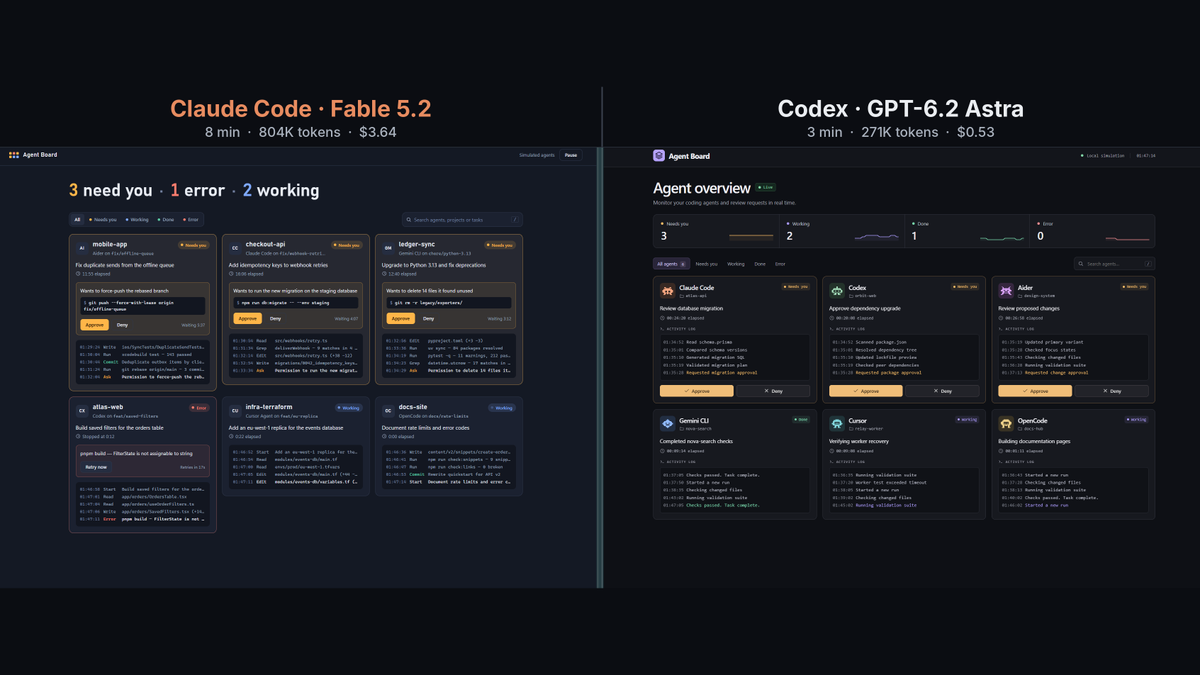
I gave Claude Code (Fable 5.2) and Codex (GPT-6.2 Astra) the same prompt: build a live dashboard for monitoring AI coding agents, in one HTML file.
Both on high effort. One shot, no follow-ups. 🧵
@GetOverSightly Same pain, different angle. I went at it from the terminal side, so the tab itself shows when an agent needs you. A master feed across agents makes a lot of sense once you're past a handful. Following along 👋
How many AI coding agents do you run at the same time?
I'm usually at 3–4 (Claude Code + Codex) across different projects. Curious what others do, and how you keep track of which one needs you.
Week 1 of building SplitNest in public:
- launched on Reddit, https://t.co/MQaM5T8wp6, X and Discord
- 3 → 5 stars, 47 visitors
- best feedback: add a sound when an agent needs you
- next: a live usage line per agent (tokens, context, cost)
Sharing the numbers every week.
@mathiasvrb Both. Each agent gets its own tab, but tabs alone weren't enough, I kept missing the one waiting on me. So I built a terminal for it: tabs show Working / Needs you / Done, and I get a Windows notification + sound when one needs me. How do you handle it today?
Heads up if you use Opus 4.8 fast mode in Claude Code: it goes away on Nov 30, so it's time to move to Opus 5.5.
I'll share what developers report about speed and cost after switching.
Terminal bug that took me way too long:
If you use xterm.js with the WebGL renderer, never call fit() inside requestAnimationFrame. The canvas is cleared one frame before it's redrawn, and you get a visible flash on every resize.
Use a normal timer instead.
I ran both side by side in SplitNest. The cost line on each tab is a feature I'm building now: live time, tokens, context and spend per agent.
https://t.co/n1qEuFMeBL
I gave Claude Code (Fable 5.2) and Codex (GPT-6.2 Astra) the same prompt: build a live dashboard for monitoring AI coding agents, in one HTML file.
Both on high effort. One shot, no follow-ups. 🧵
My verdict: Codex's version looked more like a real product, and it was ~2.7x faster and ~7x cheaper.
One task, one run, so a first impression, not a benchmark. Have you tried 6.2 yet?
@NabhaniMehdi@ClaudeDevs Good call. SplitNest already plays the Windows notification sound when it's in the background (Settings › Notifications). But when you're looking at another tab inside the app, it's only a visual notice. Adding a sound for that case too, thanks for the idea 🙌
I run 3–4 Claude Code sessions at once on Windows and kept missing the one waiting for a permission.
So I built SplitNest, with Claude Code: each tab shows if the agent is working, done or needs you, and each agent gets its own git worktree.
@ClaudeDevs 🧵
Claude Code is very good at writing code that *looks* finished.
What fixed that for me: small milestones, and each one is only "done" with evidence. A test against a real shell, a real end-to-end run, a measurement. Not "looks right".
Wrote up the hard parts of building a terminal for AI coding agents on Windows:
- why resizing breaks with ConPTY
- keeping terminals outside React
- knowing when Claude Code needs you
- building it with Claude Code
https://t.co/ALV6GQ8Hcb
I kept missing Claude Code permission prompts buried in terminal tabs, so I built SplitNest: a free, open-source Windows terminal workspace for AI coding agents. 🧵
Also: PowerShell + WSL split panes, file explorer, built-in editor, and Resume for agent conversations after a restart.
No telemetry. MIT licensed. Built mostly with Claude Code.