IntentEngine™
Automatic Setting Optimization Artificial Intelligent Engine.
The right settings take time to find, and they change with how you play.
You play. It adjusts.
From that data, the engine identifies the sensor position on the mouse where you perform best. This is just a beginning.
#PulsarP1 #IntentEngine #DualSensor #GamingMouse #Esports
Why is your aim shaky for no explicable reason? Why do some mice feel better than others to you? Why is the G pro's shape SOOOO booty (terrible)....
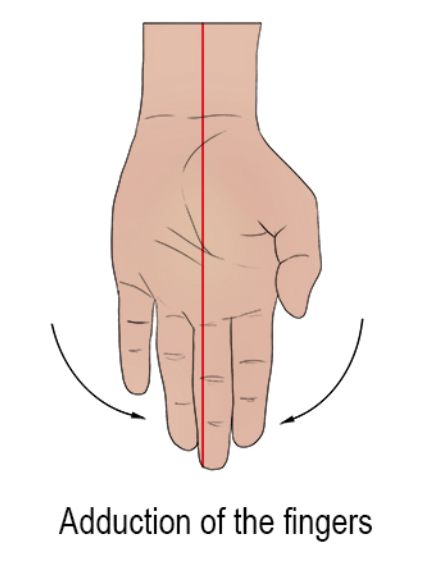
Most mice have sheer walls (some dont but the angles and curves are barley enough to be meaningful). This forces you to rely on ADDUCTION (bringing your fingers together side by side **See ref image**).
Adduction is cool and all until you have to rely on it for hours. Its simply weaker and tires faster so why do that when there's a better option? That's why you have ShapeShift, you shift the angles of the main contact points on your mouse into a position where your fingers now rely more on FLEXION (curling motion). Simply making it MUCH easier to control your mouse, play longer and have much less fatigue. EZ PZ lemon squeezy... It actually might be your mouse this time.
The Best Settings for Windows 10/11 in less than 60 Seconds for Your Gaming PC! 🚨
Potentially better latency, fps and more!
disc below, more tools, tips and much more
How to get LOWER PING in any game with one Windows setting 📶
Policy-based QoS tags your game's packets so your priortizies them over any others.
Full setup in the video 👇
You're lagging out of games and getting packet loss with your Realtek Network Adapter because of your settings
Do these to optimize your Realtek settings for lower ping + lower delay in Fortnite, Valorant, COD, + More
❤️+♻️+🔖
NVIDIA PURPOSELY LOCKED DOWN CONSUMER GPUs 😳
Someone just found a way to remove the limit.
The reported performance gains are crazy:
→ RTX 3060: +87%
→ RTX 3090: +65%
→ RTX 4090: Nearly 2x peak performance
No BIOS flashing.
No driver patches.
Just a way to unlock performance NVIDIA left on the table.
🚨 Best NVIDIA Control Panel Settings
Not using the right settings?
You could be missing out on smoother gameplay and better responsiveness.
Try these settings in your NVIDIA Control Panel and optimize your gaming experience. 👇
WTF NVIDIA GPUs just got a BIG performance boost 😳
Someone removed the hidden limits.
> RTX 3060: +87% performance
> RTX 3090: +65%
> RTX 4090: Nearly 2x peak performance
No BIOS flash. No driver patch
plug and play
The Best Ethernet Settings for Windows 10/11 in less than 60 Seconds for Your Gaming PC! 🚨
Potentially better ping, latency, download speeds and no packet loss!
disc below, more tools, tips and much more
If your a PC Gamer you need to do these settings
Reduce Windows Telemetry and System Overhead with these Steps
(Higher FPS + Lower Latency) More info Below!
🚨NVIDIA Users
NVIDIA just added a setting that could give games MORE GPU performance
Here's how to use it ⬇️
1. Open the NVIDIA App
2. Go to System → Advanced
3. Find GPU App Prioritization
4. Try Custom (85%) or select Foreground app priority (90%)
NVIDIA added a GPU setting most people haven’t touched.
NVIDIA App → System → Advanced → GPU App Prioritization
Default: 80% foreground / 20% background
Set it to: 90% / 10%
The Finals, 4K max settings, max ray tracing:
Avg FPS → 78.0 to 81.7 (+4.7%)
1% lows → 74.3 to 78.4 (+5.6%)
0.2% lows → 69.5 to 76.4 (+10%) ⚡
One slider. 10% better frames.