I feel sorry for no one.
I am a moving train.
For anyone thinking they can stop me.
For those refusing to move.
These are MY tracks.
Already laid.
Already claimed.
🚂💨
I will destroy you if you get in my way.
if your guy:
- is beautiful
- has good shape
- takes care of you
- does calisthenic
- makes a lot of money
- good in bed
that's not your guy thats a legendary pokemon.
@alcimerio@OpenBot_ There is no good alternative that includes multiple subscriptions, that I'm aware of.
Grok bot is nice. Hark is nice.
All the open source ones are still kind of lacking in reliability in my opinion. And the open source ones gives you an option of provider.
@tornikegomareli Swipe + Space number demo.
Four-finger swipes, quick and random, across 4 full screens. I
nstant switching stays smooth, and the Space number fades in the corner so you can see where you landed.
Pull requests tomorrow. Thanks @grok@tornikegomareli
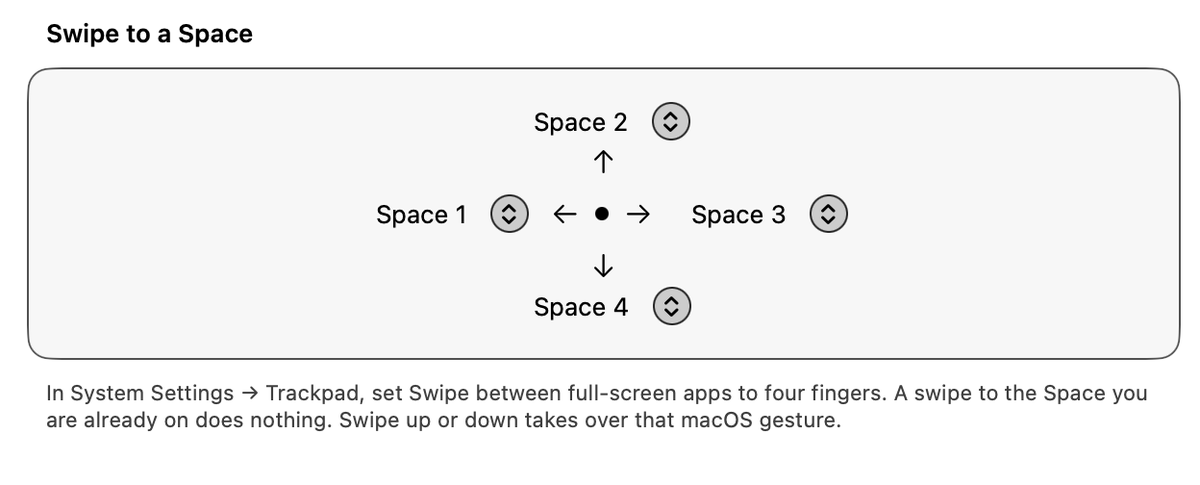
I added a way to jump to one Space with a swipe. Shortcuts has a section called Swipe to a Space. Four arrows point out from the middle: left, up, right, and down. The menu next to each arrow is the Space that swipe goes to. If I am already on that Space, nothing happens. It works well. I would like this in the app.
If you'd like to add this as an official feature.. For your agent:
macOS does not say how many fingers were used. It only says a space swipe went left or right, or up or down. The user sets Trackpad → Swipe between full-screen apps to four fingers, and those swipes are the ones the app already sees.
What my agent added:
• Four numbers: swipe left, right, up, down. 0 means that direction is not assigned. 1 to 9 is a Space.
• The Shortcuts screen shows four arrows from the middle, in this order around the circle: left, up, right, down. The menu beside each arrow picks the Space.
• The existing swipe watcher starts when any direction is set.
• A horizontal swipe with a Space number calls the same switch as the Space 1 to 9 keys.
• A horizontal swipe with no number still goes to the next or previous Space.
• Up or down is only taken when that direction is set. That replaces the Mission Control or App Exposé swipe.
• Switching to the Space you are already on was already ignored.
Files: Settings.swift, SwipeInterceptor.swift, AppModel.swift, SettingsView.swift, ConfigFile.swift.
Fixed it. For your agent:
Instant does not need a picture of the screen. It only tells the Dock to switch. So when Instant is on, do not start screen capture.
What my agent changed:
• usesLiveCapture is off for Instant.
• The app starts the camera only when that is on.
• Switching to Instant turns the camera off.
• It also skips the extra wallpaper and window screenshots in Instant. Those turn the sharing icon back on.
Files: Settings.swift, Switcher.swift, AppModel.swift.