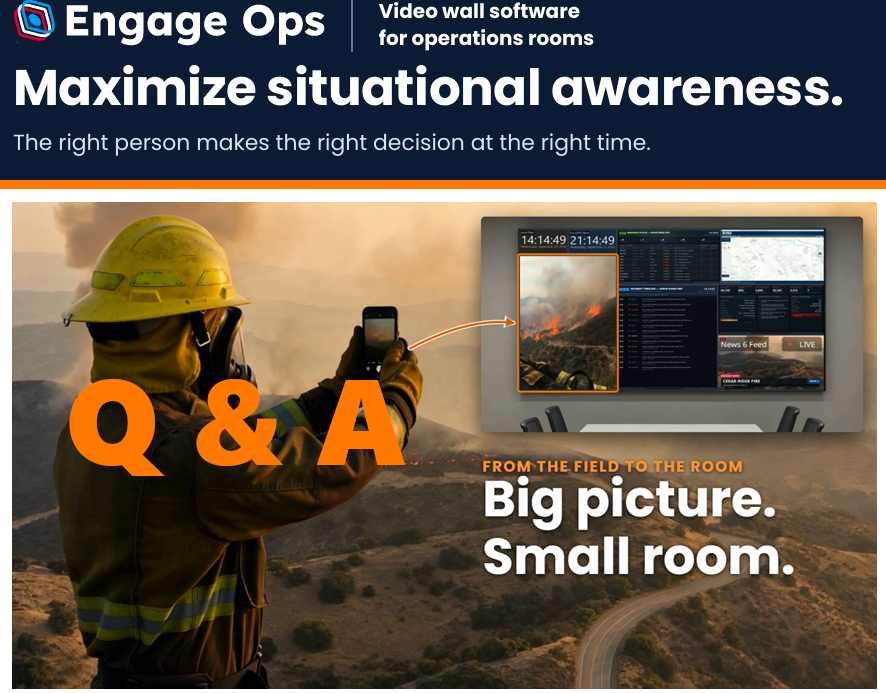
Remember the Engage Ops Q&A post from last week? Here's a nicely formatted and organized version of it. Learn lots about Engage Ops for your control room here:
https://t.co/jiDKoOObOs
Engage Ops is easy to install and use, as the topology shows. One PC, one or more displays, sources (including phones), and control. Easy and powerful for your control room to help you manage crises.
https://t.co/nHwQWSK3YH
Engage Ops Q&A
Q. How does Engage Ops differ from the Hiperwall video wall product?
A. Engage Ops shows a bunch of sources on a few displays driven by a single "Host" PC. Hiperwall scales to hundreds of displays and thousands of sources. Hiperwall is the stadium. Engage Ops is the really good sports bar. Same game, different room.
Q. When you say "a few displays", what do you mean?
A. A common Engage Ops scenario would be a single large display with an embedded PC. If your Host PC has a multi-output graphics card, though, Engage Ops supports up to four 4K displays. They can be arranged as a 2x2 or a 1x4 or 4x1 as you wish. It can even support a 1x3 wall and leave a 4th for the control interface if you don't want networked control.
Q. Does Engage Ops work with Hiperwall?
A. Yes, the "Live View" from Engage Ops can become a source for Hiperwall, so what you're showing on your Engage Ops wall can also be shown on your larger Hiperwall.
Q. How much content can Engage Ops show?
A. Engage Ops can have 12 sources available and show 9 of them on the wall at once. It can also show up to 4 clock widgets that don't count against those limits. The sources can be desktop and application captures delivered via network as well as capture device streams, which include phone cameras on iPhone and Android, so you really can deliver content from the field.
Q. What about audio? Can the sources play audio too?
A. Yes, but only one audio stream plays on the wall at a time (because nobody has ever made a better decision while two videos were shouting). It is extremely easy to switch which audio is playing.
Q. Do contributors with sources need to install software to get their applications up on the Engage Ops video wall? Do they need a dongle?
A. No, a browser is enough. For the most capability, they can install our native source app, which can automatically reconnect source windows after a reboot, but it isn't required.
Q. Some of my content runs on Mac or Linux. Can I send that to Engage Ops too?
A. Yes, browser-based capture works on both. Native source apps are planned for both, but no release date is set.
Q. Can anyone on the network just throw stuff up on the video wall?
A. No, they need admission to do so, either via PIN, request-to-join approval, or an API key. You're in charge of who sends to you wall.
Q. Can I arrange my content however I like? Or does this use a fixed grid like some competitors use?
A. You can arrange content how you like. Engage Ops supports a user-defined grid mode to help you align content boundaries, but each content item can cover multiple grid cells. It also allows freeform placement, so position and size are entirely up to you. It can even auto-place content - as a source connects, Engage Ops will choose a suitable layout to show everything. And content can be locked into place, so the auto rearrangement won't move important sources.
Q. While someone is controlling Engage Ops, does everything they do show up live on the video wall?
A. No, so you can try out your next layout without the whole room watching you think. Engage Ops supports staging, which allows complete control over a preview version of the wall, so changes don't affect the wall's content. Then you can commit the staged view to the wall.
Q. Can I save my favorite layouts so my content always shows where I like it?
A. Yes, you can save Environments and recall them in just a couple clicks.
Q. What happens when the power goes out?
A. When power is restored, the wall comes back up as it was and sources reconnect on their own. Engage Ops will place sources at their previous location as they connect.
Q. Can more than one person control Engage Ops at once?
A. Yes, control is via a secure web app, and we don't limit how many are active at once. Deciding who's really in charge is up to you.
Q. Can multiple people watch what is happening remotely via Live View?
A. Yes, several Live View streams are allowed, each displayed in a secure browser page (so a smart TV or a tablet will work). Of course, the power of your PC will be the limiting factor of how many work well.
Q. With all this discussion of remote Live View, remote sources, and even remote control, does it need the cloud? How open does my network need to be to make everything work?
A. No cloud. The only thing that leaves your building is what you decide to send. The remote features are completely opt-in. If you don't need those things, Engage Ops will live happily on your LAN without connecting to the Internet. It is completely on-premises. But if you want remote access, you need to open a few ports through your firewall. Detailed instructions are included with Engage Ops.
Q. It sounds like Engage Ops is really powerful - does that mean it needs a super powerful PC?
A. While a super powerful PC with a great GPU will run Engage Ops at its best, it runs well on small form factor AMD and Intel boxes too. It really depends on how many displays you want to drive and how many sources you want at once and at what resolution. Several 4K displays will need a lot more power than just one. For the moment, your Host PC must run Windows 11.
Q. So I don't need a rack and a server closet and dongles to hook up my content?
A. Nope, just one PC. You can turn your server closet back into a storage closet. If you want HDMI capture dongles, you can use them with Engage Ops either on the Host or on source PCs.
Q. Can it fit in a truck?
A. You bet: a rugged display with an embedded Host PC are all you need to run Engage Ops in your mobile command vehicle. Control it with a laptop. Starlink or other connectivity lets you receive sources and send Live Views.
Q. Is there a subscription?
A. No, buy it once and use it forever. We do offer a yearly HiperCare subscription, which includes version updates and continued support. The first year is included with purchase.
Q. How do I buy it? Do you have E-Commerce?
A. Engage Ops is a professional video wall product, so we recommend using an integrator to build and validate your system. We sell through the channel, not direct to customers. We can help you find a dealer if you don't have a favorite.
Q. Engage Ops? How did you get the name?
A. Engage Ops is built on technology we developed for our Engage collaboration product but is designed for your Ops room.
See if Engage Ops will work for you at https://t.co/Rngei7hfxp
Because Engage Ops is so new, we've received some questions from integrators and end users. Lots of good questions with hopefully amusing answers below.
The interest in the Engage Ops video wall control software for operations rooms is growing. Here's where you can find out more about it:
https://t.co/C3bZesCOII
I had some fun making this video showing off an Engage Ops use case. It is designed for small control rooms and EOCs. While the scenario on the video is an example, the Engage Ops captures are real. Learn more at https://t.co/k4UNesB5Ys
Hiperwall's new video wall software is ready to help you enhance situational awareness in your small control room, EOC, or mobile command post. Powerful and easy, with remote sources and remote viewers. Contact Hiperwall for details!
Engage Ops is capable yet simple video wall control software aimed to help small crisis management teams maintain and enhance situational awareness. It even works with the larger Hiperwall video wall software. Take a look and see if it fits your needs. Just 1 PC drives your wall.
Big picture. Small room. Engage Ops runs an ops room's video wall from one PC on your own network. Field crews share live from a phone browser, and operators stage the next view off-air. Now available for EOCs and mobile command.
https://t.co/tUmqA8dhxE
Small ops rooms and command vehicles handle the same incidents as the big centers and need enhanced situational awareness. We built Engage Ops so what the field crew sees is on the wall right away. One PC, your own network, nothing to subscribe to.
https://t.co/R50bGIV0UN
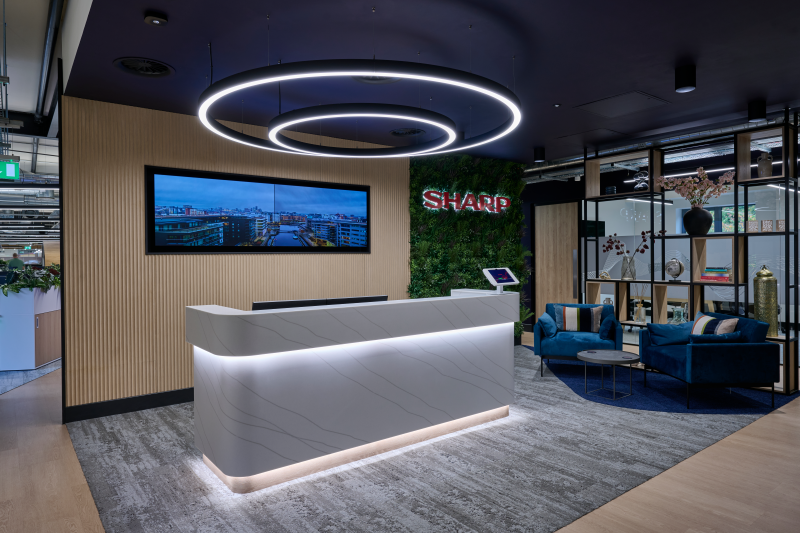
.@SharpDisplay opens Leeds HQ as techshowroom. The 10,200sqft flagship office features a 195in dvLED installation, @Hiperwall command-and-control and desk management systems
https://t.co/QR70Wjox7x
To sign up for Installation's daily mailer click here:
https://t.co/PLwPlnF6H0
@Tesla The lane splitters in California should be especially appreciative - I know my Model Y works hard to get out of their way, often before I even know they're approaching.
Do we need AI keyboards? And by that, I mean: how many times have you tried to instruct your AI "Let's add ..." only to accidently hit the Enter key when reaching for single quote? I do it all the time! Maybe it's time to reformat the keyboard layout for AIs? 😁
Hiperwall System 2026 R2 is here: capture anything, whole or cropped · the suite in 15+ languages · semantic tags + our own MCP server, so your AI can run the wall under operator control. See what's new: https://t.co/FgoPi5oIBY
I spent 5 minutes last night with @Alexa+ arguing with me that Saturday is May 31. I asked when the next full moon is, and it replied "Saturday May 31". I suggested that it check again because Saturday is the 30th. It still told me it was the 31st. I asked it was the date was last night - it replied Thursday May 28. I asked for Friday, and it said May 29, but it still said Saturday was the 31st because the days map strangely in May. I told it I didn't believe it and it should explain it to me. It replied as if I were mistaken: "Today is Thursday May 28, tomorrow is Friday May 29, Saturday is May 30. Oh, I guess you were right." And then went on to tell me that AIs can make mistakes. Yes they can!
Been thinking about AI a lot lately. It's great at lots of things, but it isn't great at the thing it should be the best at and we're terrible at: helping us remember.
Just as we no longer remember phone numbers, because our phone knows them for us, we should be able to have AI help us not waste brain space remembering things.
I should be able to say "Hey AI, I put the fridge air filters in the 3rd drawer to the right of the stove." Then 6 months later, I could say "Hey AI, where did I put those fridge air filters?"
Computers are good at remembering things, but most AIs are terrible at it. I think this needs to change if we really want helpful AI assistants.