🔎 Need data from another https://t.co/OBMVHPccYU board?
The new VLOOKUP Column Extension in Smart Spreadsheet automatically retrieves matching values - from product prices to employee details - and keeps them up to date.
Less manual work, fewer errors!
👉 https://t.co/9PqVRCx5Yi
When tasks pile up, deadlines keep shifting, and ownership changes hands, it’s easy to lose track of what’s really happening in your workflows.
Learn how to use the Activity Log in https://t.co/OBMVHPccYU to spot bottlenecks, track workload changes, and uncover workflow issues before they turn into bigger problems.
Read the two-minute how-to: https://t.co/xIqW6SpKjw
Too many columns. Complicated formulas. Manual workarounds. Sound familiar? 😵💫
We've put together a guide to the common limitations of https://t.co/OBMVHPccYU formulas and practical ways to work around them with Smart Spreadsheet - so you can spend less time untangling calculations and more time getting work done.
👉 Read the full guide: https://t.co/SiXEMWrDf2
🏎️ Three roads. One https://t.co/OBMVHPccYU app.
🟢 Smart Spreadsheet - Excel-like formulas, charts & live data
🔵 Google Sheet View - Google Sheets UI, no account needed
🔵 Google Drive Embedder - Your existing Google files
🏁 Which road would you take? 👇
🔗 https://t.co/UPpw0lDFeI
🔗 Connecting SharePoint or OneDrive to Confluence is only step one. The real value is what you can build on top of that live data:
Once your files stream in via 𝐋𝐢𝐯𝐞 𝐓𝐚𝐛𝐥𝐞𝐬 𝐟𝐫𝐨𝐦 𝐂𝐒𝐕 & 𝐉𝐒𝐎𝐍 𝐟𝐨𝐫 𝐂𝐨𝐧𝐟𝐥𝐮𝐞𝐧𝐜𝐞 𝐟𝐨𝐫 𝐂𝐨𝐧𝐟𝐥𝐮𝐞𝐧𝐜𝐞, you can turn raw data into dynamic reports using 𝐓𝐚𝐛𝐥𝐞 𝐅𝐢𝐥𝐭𝐞𝐫, 𝐂𝐡𝐚𝐫𝐭𝐬 & 𝐒𝐩𝐫𝐞𝐚𝐝𝐬𝐡𝐞𝐞𝐭𝐬 𝐟𝐨𝐫 𝐂𝐨𝐧𝐟𝐥𝐮𝐞𝐧𝐜𝐞:
🎯Interactive status reports: Add dropdown and date filters directly on the page so stakeholders can isolate specific milestones without touching the source file.
📈 Executive summary dashboards: Generate automated pivot tables to track department budgets, project workloads, or resource allocation.
🚀 Real-time visual tracking: Convert live data rows into dynamic pie, bar, or trend charts that refresh instantly whenever the SharePoint or OneDrive file is updated.
No more static copy-pasting - just live, interactive reporting inside Confluence.
👉 Full breakdown and setup guide: https://t.co/qQrJmBOpmM
Too much data. Too many boards. Not enough clarity? 📊
We’ve put together a practical guide to https://t.co/OBMVHPccYU dashboards, including setup tips, cross-board reporting, and ways to go beyond native widgets with Smart Spreadsheet.
👉 Read the full guide: https://t.co/tjgx5JPV2m
A checklist step that needs a file can finally hold one! 🎉
Checklists for Jira (Templates & Automation) now lets you attach files & screenshots right on the checklist item. Paste it or drag it in — ✅ done.
📝 Full guide: https://t.co/wTJvsyBYMA
💸 Budgets, expenses, invoices, reports… Managing finances shouldn’t feel like putting out fires.
You can turn https://t.co/OBMVHPccYU into a more organized financial management hub - with budget tracking, custom columns, automations, dashboards, and spreadsheet-powered reporting.
👉 Read the full guide: https://t.co/EEJ67QZ5eU
🚀 Turn Salesforce data into live dashboards in Confluence Cloud!
Great news! Our free 𝐋𝐢𝐯𝐞 𝐓𝐚𝐛𝐥𝐞𝐬 𝐟𝐫𝐨𝐦 𝐂𝐒𝐕 & 𝐉𝐒𝐎𝐍 𝐟𝐨𝐫 𝐂𝐨𝐧𝐟𝐥𝐮𝐞𝐧𝐜𝐞 𝐟𝐨𝐫 𝐂𝐨𝐧𝐟𝐥𝐮𝐞𝐧𝐜𝐞 app now supports Salesforce integration.
Bring your Salesforce data directly into Confluence, keep it automatically updated, and turn it into interactive dashboards with 𝐓𝐚𝐛𝐥𝐞 𝐅𝐢𝐥𝐭𝐞𝐫, 𝐂𝐡𝐚𝐫𝐭𝐬 & 𝐒𝐩𝐫𝐞𝐚𝐝𝐬𝐡𝐞𝐞𝐭𝐬 𝐟𝐨𝐫 𝐂𝐨𝐧𝐟𝐥𝐮𝐞𝐧𝐜𝐞.
✅ Display Salesforce Reports, Opportunities, Accounts, and more
✅ Connect data without coding using a Visual Builder
✅ Keep Salesforce data automatically synchronized
✅ Build interactive charts, pivot tables, and sales dashboards
📊 New guide: Learn how to create a Salesforce dashboard in Confluence, step by step: https://t.co/uMNjTszOxV
🔎 Exploring Salesforce integrations? Check out our comparison of popular Atlassian Marketplace apps: https://t.co/3aGt9CuSQj
https://t.co/OBMVHPccYU formulas work well for simple calculations. But what if you need cross-item analysis, external data lookups, or calculated values in automations?
Explore 4 native Formula Column limitations - and ways to work around them with Smart Spreadsheet. 🧮
👉 Read the full guide: https://t.co/SiXEMWrDf2
Two roads. Two workflows. One app. No need to compromise.
With Smart Spreadsheet for https://t.co/OBMVHPccYU, you can choose how you want to work with spreadsheets and files.
🟢 Smart Spreadsheet view - when you want to work with data:
• Excel-style formulas
• Pivot tables & charts
• Conditional formatting
• Live https://t.co/OBMVHPccYU board data with sync
• Blend data from boards, XLSX, CSV, Google Sheets and other sources
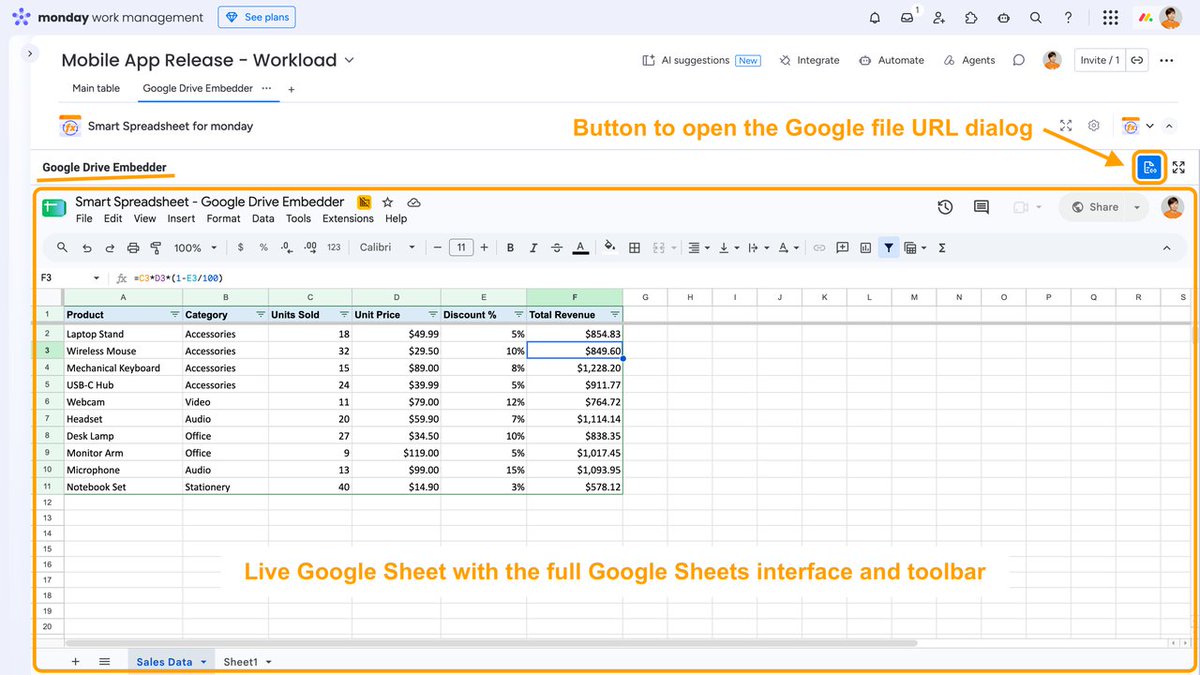
🔵 Google Drive Embedder view - when you want to work with your existing Google files:
• Select a file directly from Google Drive or enter its URL
• Open Google Sheets, Docs, Slides and other Drive files
• Use the familiar native Google interface
• Edit and work with your files without leaving https://t.co/OBMVHPccYU
No need to choose one over the other - both views are part of Smart Spreadsheet for https://t.co/OBMVHPccYU.
So… which road would you take? 👇
https://t.co/UPpw0lDFeI
If your team writes requirements in Confluence and runs work in Jira, there's usually a manual step in between.
Someone copies the Acceptance Criteria, Definition of Done, or Definition of Ready from Confluence into the Jira issue by hand.
Then the requirements change — and now the checklist in Jira is out of date. So someone updates it again and again.
We've been thinking: what if AI handled that copying? Confluence stays the source of truth, and the relevant criteria show up in Jira automatically, where the work happens.
We've described how this could work with AI Checklists for Jira: https://t.co/zFhlqYqTu4
So, where does your team keep Acceptance Criteria and DoD today, and would you want them synced into Jira?
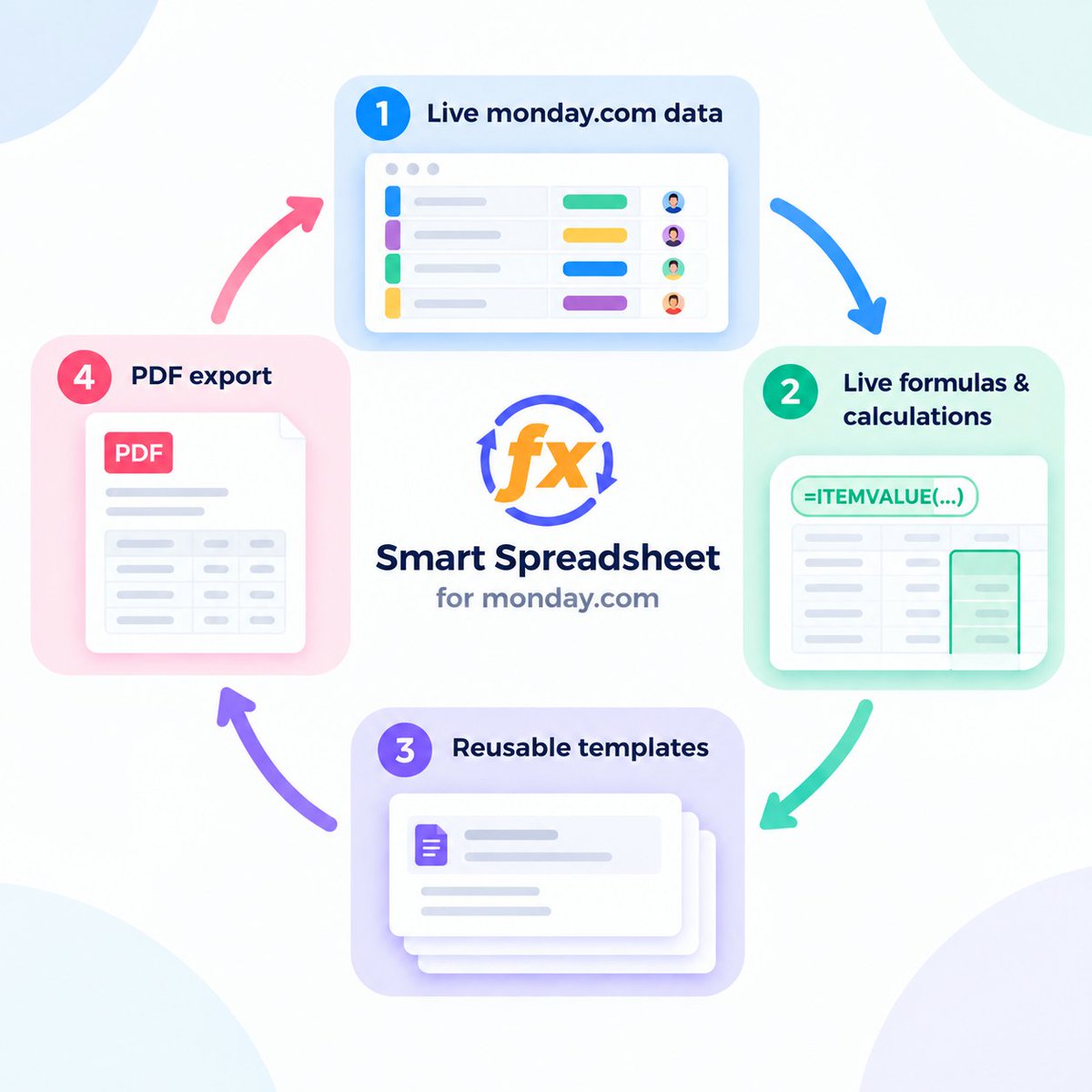
Smart Spreadsheet now supports PDF export - completing the workflow for creating reusable, data-driven documents in https://t.co/OBMVHPccYU.
https://t.co/OBMVHPccYU data → live formulas → templates → PDF
Create a document with live data and calculations, save it as a reusable template, generate it whenever needed, and export the final version as a fixed PDF.
Perfect for insurance quotes, bills, material issue notes, and other repetitive documents you need to send to clients, contractors, or other stakeholders.
Learn more: https://t.co/cdcXzesoOu
🚀 New in Smart Spreadsheet: Google Drive Embedder! Work with Google Sheets, Google Docs, Google Slides, and other Google Drive files directly in https://t.co/OBMVHPccYU.
The new Google Drive Embedder is a separate view where you can add a Google file by URL and work with it using its native Google interface - without leaving https://t.co/OBMVHPccYU.
📖 Learn more: https://t.co/9s1yFa5Omt
Construction material planning in https://t.co/OBMVHPccYU 🏗️
From site measurements to purchase quantities and Material Issue Notes:
→ Live https://t.co/OBMVHPccYU data
→ Safety stock + purchase unit calculations
→ Excel-style formulas
→ Calculated values synced back to the board
→ Cost & procurement reports
→ Automated .xlsx reports
→ Item-specific Material Issue Notes
The idea: keep the board simple while moving advanced calculations and reporting into Smart Spreadsheet.
Full walkthrough + screenshots 👇
https://t.co/eKMDvcAbGi
Looking to connect #Salesforce with #Confluence?
We compared popular Atlassian Marketplace apps, covering setup, authentication, reporting capabilities, and more to help you understand the available options.
Read more: https://t.co/3aGt9CuSQj
#Atlassian#CRM#Confluence#Salesforce
How can insurance teams automate their workflow in https://t.co/OBMVHPccYU?
We built an Insurance Pipeline Template that covers the journey from lead → premium calculation → quote → revenue analysis → automated reports.
VLOOKUP, live item data, quotes generation, Pivot Tables, Charts, and automated report delivery - all in one connected workflow.
See the full setup: https://t.co/BTgv8xba3z
🚀 Smart Spreadsheet is now fully integrated with the https://t.co/OBMVHPccYU Template Center!
Save complete board setups with Smart Spreadsheet views as reusable templates - with formulas, formatting, charts, and two-way sync preserved.
We’ve also added a ready-to-use Insurance Pipeline Template for automated premium calculations, quotes, and deal analysis.
Find it in the https://t.co/OBMVHPccYU Template Center.
Learn more about Smart Spreadsheet templates: https://t.co/cdcXzesoOu
Managing projects across multiple https://t.co/OBMVHPccYU boards?
In our latest monday Community post, we share a practical reporting workflow from one of our customers.
Instead of creating multiple Dashboard widgets, they use Smart Spreadsheet to combine live data from several boards into a single Master Sheet, then build multiple reports with Pivot Tables and charts - all inside one Dashboard widget.
One of those reports is a simple team workload chart showing planned hours by employee and reporting week.
If you work with cross-board reporting, custom dashboards, or spreadsheet-style analytics in https://t.co/OBMVHPccYU, this example might give you a few ideas.
Read the full post:
https://t.co/x9Hp7hzKv5
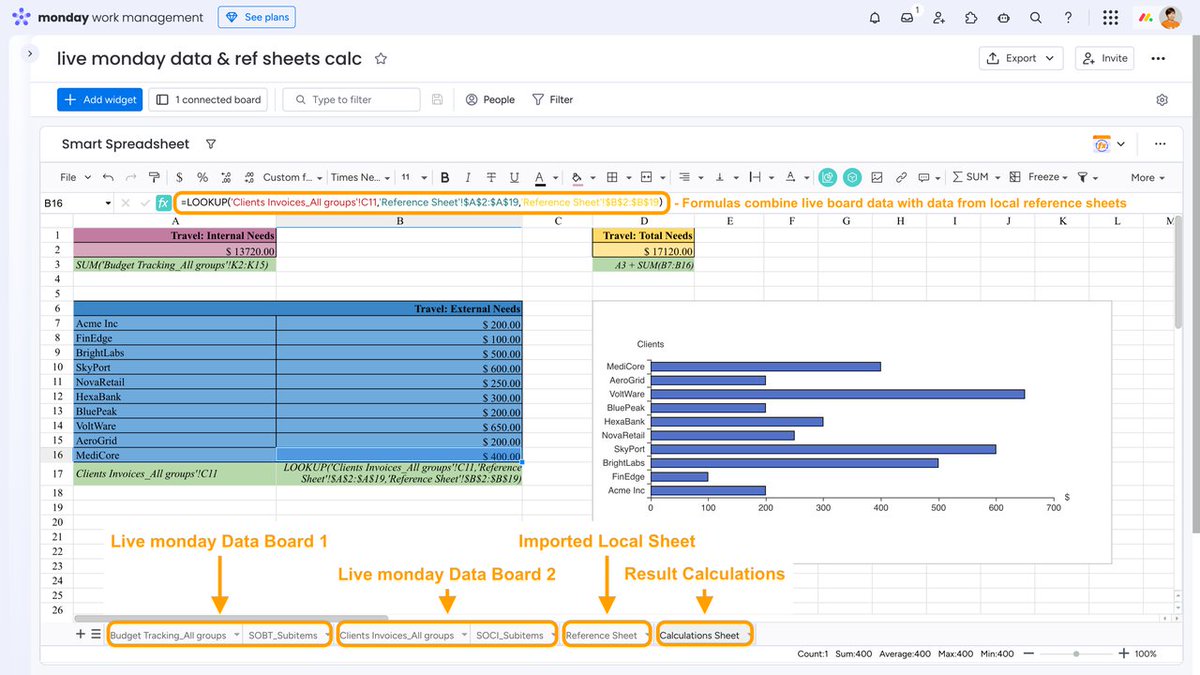
Cross-board formulas.
External spreadsheets.
One reporting workflow.
See how to bring everything together in https://t.co/Ea3RtMbcWv.
Learn more 👇
https://t.co/TNe6BaugSR