VibeArmory 0.3.0 is out today.
VibeArmory lets you see and control what AI agents do on your Mac.
What's new:
🧠 On-device ML that learns what's "normal" on your Mac. Mark findings as Expected, and Insights ranks each new finding by how "unusual" it is compared to your normal activity. The model trains and runs entirely on your Mac.
🧭 Get faster answers about any agent session. Tree, Map, Folders and Network views of every Claude Code and Codex session, with blocking right from the views.
🖥️ Your whole system, rated and risk-scored: launch items, extensions, open ports, open files, and the credentials networked programs hold open.
📋 One place for every network and file access rule, broadest first, so the risky ones stand out.
🔒 No account, no cloud, all local. Nothing leaves your computer.
Beta testers can update from the app. Not in the beta yet? Sign up with the link below.
#AIAgents #DeveloperTools #Cybersecurity #macOS #Privacy
Now available on MrKan: Web Loop cards
Sometimes work should begin when something changes outside your board. For example, a new CVE, a new Linux kernel, a new release on GitHub.
A Web Loop card does the checking for you. You give it a web page to watch, how often to check (e.g once an hour, or every 3 days), and what counts as a change: a newer version, a different value, or a match.
Then you choose what happens when it changes:
• reassign the card to whoever should act
• move the card to another column on your board
• create a new card for the person or agent who will do the next step
• send a notification email
Every check leaves a comment on the card, so you can see the loop is alive. When the condition is met, the loop acts once, says what it found, and stops.
Your agents on MrKan can create loops too: an agent can set a watch and get the work back when the condition is met.
#AIAgents #DevOps #CyberSecurity #VulnerabilityManagement
Supply Chain attacks are on the rise, and it will only get worse before it gets better. Decades of technical debt are now exposed, and defects are chained by AIs in ways humans did not anticipate.
If you're on Mac and running AI agents locally, a monitoring+protection tool like VibeArmory is a MUST.
VibaArmory is like having an X-ray machine for your computer. It gives you the key findings and recommendations in real-time to keep your machine protected. You'll be surprised to see all the File, Data Transfers, and Network I/O that are happening behind the scenes.
Enforce mode locks your machine down with strict process fencing, allowing only approved domains and specific folders to be accessible by each agent.
You'll sleep better at night, knowing the perimeter is well defined and enforced for each agent.
#Cybersecurity #AI #AIAgents #Security
Hey Jon, the agent monitor currently has 3 modes - Alert , Ask, Enforce.
1-Alert : show in real time which folders are accessed without blocking.
2-Ask : will ask if you want to allow or block. Folder access blocked until approved. Approval 1hr or permanent.
3-Enforce : will allow or block access, based on your rules, without asking.
AI agents are here to stay. We've given them the keys to our machines and data.
Many of us run multiple agents daily, with limited visibility into what they do: what files they access, what hosts they talk to, what data goes in and out.
Say an agent runs "npm install", reads "~/.ssh/config", and sends 2 MB to a host you've never heard of.
Would you even know?
We're building VibeArmory so you can see all this and act on it. Today we're announcing the Private Beta for macOS.
Here's what it can do:
- Agent monitoring: every Claude Code and Codex session, step by step. Each command, file, network connection, and data flow is logged.
- Network firewall: watch live traffic for each process. Block domains, IPs, or URLs.
- File firewall: each agent session is fenced inside its project folder. Allow extra files and folders; everything else stays blocked.
- HTTPS inspection: read requests and responses, with secrets masked until you unlock them (via Touch ID).
- Risk ratings: large uploads, open ports, and unsigned programs get flagged.
- A CLI for everything: "watchdog live", "watchdog block", "--json" for scripts.
- Privacy: no account, no cloud, no analytics. VibeArmory data stays on your computer.
- Security: an agent can't turn VibeArmory off.
Sign up with the link below.
#AIAgents #DeveloperTools #Cybersecurity #Privacy #Security
Looking for a job? Open to work? 👀
You know the routine... Open 10 different job sites. Type the same job title in 10 search boxes. Scroll past 200 openings. Read 20 bullet points per posting to work out whether you're a "self-starter who thrives in ambiguity". Paste the promising ones into a spreadsheet that's out of date by tomorrow 📉
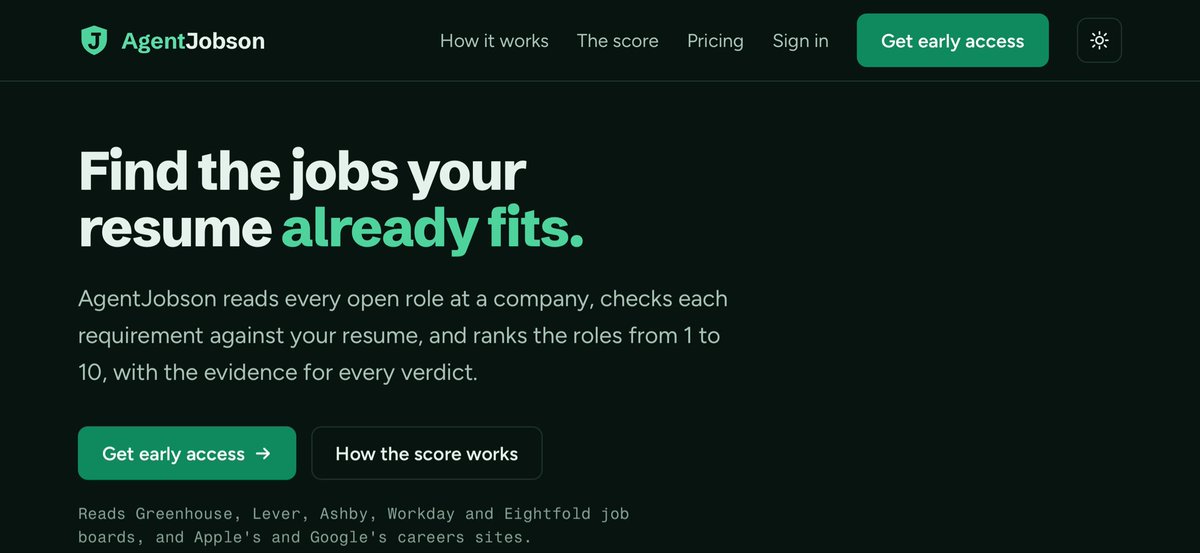
So, we built AgentJobson: the AI agent for your job search 🤖💼
Give it your resume, the companies, and the positions you're looking for. It reads every job post, checks every single job requirement against your resume, and hands you a ranked list with scores for each job, with a detailed analysis of reasons why your resume ranked high or low.
What it does:
📄 Analyzes your resume the way a recruiter would: experience, accomplishments, degrees, titles, skills.
✅ Checks every job requirement as met, partial or not, and quotes the line from your resume behind each verdict.
📊 Ranks every job from 1 to 10, best fit first, so the top 5 or 10 worth applying to float above the 200 that aren't.
📋 Retire your spreadsheet: mark each job Apply, Skip, Applied, Interview or Offer, add your own tags, and use search/filter to stay organized.
🏢 Goes straight to the source: each company's own careers site.
⏰ Stay Fresh: Click "Check for new jobs" to see new jobs added since your last check. On Pro, it checks automatically every 6, 12 or 24 hours, and emails you what's new.
🧐 It's honest to a fault. It only credits what your resume actually says. If your resume never mentions Python, "proficiency in Python" is a "not". Annoying? A little.
🎯 Finds your skill gaps: every "not" is a free to-do list for your resume, and for what skills to learn next.
What it won't do: write your cover letter, apply, or interview for the job, or tell you you're a "perfect fit" for a job you're not 😅
Free for 7 days. Plans start at $20/month. We're letting people in a few at a time, so request early access using the link in the comment below 👇
#JobSearch #OpenToWork #JobHunting #AI #AIAgent
We recently announced MrKan as a hosted service ☁️.
We've been asked whether it can be installed locally and run air-gapped, because some boards hold things that can't leave the building: client work, internal plans, the tasks their AI agents are working on.
Introducing MrKan: Docker edition 🐳
What that means:
🔒 All your MrKan data (boards, cards, chats, etc.) stays on your devices.
✈️ No Internet needed: install from a file and run with no connection at all. Even two-factor sign-in (2FA) with an authenticator app works offline.
🛡️ Locked down by default: a hardened container (read-only, no admin rights) that only answers on the machine it runs on, scanned for known vulnerabilities, with a full list of everything inside it (SBOM).
🧠 Running local LLMs (e.g. Qwen or Nemotron with Ollama) for your own agents? Then your whole setup is local: your agents work the board on your network, and nothing leaves it.
📦 Easy install: one container, about 90 MB, for Linux or Mac (x86 and ARM), up and running in a few minutes with the included step-by-step guide.
🔄 Backups, upgrades and rollback flows are built in.
Why it matters 💡 A board is where your team's real work lives, and more and more of that work is done alongside AI agents 🤖. You should be able to choose where it runs, whether that's our cloud, or a server in your own building.
Sign up for early access now. 🚀 During signup, tell us which you'd like to try: Docker edition (local, self-hosted) or hosted service (cloud SaaS).
Link below 👇
#MrKan #Kanban #Docker #AirGapped #SelfHosted #LocalLLM