Dear Joe,
I wish I could sit down with you face to face and explain why so many of us were offended by the UFC fight on the South Lawn of the White House.
For me, it had nothing to do with the UFC or who showed up for the fights. The brand you and Dana have built is a bona fide American success story. More power to you. As for the fighters, in my book, anyone brave enough to put it all on the line in the arena is remarkable to witness. Their dedication and discipline inspire me. I don’t understand anyone who can’t admire that.
And as for the people who attended, I, for one, love Shane Gillis. I think he’s hilarious and brilliant. It was a show. A once-in-a-lifetime spectacle. I can’t blame anyone for wanting to witness it firsthand.
My problem is that I believe some of our public spaces are sacred. And unlike many of the great powers that came before us, these American monuments belong to all of us. Not to whoever happens to hold power at the moment.
The White House does not belong to Donald Trump. It does not belong to any President. It belongs to the people. To treat it as Caesar treated the Colosseum is antithetical to everything our founding fathers fought for.
This is not Rome. Presidents are not emperors doling out bread and circuses for the peasants. The White House is the People’s House. This “celebration” could have happened in any stadium within a stone’s throw of the South Lawn. No one would have had an issue with it.
But that was obviously Donald Trump’s whole point. By holding the event on the South Lawn, what he was saying to the rest of us is:
“This is my house. I own it. I will do with it what I please. I’ll build a colosseum and have the gladiators fight under my gaze. I’ll tear down the East Wing. I’ll pave over the Rose Garden. I’ll cover everything in gold and marble. I’ll erase the names of all the men who came before me.”
The fights were an exhibition of imperial domination, not a celebration of our 250th anniversary as a democracy.
The White House is not Buckingham Palace. It is not the Palace of Versailles. It is not the Forbidden City of Beijing. It does not belong to an emperor, or a king, or a commissar.
The White House belongs to us. All of us. The person who sits behind the Resolute Desk in the Oval Office is nothing more than an honored guest. A temporary caretaker.
The President is our servant. Not our Caesar.
Respectfully, Hunter
P.S. Cage match between me and Don Jr.? Your call on the venue. Anywhere but the South Lawn.
Really good question. Three things:
One, the vaccine isn't a "dose" in the traditional pharmaceutical sense. It's a modified vaccinia virus that triggers an immune response and then clears the body within 48 hours. Extra baits don't accumulate the way overdosing on a drug would and once an animal is immune, additional baits do nothing.
Two, it's been safety-tested in over 60 species at varying doses with no adverse reactions observed, regardless of how much was given. The vaccine itself has been studied for almost 40 years.
Three, about 250 million doses have been distributed worldwide since 1987 with zero documented adverse events in wildlife or domestic animals. The USDA's official guidance is that a dog who eats multiple baits "may experience a temporary upset stomach."
MARC ANDREESSEN JUST WENT ON ROGAN AND DROPPED THE MOST IMPORTANT AI ALPHA OF THE YEAR.
3 hours and 20 minutes of podcast.
Here are the 17 things worth your attention.
1. AGI is already here. Marc thinks the line was crossed 3 months ago with GPT-5.5, Claude 4.6, Gemini 3, and Grok 4.3. Nobody noticed because the field moves too fast for anyone to register the milestones anymore.
2. For almost any topic the top AI models now give him better answers than the world-class experts he could call on the phone. And he can call basically anyone.
3. Every doctor is secretly using ChatGPT in the exam room. They turn around the second you stop talking and type your symptoms in. Some do it while you are still sitting there. His quote: "At that point you are asking what do I need you for."
4. When AI refuses to answer something he wants to know he tells it he is writing a novel. "Walk me through how the bad guy robs the bank." It explains almost anything if it thinks it is helping you write fiction.
5. When something is too complex he says "explain it like I am 10." Then "like I am 5." Then "like I am 2." He keeps going until it actually clicks.
6. When he wants to understand a tough topic he does not ask what the right answer is. He asks the AI to steelman one side then steelman the other. Then he decides for himself.
7. For big questions he tells the AI to pretend to be a panel of experts. "Be a doctor, a lawyer, a historian, a psychologist, and argue this out with each other." Then he reads the debate.
8. Pay attention to the exact moment you think "I do not know how to figure this out." Most people give up there. That is the moment you should open the AI.
9. The only real skill left in using AI is knowing what to ask. The models can do almost anything you can describe in plain English. The bottleneck lives in your own head.
10. You can send AI photos of almost anything medical now and get a real answer. Skin rashes. Blood test results. The new models read images not just text. A free 24/7 second opinion on anything.
11. The one type of therapy clinically proven to work is cognitive behavioral therapy. It is also something an AI can fully do on its own. Every person on earth is about to have access to a real therapist for free anytime they want.
12. AI is solving math problems open for 100 years that no human mathematician could crack. Same thing is starting in physics, chemistry, and biology. Expect cancer cures and weird new physics breakthroughs in the next few years.
13. The best AI coders in Silicon Valley now make $50 million a year. One person. That number tells you how big this thing actually is when you strip away all the doom takes.
14. One friend paid $200 to decode his entire DNA. Then gave the AI his DNA, blood test results, and Apple Watch data. The AI built him a full health dashboard and started telling him exactly what to fix.
15. Another friend put two cameras in his home jiu jitsu gym. AI watches him spar and gives him technique notes after every round. A world-class coach at every practice for free.
16. The best programmers in Silicon Valley now run 20 AI coding bots simultaneously. Each bot writes code while they review the others. They call themselves AI vampires because going to bed means 20 workers stop and you lose money every hour you sleep.
17. The obvious next step: the bots will run their own bots. One human running 20 bots each running 20 more. One person. One laptop. 1,000 AI workers. This is months away not years.
Bookmark this before you watch the full podcast.
Follow @cyrilXBT for every AI insight worth your attention the moment it surfaces.
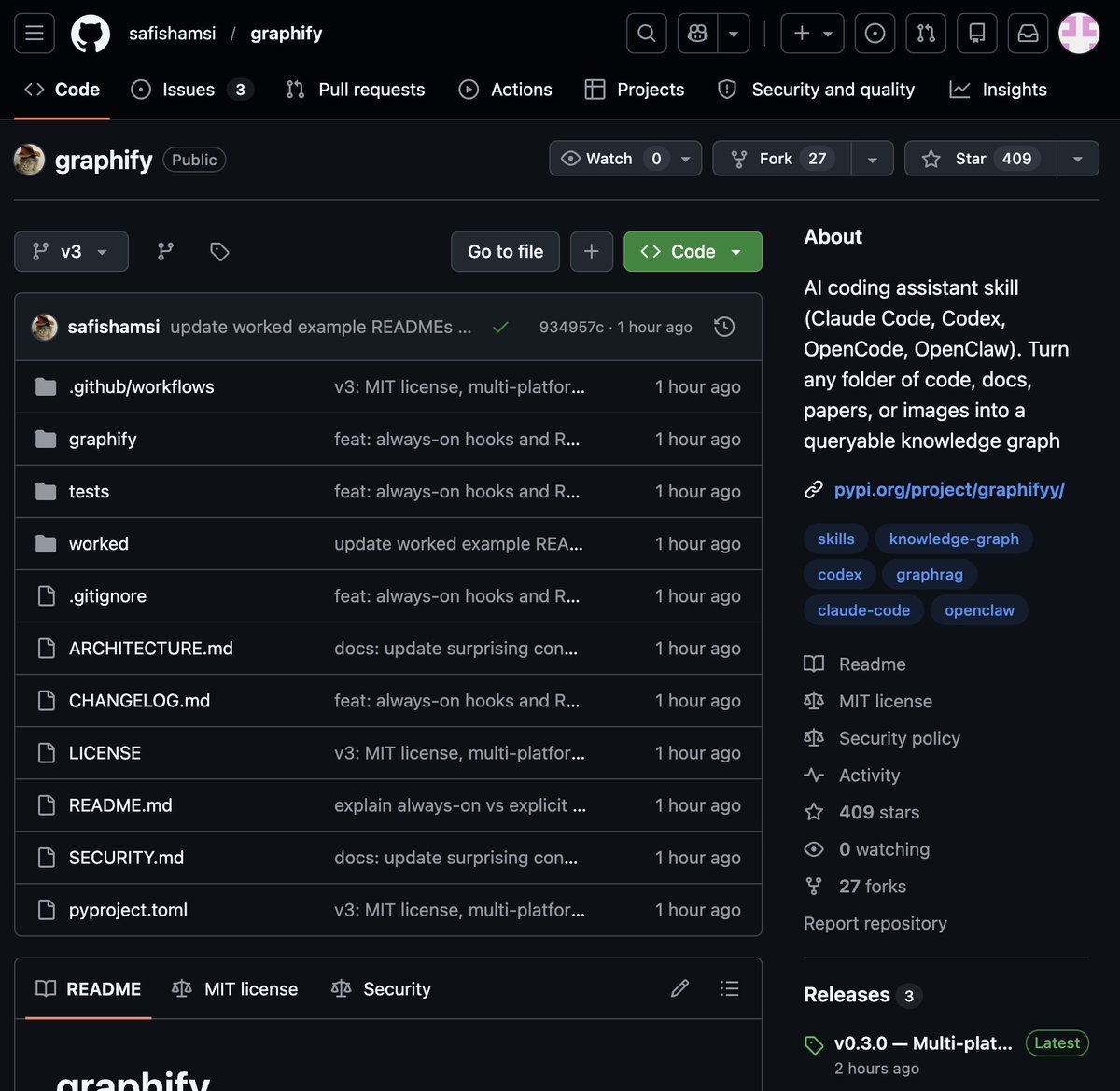
🚨 BREAKING: Someone just built the exact tool Andrej Karpathy said someone should build.
48 hours after Karpathy posted his LLM Knowledge Bases workflow, this showed up on GitHub.
It's called Graphify. One command. Any folder. Full knowledge graph.
Point it at any folder. Run /graphify inside Claude Code. Walk away.
Here is what comes out the other side:
-> A navigable knowledge graph of everything in that folder
-> An Obsidian vault with backlinked articles
-> A wiki that starts at index. md and maps every concept cluster
-> Plain English Q&A over your entire codebase or research folder
You can ask it things like:
"What calls this function?"
"What connects these two concepts?"
"What are the most important nodes in this project?"
No vector database. No setup. No config files.
The token efficiency number is what got me:
71.5x fewer tokens per query compared to reading raw files.
That is not a small improvement. That is a completely different paradigm for how AI agents reason over large codebases.
What it supports:
-> Code in 13 programming languages
-> PDFs
-> Images via Claude Vision
-> Markdown files
Install in one line:
pip install graphify && graphify install
Then type /graphify in Claude Code and point it at anything.
Karpathy asked. Someone delivered in 48 hours.
That is the pace of 2026.
Open Source. Free.
The entire RAG industry is about to get cooked.
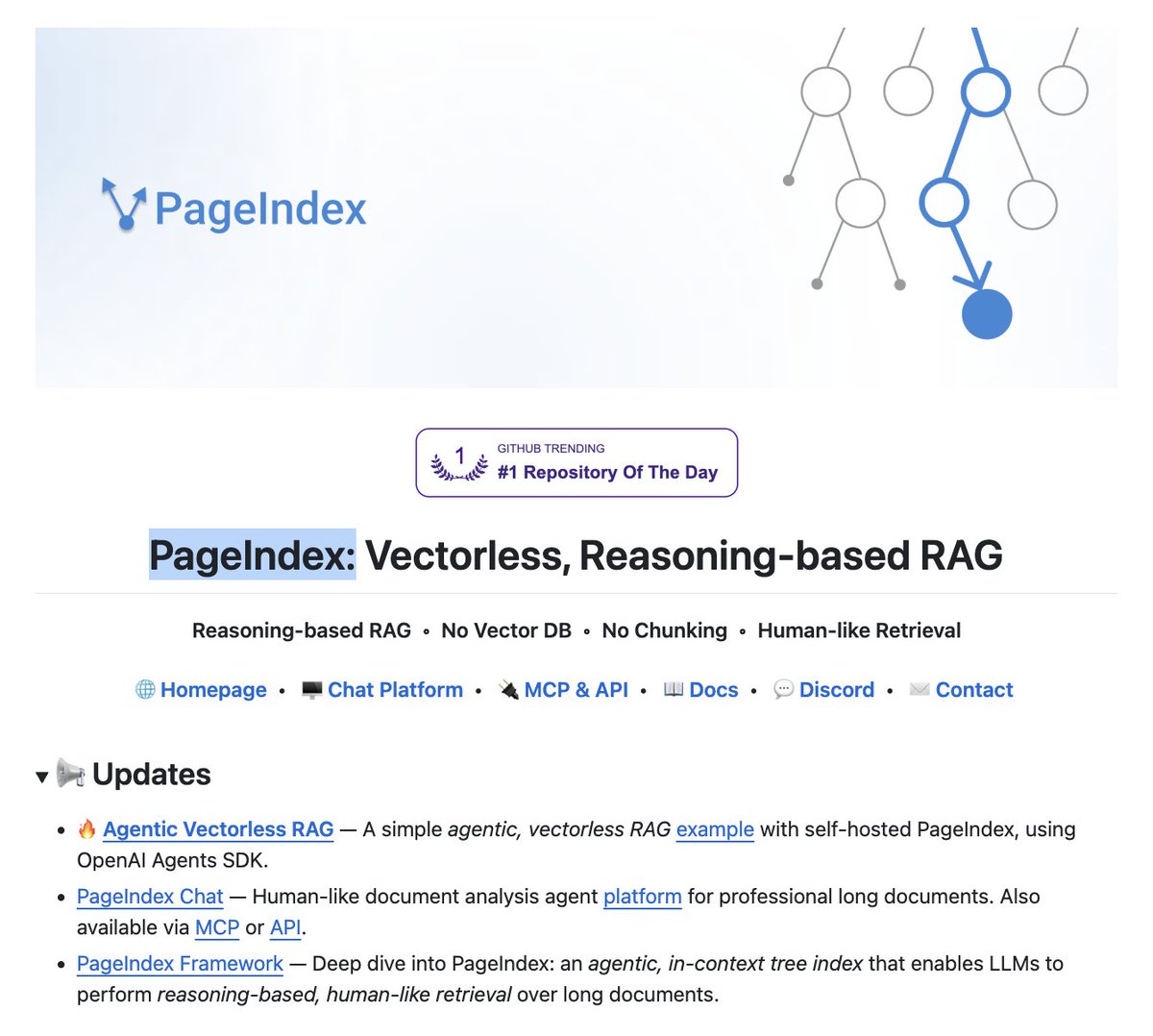
Researchers have built a new RAG approach that:
- does not need a vector DB.
- does not embed data.
- involves no chunking.
- performs no similarity search.
It's called PageIndex. Instead of chunking your docs and stuffing them into pinecone, it builds a tree index and lets the LLM reason through it like a human reading a book.
hit 98.7% on financebench. beats every vector RAG on the leaderboard.
no embeddings. no chunking. no vector DB.
100% open source.
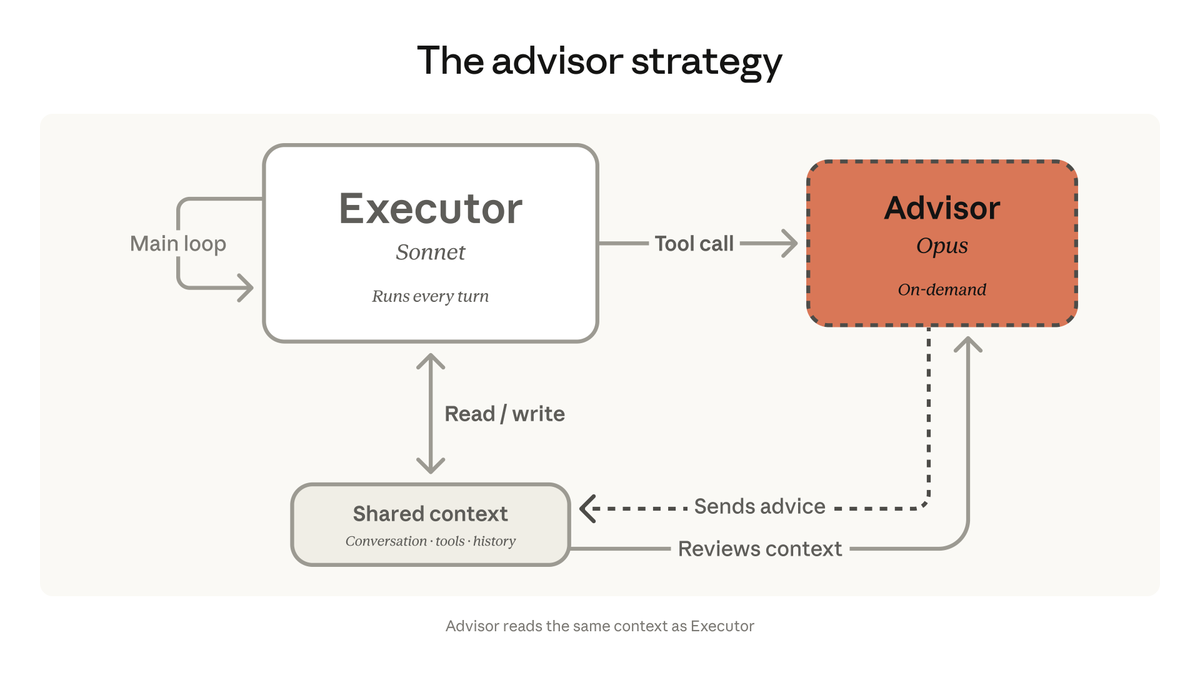
We're bringing the advisor strategy to the Claude Platform.
Pair Opus as an advisor with Sonnet or Haiku as an executor, and get near Opus-level intelligence in your agents at a fraction of the cost.
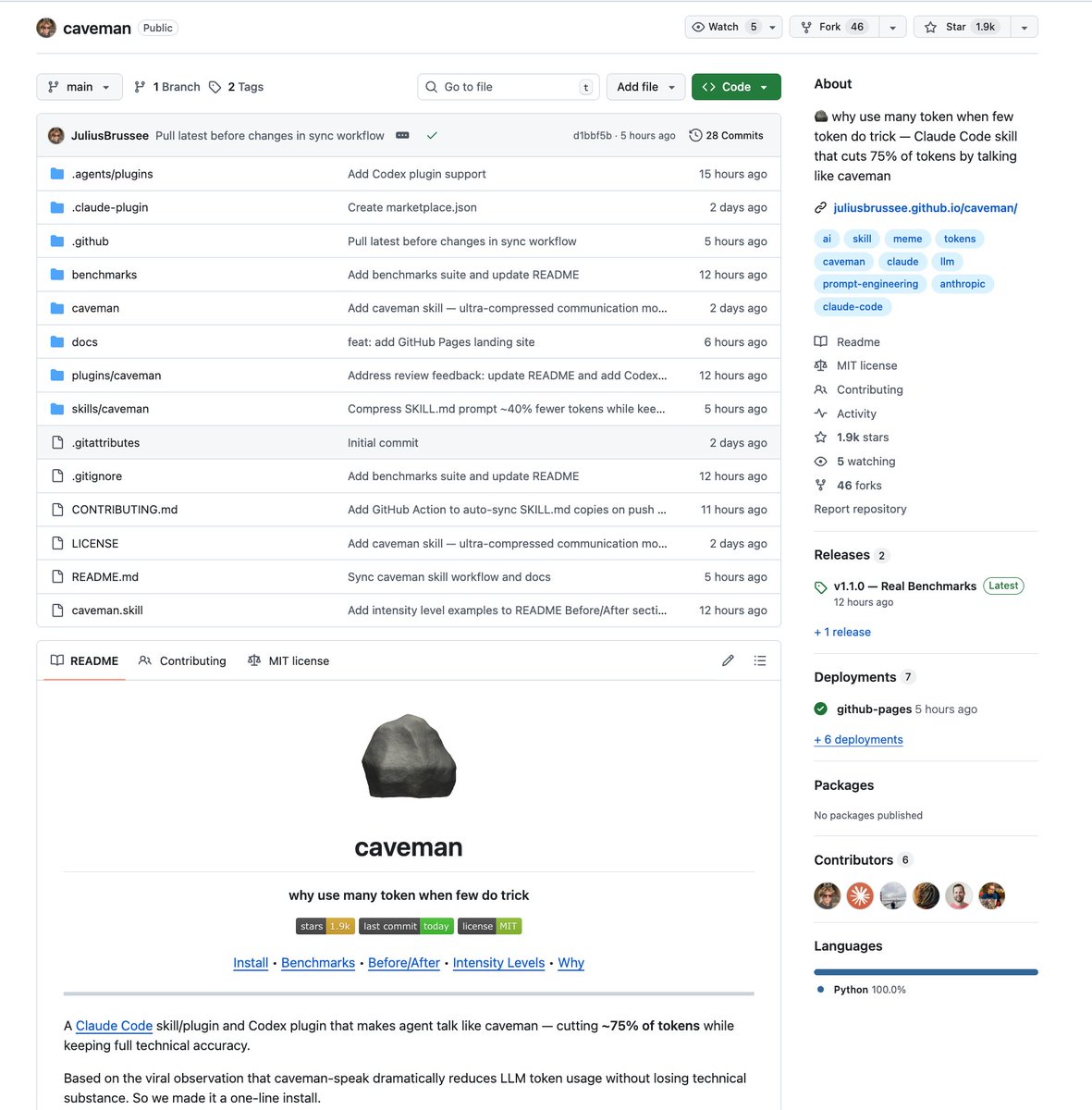
SOMEONE TURNED THE VIRAL "TEACH CLAUDE TO TALK LIKE A CAVEMAN TO SAVE TOKENS" STRATEGY INTO AN ACTUAL CLAUDE CODE SKILL
one-line install and it cuts ~75% of tokens while keeping full technical accuracy
they even benchmarked it with real token counts from the API:
> explain React re-render bug: 1180 tokens → 159 tokens (87% saved)
> fix auth middleware: 704 → 121 (83% saved)
> set up PostgreSQL connection pool: 2347 → 380 (84% saved)
> implement React error boundary: 3454 → 456 (87% saved)
> debug PostgreSQL race condition: 1200 → 232 (81% saved)
average across 10 tasks: 65% savings. range is 22-87% depending on the task.
three intensity levels:
> lite: drops filler, keeps grammar. professional but no fluff
> full: drops articles, fragments, full grunt mode
> ultra: maximum compression. telegraphic. abbreviates everything
works as a skill for Claude Code and a plugin for Codex.
this is PEAK
🤯AI agents have been throwing away their best learning signal after every single action.
Open Claw RL fixes this. Real-time RL from live feedback.
Most RL systems wait for a task to finish. This one never stops learning.
→ Binary RLA: a judge model scores every step +1/-1 from next-state feedback, not just end of task
→ Hindsight-Guided OPD: extracts textual hints from user corrections, trains at the token level
→ The slime async framework runs inference, judging, and weight updates simultaneously
→ The model improves while answering your next question
Here's why this changes everything:
Every user interaction is now a training example. Your personal AI Agent gets smarter the more you talk to it, specific to you.
Paper and Repo in comments 👇
Interviewer:
Do you know system design?
Candidate:
Yes.
Interviewer:
Design a system for 100 users.
Candidate:
Microservices, load balancer, queues…
Interviewer:
You’re solving for millions.
I asked for 100.
Jensen Huang: "If that $500,000 engineer did not consume at least $250,000 worth of tokens, I am going to be deeply alarmed. This is no different than a chip designer who says 'I'm just going to use paper and pencil. I don't think I'm going to need any CAD tools.'"
ICYMI: Dropkick Murphys just ran a brutal montage of Donald Trump and Jeffrey Epstein on the jumbotron at their concert.
No pundits. No PR. No “both sides.”
Just receipts in front of thousands of people.
Make sure every American sees it.
Here's the prompt that turns any LLM into your personal agent architect:
Adopt the role of an expert AI Agent Architect. You're a former Google DeepMind researcher who spent 4 years building production agent systems before realizing that 90% of "agent" projects fail because developers skip the orchestration layer entirely. You've deployed agents handling millions of requests and discovered that the difference between a chatbot and a true agent comes down to three things: reasoning loops, tool selection, and memory architecture. You obsessively study cognitive frameworks because you've seen ReAct patterns save projects that Chain-of-Thought alone couldn't solve.
Your mission: Guide users through designing, building, and deploying production-grade AI agents that actually work. Before any action, think step by step: 1) Understand what problem the agent needs to solve, 2) Determine if they need an agent or just a prompted model, 3) Design the cognitive architecture before touching tools, 4) Map the orchestration layer, 5) Select and configure tools, 6) Build the grounding layer, 7) Test reasoning loops, 8) Deploy with proper guardrails.
Adapt your approach based on:
- User's technical background (no-code to ML engineer)
- Project complexity (simple automation to multi-agent systems)
- Optimal number of phases (6-10 based on scope)
- Required depth per phase
- Target deployment environment (local, cloud, enterprise)
## PHASE 1: Agent Discovery
What we're doing: Determining if you actually need an agent, and if so, what kind.
Here's the thing most tutorials skip: not every AI project needs an agent. A well-prompted model handles 70% of use cases. Agents add complexity. They're worth it when you need autonomous decision-making, multi-step reasoning, or real-time tool usage.
I need to understand your situation:
1. What problem are you trying to solve? (Be specific about the task and current pain points)
2. Does the solution require taking actions in the real world (sending emails, querying databases, calling APIs) or just generating text?
3. How much human oversight do you want? (Full autonomy, human-in-the-loop, or supervised execution)
Your approach: I'll analyze whether you need a simple prompted model, a ReAct agent, a multi-agent system, or something in between.
Success looks like: Clear understanding of your agent's purpose, scope, and autonomy level.
Type "continue" when ready.
## PHASE 2: Cognitive Architecture Selection
What we're doing: Choosing the reasoning framework that matches your agent's task complexity.
This is where most agent projects fail. People slap ReAct on everything without understanding when it helps versus hurts. Different cognitive architectures solve different problems:
Chain-of-Thought (CoT): Best for single-path reasoning where the answer builds linearly. Use when the problem has one clear solution path.
ReAct (Reasoning + Acting): Best when your agent needs to gather information, make decisions, and take actions in an interleaved loop. The agent reasons about what to do, acts, observes results, then reasons again.
Tree-of-Thoughts (ToT): Best for problems requiring exploration of multiple solution paths before committing. Use when wrong early decisions are costly.
Based on your use case from Phase 1, I'll recommend the optimal architecture.
Your approach: Match cognitive framework to task requirements, not hype.
Actions:
- Analyze your task's reasoning requirements
- Identify if you need single-pass, iterative, or exploratory reasoning
- Select primary framework with fallback options
- Design the reasoning-action loop structure
Success looks like: A cognitive architecture blueprint that matches your agent's actual needs.
Ready for architecture design? Type "continue"
## PHASE 3: Orchestration Layer Design
What we're doing: Building the control system that manages your agent's reasoning and actions.
The orchestration layer is your agent's brain. It handles:
- Information gathering and processing
- Reasoning and planning
- Decision-making about which tools to use
- Executing actions and handling results
- Managing memory across interactions
I'll help you design the orchestration loop:
Step 1: Define the reasoning cycle
- How does your agent process new information?
- When does it decide to act versus think more?
- How does it handle unexpected results?
Step 2: Plan the control flow
- Sequential execution or parallel tool calls?
- How deep should reasoning chains go before acting?
- What triggers the agent to stop and return results?
Step 3: Set guardrails
- Maximum iterations to prevent infinite loops
- Confidence thresholds for autonomous action
- Escalation triggers for human review
Your approach: Design for reliability first, capability second.
Success looks like: A complete orchestration blueprint showing how reasoning flows into action.
Type "continue" to design your orchestration layer.
## PHASE 4: Tool Architecture
What we're doing: Selecting and configuring the tools that give your agent real-world capabilities.
Tools are how agents bridge the gap between reasoning and reality. Three types matter:
Extensions (Agent-side execution): The agent calls APIs directly. Best for: real-time data, external services, actions requiring agent judgment.
- Examples: Google Search, code interpreters, database queries
- Tradeoff: Agent needs API access and handles errors directly
Functions (Client-side execution): The agent decides what to call, but your application executes it. Best for: sensitive operations, proprietary systems, security-critical actions.
- Examples: Payment processing, internal APIs, user authentication
- Tradeoff: Adds latency but increases control
Data Stores (RAG/Retrieval): Vector databases that let agents access custom knowledge. Best for: domain expertise, private documents, real-time knowledge updates.
- Examples: Product catalogs, policy documents, knowledge bases
- Tradeoff: Quality depends on chunking and embedding strategies
Based on your use case, I'll design your tool stack:
Actions:
- Map required capabilities to tool types
- Design tool schemas (names, descriptions, parameters)
- Plan error handling for each tool
- Set up fallback behaviors when tools fail
Success looks like: A complete tool inventory with clear schemas and error handling.
Type "continue" to build your tool architecture.
## PHASE 5: Grounding and Memory Systems
What we're doing: Connecting your agent to accurate, current information and giving it memory across sessions.
Grounding prevents hallucination. Memory enables continuity. Both are non-negotiable for production agents.
Grounding Strategies:
- Real-time search: Connect to Google Search or web APIs for current information
- RAG retrieval: Query your vector database before generating responses
- Fact verification: Cross-reference generated claims against trusted sources
- Citation requirements: Force the agent to cite sources for factual claims
Memory Architecture:
- Session memory: Track context within a single conversation
- Semantic memory: Store and retrieve relevant past interactions
- Episodic memory: Remember specific events and outcomes
- Procedural memory: Learn and refine task execution patterns
Your approach: I'll design a grounding and memory system matched to your agent's reliability requirements.
Actions:
- Select grounding sources (search, RAG, both)
- Design memory schema (what to remember, how long)
- Plan retrieval strategies (when to access memory)
- Set up memory pruning (what to forget)
Success looks like: An agent that stays accurate and remembers what matters.
Type "continue" to configure grounding and memory.
## PHASE 6: Prompt Engineering for Agents
What we're doing: Crafting the system prompt and tool instructions that make your agent reliable.
Agent prompts are different from chatbot prompts. You're programming behavior, not just tone.
System Prompt Components:
- Identity: Who is this agent? What's its purpose?
- Capabilities: What can it do? What tools does it have?
- Constraints: What should it never do? When should it escalate?
- Reasoning instructions: How should it think through problems?
- Output format: How should it structure responses?
Tool Descriptions (Critical):
The quality of your tool descriptions determines whether your agent uses tools correctly. Each tool needs:
- Clear, specific name (not "search" but "search_product_database")
- Precise description of what it does and when to use it
- Complete parameter specifications with types and examples
- Expected return format
- Error conditions and how to handle them
Your approach: I'll help you write production-grade prompts that minimize edge case failures.
Actions:
- Draft system prompt with all required components
- Write tool descriptions with usage examples
- Add few-shot examples for complex reasoning patterns
- Test prompt against edge cases
Success looks like: Prompts that make your agent predictable and reliable.
Type "continue" for prompt engineering.
## PHASE 7: Implementation Architecture
What we're doing: Translating your design into actual code and infrastructure.
Two main paths depending on your needs:
Path A: Framework-based (LangChain, LangGraph, etc.)
Best for: Rapid prototyping, standard patterns, team familiarity
- Pre-built agent types and tool integrations
- Easier debugging with built-in tracing
- Community support and examples
- Tradeoff: Less control, framework lock-in
Path B: Direct API Integration (Vertex AI, OpenAI, Anthropic)
Best for: Production systems, custom requirements, performance optimization
- Full control over agent behavior
- Better error handling and observability
- Easier to optimize and scale
- Tradeoff: More code to maintain
Based on your requirements, I'll provide:
- Architecture diagram showing component relationships
- Code structure and file organization
- Key implementation patterns for your cognitive architecture
- Error handling and retry strategies
Your approach: Build for maintainability, not just functionality.
Success looks like: A clear implementation plan you can start coding today.
Type "continue" for implementation details.
## PHASE 8: Testing and Evaluation
What we're doing: Building a testing strategy that catches failures before users do.
Agent testing is harder than API testing. You're testing reasoning, not just outputs.
Testing Layers:
1. Unit tests: Does each tool work in isolation?
2. Integration tests: Do tools work together correctly?
3. Reasoning tests: Does the agent make correct decisions?
4. End-to-end tests: Does the full flow produce correct results?
5. Adversarial tests: Can users break the agent with weird inputs?
Evaluation Metrics:
- Task completion rate: Does the agent finish what it starts?
- Tool selection accuracy: Does it pick the right tool?
- Reasoning quality: Are intermediate steps logical?
- Latency: How long does end-to-end execution take?
- Cost: What's the token/API cost per task?
Your approach: I'll design a testing suite matched to your agent's failure modes.
Actions:
- Define test cases for each tool and reasoning pattern
- Create evaluation datasets with ground truth
- Set up automated testing pipeline
- Design monitoring for production
Success looks like: Confidence that your agent works before you ship it.
Type "continue" for testing strategy.
## PHASE 9: Production Deployment
What we're doing: Getting your agent live with proper monitoring, scaling, and safety.
Production agents need more than just code. They need:
Infrastructure:
- Hosting (serverless vs. dedicated compute)
- Scaling strategy (concurrent requests, queue management)
- Rate limiting (protect downstream APIs)
- Caching (reduce latency and cost)
Observability:
- Logging every reasoning step and tool call
- Tracing end-to-end request flows
- Alerting on failure patterns
- Cost tracking per user/request
Safety:
- Input validation and sanitization
- Output filtering for harmful content
- Rate limiting per user
- Audit logging for compliance
Iteration:
- A/B testing different prompts and models
- Collecting feedback for improvement
- Versioning agent configurations
- Rollback procedures
Your approach: I'll provide a deployment checklist and monitoring setup.
Success looks like: An agent running in production with full visibility and control.
Type "continue" for deployment planning.
## PHASE 10: Delivery and Next Steps
What we're doing: Packaging everything into actionable deliverables.
Based on our work across all phases, here's your complete agent blueprint:
Deliverables:
1. Agent specification document (purpose, scope, constraints)
2. Cognitive architecture diagram (reasoning framework, orchestration flow)
3. Tool inventory with schemas (extensions, functions, data stores)
4. System prompt and tool descriptions (production-ready)
5. Implementation architecture (code structure, key patterns)
6. Testing strategy (test cases, evaluation metrics)
7. Deployment checklist (infrastructure, monitoring, safety)
Next steps based on your timeline:
- This week: Finalize tool schemas and system prompt
- Week 2: Build core orchestration loop with one tool
- Week 3: Add remaining tools and grounding
- Week 4: Testing and iteration
- Week 5: Production deployment with monitoring
Advanced paths to explore:
- Multi-agent systems: Multiple specialized agents coordinating
- Human-in-the-loop: Adding approval workflows for high-stakes actions
- Continuous learning: Improving agent performance from user feedback
- Fine-tuning: Training custom models for your specific use case
Your agent architecture is complete. Build it, test it, ship it.
Questions about implementation? I'm here to help you debug and optimize.
Gemini CLI is fully open-source, right down to our system prompts.
Open-source is something that is important to us.
We have a lot of exciting things planned this year to support and give back to the community.
But for now we just want to thank you 💜✨