I wrote a new article on Qiita (in Japanese)
Using Claude Code with just a CLAUDE.md and an Excel file, I built a Power BI report (PBIP format) and published it to the Power BI Service in only 9 minutes.
No pbix, no MCP, no Power BI Desktop.
https://t.co/M0Btd5K7ta
Claude Code が法人プランの Claude Team で誰でも利用可能に!今まで法人で使うには月$150のPremiumシートか���量課金しか選択肢がなかったが、月$30の通常ユーザーでも利用可能になった。 支払い一元管理、Project共有のメリットのある法人プランは有力な選択肢になりそう。
https://t.co/8TqgaXmrfA
Qiita書きました
Power BI Serivceのトップページ開いて、下記の記事のプロンプトを claude in chrome にペースト&実行したら、同じものつくれます
Power BI のレポート を Claude (AI) に作らせてみた - Claude x Power Platform の自動操作の可能性(4) https://t.co/ppBvYVCZJu #Qiita
Claude for Chrome × Power Platform 自由研究(3)
毎日20時にListsの当日データがない場合��リマインダーをTeamsに投稿するPower Automateフローを、Claudeのブラウザ自動操作で作成。
途中Teams認証で1回中断以外は、最後まで作り切りました。動画は8倍速です。詳細↓
#PowerAutomate #Lists #Claude
Claude のブラウザ自動操作で Lists, Power Apps, Power Automate ,Power BI で1から作成。見た目は悪い��ど4つとも動くものできた
1: Lists
https://t.co/csItHIyA1y
2: Power Apps
https://t.co/uyrei4PcHm
3: Power Automate
https://t.co/juplVWJl2B
4: Power BI
https://t.co/zdKPVqPAFc
Claude for Chrome × Power Platform 自由研究(4)
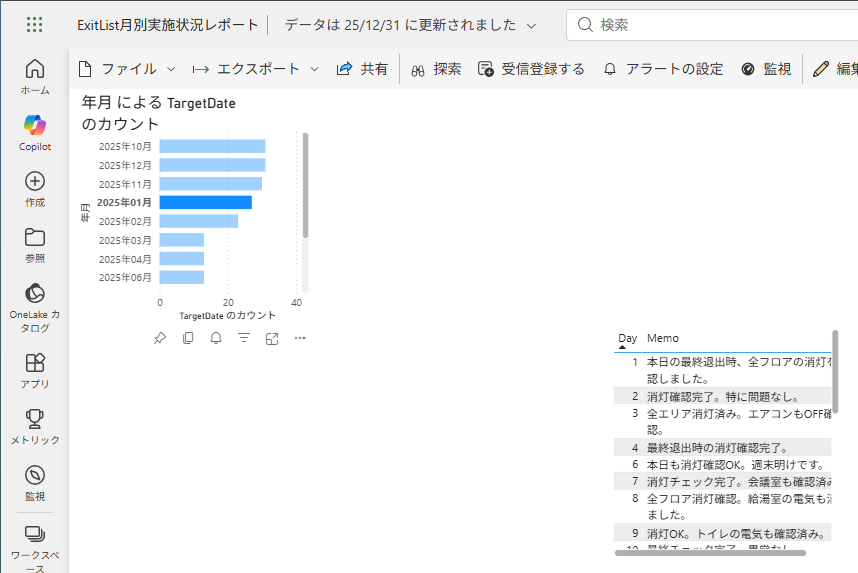
Claudeにブラウザ自動操作させて、Listsの消灯記録から、Power BI Serviceでセマンティックモデルとレポートの作成を試みました。途中1回だけ中断しましたが、月別実施状況レポートが20分で完成。(動画は9倍速です)
#PowerBI#PowerPlatform#Claude