New 3D AI Workflow for Modular Game Characters
Running in-game in Unreal Engine!
For game-ready characters, generating the whole model in one shot doesn't cut it. You need modular parts. Head, torso, arms, armor, accessories: all as separate meshes so you can swap, iterate, and reuse.
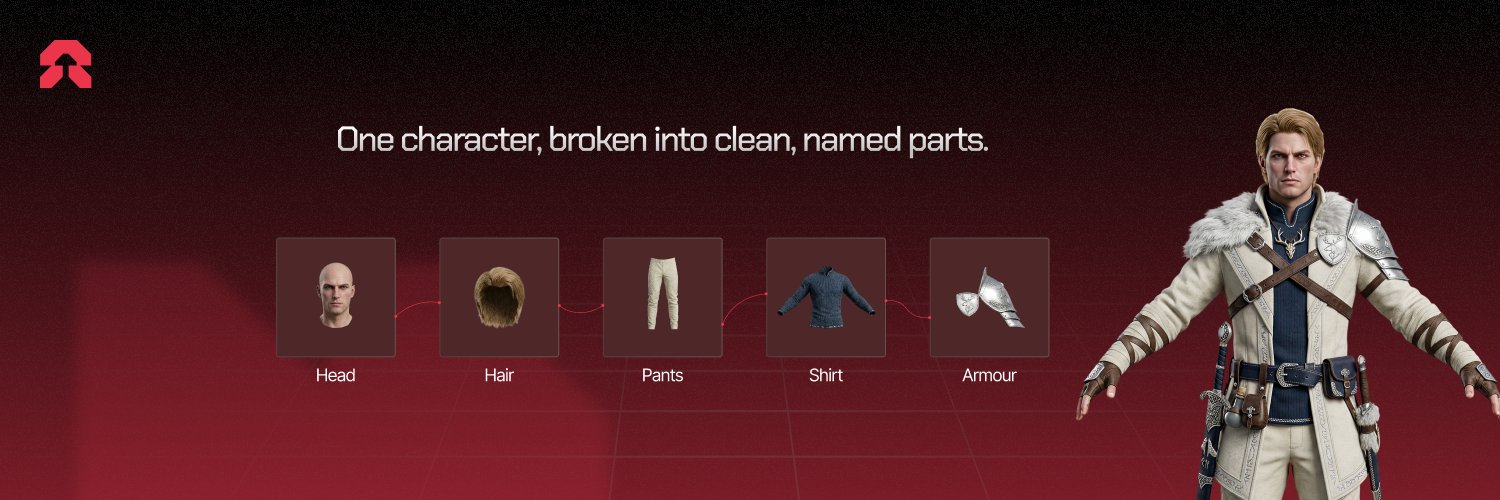
This video shows a full pipeline using @AssetHub_io to break a character concept into parts and generate each one separately. It auto-detected the pose, split it into parts, then generated reference images for each piece.
Concept image from Nano Banana 2. All part images and high poly meshes generated through AssetHub: Tripo 3.1 for most models, Hitem3D for a few specific parts.
After generation:
assembled in Blender
→ AI + manual retopo
→ AI UV + unwrapping in 3ds Max
→ AI texturing (Tripo / Hitem3D) + rework in Substance Painter with normals, roughness, and micro-details.
All AI functions available on AssetHub.
Rigged in Blender, then brought into Unreal Engine with a dynamic cloth sim rig. What used to take weeks is now possible in a fraction of the time.
Drop a comment for any questions!
Let's build the next character for the team!
I’m continuing to test the modular character setup in UEFN using the Metahuman Component. Works really well with custom NPCs!
For this new character, I'm back to a fresh 3D workflow using @assethub_io . Still aiming for that flat/ anime style so I can go straight to the Tripo P1 model and get the low poly textured meshes to work with.
Assembling and rigging are done in Blender. Again making a shape key for the eyes blinking.
Because I'm going to use the same bone structure, I can re-use some Control Rig systems like the hair and eyes procedural animations. The character has 35K triangles and each accessory is about 2.5K.
Let's build the next character for the team!
I’m continuing to test the modular character setup in UEFN using the Metahuman Component. Works really well with custom NPCs!
For this new character, I'm back to a fresh 3D workflow using @assethub_io . Still aiming for that flat/ anime style so I can go straight to the Tripo P1 model and get the low poly textured meshes to work with.
Assembling and rigging are done in Blender. Again making a shape key for the eyes blinking.
Because I'm going to use the same bone structure, I can re-use some Control Rig systems like the hair and eyes procedural animations. The character has 35K triangles and each accessory is about 2.5K.
@insaneUEFN@assethub_io Smart! I'm guessing the reason this workflow isn't common is because of cost? Because there's no other reason you shouldn't be able to upload a whole city and have it automatically segment each object down to the smaller components.
Actually the real challenge has been splitting a concept image into clean, usable images of each object and its parts, to generate a 3d mesh each, at ease.
Until recently, that meant manually prompting AI image gen to extract each part one at a time, and it rarely gave you a good result on the first shot. It took a lot of iteration with AI knowledges.
Image AI and its agentic quality finally caught up to automate this cleanly for everyone.
Then each auto-segmented image become usable for 3D generation.
Some major game studios in Asia have actually started adopting this workflow.
City-scale one-shot segmentation needs an even heavier agent, but we’re working hard to get there! :)
Been a fan of yours, I’m a founder at AssetHub building this.
Would love your honest take if you’re open to testing it.
What about a 2 day version?
After @andrewpprice posted about the two extremes (fully manual vs fully AI car modeling), I wanted to try a hybrid approach. Not sure if his examples were more film or game-focused, but I’m aiming for a game-ready asset.
Using @AssetHub_io for the main workflow hub. Because of the canvas and part splitting tools , iterating is smooth here.
Generating high poly meshes with Tripo inside AssetHub. Retopoly with Hunyuan 3D Studio. Texturing with Trellis2 in ComfyUI. Did some manual modeling for the rims since i still dont trust AI generated rims being 100% circular😄
Assembly in Blender. End result: car exterior + interior 36K tris. Wheels total still 32K hehe. I’d bake those tire detail normals onto a simple cylinder next. In UEFN / Unreal Engine i used a clear coat material to give the car some nice reflections.
Is it perfect? No. retopo and texturing are still the weak spots, but that gap is closing. Would I use this in a game? 100%! (after improving the tires).
If you want to try AssetHub, you can sign up and use JR1627 to skip the waitlist.