HHappy birthday to our founder, Iniobong Udoh @techwithini 🎉
Through Tech Skills Hack, you’ve given so many people clarity and confidence in tech.
Bigger impact, bigger rooms. We’re proud of you. 🚀
#birthday
Excel feels hard when you don’t know the shortcuts.
These moves save time and boost productivity.
We’re enrolling beginners into our Data Analytics Bootcamp starting March 27th.
Excel, Power BI, SQL.
Register: https://t.co/6oUmNlcWzB
#excel#dataanalytics#dataanalysis
@cindiphina Hello @cindiphina, we are so sorry, we are just seeing your message
Registration for the March cohort is ongoing, you can get more info and register here https://t.co/6oUmNlcWzB
Grateful for our students, clients, sponsors, partners, and everyone supporting Tech Skills Hack. Thank you for believing in the journey so far.
Here’s to a beautiful and rewarding 2026 where learning turns into results and partnerships create real impact.
#techskillshack #2026
trong foundations matter.
Cohort 10 went deeper into Excel, covering formatting, named ranges, and absolute referencing. Clear progress, great questions, solid feedback.
Cohort 11 starts March 27.
Details link is in the bio.
#techskillshack#DataAnalytics#dataanalysis#excel
Cohort 10 is live.
Over 60 students joined our Data Analytics for Beginners bootcamp launch. We covered data analytics basics and started hands on learning with Excel. Strong engagement, great questions, solid feedback. Onward.
#techskillshack#DataAnalytics#bootcamp
May this festive season wrap you in warmth, wonderful memories, and the spirit of togetherness.
Cheers to laughter, great food, and peace as we celebrate. Merry Christmas and a hopeful New Year ahead.
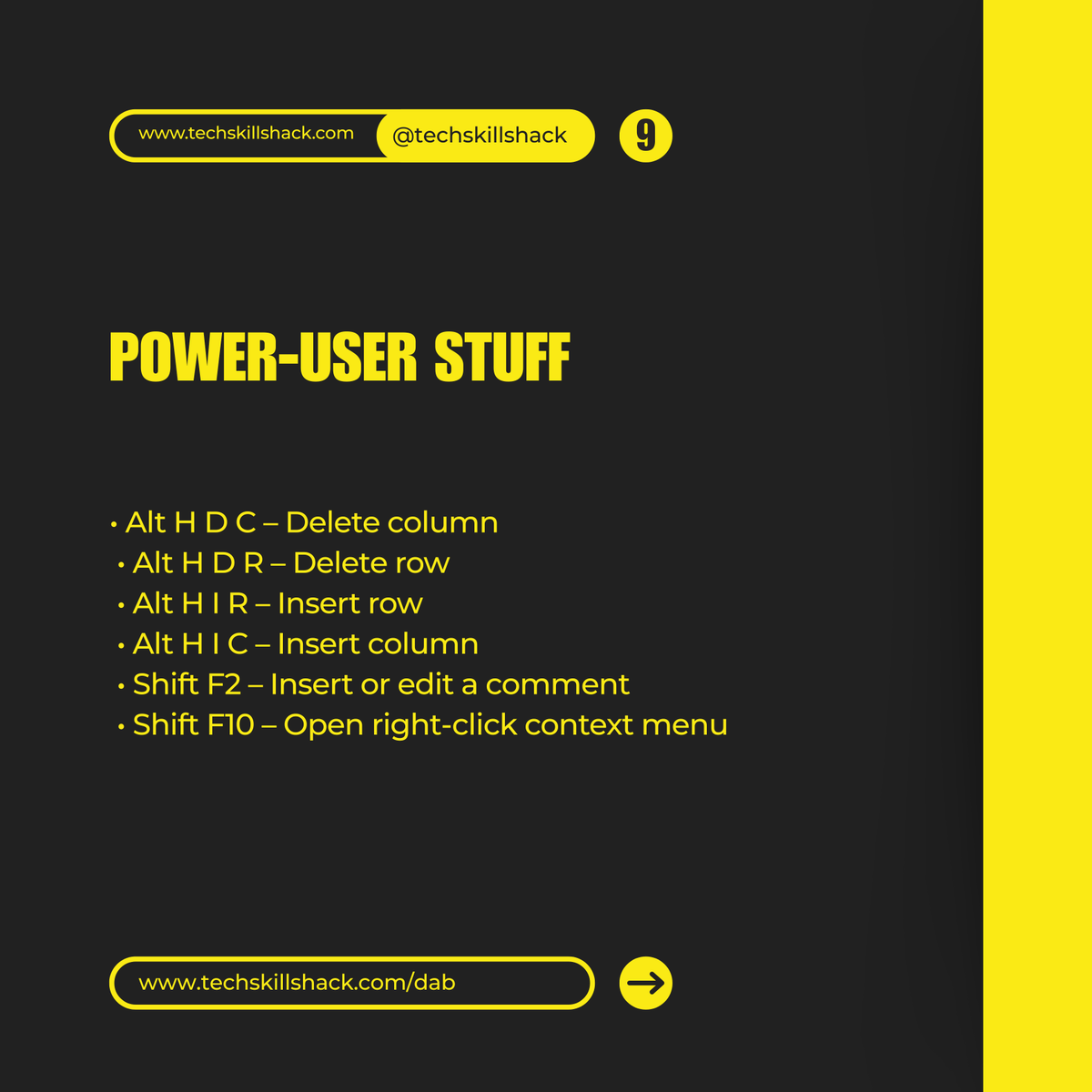
Power-user stuff
• Alt H D C – Delete column
• Alt H D R – Delete row
• Alt H I R – Insert row
• Alt H I C – Insert column
• Shift F2 – Insert or edit a comment
• Shift F10 – Open right-click context menu
Important Excel shortcuts you should know.
Workbook and worksheet control
• Ctrl N – New workbook
• Ctrl O – Open workbook
• Ctrl F4 – Close workbook
• Ctrl Page Up – Move to previous sheet
• Ctrl Page Down – Move to next sheet
• Shift F11 – Insert new sheet
#Excel#Data
Paste special
• Ctrl Alt V – Paste special dialog
• Alt E S V – Paste values
• Alt E S F – Paste formulas
• Alt E S T – Paste formats
• Alt E S W – Column widths
Row and column power moves
• Ctrl Shift 9 – Unhide rows
• Ctrl 9 – Hide rows
• Ctrl Shift 0 – Unhide columns
• Ctrl 0 – Hide columns
• Alt H O I – Auto fit column width
• Alt H O A – Auto fit row height
Quick navigation + visibility
• Ctrl F – Find
• Ctrl H – Replace
• Ctrl Shift F – Opens Find dialog with Format options
• Alt W F – Freeze panes
• Alt W S – Split window
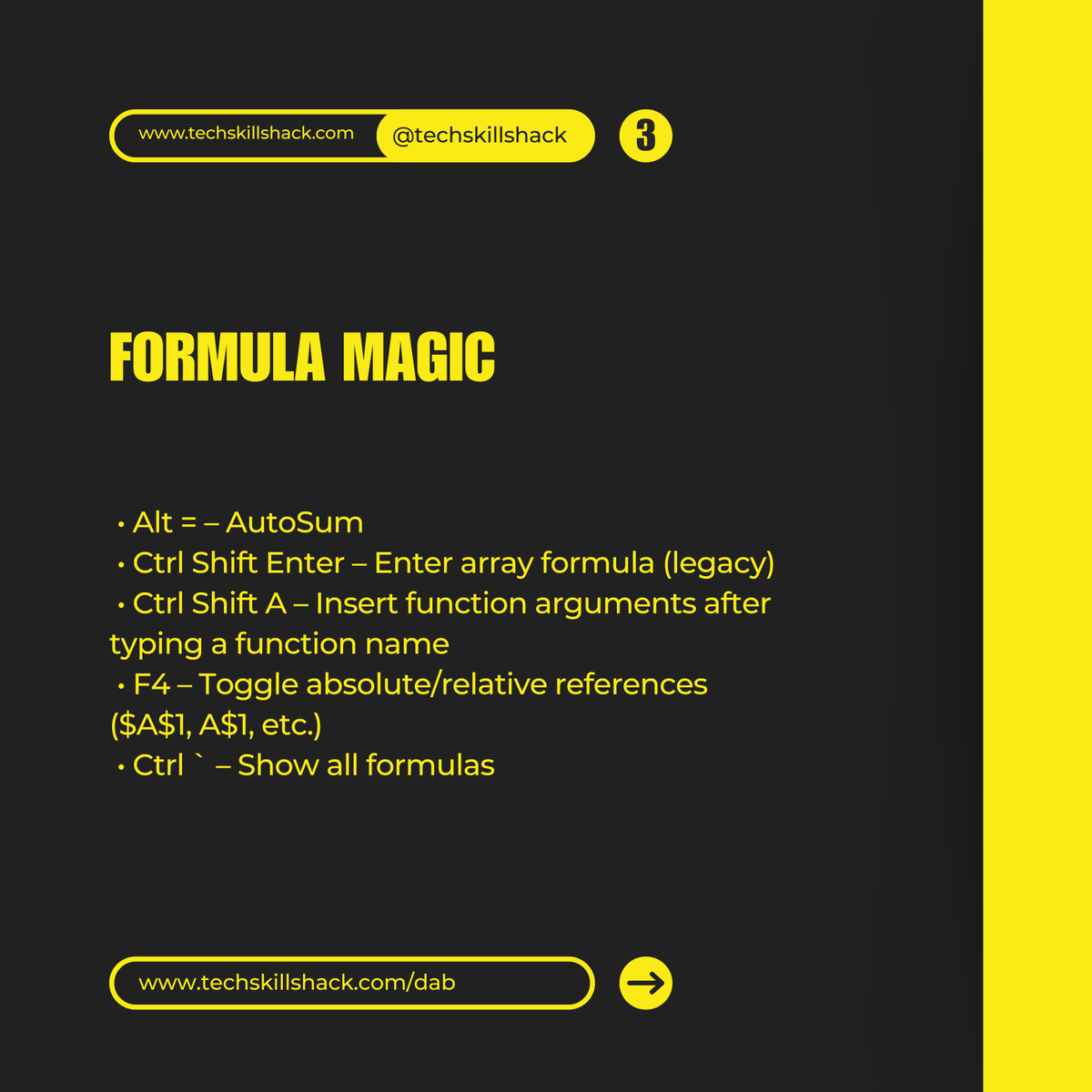
Formula magic
• Alt = – AutoSum
• Ctrl Shift Enter – Enter array formula (legacy)
• Ctrl Shift A – Insert function arguments after typing a function name
• F4 – Toggle absolute/relative references ($A$1, A$1, etc.)
• Ctrl ` – Show all formulas
Happy new month from all of us at @Techskillshack.
December is here, and we’re rooting for you. This month you won’t just grow, you’ll bloom in ways you’ve never experienced. New skills, new opportunities, new results.
Let’s make this the month you step into your next level.
#TSH