Coming soon to @tensorlake !
We will manage windows licenses and offer Windows Sandboxes which agents can control remotely and work with Windows apps like Office, Powerpoint and Excel sheets.
You can now vertically scale running sandboxes on @tensorlake. This was one of the most requested features for building coding agents. Sandboxes can now adapt to the workload on the fly, instead of relying on static resource configuration.
The live DuckDB workload in the demo scaled up by 7x in throughput when its CPU and memory were increased live. If the machine running the sandbox doesn’t have enough capacity, the sandbox is transparently migrated to a node that can meet the new resource requirements.
Two and a half years ago, I built an open-source project called Indexify during evenings and weekends before starting Tensorlake. It was a compute engine for building a serverless durable workflow engine for data-intensive applications. If you had a million PDFs and wanted to OCR and index all of them, you’d reach for something like this.
What remains today is the underlying fast VM scheduler that ran lowe latency functions in MicroVMs. It has been powering Tensorlake’s sandbox platform and runs hundreds of thousands of sandboxes every day. We did Computer SDK's 100k challenge a couple of months back - burst from 0 to 100k sandboxes in 20 seconds on top of this service.
As we scaled over the last two months by 20–30x, we built a new scheduler from the ground up to address some of the scaling challenges and requirement to be highly available even during partial failures. It’s unlike anything in the industry: the life cycle of sandboxes and clusters is still represented as replicated state machines, but it’s heavily sharded, with very little global ordering.
Instead of building a specialized database using Raft, we now use FoundationDB to store the WAL, and use watches to replicate that WAL across scheduler replicas. Thanks to coding agents, we have been able to build a simulator which injects all kinds of failures into the system to prove the changes we make preserve reliability, speed and correctness.
We are going to push this to production next week, we are hoping it would power the next chapter of the company. Long live Indexify!
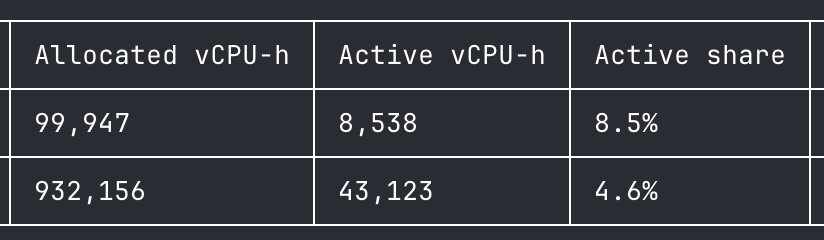
Active CPU usage based billing makes it possible to use sandboxes at scale for background agents.
I was looking into resource usage of some of our users. More often than not, most agents use between < 10% of CPU in aggregate of what users request for. I expect every platform to offer this shortly if they are not doing it already.
We’re partnering with @scale_AI to integrate @tensorlake sandboxes with AgentEnv.
Here’s a real-world environment: the Port of Barcelona, built with AgentEnv and running in @tensorlake sandboxes. A GLM 5.3-based agent achieves a perfect 1.0 score on a task that manages ship movements in the port based on weather conditions.
Docs below 🧵
Tensorlake is now a built-in sandbox provider in @scale_AI 's AgentEnv Framework. An open-source framework for building RL environments.
Check out the docs and the demo to see how the Tensorlake sandbox hosts a full environment for a PortSim task.
https://t.co/7mfsIbMeNy
Added @tensorlake as a sandbox provider to @scale_AI AgentEnv Framework. I tested it with a PortSim task:
An agent runs a port through a real windy week inside two Tensorlake sandboxes. Got a perfect score.
It was super fun to build and a great environment to play with.
Added @tensorlake as a sandbox provider to @scale_AI AgentEnv Framework. I tested it with a PortSim task:
An agent runs a port through a real windy week inside two Tensorlake sandboxes. Got a perfect score.
It was super fun to build and a great environment to play with.
I wanted to explore agent sandboxing through a small project, so I built a prototype using @pydantic and @tensorlake. It was a great experience with tensorlake.
Credit to @tensorlake for the excellent documentation, error responses and free tier to experiment.
I wanted to explore agent sandboxing through a small project, so I built a prototype using @pydantic and @tensorlake. It was a great experience with tensorlake.
Credit to @tensorlake for the excellent documentation, error responses and free tier to experiment.
One of the things you can now do with Tensorlake's new VMM is grow your VM's disk size while it's running!
If your coding agent runs out of space when it's compiling a project, just resize and keep going.
One of the things you can now do with Tensorlake's new VMM is grow your VM's disk size while it's running!
If your coding agent runs out of space when it's compiling a project, just resize and keep going.
We are rolling out our new VMM to a small percentage of machines in production today!
It brings p95 resume latency for large sandboxes down to 1.5–2s when the snapshot isn’t cached on the machine.
In addition, it supports live vertical scaling of CPU, RAM, and even disk!
We’re wiring in live migration as well, enabling vertical scaling even when the machine running a sandbox doesn’t have enough resources.
We worked extremely hard on this over the last few months, and we’d started to hit the limits of what our previous VMM infrastructure would let us build.
Tensorlake's Typescript SDK was compromised yesterday with Shai-Hulud worm for roughly 102 minutes. The package was removed the moment we found out about the incident.
We don't believe any users were affected as we track the SDK versions when users manage lifecycle of sandboxes. We can't decisively say who installed the package in their CI/CD pipelines. We have notified our users of this incident.
The attacker stole the credentials of an employee who is a GitHub admin of the SDK repository and committed the malicious code from a browser.
We have removed repository admin rights from all employees, reduced the organization to two owners protected by hardware security keys, blocked direct pushes to main for every account including owners, required signed commits, and placed every package publish behind a second-person approval.
Github Advisory - https://t.co/vz3FZFUz78
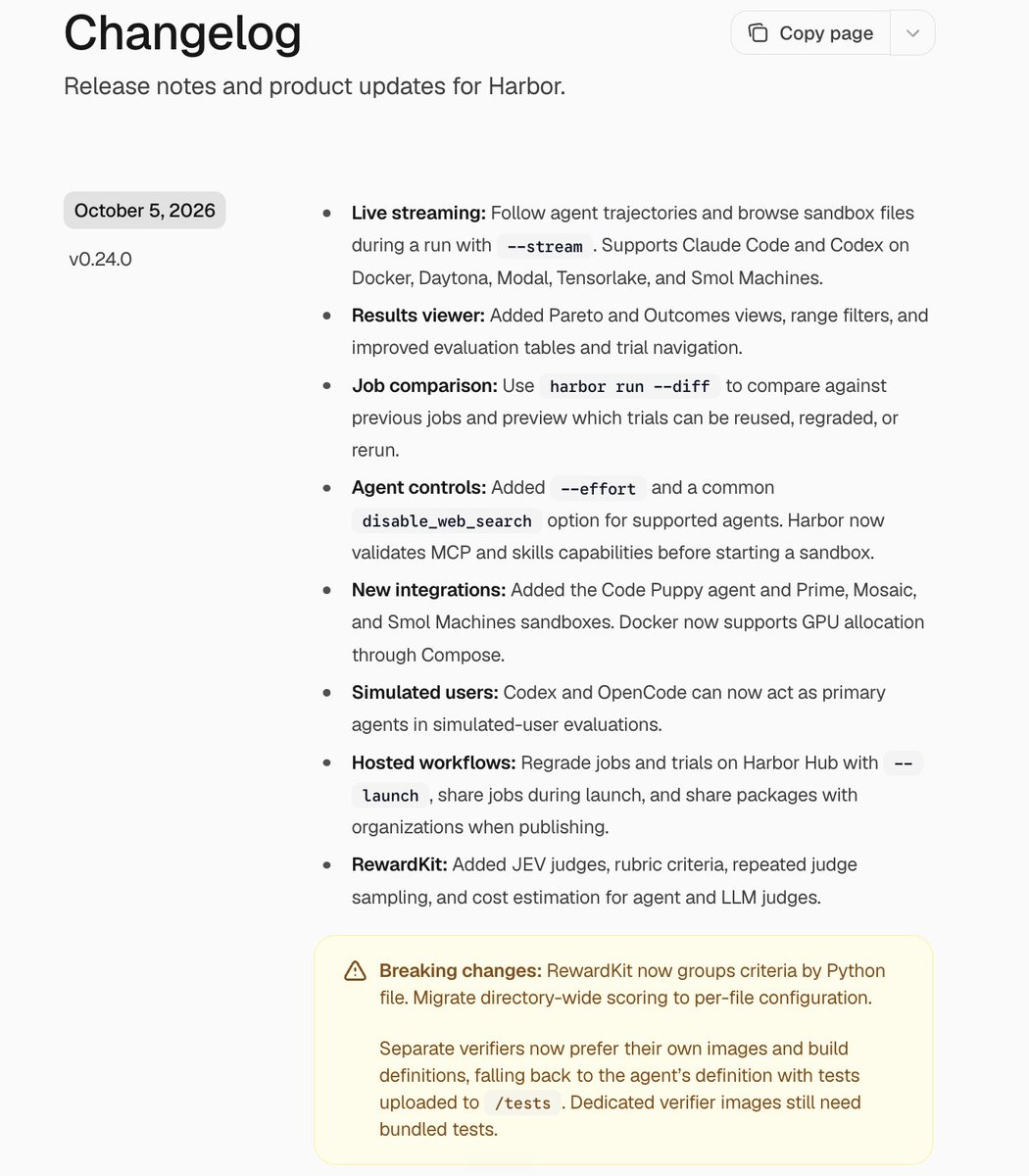
Got @tensorlake sandboxes working as ASP (Agent Sandbox Protocol) sandboxes in Harbor, using the SSH design. The agent runs on my laptop, and its tools run in a Tensorlake sandbox with the internet fully off. Tensorlake's native sandbox APIs can support other ASP designs too.
We have an active RFC for an Agent Sandbox Protocol (ASP) that disentangles an agent's execution environment from its runtime. There are many advantages it provides, including preventing trajectory modification.
- increased security
- resource isolation
- no contamination
- separate configuration (e.g. no network in execution environment)
For this to work, we'd need agent developers to opt in and implement their tools in a sandbox-agnostic manner using the protocol. I personally think this is the direction the industry needs to move in, and would love the community's help in designing this protocol.
https://t.co/a64gniRgPt