f*cking insane. i turned Grok Bot into an AI chief of staff, gave it one goal: “find me $50,000 a month of new business, send nothing”, and went to bed. by 6am it was on the table
6 bots ran in parallel on Grok’s cloud computer from 2am to 6am. my laptop stayed shut
the rule:
“build me a $50,000/mo pipeline. B2B SaaS, 10–200 people, US and EU. public data only. every claim needs a source. contact nobody without my yes”
the night shift:
→ 02:14 scanned 240 companies across their sites, job posts, X and news. 1,912 public signals
→ 02:51 scored every one and kept 25. 215 dropped as noise
→ 03:20 read all 25 sites for pricing, stack and hiring. found 41 gaps
→ 03:44 drafted 25 openers with a receipt behind every line. sent: zero
→ 03:58 built one offer covering all 25, then locked everything in my approval queue
its morning note: “best angle: ops hiring. nothing sent. your call.”
$50,000/mo is potential, not revenue. not a dollar is earned until i approve and they say yes
it runs the whole night shift again every Monday on its own, skips everyone already on the list and brings me new ones. nobody has to remind it
Grok Bot chief of staff hands each job to a specialist bot instead of doing everything itself, and they all run on their own cloud computer
240 companies → 25 worth it → 1 offer → $50,000/mo → 0 sent without my yes
somebody’s chief of staff is already reading your future clients’ job posts
steal it: the exact chief of staff instruction is in the first reply ↓
Grok Bot could be the first team you build instead of hire
Six bots can run 200+ agents, hold their own 5 a.m. standup and hand you one board in the morning
In this article, I show you how https://t.co/cqCWdWY857
full prompt:
"This is my own robot vacuum connected to my home network. I want to know if someone else could be watching or listening through it.
I've attached a photo of the robot or its Settings → About screen.
Use Claude Code to investigate what this device can access, transmit, and expose. Help me find evidence of unauthorized access, not just theoretical risks.
The check:
step 1 → Identify the exact manufacturer, model, firmware and operating system. Find out whether it has a camera, microphone, speaker or remote-viewing feature.
step 2 → Research its documented security vulnerabilities, previous hacking incidents and manufacturer advisories. Use credible sources and provide links.
step 3 → Check what data it can send over the internet: live video, audio, room maps, photos, device telemetry and cloud recordings. Explain which features are actually supported.
step 4 → Walk me through checking the manufacturer's app for unknown accounts, shared users, active sessions, unfamiliar devices, remote-viewing history and security alerts. Tell me if the app doesn't expose this information.
step 5 → If I'm running Claude Code locally, help identify the robot on my Wi-Fi and inspect available network information. Ask permission before testing anything. Only investigate devices I own.
step 6 → Look for evidence of suspicious access: unexpected logins, unfamiliar sharing permissions, unexplained camera activity, unusual remote commands or security warnings. Don't treat ordinary cloud connections as proof of spying.
step 7 → If something suspicious appears, explain what it means, how confident you are and how to secure the device. Guide me through revoking unknown access, changing passwords, enabling 2FA, updating firmware and disabling remote viewing where supported.
Final report:
→ Does this robot have eyes or ears?
→ Can someone access them remotely?
→ Are there known security vulnerabilities?
→ Is there actual evidence of unauthorized access?
→ What should I change immediately?
Don't root the robot, exploit vulnerabilities, bypass authentication or access anyone else's devices.
Never claim someone is watching me without evidence. If the manufacturer doesn't expose access logs, say that the check is inconclusive.
Give me exact instructions for my model, not generic advice.
Start by identifying my robot vacuum from the photo. When possible, perform the checks yourself instead of just explaining them.
I want to know who, if anyone, can see through the thing cleaning my floors."
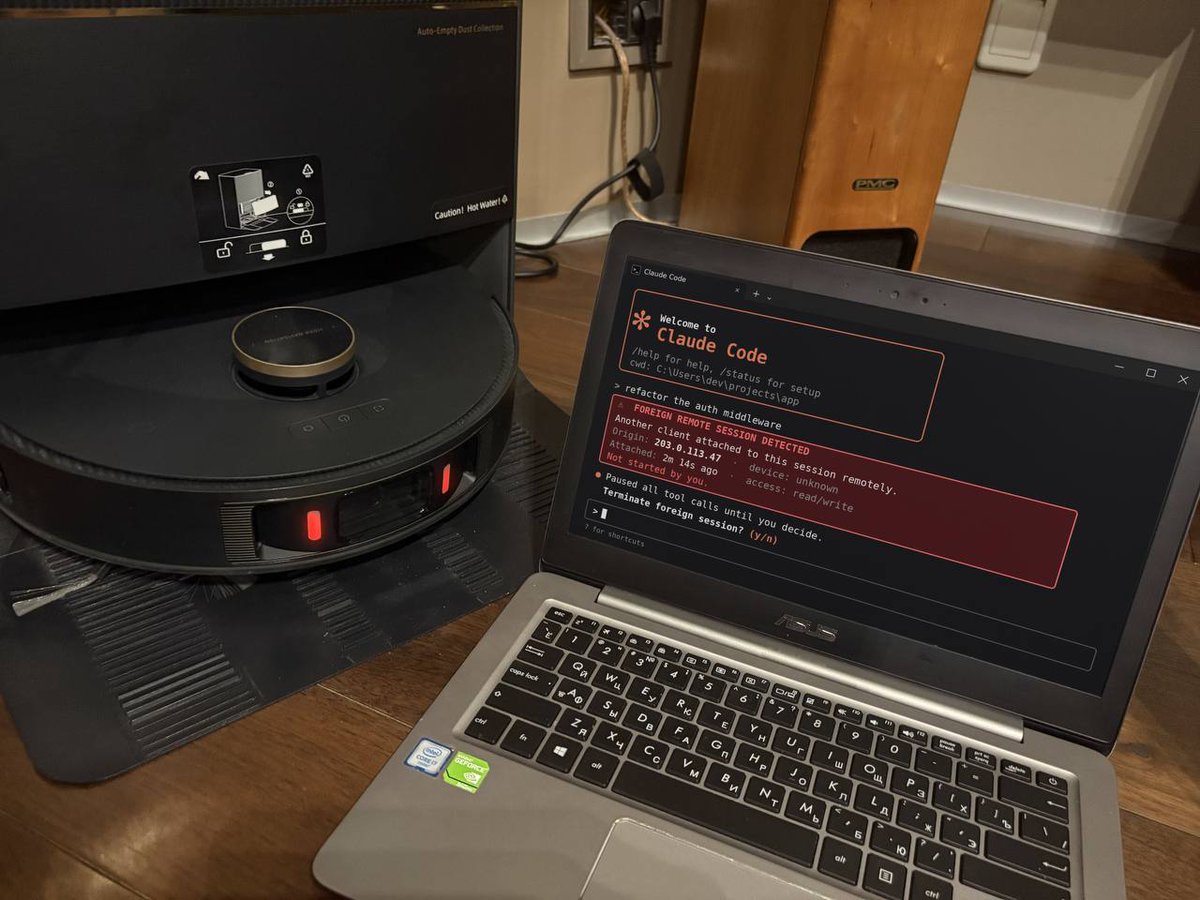
Claude Opus just found someone else with access to my robot vacuum’s CAMERA.
All I wanted was to connect Claude Code to my vacuum and see what I could control.
Instead, Claude flagged an active remote session with access to the camera and remote controls.
Inside my own house.
I thought it was a bug. Changed the password, rebooted everything, connected again.
The session was still there.
Then the vacuum started talking. Not in its usual robot voice.
You can run the same check on your own smart devices with Claude Code:
step 1 → join the same Wi-Fi as your vacuum, open Claude Code and paste the prompt from my first reply
step 2 → let Claude identify the device and check its connections, permissions and remote-access settings
step 3 → look for shared users or sessions you don’t recognize. If you find one, revoke it and contact the manufacturer
You probably have 5+ smart devices at home. Run the same check on every one of them.
Save this. You might want it at 2am when your vacuum starts talking back.
What smart device should I investigate next?
I gave Claude Opus 5.5 control of my 12 year old Samsung TV.
this thing doesn't even run Android.
Your old TV might not need replacing. It might just need Claude Code.
Now I can literally tell Claude what to do instead of touching the remote.
here's what actually worked:
→ found the TV on my local network
→ figured out its encrypted remote protocol
→ paired using the PIN on the TV
→ sent real remote commands
→ doing ANYTHING just by asking Claude
No firmware hacks, just Claude Code talking to a TV from 2014.
and yes, that's the actual TV in the video.
And the best part? You can try this on your own Smart TV.
full Claude Code prompt in the first reply ↓
FULL PROMPT — Turn Your Smart TV Into a Claude-Controlled TV
"This is my own Smart TV connected to the same home network as my computer. I want Claude Code to discover it, connect to it, and let me control it using natural-language commands.
I've attached a photo of my TV's model label or Settings → About screen. If the model isn't clear, ask me for it.
GOAL:
Turn Claude Code into a working AI remote control for my TV.
Done means: Claude can execute supported commands on my real television, such as changing volume, navigating menus, switching inputs, opening apps, and playing a video when supported.
I should be able to say 'Claude, turn up the volume' or 'Open YouTube' without manually typing terminal commands.
STEP 1 — IDENTIFY
Identify the TV's manufacturer, exact model, year, operating system, and supported control methods.
Determine whether it uses Android TV, Google TV, Samsung Tizen, older Samsung Smart TV, LG webOS, Roku, Fire TV, or another platform.
Never assume every TV runs Android or supports ADB.
STEP 2 — DISCOVER
Confirm this computer can access my home network.
Discover the TV using appropriate local discovery methods, such as SSDP, mDNS, or documented device APIs.
Find its local IP address and available control services.
If discovery fails, show me exactly where to find the TV's IP address.
Explain any compatibility limitations before continuing.
STEP 3 — CONNECT
Choose the correct method for my TV:
Android TV / Google TV / Fire TV: investigate supported ADB or official remote-control interfaces.
Samsung Tizen: investigate supported local remote-control APIs and pairing.
Samsung 2014 / older Smart TV: investigate compatible legacy Samsung remote-control protocols, including encrypted PIN pairing where applicable.
LG webOS: investigate supported WebSocket remote-control pairing.
Other TVs: identify an appropriate documented local control interface.
Use established open-source libraries or official tools where appropriate. Install required software from trustworthy sources after my approval. If no compatible controller exists, build a minimal local controller using the documented protocol.
Never use an incompatible protocol just because it's easier.
Guide me through any required on-screen permissions, PIN codes, or developer settings.
STEP 4 — TEST
Once connected, test these actions one at a time:
Increase volume by one step.
Decrease volume by one step.
Open the home screen or main menu.
Navigate using remote-control commands.
Open YouTube or another available app, if supported.
Attempt to play a video I choose, if the TV supports this.
Ask me to confirm what happened on the screen whenever the TV cannot provide reliable feedback.
Don't claim success until a command actually works.
STEP 5 — NATURAL-LANGUAGE CONTROL
Create a reusable local controller and teach Claude Code how to operate it.
I want to type or dictate requests such as:
'Turn the volume up by 5.'
'Open YouTube.'
'Switch to HDMI 1.'
'Play the Interstellar trailer.'
'Pause the video.'
'Go back to the home screen.'
Translate each request into supported TV commands and execute them automatically.
Don't make me manually type terminal commands once the controller is configured.
STEP 6 — DEMO
Help me demonstrate the result on camera.
Show a natural-language request in Claude Code, the actual command execution, and the physical TV responding.
Keep the demonstration real, visible, and reproducible.
RULES:
Never root, flash, or factory-reset the TV.
Never enter hidden service menus.
Never uninstall or disable system apps.
Ask permission before installing software or changing settings.
Never expose TV controls to the public internet.
Never enter passwords or approve pairing for me.
Keep everything on my local network.
Explain how to disconnect or undo configuration changes.
If a feature is unsupported, say so and offer the closest working alternative.
IMPORTANT:
Don't stop after writing a plan or generating code.
If you're running locally on my computer, proceed with discovery, configuration, pairing, and real-world testing, requesting my input only when necessary.
If you're running in a cloud environment without access to my home network, explain that limitation and prepare a way to run the controller locally.
Start by identifying my TV from the attached photo and checking which control method it supports."
the Grok Bot team just made their own ready-to-use agents public
10 bots that can handle coding, marketing, sales, research and even build MORE bots for you.
this is a f*cking goldmine.
you can import a bot built for a specific job, connect your tools, and make it work for you without writing the whole thing from scratch.
10 i'd grab first:
bot 1 → dr eggbot builds custom Grok Bots for any job you describe.
bot 2 → Lingxi's Engineer Bot supervises coding agents and reviews their PRs.
bot 3 → Stalk Bot tracks competitors' products, pricing and every move they make.
bot 4 → Haggle Bot finds wasted SaaS spend and drafts negotiations to cut your bills.
bot 5 → Proto Bot turns feature ideas into working prototypes inside your app.
bot 6 → Video Editor turns raw footage into edited, captioned videos.
bot 7 → figma bro converts Figma designs into developer-ready specs.
bot 8 → Distro Bot builds marketing campaigns and prepares everything for your approval.
bot 9 → Startup QA Bot tests your product and catches bugs before your users do.
bot 10 → Signal Prospector finds potential buyers and drafts personalized outreach.
save this before you spend another 3 hours writing a giant system prompt for a bot that already exists.
REA + Opus 5.5 is f*cking insane.
someone put Spider-Man inside Batman: Arkham Knight.
the developer released the reverse-engineering work behind it, and now REA gives Claude the tools to investigate game mechanics like these.
here’s what the clip doesn’t show:
→ Spider-Man is actually swinging 2 KILOMETERS above New York
→ both games run at once while Gotham gets scanned in 50-meter chunks and rebuilt inside Spider-Man’s physics world
→ his rendered frame gets cut out and pasted back into Gotham
→ in combat, an INVISIBLE BATMAN does the fighting while Spider-Man copies his moves frame by frame
the creator even reconstructed Spider-Man’s skeleton from recordings of him moving. and if Spidey gets stuck inside a building, you can literally ask Claude to teleport him 200 meters into the air.
the entire project is open source, including the RE scripts, technical findings and Claude setup guide.
ArkWeb: https://t.co/k0TNSM0JSD
REA: https://t.co/t16FAtEUQS
to investigate mechanics in your own games:
→ connect REA to Claude Code with npx rea-agents setup
→ pick one feature in a single-player game you’re allowed to inspect
→ ask Claude to trace it and show the evidence for every finding
save this before your first game binary. full AI reverse engineering breakdown in the article below ↓
REA is most dangerous thing on the internet right now...
It lets your AI agent reverse engineer any app, down to the binary
If you use it correctly, you can rebuild any feature you pay for, for FREE
In this article, I show you how: https://t.co/3P1FNXiXzl
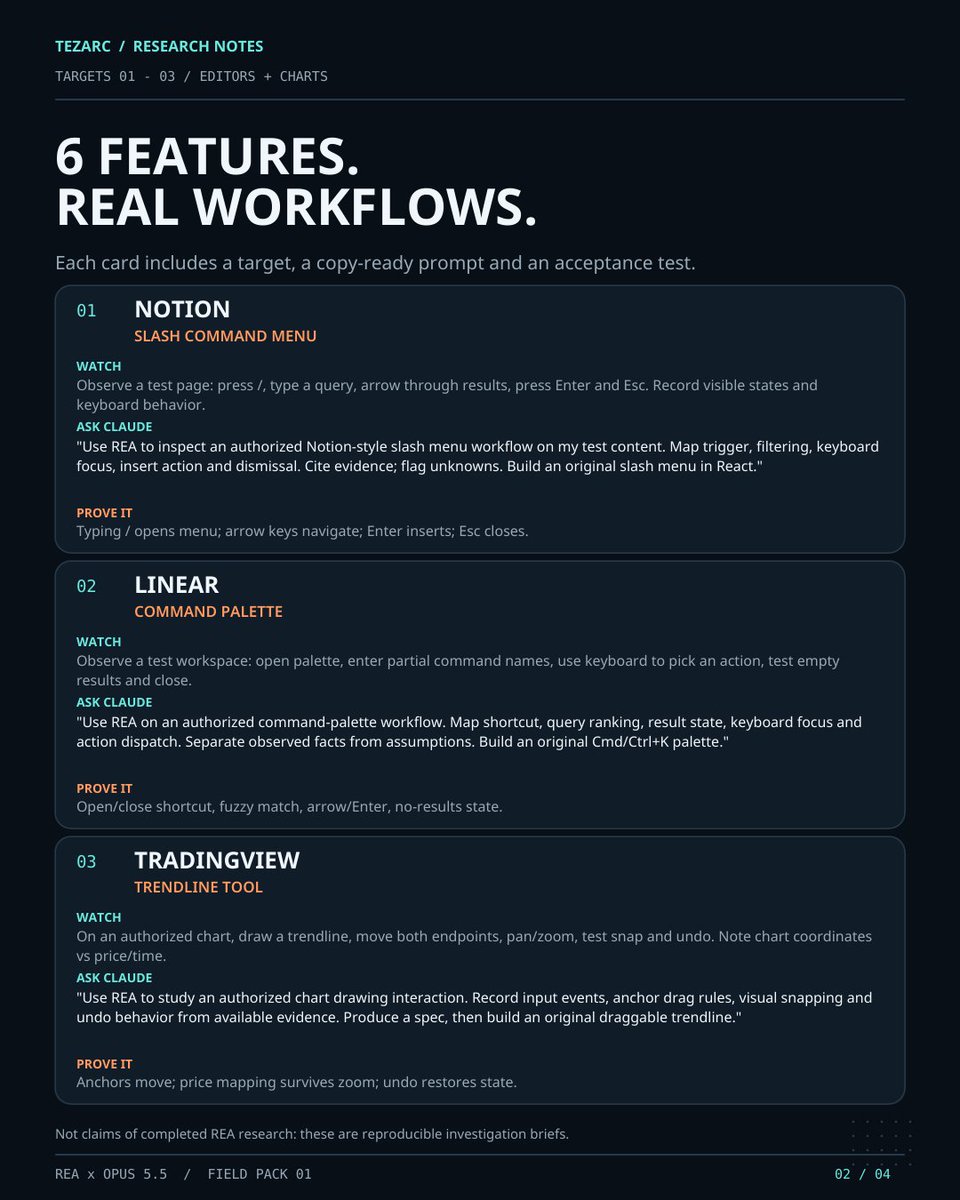
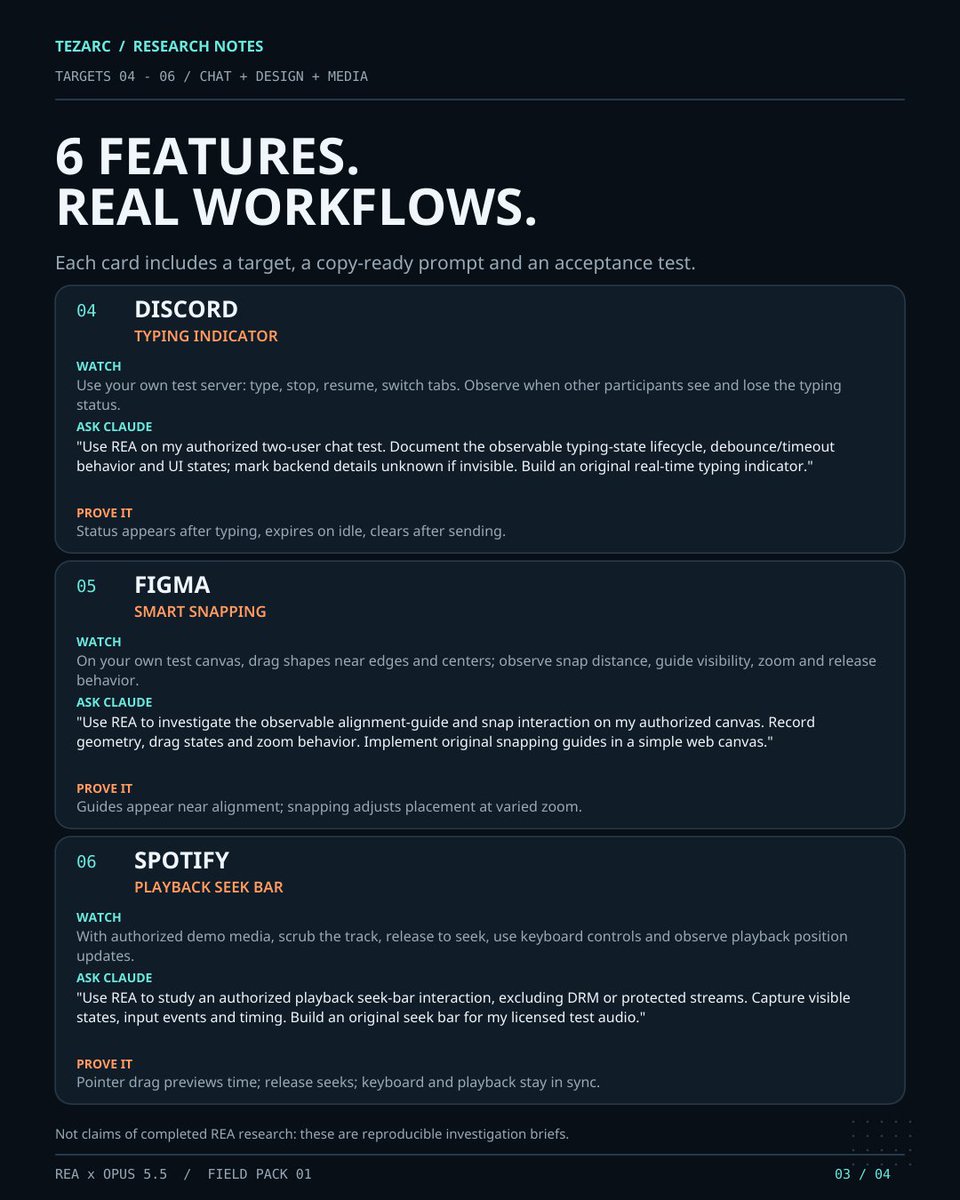
6 app features. 6 REA + Opus 5.5 prompts.
the full rebuild pack is below — pick a feature, investigate how it works, and build your own version.
setup, evidence, specs and verification included.
save this for your next project ↓
REA + Opus 5.5 is the most dangerous combo for paid software right now.
you're using 6 different apps, but probably only care about a handful of features.
Notion. Figma. TradingView. Discord. Linear. Spotify.
there's a FREE open-source MCP with 269K GitHub stars that lets Claude investigate how software actually works, down to the binary.
instead of asking AI to guess from screenshots, you can make it investigate the real behavior.
here are 6 features worth rebuilding in your own projects:
1 → Notion's slash menu
type "/" → search blocks → select an action → insert it into the editor.
2 → Linear's command palette
Cmd+K → fuzzy search → keyboard navigation → execute commands.
3 → TradingView's drawing tools
place a trendline → drag its anchors → snap to prices → undo changes.
4 → Discord's typing indicator
start typing → send a status event → reset the timer → disappear after inactivity.
5 → Figma's smart snapping
drag an object → detect nearby edges → show alignment guides → snap into place.
6 → Spotify's playback controls
drag the timeline → seek audio → synchronize the position → update the UI.
here's how to try it with REA + Claude Code:
step 1 → install REA
run:
npx rea-agents setup
select Claude Code, approve the setup, restart.
step 2 → pick ONE feature
start with software you're allowed to inspect. don't try to rebuild the whole app.
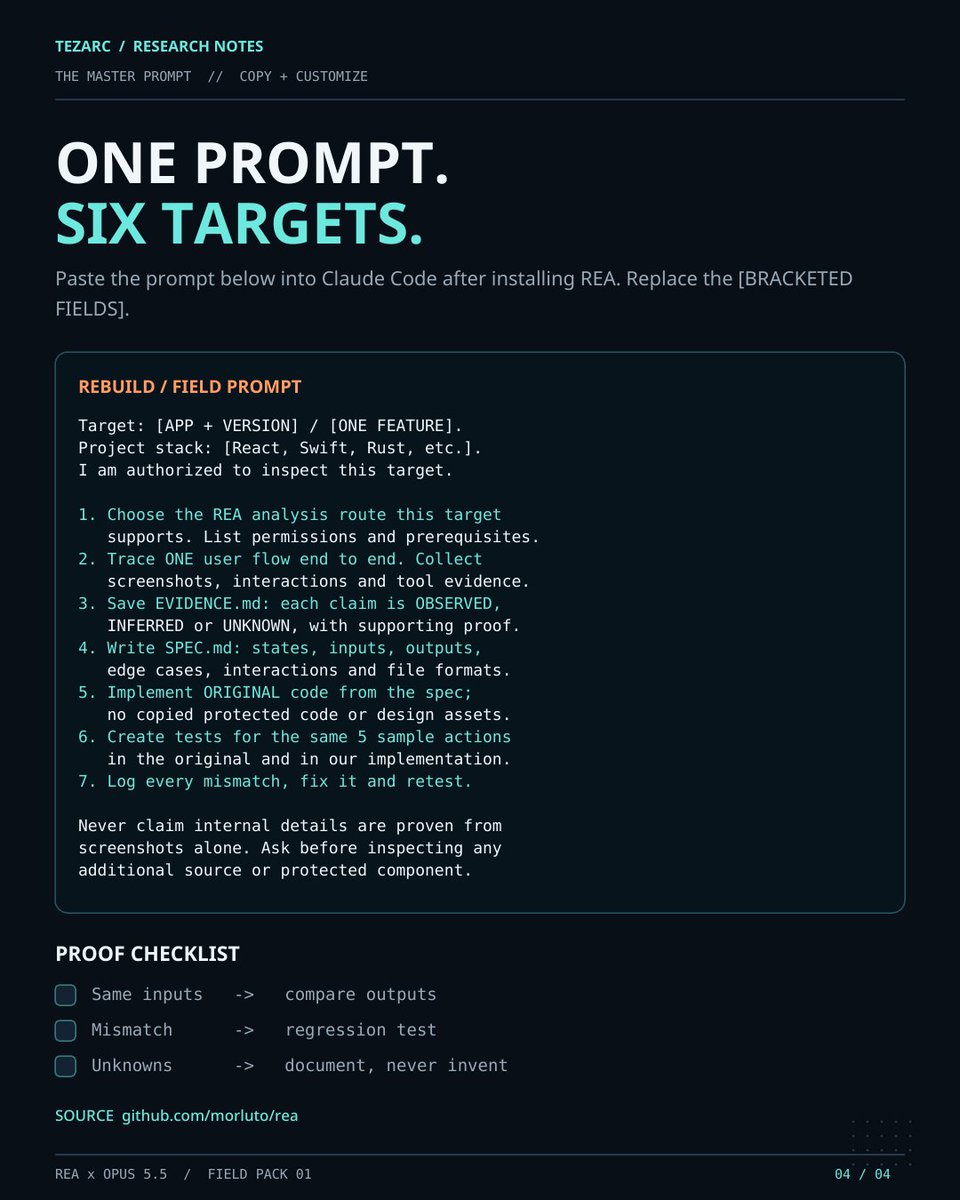
step 3 → paste this into Opus 5.5:
"Use REA to investigate [APP + FEATURE].
Trace the user interaction to the underlying behavior using the available analysis tools.
Show the evidence: relevant functions, modules, calls, events and state changes. Separate confirmed findings from assumptions.
Turn the findings into SPEC.md with inputs, outputs, edge cases and expected behavior.
Then implement an original version in [YOUR STACK].
Test both versions with the same inputs, log every mismatch, and keep fixing until the required behavior passes."
step 4 → make it prove the result
don't accept a screenshot that merely looks similar.
click the buttons. change the inputs. test the edge cases.
you want the behavior, not just the appearance.
that's the difference between another pretty AI clone and something you can actually use.
REA: https://t.co/t16FAtEUQS
save this for your next project.
the full breakdown of AI reverse engineering is in article below ↓
REA is most dangerous thing on the internet right now...
It lets your AI agent reverse engineer any app, down to the binary
If you use it correctly, you can rebuild any feature you pay for, for FREE
In this article, I show you how: https://t.co/3P1FNXiXzl
REA + Claude Opus 5.5 is f*cking insane for rebuilding software.
This developer, Brandon Thomas, used Claude to recreate Photoshop, Premiere and Illustrator. then he went after Microsoft Office.
13 open-source apps. 13K GitHub stars on his Word clone. even the Excel alternative already supports 513 of 523 worksheet functions.
and now there’s a free tool with 260K+ GitHub stars that lets AI agents investigate how software actually works.
it’s called REA (Reverse Engineer Anything).
Brandon used a clean-room approach, not REA. but here’s how you can combine REA + Opus 5.5 to rebuild your own version of a software feature.
step 1 → install REA
open your terminal and run:
npx rea-agents setup
select Claude Code, approve the setup and restart. REA’s MCP tools are now available to your agent.
step 2 → pick something to rebuild
don’t start with an entire Photoshop clone.
pick ONE feature from software you’re allowed to inspect:
layers and image editing
timeline scrubbing
document search
file import/export
step 3 → let REA investigate it
open Claude Code and paste:
“Use REA to investigate [feature] in [app]. Trace the relevant functions, modules, inputs and outputs. Show the actual evidence for each finding. Flag anything you can’t verify.”
REA can inspect native binaries, Electron apps, .NET assemblies and websites.
step 4 → make Opus write the blueprint
paste:
“Turn the REA findings into SPEC.md. Include the feature’s behavior, dependencies, edge cases and implementation plan. Separate observed facts from assumptions.”
now you have an evidence-backed blueprint instead of asking AI to guess.
step 5 → rebuild it
tell Opus:
“Implement this feature from SPEC.md in [framework]. Write original code, add a test for each behavior, and make the result runnable.”
start with one working interaction. expand after it works.
step 6 → compare and fix
run the same inputs through the original and your version.
if the output differs, fix it. if an interaction breaks, add a regression test.
repeat until the feature behaves the way you need.
REA investigates → Opus rebuilds → tests verify.
all 13 ArtCraft apps:
https://t.co/UoFEyGdjU3
REA GitHub:
https://t.co/t16FAtEUQS
save this before your next build.
broke down AI reverse engineering, its tools and limitations in the article below ↓
REA is most dangerous thing on the internet right now...
It lets your AI agent reverse engineer any app, down to the binary
If you use it correctly, you can rebuild any feature you pay for, for FREE
In this article, I show you how: https://t.co/3P1FNXiXzl
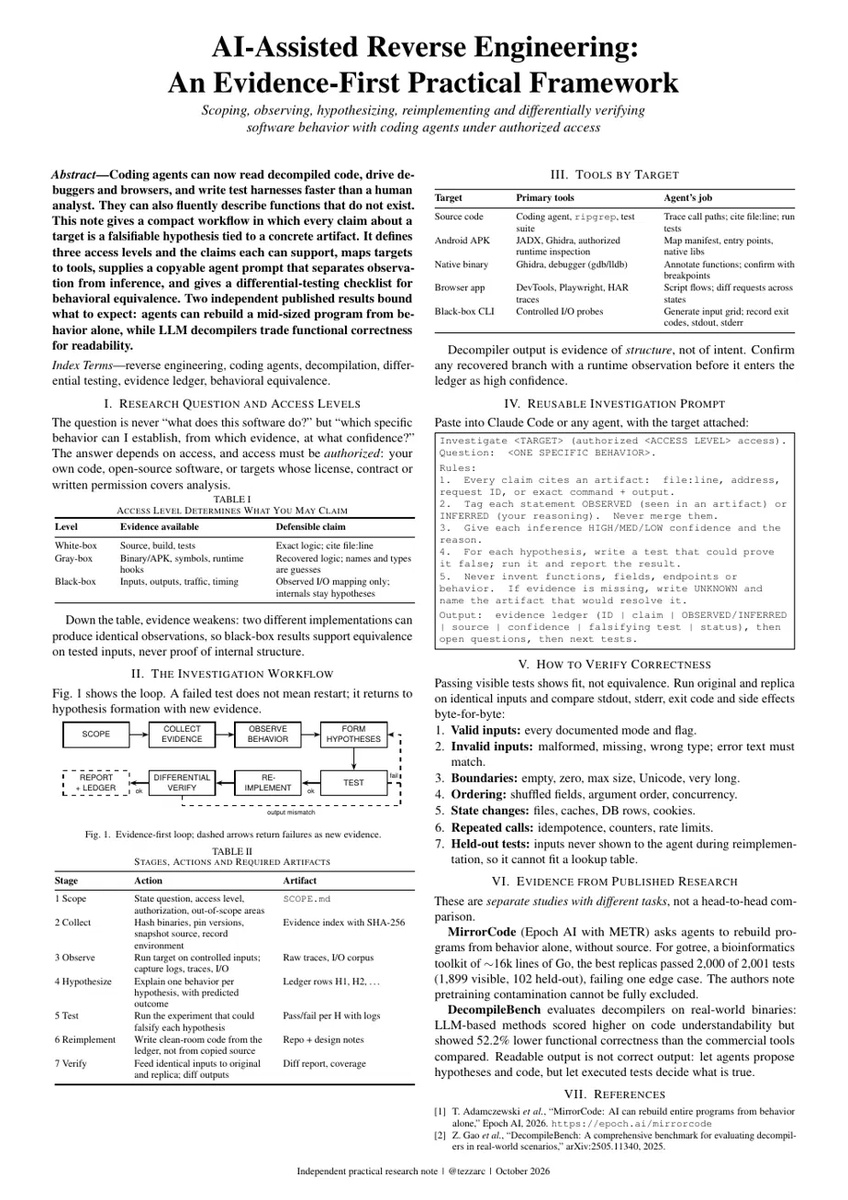
this should NOT be possible. Claude rebuilt a 16,905-line program without access to a single line of its code.
no human help. the best copy failed exactly 1 test out of 2,001.
it only watched what went in and what came out. Epoch AI estimates the same job would take a human engineer 2 to 17 weeks.
and the biggest tasks go further. on one of them, a single run worked 19 days straight with no human touching it and cost $2,600.
one dev already used Claude Code to decode how a Fire TV and a Kodak Bluetooth device talk, only by recording their traffic.
but AI also makes things up, and it does it convincingly. in a separate study, AI tools that turn programs back into code wrote cleaner-looking code than the standard tools and were 52.2% less correct.
I put the whole method on one page. Steal it.
the fastest way to start:
→ pick one thing the software does: one button, one command, one request
→ record 3 real examples of it happening
→ make the AI write down how it works, with proof for every claim
→ run one test that could prove it wrong
if the AI can’t point to proof, the claim stays OPEN.
let the AI propose. let the evidence decide.
only on software you own or are authorized to inspect.
the page has the copy-paste prompt for Claude Code, the tools for every kind of target and the 7 checks to run before you trust the result. full guide in the article below ↓
I let Jev decide how hard Opus 5.5 was allowed to think on the same 6 coding tasks.
first run:
max reasoning on every step.
64,899 thinking tokens
913s
$3.76
12/12 hidden checks
second run:
Jev picked the reasoning effort step by step.
954 thinking tokens
387s
$1.70
12/12 hidden checks
Jev wasn't writing the code or replacing Opus.
it was only deciding how much reasoning each step got.
and apparently a lot of those steps had been paying for max reasoning for no reason.
but the 64,899 → 954 headline hides one ugly detail:
one task caused most of the token gap.
remove it and the result looks a lot less ridiculous.
cost still fell 21%.
@Dain0x a no-trade state deserves its own rule here. otherwise the desk can answer all 3 questions and still force a trade because “something has to happen”