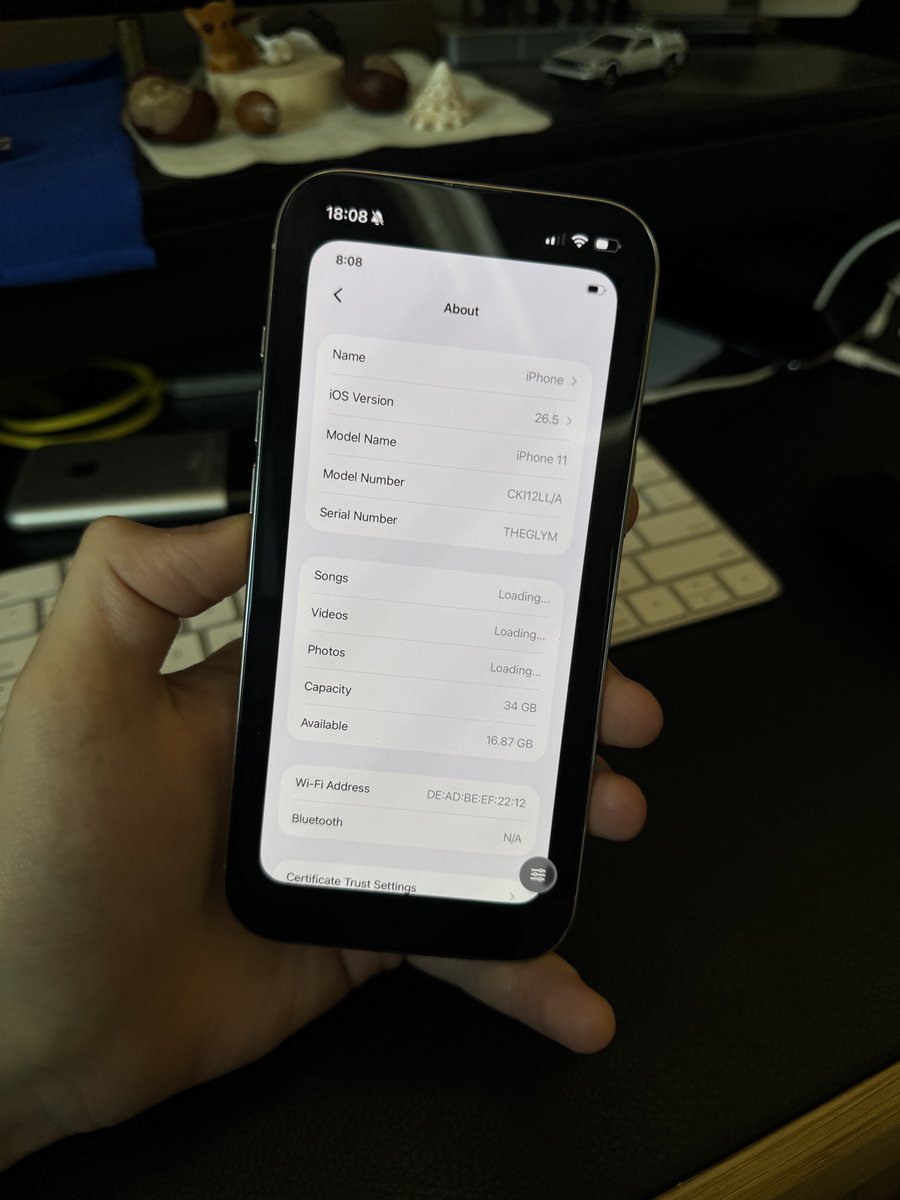
@makrotasuss@makrotasuss@khanhduytran0 What do you guys think about iOS 26.5 running natively on an iPhone XS, even though it only officially supports up to iOS 18?))
Я думаю у тебя получиться )) я могу тебе закинуть свою реализацию, но если ты не выложишь это в опенсоурс) а тк ты ведешь работу публично, врятли тебе такой вариант интересен)
Да и в любом случае намного круче когда у тебя у самого что то получится сделать, чем просто получить. Тем более что ты теперь знаешь что это возможно)
OnlyLimits 1.2 is out 🎉
The macOS menu bar app that shows every Codex account's remaining limit at once now shows your Mac's RAM and disk usage too - one click each, right next to the bars.
Native SwiftUI, zero dependencies, ~1 mb.
More info:
https://t.co/pspkSrHfuL
I really enjoyed your app. I read absolutely all of the theoretical material and completed every exercise. It takes much more than 2–3 hours, but it is definitely worth it! In addition, whenever something was unclear or ambiguous to me, I used Fable on the other half of the screen to clarify it.
I’ve put together a list of improvements that you might consider implementing in future updates:
1. Explain not only how LLMs work, but VLMs as well. It would be very interesting to get a similarly accessible explanation of how a model can be taught to understand what is in an image and how to work with visual information.
2. Support for connecting an external server. I completed the course on an M5 Max with 128 GB of memory. It’s a great computer, but it is still relatively weak when it comes to training models. If the app allowed users to connect to rented servers equipped with powerful GPUs—for example, a cluster of NVIDIA B200s or other GPUs—the training capabilities and examples in your app could be taken to an entirely different level. Ideally, there could be automatic conversion to a Mac-compatible format while still keeping CUDA support. Users could rent GPU servers, enter their access credentials in your app, and manage and monitor the training process from their main Mac.
3. The third point follows from the second one. Once external servers can be connected, the available training “templates” and model sizes could be significantly larger than they are now. You could also add more options for tokenizers, attention mechanisms, and other components that are already available in the app.
4. Explain how to create custom tools for an LLM and how to train the model to use them correctly at the appropriate time.
5. Explain how to create a harness around an LLM—a surrounding system of tools and infrastructure that the LLM can work with.
6. Allow the app to be translated into other languages using an external LLM. This way, you wouldn’t have to spend your own money on translations. Users who need another language could simply add their own API key and, with essentially one click, translate the interface, making the learning process easier and more effective for them.
7. Add links from every model-training stage and parameter to the corresponding explanation in the educational section. Even after reading everything and feeling like you “understand” it, you still need to go back from time to time to refresh your memory.
8. I think it would also be very interesting to analyze some existing models: how they work, why they were designed the way they were, what is good about their architecture, and what could be improved. This could be done using specific open-source models as examples. It would provide a better understanding of what could be improved in the architecture of your own models and would make it even clearer why certain architectural decisions are made.
9. BUG: When I create a new model project, the green checkmarks indicating completed milestones from another project do not reset. Logically, since this is a new project, all of those stages should have to be completed again (except for the theoretical learning section).
I started independently learning about LLMs around a year ago, mostly in my spare time. Your app has given me a tremendous amount of useful knowledge in a very short period of time. I want to express my sincere gratitude for all the work and effort you’ve put into it. Thank you so much!
I couldn’t find anywhere in the app where I could support you, buy you a coffee, or simply send a small token of appreciation. Please consider adding that in the future as well—I’m sure I’m not the only person who has wanted to do so :)
———————
English isn’t my native language, so I used AI to translate my original message. I wanted to make sure I could express my thoughts, suggestions, and gratitude as clearly as possible.
Wild concept: reading the README before lecturing. Keychain is literally listed as the next hardening step.
Meanwhile the “industry standard” you’re comparing to - ~/.codex/auth.json - is the exact same plaintext file, shipped by OpenAI, sitting on every Codex user’s Mac right now. Go audit that first.
I just wanted to see how much of my Codex limits I had left - across ALL my accounts at once, right in the menu bar - without weighing my Mac down with junk I don't need.
Couldn't find an alternative without a pile of extra functionality. So I made it myself.
OnlyLimits: every account side by side, 940 KB, zero dependencies, ~0% CPU, no telemetry - your credentials never leave your Mac. Native Swift, Free.
Maybe you need it too:
https://t.co/QtNru33xwi
The original iPhone.
Running iPhone OS 1.1.4 before iOS, before the App Store, before multitasking, before smartphones became what they are today.
I made a short video exploring the interface and showing what using the first iPhone actually felt like.
Next year, the original iPhone turns 20. This one is still running on its original battery, and it still holds a charge for over a week.
Neither me nor the LLM decides what to remove.
ccclean removes at least the number of tokens you configure from the oldest part of the conversation. The exact cut is then moved to the next user message boundary, so complete user/assistant exchanges are preserved rather than split in half.
Token counts come from Anthropic’s official token counting API (each model has its own tokenizer), with a faster but less accurate estimation mode available as well.
In interactive mode, ccclean shows exactly what will be removed and requires explicit confirmation before deleting anything. There’s also a fully automatic mode.
If you launch Claude Code via ccclaude, cleanup and session restart happen automatically using Claude Code’s standard hooks, so the conversation continues seamlessly.
So there is no semantic “importance” algorithm here. The only input is the minimum number of tokens to remove; the final cut is adjusted only to avoid breaking the conversation structure.
Claude Code sessions can now be infinite.
I built ccclean: start any session with ccclaude, and when the context fills up, old messages are automatically cleaned, important context is preserved, and your work continues without interruption.
No more “start a new chat.”
I turned this tiny e-paper device into my dedicated Claude Code terminal.
It’s magnetic, incredibly lightweight, readable even in direct sunlight, lasts for weeks on a single charge, connects to multiple computers, and lets me switch between active Claude sessions instantly.
After seeing your post about e-paper displays, I couldn’t resist building something with one too, @bunkaich.