Backend isn’t just APIs and CRUD.
This is the roadmap companies like Google, Meta, Amazon expect you to know.
DSA
> Companies like Google don’t care about your projects if you fail here.
> This is the real filter.
> Conquer this, and every door in tech opens.
> Struggle here, and those doors stay shut.
0. Ground Setup
Before going crazy with topics, you need:
> One main backend language (JavaScript/TypeScript, Go, Java, Rust — pick one and master it)
> Git + GitHub: branching, PRs, rebases, conflict resolution
> Linux basics: ls, cd, cat, grep, find, permissions, SSH
> Editor mastery: VS Code or any solid setup
First principles here:
> What is a program? How does source code become a running process?
> What is an OS process vs thread?
> What does it mean to run a server on a port?
You should be able to:
> SSH into a Linux box, pull a repo, install deps, run a server on a port, view it via browser
---
1. Core Backend Fundamentals
1.1 Networking and HTTP
You cannot be a strong backend engineer if HTTP is just “that thing Express uses”.
Understand:
> DNS → IP → TCP → HTTP
> Difference between IP / TCP / UDP / HTTP / HTTPS
> HTTP methods, status codes, headers, idempotency, safe methods
> REST vs RPC vs GraphQL
Practice:
> Build a backend without any framework using native http
> Parse JSON body manually
> Implement basic rate limiting
> Add API versioning (/v1, /v2)
---
1.2 API Design and Backend Architecture Basics
First principles:
> Resource modeling
> Stateless vs stateful
> Consistent naming, validation, clear errors
> Pagination, filtering, sorting
Layered architecture:
> Controller → Service → Repository (DAO)
You should be able to:
> Design APIs for Task Manager or Expense Tracker
> Keep error and response structure consistent everywhere
---
2. Databases and Data Modeling
Big companies will grill you here.
2.1 Relational Databases
SQL is non-negotiable.
Understand:
> Table, row, column, primary key, foreign key
> Normalization: 1NF, 2NF, 3NF basics
> Joins: inner, left, right, full
> Transactions and ACID
> Indexes and their impact
You should be able to:
> Instagram schema: users, posts, likes, comments, followers
> Query top posts, mutual followers
> Use migrations, not manual DB edits
---
2.2 NoSQL and When to Use It
Understand:
> Document DB vs relational DB
> Denormalization
> Event logs and analytics needs
> CAP theorem basics
> Collections, documents, indexes, aggregation pipeline
Be able to decide:
> When a feature needs SQL vs NoSQL
---
3. Authentication, Authorization and Security
3.1 Auth Basics
Understand:
> Authentication vs authorization
> State vs stateless auth
> Password hashing (bcrypt/argon2)
> Cookies: HttpOnly, Secure, SameSite
> Access vs refresh tokens
> Token revocation and rotation
> Basics of OAuth2 / OpenID Connect
You should be able to:
> Implement email/password auth with verification and forgot password
> Explain cookies vs localStorage
> Explain token invalidation strategies
---
3.2 Web Security Core
Understand:
> SQL injection, XSS, CSRF, IDOR (OWASP Top 10)
> Input validation and output encoding
> CORS and preflight
You should be able to:
> Identify common vulnerabilities in APIs
> Configure CORS correctly
---
4. Concurrency, Performance and Scalability
4.1 Concurrency and Asynchrony
Understand:
> Event loop, callback queue, microtasks
> Blocking vs non-blocking I/O
> CPU-heavy work blocks Node
You should be able to:
> Explain when to use worker threads and offloading
---
4.2 Caching
Concepts:
> In-memory vs Redis caches
> TTL, LRU, invalidation
> HTTP caching: ETag, Last-Modified, Cache-Control
You should be able to:
> Use Redis to cache DB queries and rate limit
> Plan cache keys well
---
4.3 Scaling and Architecture Patterns
Understand:
> Vertical vs horizontal scaling
> Stateless services for scale-out
> Load balancers
> Monolith vs microservices
> Sync vs async flows (queues)
Patterns:
> Circuit breaker
> Retry with backoff
> Idempotency keys for POST
You should be able to:
> Split a monolith into services and make them communicate
---
5. Messaging, Queues and Async Systems
Understand:
> RabbitMQ, Kafka, Redis streams
> Producers, consumers, delivery semantics
Use cases:
> Emails, uploads, payment pipelines, logs
You should be able to:
> Offload heavy jobs to background workers
> Build async workflows
6. Testing and Quality
Understand:
> Unit, integration, E2E tests
> Test pyramid
> Deterministic vs flaky tests
You should be able to:
> Test auth flows and business logic
> Run tests in CI (GitHub Actions or similar)
7. DevOps Basics for Backend Engineers
7.1 Containers and Deployment
Understand:
> Dockerfile basics (FROM, COPY, RUN…)
> Docker Compose for app + DB
> Environment variables and config
You should be able to:
> Containerize backend and DB
> Deploy to any cloud provider
7.2 CI/CD and Observability
Understand:
> CI pipelines: tests, lint, build
> Auto deploy workflows
> Logging and metrics
You should be able to:
> Add logging middleware with request IDs
> Monitor latency, error rate, throughput
8. System Design
This becomes crucial for big tech interviews.
Understand:
> Load balancer, app server, DB, cache, queue, file storage
> Consistency models
> API Gateway and BFF patterns
> Unique ID generation (UUID, Snowflake)
Practice on paper:
> URL shortener
> Instagram feed
> E-commerce checkout
> Notification systems
Consider:
> DB schema, caching, queue usage, failure handling
9. Domain-Specific Knowledge
Depending on role and product:
> Fintech: strong consistency, audit logs, idempotency
> E-commerce: carts, pricing, orders, inventory
> Real-time: WebSockets, SSE, backpressure
Choose what aligns with your career direction and keep grinding.
Apache Kafka was born out of a problem. 😉
LinkedIn engineers => faced difficulties in tracking website metrics, activity streams and other operational data.
A team of engineers => led by Jay Kreps, Neha Narkhede and Jun Rao started developing a distributed publish-subscribe messaging system that could handle high-throughput, low-latency data streams.
This system eventually became Apache Kafka.
It was open sourced in early 2011.
The name 'Kafka' was chosen by Jay Kreps.
He named the system after the famous author 'Franz Kafka'. 😊
Kreps was an admirer of Franz Kafka's writing and found the name fitting for a system that dealt with the flow of information.
It's written in Java and Scala.
Later they founded => 'Confluent' (a company) in 2014 to provide commercial support and additional tools for Kafka users.
------
In case you don't know about Pulumi Neo, the first AI Infrastructure Agent.
✔️ Get started for free => https://t.co/c4vCIsiRvr
➕ Learn more about Pulumi Neo => https://t.co/G7Cr7mblGx
-------
𝐋𝐞𝐭'𝐬 𝐮𝐧𝐝𝐞𝐫𝐬𝐭𝐚𝐧𝐝 𝐭𝐡𝐞 𝐛𝐚𝐬𝐢𝐜 Kafka 𝐟𝐥𝐨𝐰.
[1.] Producer sends a message
◾ An application acts as a producer, creating a message with data (payload) and optional key.
◾ The producer connects to a broker in the Kafka cluster and identifies the target topic.
◾ Kafka uses a partitioner to determine which partition within the topic should receive the message. This ensures load balancing and parallel processing.
◾ The message is delivered to the leader replica of the chosen partition.
[2.] Message storage and replication
◾ The leader replica appends the message to its log segment.
◾ The message receives a unique offset, serving as its position within the log.
◾ The leader replicates the message to follower replicas for fault tolerance.
[3.] Consumer fetches messages
◾ An application acts as a consumer, joining a consumer group.
◾ Consumers within the same group share offsets and coordinate consumption.
◾ Each consumer fetches messages from its assigned partitions based on its committed offset.
◾ The consumer receives batches of messages and processes them.
[4.] Acknowledging consumption
◾ Once processing is complete, the consumer commits its new offset.
◾ This tells Kafka which messages have been successfully consumed.
◾ Kafka tracks committed offsets for each consumer in the group.
[*.] Flow continues
◾ Producers continue sending messages and consumers keep fetching and processing them based on their latest offsets.
◾ This cycle ensures ordered delivery and reliable consumption even with failures or restarts.
Remember,
👉 Message flow is asynchronous. Producers don't wait for consumers to process messages.
👉 Consumers can lag behind producers if processing is slow.
👉 Kafka offers mechanisms for handling failures and ensuring at-least-once or exactly-once delivery semantics.
Topics => Partitions =>Log Segments
(Data is actually stored in log segments)
Follow @techNmak
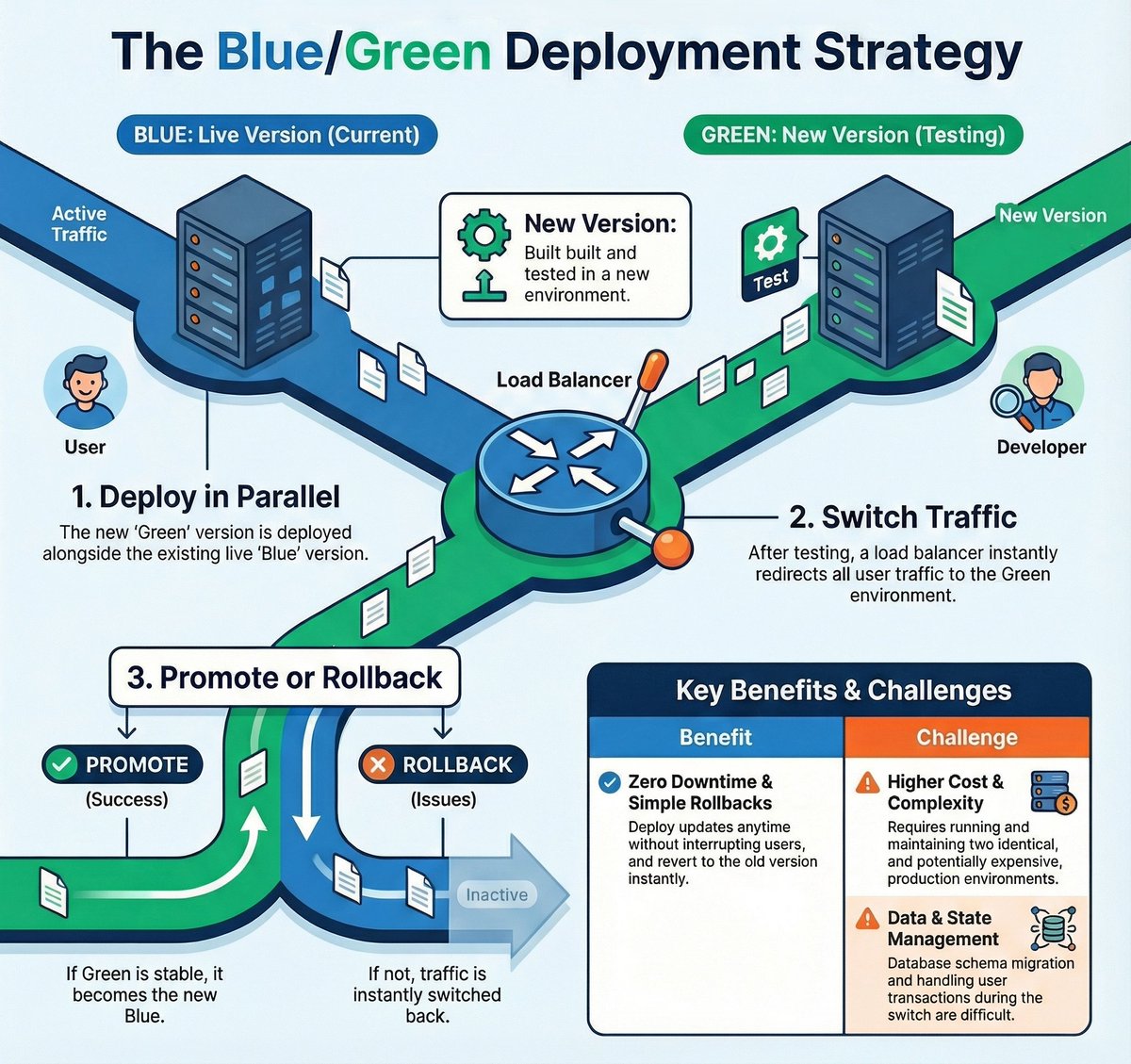
Blue/Green deployment is one of the safest ways to release a new version without downtime.
You run two identical environments: Blue (live) and Green (new version).
You deploy the new release to Green, test it, and once everything looks good, the load balancer switches all traffic from Blue to Green instantly.
If something breaks, switching back is just as fast, the old Blue environment is still running.
The benefit is zero downtime and instant rollbacks. The challenge is cost and complexity, because you're maintaining two full environments and handling things like database changes carefully.
When uptime matters, and you want predictable, low-risk deployments, Blue/Green is hard to beat.
We cached everything aggressively. Response times were amazing. Then we hit a subtle bug.
The problem:
- User updated their profile
- Changes didn't appear
- Waited 5 minutes, still nothing
- Logged out and back in, still old data
- Cache TTL was 1 hour
The cache architecture:
- Redis cache at application layer
- CloudFront cache at CDN layer
- Browser cache at client layer
- All with different TTLs
- No cache invalidation strategy
User experience:
- Update profile
- See old data for up to 3 hours
- Think the update failed
- Try again
- Multiple update requests
- Database writes stacking up
- Still seeing old data
The fix:
- Implemented cache invalidation on writes
- Used cache tags for related data
- Set shorter TTLs for user-specific data
- Added "force refresh" option
- Built cache warming strategy
Aggressive caching makes your app fast. It also makes your data stale. Cache what changes rarely, invalidate what changes often.
This is one of the clearest breakdowns of idempotency keys I’ve read in a long time.
Summary of the post (for anyone skimming):
> Exactly-once delivery in distributed systems is impossible.
> Exactly-once processing is possible with idempotency keys.
> UUIDv4 works but forces consumers to store every processed ID, which becomes expensive.
> UUIDv7/ULID improves things by adding timestamps, letting systems reject “too old” messages but still messy.
> Monotonically increasing keys are ideal: consumers only store the latest key per partition.
No unbounded memory growth.
> But producers struggle with monotonic sequences under concurrency unless you serialize all requests (slow!).
The elegant solution:
derive idempotency keys from the database transaction log (WAL/LSN).
This gives:
> strict monotonicity
> producer parallelism
> constant-space duplicate detection
CDC tools like Debezium make this practical, and Postgres’ {CommitLSN, EventLSN} tuple is perfect as a 128-bit key.
---
My take:
Fantastic write-up. The best part is the emphasis on correctness vs convenience - UUIDs are fine for small systems, but real distributed pipelines eventually need deterministic ordering.
A few potential improvements that could make it even stronger:
Show an example where a UUID-based system silently double-processes messages after TTL expiry - makes the pain concrete.
A short snippet demonstrating how to combine (CommitLSN << 64) | EventLSN into a uint128 would help readers implement it faster.
Discuss how this interacts with multi-region deployments where WAL ordering is not globally meaningful.
But overall a genuinely helpful deep dive into idempotency strategy design. Great post.
I absolutely found it useful.
Here’s a real example of how ignoring idempotency can burn you - literally.
About 2 years ago, I was working at a startup where our payment flow relied heavily on idempotency keys (like most payment providers: Stripe, Razorpay, PayU, Cashfree, etc.).
The idea is simple, each payment attempt must have a unique, backend-generated idempotency key so that:
repeated retries don’t charge the user twice
- timeouts can be recovered safely
- webhooks can be reconciled deterministically
- follow-up queries about payment status use the same key
Well… we weren’t doing that.
The Flutter app was generating idempotency keys on the client side, without reconciliation with our backend database.
And because of some retries + network issues + inconsistent key generation, the same payment was processed multiple times.
End result: we lost $10,000 in duplicate charges.
No fraud. No hack. Just poor idempotency.
Thankfully, I wasn’t fired mostly because I tracked the root cause quickly.
I remembered an odd flow where the app generated the id instead of the backend.
That tiny detail turned out to be the entire reason why our payment flow wasn’t deterministic.
Here’s the correct flow (for anyone who builds payments):
1. Backend generates the idempotency key
2. Backend sends this key to the client
3. Client passes the same key to the payment provider
4. Payment provider uses the key to dedupe retries
5. Webhook arrives → backend verifies using the same key
6. If payment seems “stuck”, backend queries the provider using the same key
7. No matter how many retries occur, only one payment is ever processed
This incident taught me that idempotency isn’t a “nice-to-have.”
It’s literally the difference between correct systems and catastrophic failures!!
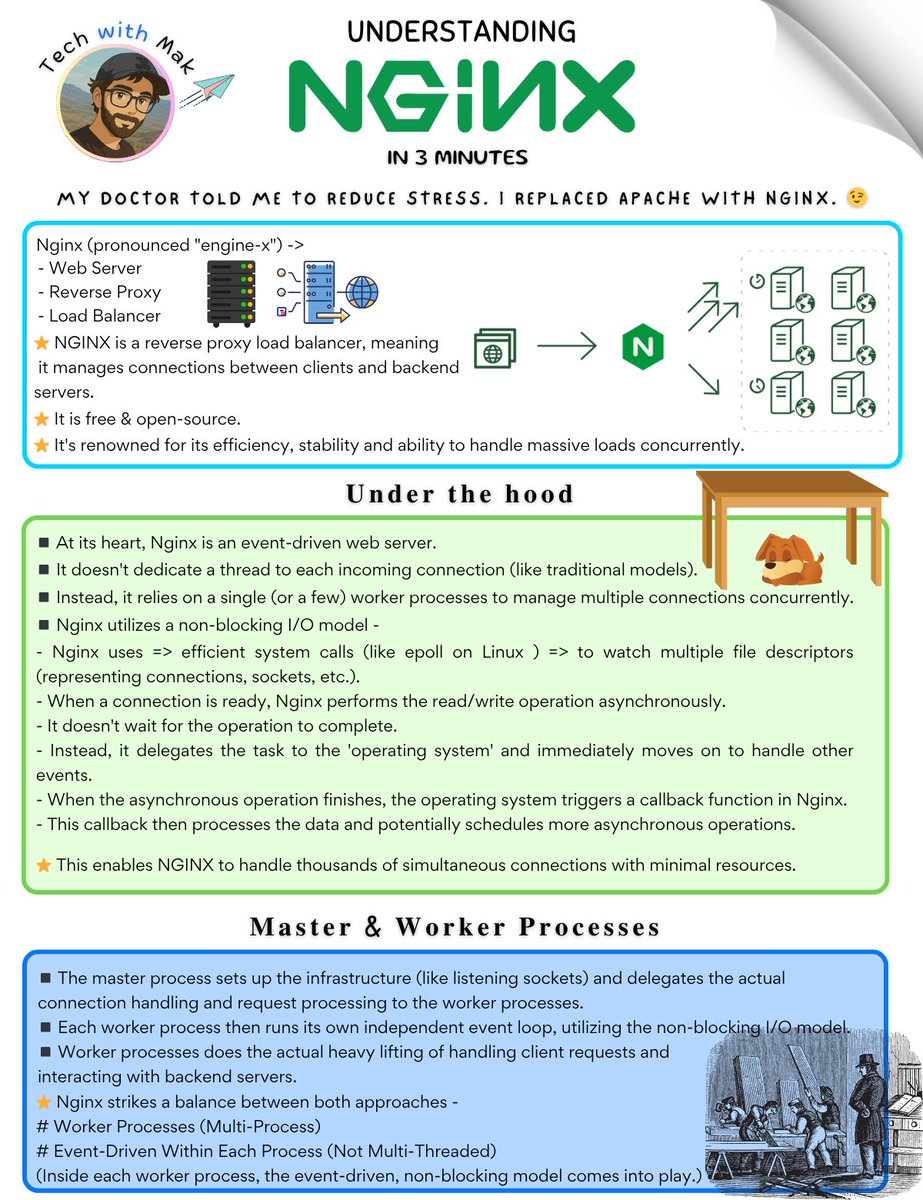
My doctor told me to reduce stress. I replaced Apache with Nginx. 😉
Nginx (pronounced "engine-x") ->
- Web Server
- Reverse Proxy
- Load Balancer
⭐ NGINX is a reverse proxy load balancer, meaning it manages connections between clients and backend servers.
◾ It is free & open-source.
◾ It's renowned for its efficiency, stability and ability to handle massive loads concurrently.
𝐔𝐧𝐝𝐞𝐫 𝐭𝐡𝐞 𝐡𝐨𝐨𝐝 -
◾ At its heart, Nginx is an event-driven web server.
◾ It doesn't dedicate a thread to each incoming connection (like traditional models).
◾ Instead, it relies on a single (or a few) worker processes to manage multiple connections concurrently.
◾ Nginx utilizes a non-blocking I/O model -
- Nginx uses => efficient system calls (like epoll on Linux ) => to watch multiple file descriptors (representing connections, sockets, etc.).
- When a connection is ready, Nginx performs the read/write operation asynchronously.
- It doesn't wait for the operation to complete.
- Instead, it delegates the task to the 'operating system' and immediately moves on to handle other events.
- When the asynchronous operation finishes, the operating system triggers a callback function in Nginx.
- This callback then processes the data and potentially schedules more asynchronous operations.
This enables NGINX to handle thousands of simultaneous connections with minimal resources.
𝐌𝐚𝐬𝐭𝐞𝐫 & 𝐖𝐨𝐫𝐤𝐞𝐫 𝐏𝐫𝐨𝐜𝐞𝐬𝐬𝐞𝐬 -
◾ The master process sets up the infrastructure (like listening sockets) and delegates the actual connection handling and request processing to the worker processes.
◾ Each worker process then runs its own independent event loop, utilizing the non-blocking I/O model.
So,
Worker processes does the actual heavy lifting of handling client requests and interacting with backend servers.
◾ This separation allows Nginx to handle numerous concurrent connections efficiently.
Remember,
Nginx strikes a balance between both approaches -
# Worker Processes (Multi-Process)
# Event-Driven Within Each Process (Not Multi-Threaded)
(Inside each worker process, the event-driven, non-blocking model comes into play.)
𝐊𝐞𝐲 𝐅𝐮𝐧𝐜𝐭𝐢𝐨𝐧𝐚𝐥𝐢𝐭𝐢𝐞𝐬 -
# Web Serving
Nginx serves static content (HTML, CSS, images) efficiently.
# Reverse Proxy
Nginx forwards requests to backend servers while potentially adding security or caching functionalities.
Can handle SSL/TLS termination (encryption/decryption).
# Load Balancer (Layer 4 & 7)
Nginx can distribute traffic across multiple backend servers using various algorithms (round-robin, least connections, etc.)
Improves scalability and high availability.
------
Remember,
◾ Nginx performance can be impacted by long-running requests that block the event loop.
◾ For computationally intensive tasks, Nginx may benefit from using threads or offloading work to external processes. 😊
Follow - @techNmak , for more :)
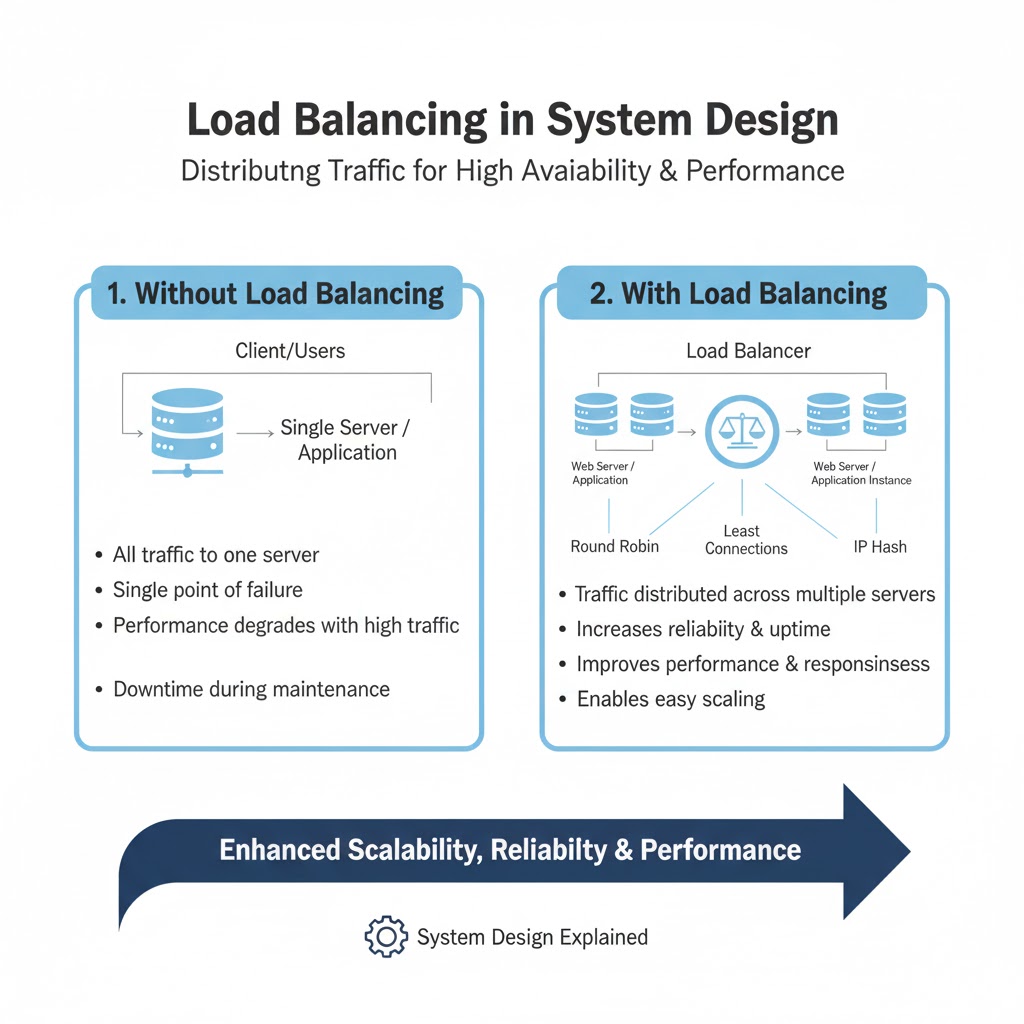
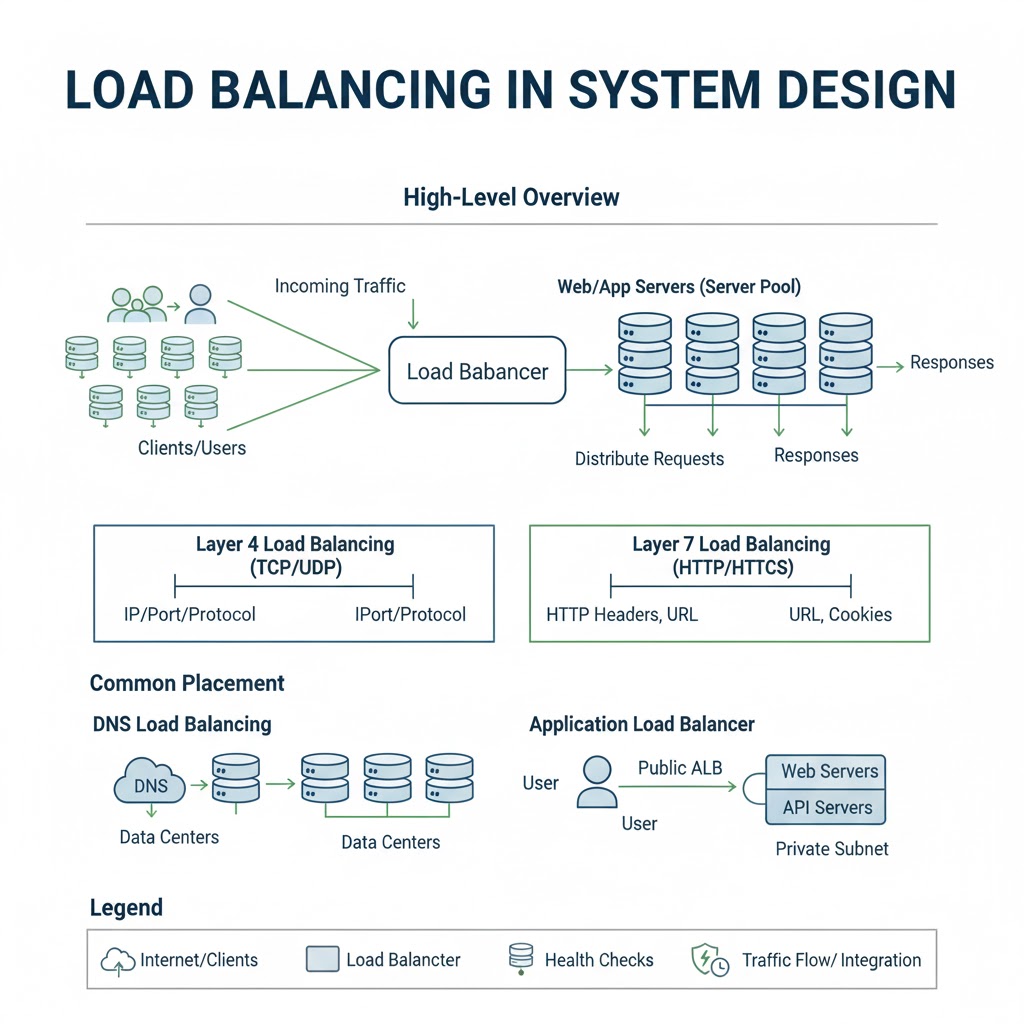
LOAD BALANCING IN SYSTEM DESIGN
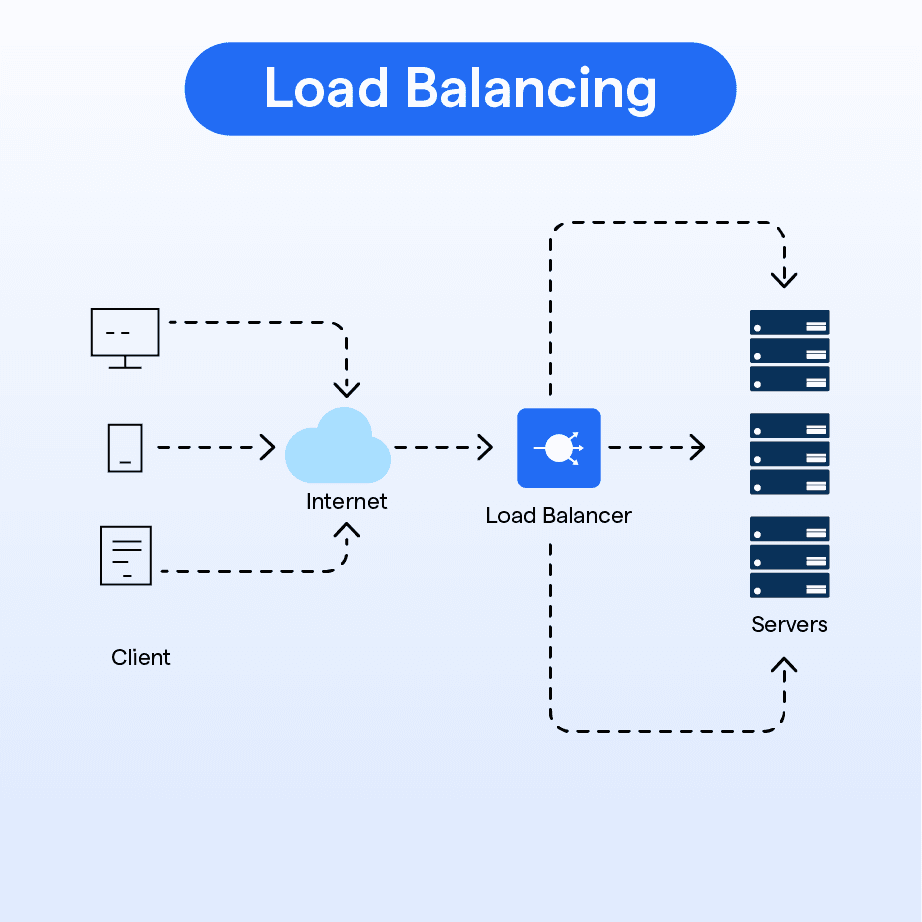
→ Load Balancing is the process of distributing incoming network traffic across multiple servers to ensure no single server becomes overloaded.
→ It improves availability, performance, and fault tolerance in distributed systems.
→ WHY LOAD BALANCING MATTERS
→ Prevents server overload
→ Ensures high availability and uptime
→ Provides fault tolerance if a server fails
→ Improves overall response time
→ Enables horizontal scaling
→ HOW LOAD BALANCING WORKS
→ Client Request → Load Balancer → Healthy Server Instance
→ Load balancer monitors server health and routes traffic only to active nodes
→ If one server fails → Load Balancer automatically redirects traffic to other servers
→ Works with web servers, application servers, microservices, and databases
→ TYPES OF LOAD BALANCERS
→ Hardware Load Balancers
→ Physical devices used in enterprise environments
→ Software Load Balancers
→ Examples: Nginx, HAProxy, Envoy
→ Cloud Load Balancers
→ AWS ELB, Google Cloud LB, Azure Load Balancer
→ LOAD BALANCING ALGORITHMS
→ Round Robin
→ Requests distributed in a circular order
→ Least Connections
→ Traffic sent to server with the fewest active connections
→ IP Hash
→ Client’s IP determines which server handles the request
→ Weighted Round Robin
→ Some servers receive more traffic based on assigned weights
→ Randomized Distribution
→ Requests sent to random servers for uniform distribution
→ HEALTH CHECKS
→ Load balancer regularly checks:
→ Server status → CPU load → Memory usage → Network availability
→ Automatically removes unhealthy servers from the pool
→ GLOBAL VS LOCAL LOAD BALANCING
→ Local Load Balancing:
→ Distributes traffic between servers within one region or data center
→ Global Load Balancing:
→ Routes users to the nearest or healthiest region
→ Used for worldwide apps (CDNs, multi-region deployments)
→ LOAD BALANCING IN MICROSERVICES
→ Each service may have multiple instances
→ Load balancer routes traffic to the correct service instance
→ Works alongside API Gateways and Service Discovery
→ BENEFITS OF LOAD BALANCING
→ Improved reliability
→ Faster request processing
→ Zero downtime during server upgrades
→ Handles traffic spikes
→ Supports auto-scaling
Grab the full System Design Handbook:
https://t.co/aE1KNO717x
25 Golden Rules of System Design, every engineer/architect must know:
1. Read-Heavy System
> use Cache (Redis/Memcached) to store frequent queries like user profiles
2. Low Latency
> use Cache & CDN (Cloudflare) to serve static assets closer to the user
3. Write-Heavy System
> use a Message Queue (Kafka) to buffer high-volume writes like logs or analytics
4. ACID Compliance
> use RDBMS/SQL (PostgreSQL) for strict transactions like banking
5. Unstructured Data
> use NoSQL (MongoDB) for flexible schemas like product catalogs
6. Complex Media
> use Blob Storage (AWS S3) for videos, images, and large files
7. Complex Pre-computation
> use Message Queue & Cache to asynchronously generate News Feeds
8. High Volume Search
> use a Search Engine (Elasticsearch) for full-text search or autocomplete
9. Scale SQL
> use Sharding to split a massive User table across multiple DB instances
10. High Availability
> use a Load Balancer (NGINX) to distribute traffic and prevent server overload
11. Global Data Delivery
> use a CDN to stream video content reliably worldwide
12. Graph Data
> use a Graph Database (Neo4j) for social networks or recommendation engines
13. Component Scaling
> use Horizontal Scaling (adding more servers) rather than upgrading hardware
14. Fast DB Queries
> use Database Indexes on frequently searched columns like email
15. Bulk Jobs
> use Batch Processing for end-of-day payroll or report generation
16. Prevent Abuse
> use a Rate Limiter to stop DDoS attacks or API spam
17. Microservices Access
> use an API Gateway to handle auth, routing, and SSL termination centrally
18. Single Point of Failure
> implement Redundancy (Active-Passive standby) to ensure uptime
19. Fault Tolerance
> use Data Replication (Master-Slave) so data survives if a node crashes
20. Real-Time Comms
> use WebSockets for bi-directional chat apps or live sports scores
21. Failure Detection
> implement Heartbeats to ping servers every 5 seconds to check health
22. Data Integrity
> use Checksums (MD5/SHA) to verify file uploads aren't corrupted
23. Decentralized State
> use Gossip Protocol for node-to-node status updates (like Cassandra)
24. Efficient Caching
> use Consistent Hashing to add/remove cache nodes without remapping all keys
25. Location Data
> use Quadtree or Geohash to efficiently query "drivers nearby.
Backend Interview question that is being asked a lot these days :
You are implementing an API that returns users to the client, but the database has 1 M(1000000) users
How will you return data to the client efficiently?
he's an engineering manager at google btw 🙌
coming from a society full of god complex ppl, i love this platform when i find ppl who make me believe that normal me can do things in life as well. ❤️
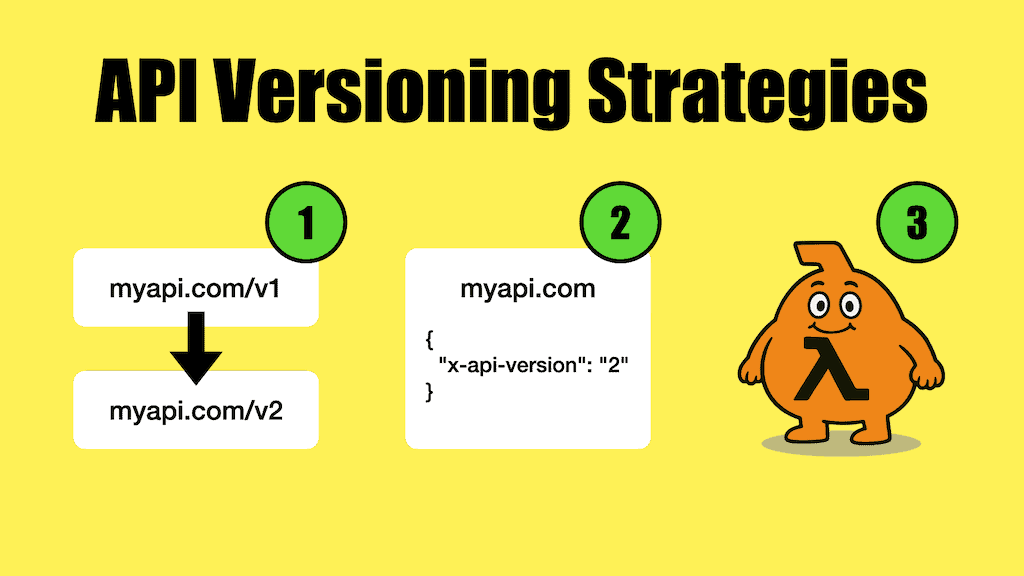
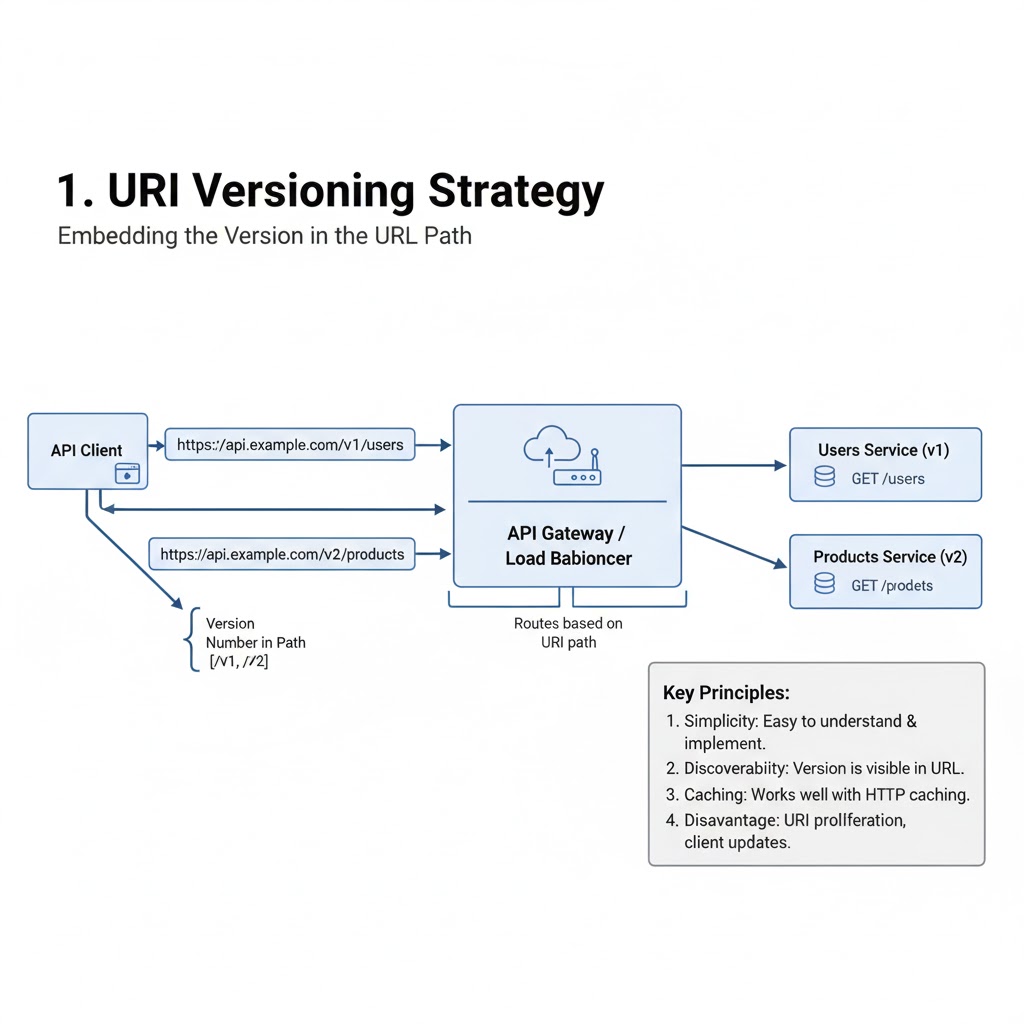
API Versioning Strategies
1. Introduction:
→ API versioning ensures backward compatibility when APIs evolve.
→ It allows developers to introduce new features or improvements without disrupting existing users.
→ Proper versioning helps maintain stability, flexibility, and long-term scalability.
2. Common Versioning Strategies
→ URI Versioning
✓ Include the version number directly in the URL.
✓ Example:
https://t.co/DOl7Qu0XLb https://t.co/0BrwsyrPyE
✓ Simple and widely used approach.
✓ Clearly visible and easy for clients to adopt.
→ Query Parameter Versioning
✓ Specify the version as a query parameter.
✓ Example:
https://t.co/1bWfLwCY7e
✓ Keeps URLs clean but can complicate caching.
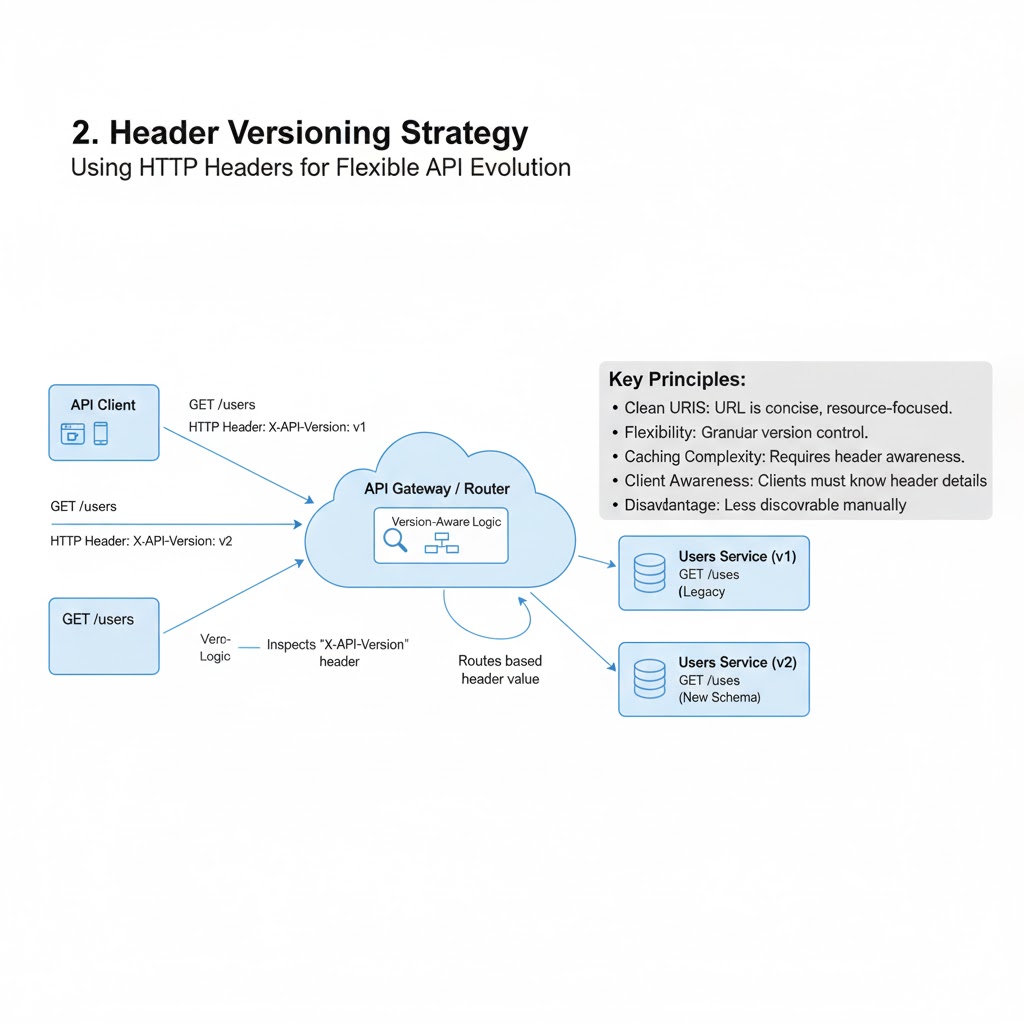
→ Header Versioning
✓ Include version information in the request header.
✓ Example:
GET /users Header: Accept-Version: v1
✓ Keeps URLs clean and flexible.
✓ Ideal for APIs with frequent updates.
→ Media Type Versioning (Content Negotiation)
✓ Define versions in the Accept header using MIME types.
✓ Example:
Accept: application/vnd.example.v1+json
✓ Allows multiple versions of a resource in the same endpoint.
✓ More complex but highly professional for enterprise APIs.
3. Best Practices
✓ Always document version changes clearly.
✓ Maintain older versions until clients migrate.
✓ Communicate deprecation timelines early.
✓ Use semantic versioning (v1.0, v1.1, etc.) for clarity.
✓ Implement automated tests across all versions.
4. Choosing the Right Strategy
→ Small public APIs → Use URI versioning for simplicity.
→ Large enterprise systems → Use Header or Media Type versioning for scalability.
→ Internal APIs → Use Query Parameter versioning for quick iteration.
5. Tip
✓ API versioning prevents breaking changes.
✓ Different strategies suit different use cases.
✓ Consistency and documentation are key to a stable API ecosystem.
→Grab this Ebook to Master APIs: https://t.co/NDhPt2nklK






![techNmak's tweet photo. Apache Kafka was born out of a problem. 😉
LinkedIn engineers => faced difficulties in tracking website metrics, activity streams and other operational data.
A team of engineers => led by Jay Kreps, Neha Narkhede and Jun Rao started developing a distributed publish-subscribe messaging system that could handle high-throughput, low-latency data streams.
This system eventually became Apache Kafka.
It was open sourced in early 2011.
The name 'Kafka' was chosen by Jay Kreps.
He named the system after the famous author 'Franz Kafka'. 😊
Kreps was an admirer of Franz Kafka's writing and found the name fitting for a system that dealt with the flow of information.
It's written in Java and Scala.
Later they founded => 'Confluent' (a company) in 2014 to provide commercial support and additional tools for Kafka users.
------
In case you don't know about Pulumi Neo, the first AI Infrastructure Agent.
✔️ Get started for free => https://t.co/c4vCIsiRvr
➕ Learn more about Pulumi Neo => https://t.co/G7Cr7mblGx
-------
𝐋𝐞𝐭'𝐬 𝐮𝐧𝐝𝐞𝐫𝐬𝐭𝐚𝐧𝐝 𝐭𝐡𝐞 𝐛𝐚𝐬𝐢𝐜 Kafka 𝐟𝐥𝐨𝐰.
[1.] Producer sends a message
◾ An application acts as a producer, creating a message with data (payload) and optional key.
◾ The producer connects to a broker in the Kafka cluster and identifies the target topic.
◾ Kafka uses a partitioner to determine which partition within the topic should receive the message. This ensures load balancing and parallel processing.
◾ The message is delivered to the leader replica of the chosen partition.
[2.] Message storage and replication
◾ The leader replica appends the message to its log segment.
◾ The message receives a unique offset, serving as its position within the log.
◾ The leader replicates the message to follower replicas for fault tolerance.
[3.] Consumer fetches messages
◾ An application acts as a consumer, joining a consumer group.
◾ Consumers within the same group share offsets and coordinate consumption.
◾ Each consumer fetches messages from its assigned partitions based on its committed offset.
◾ The consumer receives batches of messages and processes them.
[4.] Acknowledging consumption
◾ Once processing is complete, the consumer commits its new offset.
◾ This tells Kafka which messages have been successfully consumed.
◾ Kafka tracks committed offsets for each consumer in the group.
[*.] Flow continues
◾ Producers continue sending messages and consumers keep fetching and processing them based on their latest offsets.
◾ This cycle ensures ordered delivery and reliable consumption even with failures or restarts.
Remember,
👉 Message flow is asynchronous. Producers don't wait for consumers to process messages.
👉 Consumers can lag behind producers if processing is slow.
👉 Kafka offers mechanisms for handling failures and ensuring at-least-once or exactly-once delivery semantics.
Topics => Partitions =>Log Segments
(Data is actually stored in log segments)
Follow @techNmak](https://pbs.twimg.com/media/G6v2jzBaYAEvhaJ.jpg)