I opened my first Python textbook at 33.
With both excitement and dread.
If you’ve been considering taking on Python to get better at AI
This post is for you.
I’m not going to tell you it was easy.
There were days where I would be hitting my head against the wall.
Having to re-read lines of code and spend hours trying to understand what seemed obvious
But wasn’t for me.
The mental game is harder than the skills themselves.
But here are the 5 things that helped me learn:
1. Don't settle on the first resource.
I went through 20+ YouTube tutorials, 10 textbooks, and even a custom AI-generated study guide…
Before I found something that finally made sense to me.
If something doesn't click, let it go.
You’re not the problem.
Everyone explains things differently.
Find the resource that speaks to you.
2. Be mindful of Ego.
The older we get, the harder it is to change, pick up anew.
Going through this experience, I realized that this was the first time in 15 years where I took on something genuinely new, since university.
No context. No transferable skills.
Zero domain knowledge.
It was hard.
It was humbling.
Admitting you don’t know.
But once you cross that chasm, embracing your beginner’s mind
Progress accelerates beyond your expectations.
3. Just one hour.
I'm the type to grind. To push through.
But repeatedly, I have found that at about 1 hour my attention just gets capped.
No matter how much I try to push.
Beyond 1 hour "acquiring new information" hits a limit.
After that, it’s rot memorization, which I don’t want.
Find your own limit.
Knowing it makes things easier.
Commit to it.
4. Get through the basics fast.
No matter the guide or the textbook, the basics examples are always that — basic.
"Make a pizza"
"Count how many cars are in a parking lot"
It's understandable, the beginner guides need to be general enough.
But if you’re trying to build financial models, automate workflows, or analyze data…
It’s hard to connect the dots.
So move through the basics fast.
Get a rough understanding, then move onto projects that are actually valuable to you.
The learning will be faster when you are building something you are interested in or care.
5. Study Architecture.
With Claude Code, Codex, and every other AI code tool under the sun
It is now easier than ever to vibe code tools and applications.
Once you have enough python experience, dive deep into understanding architecture.
It’s less about memorizing every line of code and more about seeing the bigger picture.
Understanding what goes where, and why, changes everything.
Suddenly, problems stop being as confusing.
Tutorials make sense.
Projects start to click.
It doesn’t happen overnight, but it will happen.
Every line you write, every mistake you make, is moving you forward.
--------------------------
#Learning #Python #AI
There’s a reason most Financial Model errors happen before the analysis even starts.
Statement wiring, time conventions, formatting - this is procedural work.
Yet analysts rebuild it manually for every transaction, welcoming structural risk.
But what if you could automate the shell?
Once company parameters are provided, a deterministic model shell can be generated automatically. Statement connections are enforced and the structure remains consistent across models.
Analysis should start after structural integrity is established — not before.
Which is exactly what I'd like to share in this walkthrough.
We've been testing Claude Code at AMUR Partners for the past 90 days.
And the results speak for themselves:
Less time rebuilding spreadsheets, fewer structural errors, and more time spent on assumptions, drivers, and interpretation.
But this is just one use case.
We put out a comprehensive guide, free, for any analyst who wants to get started.
With 4 more Claude Code for Finance breakdowns to go:
- Earnings briefs: Filed, parsed, formatted before the morning call.
- Comp tables: Sourced and structured. Not reassembled by hand.
- Attribution: Validated against reference. Documented, not estimated.
- Memos: Frame and citations handled. You write the conviction.
Comment “GUIDE” and I'll send the guide directly.
(Must be following to send)
1/14 ↴
From Jim Simons at Renaissance Technologies, to David Shaw.
Since the invention of computers, there's always been speculators wanting to use technology to gain an edge.
For the past few decades, that has led Quantitative Research to dominate the field.
Quants.
Dealing with numbers, math, and formulas.
For Quants, it's about spotting signals, patterns.
It’s not about the why, why a pattern works.
If it works, you trade it.
But there is also another scientific approach:
Qualitative Research.
One that deals with language, narratives, and context.
Things that can’t be easily translated into ones and zeros.
And for most of human history, this approach has been unscalable.
Being heavily dependent on personal, subjective human judgment.
However, all of that has changed with the invention of Large Language Models.
With LLMs, we finally have the opportunity to turn what was once vast amounts of unstructured text and language into meaning.
And when it comes to asset management, turn all of that data into signals.
Which is exactly what I'm currently working on at AMUR Partners.
After all, markets are not driven by numbers alone.
They are driven by beliefs, incentives, expectations, and narratives - most of which are expressed through language.
This is AMUR Partners' 5 step approach to LLM Enhanced Qualitative Research.
--------------------------------------------
#AI #InvestmentResearch #HedgeFunds
How to use Claude Cowork in Finance:
If you’re an analyst exploring Claude but need compliance-safe workflows with public data...
Here’s the 5-layer framework we use at AMUR Partners:
1. Skill
Define what the AI actually knows how to do.
Examples:
• Summarize earnings calls
• Turn research notes into memos
• Draft investment committee summaries
Think of a skill as a repeatable instruction set for 1 finance task.
2. Connectors
Give the system access to tools or public data sources.
Examples you can safely test:
• Public filings (10-K / 10-Q)
• Earnings transcripts
• Economic reports
3. Commands
Commands trigger the workflow.
Examples:
/earnings-summary
/market-brief
/research-memo
Instead of writing prompts every time, the command runs the system for you.
4. Plugin
Now package the pieces together.
Skills + tools + commands = a Claude Cowork plugin
Example:
A “Finance Research Assistant” coworker that can:
• summarize key drivers from a transcript
• highlight risks and open questions
• generate a short memo
All from one command.
5. Workflow
This is the real leverage.
One input becomes multiple outputs.
Example:
Upload a public earnings transcript, Claude Cowork generates:
• Analyst-style summary
• Key risk checklist
• Follow-up diligence questions
If your job involves research, memos, or market updates, this structure can eliminate hours of manual work.
But it's not about replacing analysis.
It’s about removing the mechanical work.
So your time goes where it actually matters: judgment.
Build a Claude Cowork system that compresses your time-to-output safely.
Questions or clarifications? My DMs are always open 🤝🏼
------------------------------------------------------
#Claude #ClaudeCowork #Finance
Will AI replace Finance Jobs?
Andrej Karpathy just published a project which scored every job in America on how likely Al will replace it from 0 to 10.
1. He scraped all 342 occupations from the Bureau of Labor Statistics.
2. Fed each one to an LLM with a detailed scoring rubric.
3. Built an interactive treemap:
- Rectangle size equals number of jobs.
- Color equals how exposed that job is to AI.
Average score across all 342 roles is 5.3/10.
The takeaway:
Jobs that are fundamentally digital and can be done entirely from a home office are inherently highly exposed.
But what does “exposed” really mean in practice?
Let’s step back and look at these findings more objectively.
Every job has a mechanical aspect to it.
If it does, then most likely, a machine can automate it.
But will we care?
That's the question I believe most people miss.
Including the AI "thought leaders."
Much of the current conversation about AI replacing jobs focuses on what AI "can do."
Without considering our human nature.
Capability alone doesn’t define value.
We have emotional and social needs.
We care about judgment, creativity, and connection.
We are not efficient machines.
Automation changes how we work.
But it doesn’t automatically replace why we work.
So the real questions ins't:
“Can AI do the job?”
It's:
“Will we want AI to do it?”
That's the question we should all be asking.
What are your thoughts?
Most finance professionals underuse AI.
Not because they don’t want to...
But because they don’t know what’s actually useful or safe.
How do you discern between the hype and practicality?
It's entertaining to watch someone build an assistant army with 30 AI agents...
But who is using that?
I certainly am not.
So where is AI's true leverage?
Across real finance firms.
In real workflows.
With real compliance constraints?
Distilling real value from all the hype is not an easy task.
But that's exactly our mission at AMUR Circle.
Help finance professionals move beyond the noise
And use AI where it actually matters:
To produce better work.
To move faster.
And to do it without breaking compliance.
Join 5,000+ finance professionals already inside the circle.
Subscribe at https://t.co/XWW3HbLfLC
Most Claude tutorials aren't meant for Finance.
Here is how to configure it properly this weekend:
# 1. Chat = Useful out of the box. Not where the leverage is.
↳ Use it for first-draft reasoning: earnings call summaries, sector framing, quick comp narratives.
↳ Run Opus 4.6. Enable extended thinking for anything multi-step: multi-part credit questions, structured memo outlines.
↳ I use Chat less each week. All the following features below compound, chat doesn't.
# 2. Projects = Scoped context for each workflow.
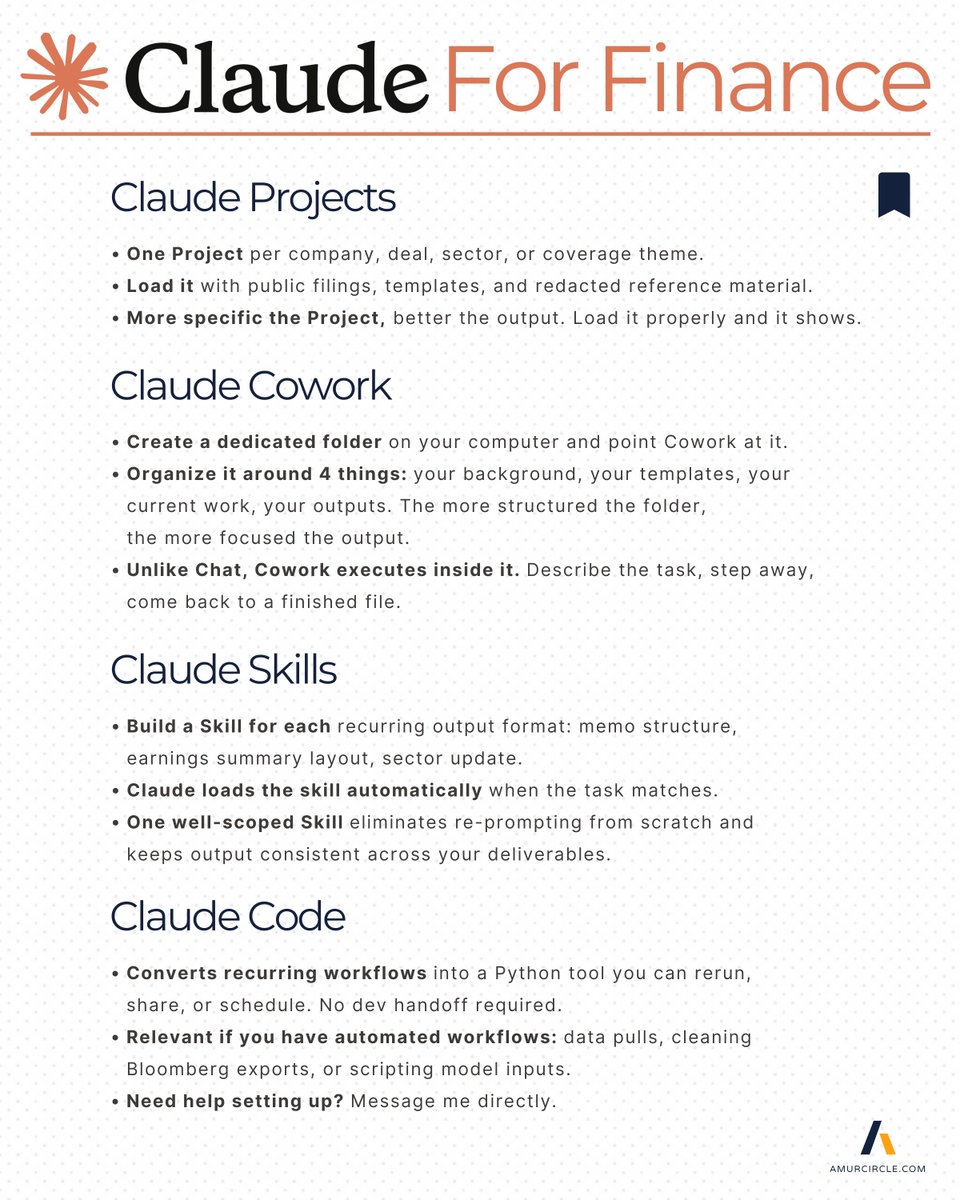
↳ One Project per company, deal, sector, or coverage theme.
↳ Load it with public filings, clean templates, and redacted reference material.
↳ The more specific the Project, the tighter the output. Load it properly and it shows.
# 3. Claude Code = Skip unless you have Python experience.
↳ Converts recurring workflows into a Python tool you can rerun, share, or schedule. No dev handoff required.
↳ Relevant if you have automated workflows - data pulls, cleaning Bloomberg exports, or scripting model inputs.
↳ Not yet? The Skills feature below gives you the same reuse logic without coding.
# 4. Skills = Encode your standards once, apply them automatically.
↳ Build a Skill for each recurring output format: memo structure, earnings summary
layout, sector update.
↳ Claude loads the skill automatically when the task matches.
↳ One well-scoped Skill eliminates re-prompting from scratch and keeps output consistent across your deliverables.
# 5. Cowork = The only feature worth configuring properly.
↳ Create a dedicated folder on your computer and point Cowork at it.
↳ Organize it around 4 things: your background, your templates, your current work, your outputs. The more structured the folder, the more focused the output.
↳ Unlike Chat, Cowork executes inside it. Describe the task, step away, come back to a finished file.
# 6. Connectors = Claude works with tools you already use.
↳ Google Drive, Notion, Slack. 50+ integrations, all free to connect.
↳ Connect once. Claude then pulls, reads, and outputs inside the tools you use.
↳ Practical example: pull a public 10-K from Drive, ask Claude to extract covenant language or segment disclosure, push the structured output back. No manual copy-paste loops.
# 7. Plugins = Pre-built commands for recurring deliverables
↳ Activate them by name instead of writing the prompt from scratch.
↳ Worth configuring for: weekly market commentary, initiation report scaffolding, CIM first-pass summaries.
↳ Warning: Treat external / free plugins like unaudited models — verify before you run them. Better yet, always build your own.
All of the above runs on public data and your personal device.
No firm systems, no client data.
Configure it once this weekend.
You will see the difference on Monday.
Need clarifications? Message me directly 🤝
---------------------------------------
#Claude #Finance #ClaudeForFinance