Win 200M, put am for safelock for the next 365 days collect 40M naira gross upfront interest, use that one guide, pay your rent, flex/sort yourself and family. Rinse and repeat after 365 days. One of the many ways to play it the right way.
5. Delete your location diary
iOS updates turn this back ON.
Apple knows your home, work, gym, and last Friday 1:32pm.
Creepy.
Settings → Privacy → Location → System Services → OFF “Significant Locations” → Clear History
4. Stop sharing exact location
Uber needs it. Most of other app does NOT. But they take it anyway.
Fix it.
Settings → Privacy → Location → Tap app → OFF “Precise Location”
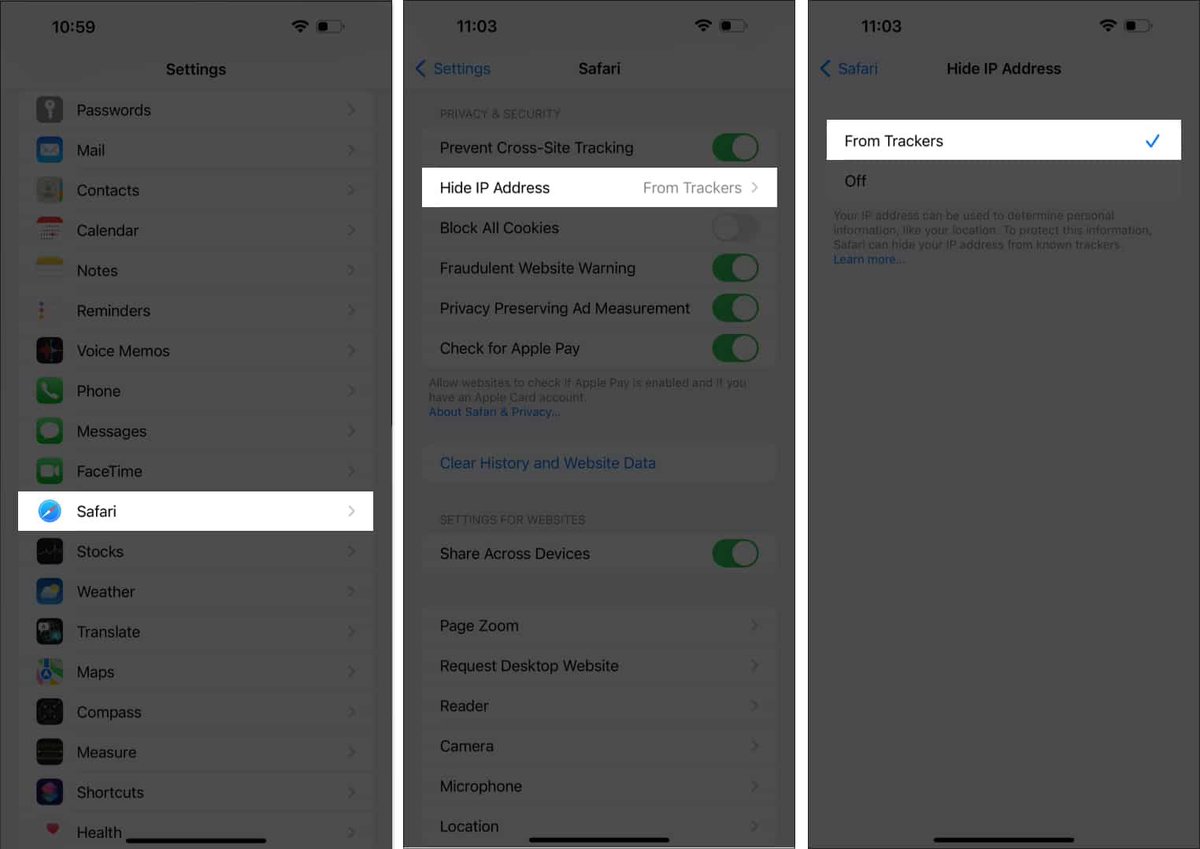
3. Hide your IP address
Websites see exactly where you live. Safari has a shield for this.
Turn it on.
Settings → Safari → Hide IP Address → “From Trackers”
Go invisible👻
2. Kill app tracking
Talk about Nike once. See Nike ads for 2 weeks straight.
Apps follow you everywhere.
Stop it.
Settings → Privacy → Tracking
Turn OFF “Allow Apps to Request to Track”
They just lost your data.
1. Stop Apple from recording you
That “Hey Siri” you never use?
Apple saves it and workers listen to “improve Siri”.
Delete it.
Settings → Privacy → Analytics → Turn OFF “Improve Siri & Dictation”
They don’t need your voice.
My brother borrowed my iPhone for 2 minutes.
He’s ex-DSS.
He handed it back and said:
“My bro, turn off #3 right now. They’re tracking everything.”
Apple won’t tell you this.
5 settings in iOS 26 that are spying on you: