@thisistechtoday @restlesspix In the simplest terms, Log encoding is used to optimize/maximize the dynamic range of a camera sensor in a 10 or 12 bit video file. The reason it often looks “flat” on a display, is because most current displays can’t display the dynamic range of the camera Log curve.
@restlesspix iPhone 12, 13 and 14 is also recording Log in HDR — HLG, Hybrid Log-Gamma. The new Apple Log curve in iPhone 15 Pro however is a custom Log OETF optimized for the iPhone 15 Pro camera sensor.
@photojoseph @restlesspix Yes. Do you have an Apple TV 4K? It will help you put the TV in the correct mode for SDR, HDR and Dolby Vision calibration. Then play 48h black video from YouTube. Much easier than putting video files on a USB stick imo. I have some additional advice if you would like.
@JBowdacious @macvfx@Adobe You can verify apps also with this command:
spctl -a -t exec -vvv /path/to/adobe.app
/Applications/Adobe Premiere Pro 2023/Adobe Premiere Pro 2023 app: accepted
source=Notarized Developer ID
origin=Developer ID Application: Adobe Inc. (JQ525L2MZD)
@JBowdacious @macvfx@Adobe If you find any systems with the same error again, you can try running the following command to see what the root cause could be.
codesign --verify --deep --strict --verbose=2 /path/to/adobe.app
To uninstall the Sony Catalyst Prepare Adobe plugin, remove the files/folders named "catalyst_prepare_plugin" in the following folders.
macOS:
/Library/Application Support/Adobe/Common/Plug-ins/7.0/MediaCore/
Windows:
C:\Program Files\Adobe\Common\Plug-Ins\7.0\MediaCore\
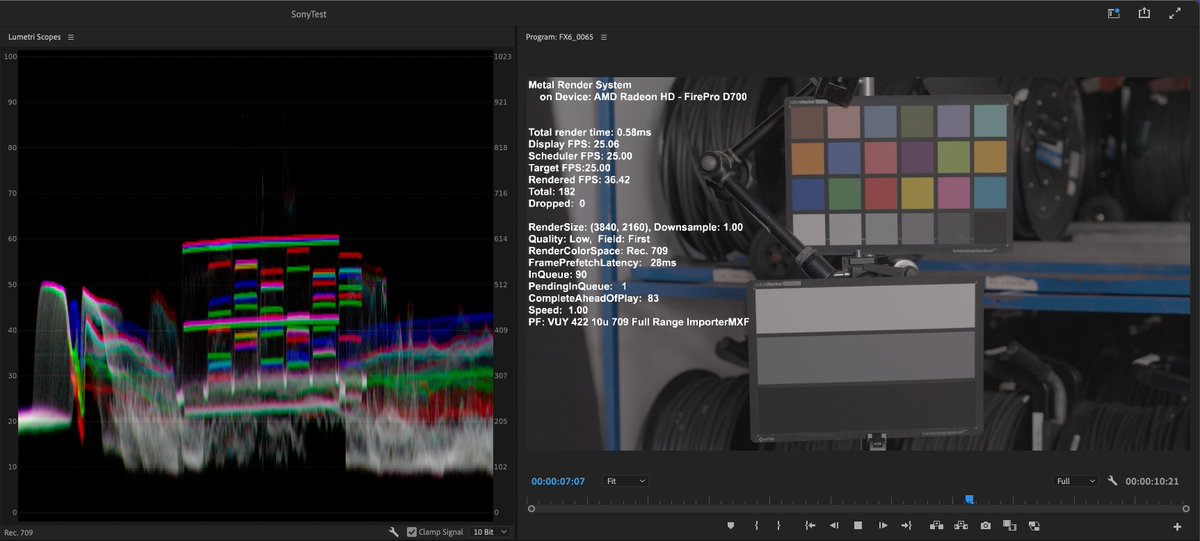
A friendly warning to anyone who have ever used or is using the Sony Catalyst Prepare Plugin for @AdobeVideo Premiere Pro. This plugin is causing multiple major issues that severely affect both playback performance and video processing quality for all Sony MXF and MP4 video.
With the Sony plugin installed, Data Levels is set to Legal/Video Range for Sony S-Log3 source media, which is wrong. Sony S-Log3 is always Full Range. This misinterpretation leads to wrong image processing for S-Log3 footage. This can clearly be seen in Adobe Lumetri Scopes.
@stalman Have you considered making your own 3D LUT in DaVinci Resolve with your grade baked in, that you can simply apply directly in-camera? That way you get your 709 grade applied to C-LOG2 without any need for grading in post. https://t.co/5fzNfnWBBd
@restlesspix @MrMJSanders @jonnyelwyn@videovillageco Cool. I’ve been using Lattice for years, and remember seeing the Screen app on the Video Village website a while ago.