Thunderhead Engineering develops software, with particular expertise in developing intuitive GUI for engineering applications, PyroSim, Pathfinder and PetraSim.
Generate rooms, doors, and stairs directly from imported BIM and CAD geometry in Pathfinder.
🔗 https://t.co/Ce3qYmVbq3
#pathfinder#bim#evacuationmodeling
Research into contaminant transport, particle modeling, and Indoor Air Quality analysis continues to expand through Ventus workflows.
Featured at IAQVEC 2026.
Learn more:
https://t.co/EJ6v4CQhuH
#indoorairquality#airflowmodeling#ventus
Non-commercial licenses are available for academic and review workflows.
Academic licenses support students, instructors, and institutions. AHJ and Reviewer licenses support project review processes.
🔗 https://t.co/412UNYf2Sq
#firesimulation#egressmodeling
Quickly define floors by selecting geometry and using “Add Floor to Fit Objects.”
PyroSim calculates elevation and wall height based on the selected objects, helping you organize multi-level models and apply clipping more efficiently.
#pyrosim#bimworkflow#engineering
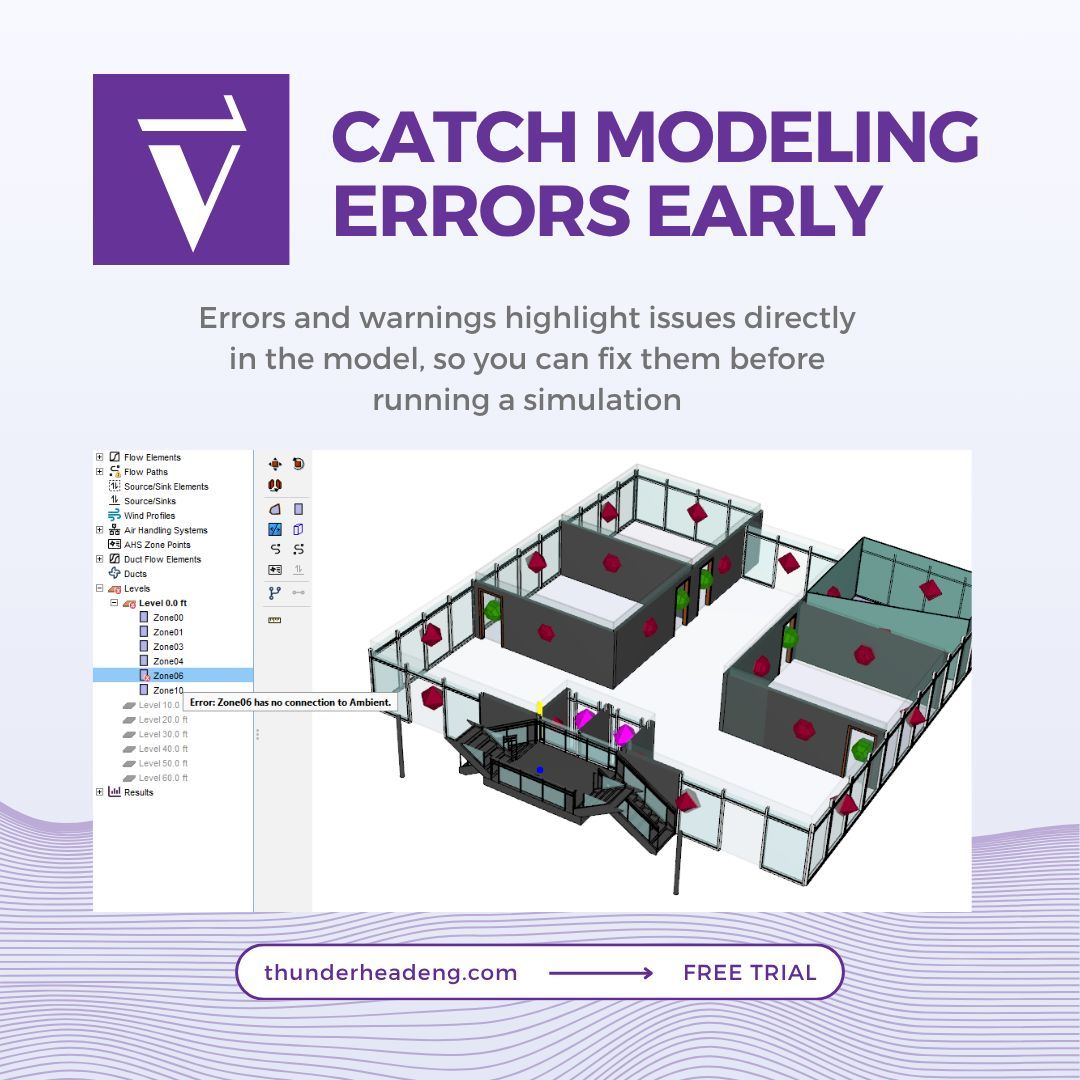
Ventus includes built-in error and warning checks.
Issues are identified directly in the model, helping you locate and resolve problems during setup.
Learn more: https://t.co/GKjFYLfEJE
#ventus#fireengineering#simulation
Advanced Pathfinder features continue to evolve.
Assisted Evacuation is supported by updated documentation to help you build and refine your models.
https://t.co/0K1dzsGnvO
#pathfinder#egressmodeling#firesafety
Mesh Refinement Zones increase resolution in targeted areas of your model.
This allows for more detailed results where needed, without increasing overall cell count.
https://t.co/VjNYXT4KZr
#pyrosim#firesimulation#bimworkflow
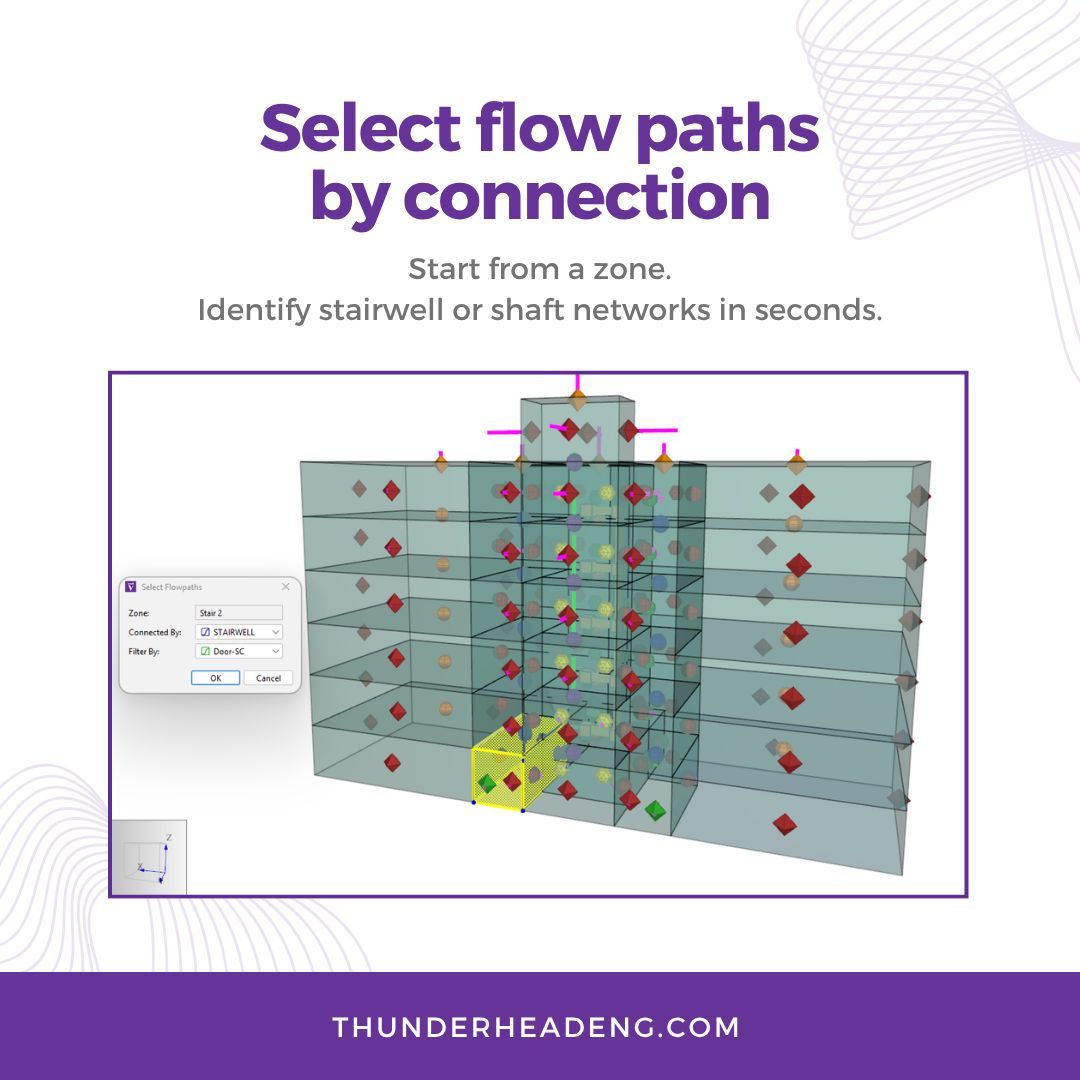
Select and filter flow paths in Ventus.
Group by connections like shafts or stairwells, or filter by values to focus on relevant data.
Learn more: https://t.co/ToegIQFhzX
#ventus#fireengineering#simulation
Pathfinding verified with IMO 10.
Green shows current seek curves. Red shows future paths and waypoints.
Learn more: https://t.co/80zJ2ZwCtk
#pathfinder#engineering
Ventus keeps a full history of your edits, so you can quickly undo, redo, and refine your workflow.
Helpful for collaboration and iteration, especially when testing changes in complex models.
#ventus#hvacdesign#engineering
Most fire models require multiple scenarios.
PyroSim lets you manage them in a single file by enabling or disabling objects as needed.
Less duplication. Easier updates. More efficient simulations.
https://t.co/mvZF41BD4z
#pyrosim#firesimulation#engineeringworkflow#bim
Use queues to move occupants through unassigned seating or event layouts.
This makes it easier to model realistic movement patterns over time, especially in large or dynamic spaces.
#pathfinder#crowdsimulation#engineering
Create occupant targets from CSV-generated occupants to model assigned seating faster.
Ideal for large populations and reducing manual setup.
Learn more: https://t.co/0RVa86VzQ1
#pathfinder#crowdmodeling#firesafety#bim
Object tags help you organize and find related elements across your model.
You can group unrelated objects, select them quickly, and manage edits more efficiently.
#pyrosim#firesimulation#bim#engineeringworkflow
Use Level Working Z to adjust floor position and control level clipping.
This makes it easier to work with vertical geometry and review elevation changes in context.
#ventus#hvac#engineeringtools
Triggers add behavior based on location.
They help model how occupants respond to their environment.
Learn more: https://t.co/sEy7MMYEiU
#pathfinder#crowdsimulation#engineering