Indian Supreme Court Developing 'Swadeshi Jurisprudence' Than Relying Only On Imported Concepts : CJI Surya Kant At Oxford
The CJI also disclosed that efforts are underway to establish an indigenous AI ecosystem for the judiciary.
#SupremeCourt
https://t.co/q6mNwSxiZU
We believe AI can be a dedicated research partner to help discover the next breakthrough.
Enter Co-Scientist: our latest Gemini-based multi-agent system that can generate, debate and evolve novel hypotheses for complex scientific problems 🧵
Andrej Karpathy just explained the future of software engineering without directly saying it.
The best AI engineers are no longer “prompting.”
They’re building systems around the agents.
Karpathy’s biggest insight wasn’t:
“Claude can code.”
It was:
LLMs become dramatically better when you force them into disciplined workflows.
That’s why "CLAUDE.md" files are suddenly everywhere.
Not because they’re prompts.
Because they behave like an operating system for the agent.
Karpathy called out the exact problems with AI coding:
- models assume instead of asking
- they overengineer simple tasks
- they hide confusion
- they rewrite unrelated code
- they optimize for completion, not correctness
So developers started encoding rules directly into the workflow:
→ Think before coding
→ Simplicity first
→ Surgical edits only
→ Goal-driven execution
And the results are wild.
People are now running multiple Claude Code agents in parallel like engineering teams:
• one agent researching
• one debugging
• one writing tests
• one optimizing code
• one validating outputs
Not “AI assistance.”
Actual orchestration.
And this part from Karpathy changes everything:
“Don’t tell the model what to do. Give it success criteria and let it loop.”
That is the shift.
From:
“write this function”
To:
“here’s the goal, constraints, tests, and verification system — now iterate until correct.”
The craziest part?
This already feels like a phase shift in engineering.
A lot of developers quietly went from:
80% manual coding → to 80% agent-driven coding in just months.
Not because AI became perfect.
Because the leverage became impossible to ignore.
We’re entering an era where the highest leverage engineers won’t necessarily be the best coders.
They’ll be the people who build the best systems around AI agents.
LOS 10 PROMPTS MÁS POTENTES DE CLAUDE Opus 4.6
Prompts avanzados que puedes usar para investigación, contenido, diseño, aprendizaje, marketing y análisis.
(Debes seguirme para poderlo recibir)
Like + RT + sígueme
Comenta “CLAUDE” y te los envío por DM.
🚨 Anthropic just showed a 27-minute workshop on how to actually do prompts for Claude.
Taught by the people who built it.
Free. No registration. No paywall.
I've seen $300 courses that don't cover what they teach in the first 8 minutes.
Watch it and bookmark it now.
Claude 4.7 changed one thing most people still don’t understand:
It stopped “guessing what you meant.”
Which means lazy prompting suddenly feels broken.
The people getting insane results from Claude right now aren’t using magic prompts.
They’re writing like operators: • define scope • force structure • remove ambiguity • start with actions • specify output length • control tone • tell it to go beyond the obvious
This image explains the shift better than most AI threads I’ve read.
The biggest takeaway:
Old AI rewarded vague prompts.
New AI rewards precision.
That’s why some people think Claude 4.7 got worse… while others are replacing hours of work with one prompt.
Bookmark this before your next prompt session.
Retweet if you’ve noticed the same shift.
🎯Top 15 Claude Prompts that turn Claude into your strategy partner.
These prompts are designed to transform Claude from a simple assistant into a powerful co-strategist enhancing decision-making, creativity, and execution across your projects.
1. Decision Evaluate (Pros/Cons)
🔶 Create a matric of pros, cons, long-term strategic value, and required resources for choosing Option A [details] vs. Option B [details].
2. Problem Solving & Root Cause Analysis
🔶 Analyze this complex project failure scenario and perform a ‘Five Whys’ root cause analysis to identify systemic issues. [Failure details]
3. Skill Development & Learning Plans
🔶 Design a step-by-step, 12-week learning path to become proficient in [programming language or tool], including resources and project ideas.
4. Market Research Analysis
🔶 Analyze the provided market data and identity three key emerging consumer trends and two significant competitive risks. [Data file contains]
5. Audience Persona Generation
🔶 Develop detailed detailed user personas for [product/service], including goals, pain points, motivations, and common objections. [Target demographics]
6. Data Visualization Suggestions
🔶 Based on this spreadsheet of sales figures, suggest the five most effective types of charts to tell a compelling story, with reasons. [Data file contain]
7. Product Comparison & Reviews
🔶 Synthesize a balanced comparison and feature review for [Product A] vs. [Product B], highlighting distinct use types for each. [Sources]
8. Strategic Scenario Planning
🔶 Generate three district, logical “What-If” scenarios for our company regarding [specific market shift or event], with potential impact and mitigation strategies. < 11
9. Content Ideas & Storytelling
🔶 Generate 15 unique, click-worthy blog post ideas and social media angles focused on the concept of [core theme] for [target audience].
10. Summarizing Long Documents
🔶 Read this attached 50-page research paper and produce a high-level executive summary, a concise list of core findings, and three critical analysis points. [Document content]
11. Tone and Voice Refinement
🔶 Re-write this existing draft email in a tone that is simultaneously empathetic, authoritative, and solutions-oriented. [Draft test]
12. Role-Playing and Interview Preperation
🔶 Pretend to be a senior data scientist interviews. Conduct a mock technical interview with me on the topic of machine learning. Start with the first question.
13. Complex Question Answering
🔶 Answer this high-level, multi-faceted business strategy question with a reasoned, multi-perspective argument, senvite argument, [Question]
14. Long-Form Content Outlines
🔶 Create a comprehensive, logical content outline for a 3,000-word article on [topic]. Group sections by thematic progression. [Key takeaways]
15. Creative Writing Prompts
🔶 Write the opening scene for a neo-noir short story, establishing atmosphere, character, and tension with unique metaphors. [Key characters] [Setting] [Conflict]
❤️ Like
🔁 Retweet
🔖 Bookmark
Follow
@sakhil_ai
for more such posts
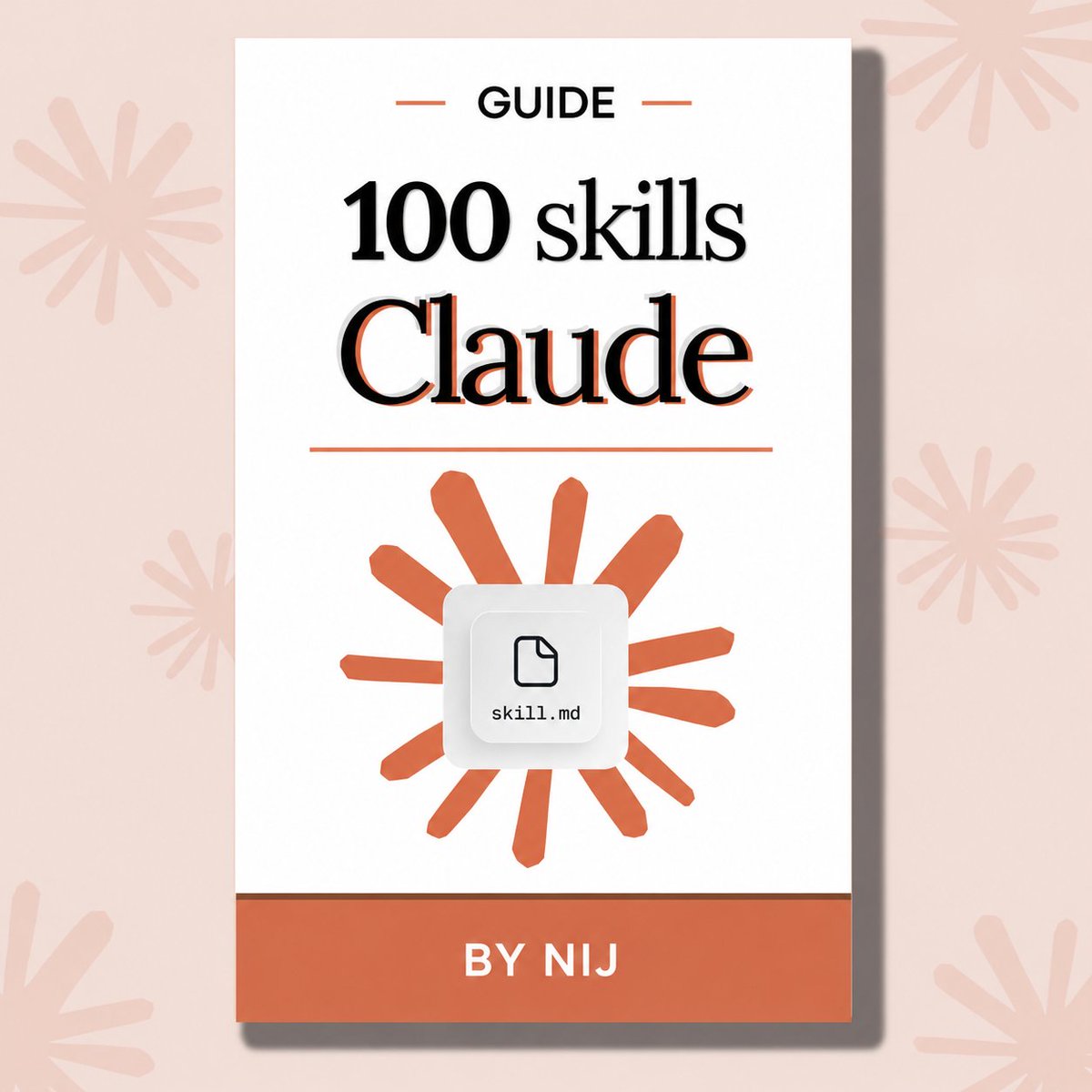
Claude is used by 11 million people every day.
I've created a guide with the 100 real skills that separate the pros from the amateurs:
→ Writing, Automation, Business, Productivity, Programming, AI and Prompting, E-commerce, Finance, and Research
FREE for 24 hours only!
Just:
1. → Like this post
2. → Comment "SKILLS"
3. → Follow me to receive a DM.
Your $20/month Claude subscription is enough.
But only if you climb all 14 of these levels:
✦ Level 1: SIGN UP
Go to claude .ai. Pay $20 for Pro.
The free plan has daily caps and no Cowork.
Claude 101: https://t.co/Vn60ElPrcK
✦ Level 2: PICK THE MODEL
Opus 4.7 + Extended Thinking for real work.
Sonnet for quick tasks. Haiku for short answers.
Most people use the wrong model 80% of the time.
✦ Level 3: PROMPT BETTER
Be specific. Give examples of good output.
Edit your message when something's off.
Open a new chat when the topic changes.
✦ Level 4: CONNECT YOUR TOOLS
Plug in Gmail, Granola, Drive, Gamma.
Claude reads your inbox, files & channels directly.
——
You just unlocked the basics.
90% of Claude users stop here. You won't.
✦ Level 5: USE COWORK
Download the desktop app. Click Cowork.
Point it at a folder on your computer.
Claude reads your files, writes new ones & saves them back to that folder.
Master Claude cowork: https://t.co/uWTpOI3oyE
✦ Level 6: BUILD A CONTEXT FOLDER
Create 3 files: about-me, my-company, anti-ai-writing-style. Each under 2,000 words.
Claude reads them before every task.
Download my .md files here: https://t.co/psB7XxAv8w
Subscribe for free. Open my welcome email.
Hit the reply button inside. Click on the Notion link.
✦ Level 7: USE VOICE INPUT
Install Wispr Flow. Hold a key, talk, release.
You speak at 150 wpm. Typing is 60.
Richer context in fewer messages.
✦ Level 8: OPEN OBSIDIAN
Install Obsidian. Open your Cowork folder as a vault.
Markdown files now display like Google Docs.
Search works across the whole folder.
Set up Obsidian: https://t.co/45xPLDRB6Y
——
You killed prompting.
Now you automate.
✦ Level 9: BUILD SKILLS
Save your repeat workflows as Skills.
Trigger them with /commands like /linkedin or /negotiation. Same prompt fires every time.
Create your first Skills here: https://t.co/6cHYYfjpP2
✦ Level 10: USE COWORK PROJECTS
Create one Project per recurring deliverable.
Each Project keeps memory between sessions
and runs scheduled tasks while you sleep.
✦ Level 11: ADD OTHER TOOLS
Claude in Excel for spreadsheets.
Claude Design for visuals: https://t.co/ZY8Fg5CuoC
Claude Code for websites: https://t.co/UgE9xBXnm6
Computer Use to control your apps.
✦ Level 12: CUT YOUR TOKEN SPEND
Plan in chat. Build in Cowork.
Batch tasks into one message.
Restart the conversation around message 20.
More tips: https://t.co/Yu24rPQafQ
——
You're now in the top 1% of Claude users.
Two levels left. The hardest ones.
✦ Level 13: ROLL IT OUT TO YOUR TEAM
Set up shared Projects with prompt templates.
Onboard one teammate first.
Then send the rollout message to the channel.
✦ Level 14: USE YOUR TASTE
Claude can produce 10 versions of anything.
Picking which one to ship is your job.
Tools just got cheap. Taste just got expensive.
——
Save this. Start Saturday morning.
Download more infographics at https://t.co/psB7XxAv8w
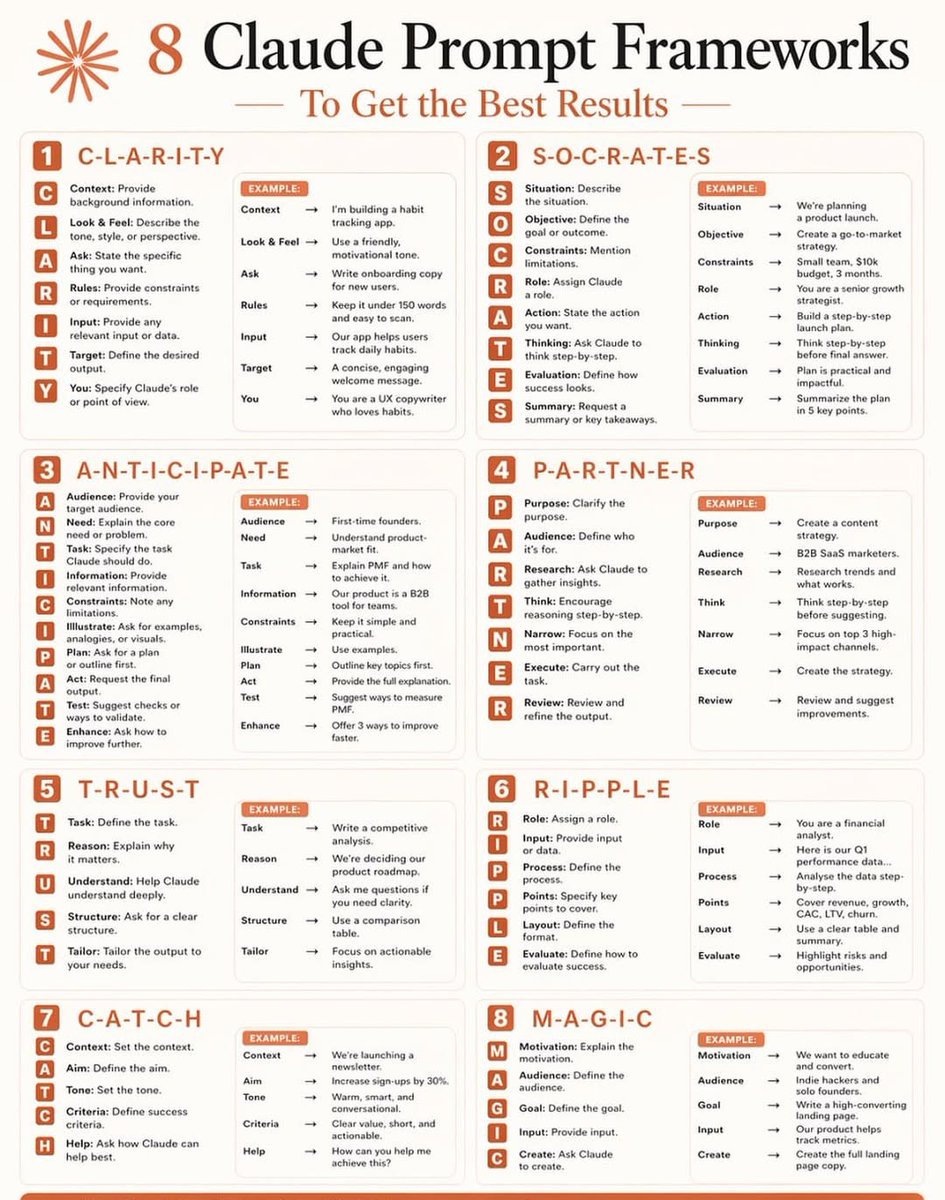
Don't waste Claude's potential with weak prompts.
Instead, use 1 of these 8 frameworks:
Most people type a question and hope for the best. That's not prompting. That's guessing.
The difference between average and elite AI output? Structure.
Here are the 8 frameworks I use every single day:
1️⃣ C L A R I T Y
Context → Look & Feel → Ask → Rules → Input → Target → You
2️⃣ S O C R A T E S
Situation → Objective → Constraints → Role → Action → Thinking → Evaluation → Summary
3️⃣ A N T I C I P A T E
Audience → Need → Task → Information → Constraints → Illustrate → Plan → Act → Test → Enhance
4️⃣ P A R T N E R
Purpose → Audience → Research → Think → Narrow → Execute → Review
5️⃣ T R U S T
Task → Reason → Understand → Structure → Tailor
6️⃣ R I P P L E
Role → Input → Process → Points → Layout → Evaluate
7️⃣ C A T C H
Context → Aim → Tone → Criteria → Help
8️⃣ M A G I C
Motivation → Audience → Goal → Input → Create
Once you start using these, you can't go back to random prompting.
Your outputs become faster, sharper, and actually useful.
ANTHROPIC CEO SAYS SOFTWARE ENGINEERING WILL BE FULLY AUTOMATED IN 12 MONTHS
While most people ask AI to write blog posts, a small group is already using it to do senior level work.













![sakhil_ai's tweet photo. 🎯Top 15 Claude Prompts that turn Claude into your strategy partner.
These prompts are designed to transform Claude from a simple assistant into a powerful co-strategist enhancing decision-making, creativity, and execution across your projects.
1. Decision Evaluate (Pros/Cons)
🔶 Create a matric of pros, cons, long-term strategic value, and required resources for choosing Option A [details] vs. Option B [details].
2. Problem Solving & Root Cause Analysis
🔶 Analyze this complex project failure scenario and perform a ‘Five Whys’ root cause analysis to identify systemic issues. [Failure details]
3. Skill Development & Learning Plans
🔶 Design a step-by-step, 12-week learning path to become proficient in [programming language or tool], including resources and project ideas.
4. Market Research Analysis
🔶 Analyze the provided market data and identity three key emerging consumer trends and two significant competitive risks. [Data file contains]
5. Audience Persona Generation
🔶 Develop detailed detailed user personas for [product/service], including goals, pain points, motivations, and common objections. [Target demographics]
6. Data Visualization Suggestions
🔶 Based on this spreadsheet of sales figures, suggest the five most effective types of charts to tell a compelling story, with reasons. [Data file contain]
7. Product Comparison & Reviews
🔶 Synthesize a balanced comparison and feature review for [Product A] vs. [Product B], highlighting distinct use types for each. [Sources]
8. Strategic Scenario Planning
🔶 Generate three district, logical “What-If” scenarios for our company regarding [specific market shift or event], with potential impact and mitigation strategies. < 11
9. Content Ideas & Storytelling
🔶 Generate 15 unique, click-worthy blog post ideas and social media angles focused on the concept of [core theme] for [target audience].
10. Summarizing Long Documents
🔶 Read this attached 50-page research paper and produce a high-level executive summary, a concise list of core findings, and three critical analysis points. [Document content]
11. Tone and Voice Refinement
🔶 Re-write this existing draft email in a tone that is simultaneously empathetic, authoritative, and solutions-oriented. [Draft test]
12. Role-Playing and Interview Preperation
🔶 Pretend to be a senior data scientist interviews. Conduct a mock technical interview with me on the topic of machine learning. Start with the first question.
13. Complex Question Answering
🔶 Answer this high-level, multi-faceted business strategy question with a reasoned, multi-perspective argument, senvite argument, [Question]
14. Long-Form Content Outlines
🔶 Create a comprehensive, logical content outline for a 3,000-word article on [topic]. Group sections by thematic progression. [Key takeaways]
15. Creative Writing Prompts
🔶 Write the opening scene for a neo-noir short story, establishing atmosphere, character, and tension with unique metaphors. [Key characters] [Setting] [Conflict]
❤️ Like
🔁 Retweet
🔖 Bookmark
Follow
@sakhil_ai
for more such posts](https://pbs.twimg.com/media/HH674jbaYAA-0cZ.png)