@Bippinbits The visual makeup of this is certainly achievable in Godot, although it looks like there's a subtle amount of a custom motion blur shader.... which is probably why most assumed it's Unreal. Looking forward to the game!
@reduzio 1. 3D asset flow/importing is improving but still a hassle
2. Better 3D level design or grayboxing tools that can easily be exported to be worked on in Blender
3. Custom editor tool creation could use some better documentation and maybe some templates
@devinthewater In some recent tests I found out that actually just letting the trees be their own nodes worked faster as long as you utilize the visibility threshold in Godot 4 and replace with sprite at far distance. That way you get frustum culling and LODs for distant trees.
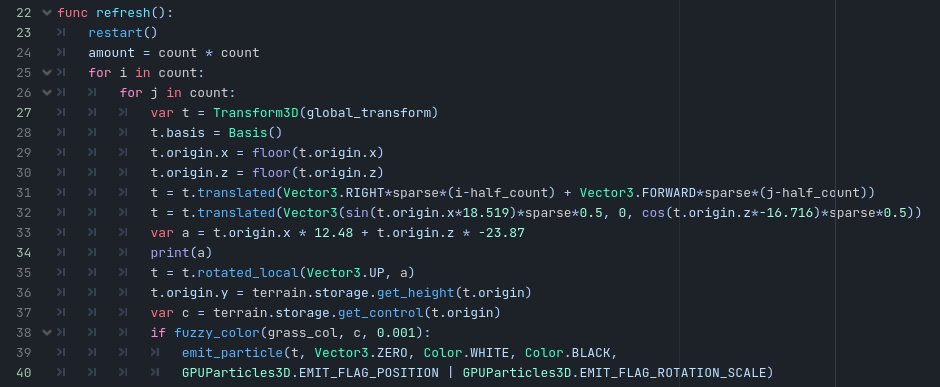
@TokisanGames Here is the code for a GPUParticles3D that places particles on the terrain with respect to the terrain's "control" color. Feel free to use and modify.
@TokisanGames@TokisanGames
I just finished writing some code to dynamically emit grass with a GPUParticles3D that follows the player for better performance. Do you have any suggestions for getting the (grass) texture ID's influence from the terrain storage? (See code in reply)
After a few hours I can see a massive improvement when it comes to Character control. No goofy physics on slopes, moving platform support, easy wall collision (and as a result, wall running), easy modification to velocity. #Godot4 is a dream.
@godotengine Thank you contributors and maintainers! You're hard work has undoubtedly changed lives and inspired many developers to build amazing projects!
@thomasbrushdev I think there's room for a balanced medium. I think it can enable people who lack skills in art (programmers) or augment an artist to produce something that they otherwise could not, but there will still be demand for skilled hand-crafted art.
@reduzio I do like the logo, but I feel like a minor refresh is needed for 4.0. That way I know which editor I'm about to open on my desktop between 4.x and 3.x lol
Still trying to improve my #GodotEngine 3.5 plugin to generate occlusion shapes from a mesh. Here it is working with CSG meshes (btw the red dot is the sample node being occluded)
@nonunknown3 Yeah I hope this will be very useful for 3.5+ projects. I believe there is a performance tradeoff for something too high in poly detail. At the very least you can freely edit a low poly occlusion mesh in Blender and import and generate an easy occluder for a game scene.
I'm working on a small #GodotEngine 3.5+ plugin (I know the hype is for the 4.0 beta) that generates occluder polys from a mesh. I'm still working out how to fix concave polygons since I collapse coplanar tris. Not ideal for rounded geometry but is anyone interested in this?