Terapia é uma parada foda. Depois que você toma gosto, flui, dá bom, dá ruim, mas dificilmente dá mais ou menos.
Vai depender muito da ferida tratada, da alegria revivida, dos detalhes sórdidos de nossas luxurias, dos lapsos de juiz, das crises de culpa. Mano, o bagulho é doido.
GitHub acaba de solucionar el mayor problema del vibe coding.
Acaban de lanzar Spec Kit y en poco tiempo ya tiene +120K estrellas.
¿La idea?
En vez de tirar prompts vagos y rezar para que el agente no rompa tu proyecto…
Spec Kit obliga a la IA a crear una especificación estructurada ANTES de tocar código.
La IA primero:
→ entiende lo que quieres construir
→ pregunta lo que falta
→ organiza el proyecto
→ y después empieza a programar
Eso significa menos tiempo arreglando errores absurdos, menos código inconsistente y resultados mucho más predecibles cuando trabajas con agentes.
El flujo es simple:
/constitution → reglas y estándares
/specify → qué quieres construir
/clarify → dudas antes de empezar
/plan → arquitectura y stack
/tasks → tareas ordenadas
/implement → ejecución
Compatible con Claude Code, Cursor, Copilot, Codex, Gemini CLI y +25 agentes.
• 120K estrellas.
• 10K forks.
• Open source.
• Publicado por GitHub.
Repositorio abajo👇
Everyone's arguing about which AI model is smartest
Meanwhile, the top 1% of Claude Code users quietly figured out something else:
The model isn't your bottleneck. Your repo is
Same model. Same prompts. One dev gets a chatbot, the other gets an autonomous engineer
The difference is a folder structure.
I call it the Final Boss Setup
━━━━━━━━━━━━━━━
1️⃣ The Context Ladder (this changes everything)
Stop thinking "what goes in CLAUDE.md."
Start thinking "what loads WHEN."
There are 4 rungs:
• Every session → CLAUDE.md (tiny, always in context)
• Path-gated → rules/*.md (loads ONLY when Claude touches those files)
• On invoke → skills/* (loads when a task matches)
• Isolated → agents & workflows (own context entirely)
Most people dump everything on rung 1.
Then wonder why Claude gets dumber as the project grows
You're not writing docs. You're designing a memory hierarchy
━━━━━━━━━━━━━━━
2️⃣ ASKED vs FORCED (the line that separates amateurs from pros)
CLAUDE.md and rules = ASKED.
Instructions Claude reads and *usually* follows
Hooks and settings = FORCED.
permissions.deny blocks rm -rf whether Claude agrees or not
Here's the test:
"Please run the formatter" → asked. Works 90% of the time.
PostToolUse hook that formats every edit → forced. Works 100% of the time.
Anything where 90% isn't good enough — secrets, migrations, prod — should never live in a markdown file.
Guidance for style. Enforcement for survival.
━━━━━━━━━━━━━━━
3️⃣ The Routing Rule (tattoo this somewhere)
Every recurring thing you do fits exactly one slot:
• Research → subagent (own context, reports back clean)
• Procedure → skill (the playbook, loaded on demand)
• Guarantee → hook (happens every time, no discretion)
Repeating a workflow in prompts? That's a skill you haven't written.
Reminding Claude to run tests? That's a hook you haven't wired.
Letting exploration pollute your main context? That's a subagent you haven't spawned.
━━━━━━━━━━━━━━━
4️⃣ Rules That Load Themselves
The underrated file: .claude/rules/ with path-gating.
frontend/react.md only enters context when Claude touches frontend code.
api-design.md only when it's in the API.
Your conventions follow Claude around the codebase like a senior engineer looking over the right shoulder at the right moment
Zero tokens wasted on rules that don't apply
━━━━━━━━━━━━━━━
5️⃣ Agents With Their Own Memory
The 2026 upgrade nobody's using yet:
agent-memory/ — Claude writes what it learned, you commit it
Your debugger agent remembers last month's gnarly race condition.
Next session, it starts smarter than it ended
Claude writes. You commit. The team inherits
Your AI's experience becomes version-controlled infrastructure
━━━━━━━━━━━━━━━
6️⃣ CLAUDE.md in the Danger Zones
Global context can't know that your auth module has landmines
So drop local files where the bodies are buried:
src/api/CLAUDE.md
src/payments/CLAUDE.md
Claude reads them exactly when it enters those directories
Warnings appear at the moment of danger — not 4,000 tokens earlier where they get ignored
━━━━━━━━━━━━━━━
7️⃣ The Golden Rules (from the trenches)
• CLAUDE.md under ~200 lines. When it grows, split into rules/. Bloat = missed signals.
• List REAL commands (npm test, build, lint) — so Claude can verify its own work.
• Secrets stay in ${ENV_VAR} references. Never in .mcp.json. Literally never.
• Commit .claude/, gitignore *.local.* — your setup is team infrastructure, not personal preference
━━━━━━━━━━━━━━━
Here's the shift most people miss:
A prompt improves one conversation
Structure improves every conversation, for every teammate, forever
Prompting is renting intelligence
Structure is owning it
Build the repo once and Claude stops visiting your codebase and starts living in it
Você já jogou um pdf de 2 mil páginas no chat do claude/gpt e teve problemas com contexto e alucinação? Bora criar uma solução juntos? Fiz esse conector local especialmente voltado pra esses casos.
Funciona assim:
- Você define uma pasta
- Põe o pdf nessa pasta ou subpasta
- O conector prepara o processo ali mesmo, dentro do seu computador, e o chat passa a consultar o caso em vez de engolir o PDF inteiro.
A diferença tá nesse último ponto. Quando você anexa um processo grande no chat, o modelo tenta segurar tudo na memória de trabalho dele, que é limitada. Ele corta pedaços, resume o que não devia, e quando a memória enche começa a misturar as coisas. É daí que vem boa parte da alucinação: ele responde com confiança sobre uma página que já esqueceu.
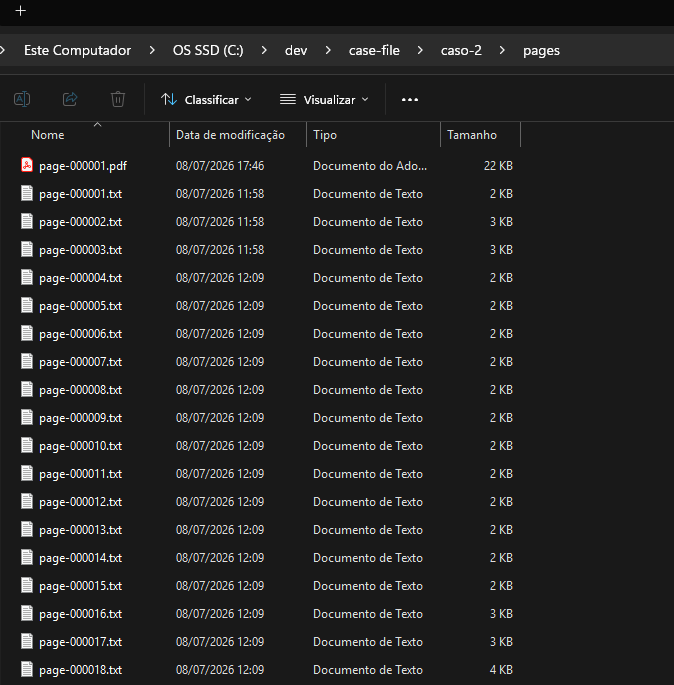
O conector resolve isso não colocando o processo na conversa. Ele desmonta o PDF página por página em arquivos de texto simples (dá pra abrir qualquer um no bloco de notas, nada escondido) e monta um índice local, um arquivo único no seu PC que funciona como um índice remissivo gigante: qualquer pergunta acha os trechos certos em milissegundos, sem reler nada. Na conversa entram só os trechos relevantes daquela pergunta, alguns parágrafos por vez. Um processo de 2 mil páginas custa pro chat o mesmo que um de 20.
Uso dois modelos do Gemini, na chave API do próprio usuário. O gemini-3.5-flash lê as páginas escaneadas: é um modelo de visão rápido e barato que transcreve até foto torta de documento tirada no banco do carro.
O gemini-embedding-2 habilita a busca por significado: ele converte cada trecho num código de significado, então "rompimento da parceria" encontra a página que fala de "perda de clientela e colapso patrimonial" mesmo sem nenhuma palavra em comum. Escolhi esse modelo por um motivo específico: ele entende imagem também, então uma página que nem o OCR conseguiu ler continua encontrável pela aparência dela.
E o custo é honesto: num processo real de 1.359 páginas com 190 escaneadas, o preparo completo saiu por uns 7 reais (e só é feito 1x). O conector mostra a estimativa em reais e pede sua autorização antes de gastar qualquer centavo. Detalhe que importa pra advogado: no plano gratuito da API o Google usa os dados enviados pra melhorar os produtos deles; no pago, não. Pra processo sigiloso, use chave com faturamento ativo.
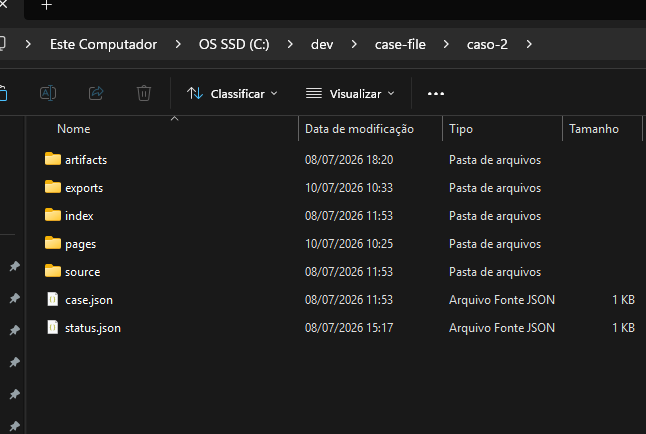
No seu computador, cada processo vira uma pasta organizada: o PDF original intocado, os textos página a página, o índice, os relatórios gerados. Você enxerga tudo no Explorer.
Na conversa, o assistente ganha ferramentas de verdade: monta o painel do caso, o índice dos autos (ele lê o rodapé do PJe e reconstrói os N documentos do caderno com as datas de juntada), a cronologia, busca qualquer coisa, abre o PDF da página na sua tela quando você quer conferir o original, e mantém um fichamento que sobrevive entre conversas: você fecha hoje, volta amanhã e ele continua de onde parou.
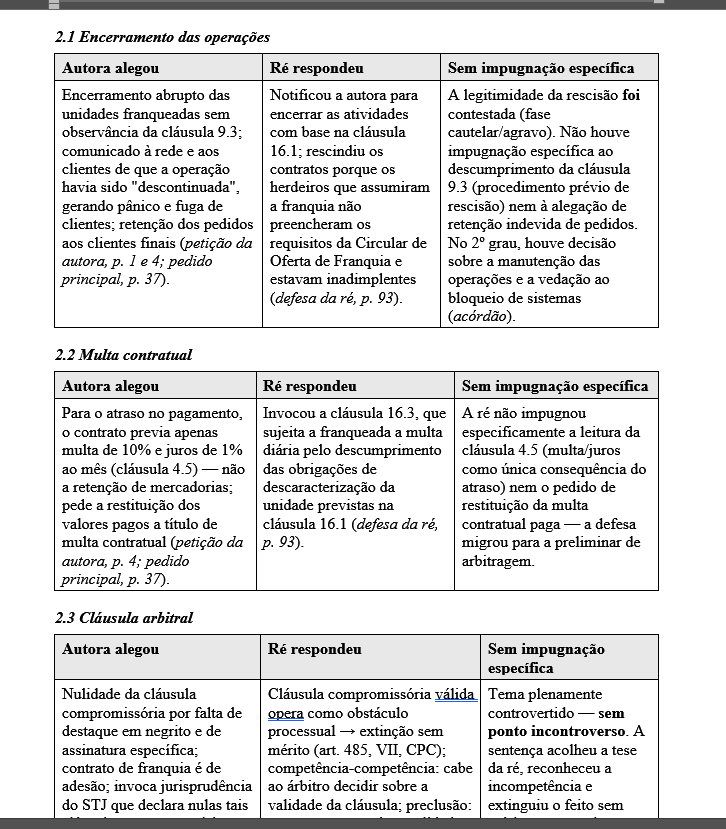
Uma das tools se chama 'Quadro de Controvérsias'. Você pergunta "o que a ré respondeu sobre a multa? e o que ficou sem impugnação específica?" e ele cruza a inicial com a contestação tema por tema, cada célula com a página de origem, e entrega um documento Word formatado, salvo na pasta do processo, pronto pra você trabalhar em cima.
Novamente: nenhuma afirmação sem fonte. Cada frase sai com a citação do processo eletrônico (ID do documento e página), que qualquer pessoa confere no PJe. Antes de gerar um relatório, o conector valida cada afirmação contra o texto literal dos autos; se o modelo inventou uma data ou um trecho, é reprovado e corrigido. E o que ele não conseguiu ler, ele te fala ao invés de inventar resposta.
O mais importante: O conector não pesquisa precedente sozinho, ele conversa com qualquer serviço de pesquisa que você tenha conectado no Claude. Por essa razão, de posse de todos os fatos sem perder a janela de contexto, o agente pode formular melhor um pedido de pesquisa de jurisprudência que você não observou ainda, e cada precedente aproveitado fica registrado na pasta do processo: tribunal, número, câmara, relator, data de julgamento, a tese em uma linha e o link pro inteiro teor. Tá na imagem.
É um experimento, de graça. Tudo roda no seu pc. Quero melhorar essa ferramenta. Te mostro abaixo como instalar
OpenAI just launched a 3-hour course on building agentic systems from scratch:
00:00 - Building workspace agents
37:42 - Deep dive into OpenAI AgentKit
1:24:01 - Agent memory (loops, context, evals)
2:21:44 - Agentic training (OpenAI playbook)
This 3-hour watch will replace you 10 paid agentic courses.
Watch it today, then learn how to build a team of AI agents from scratch in the article below.
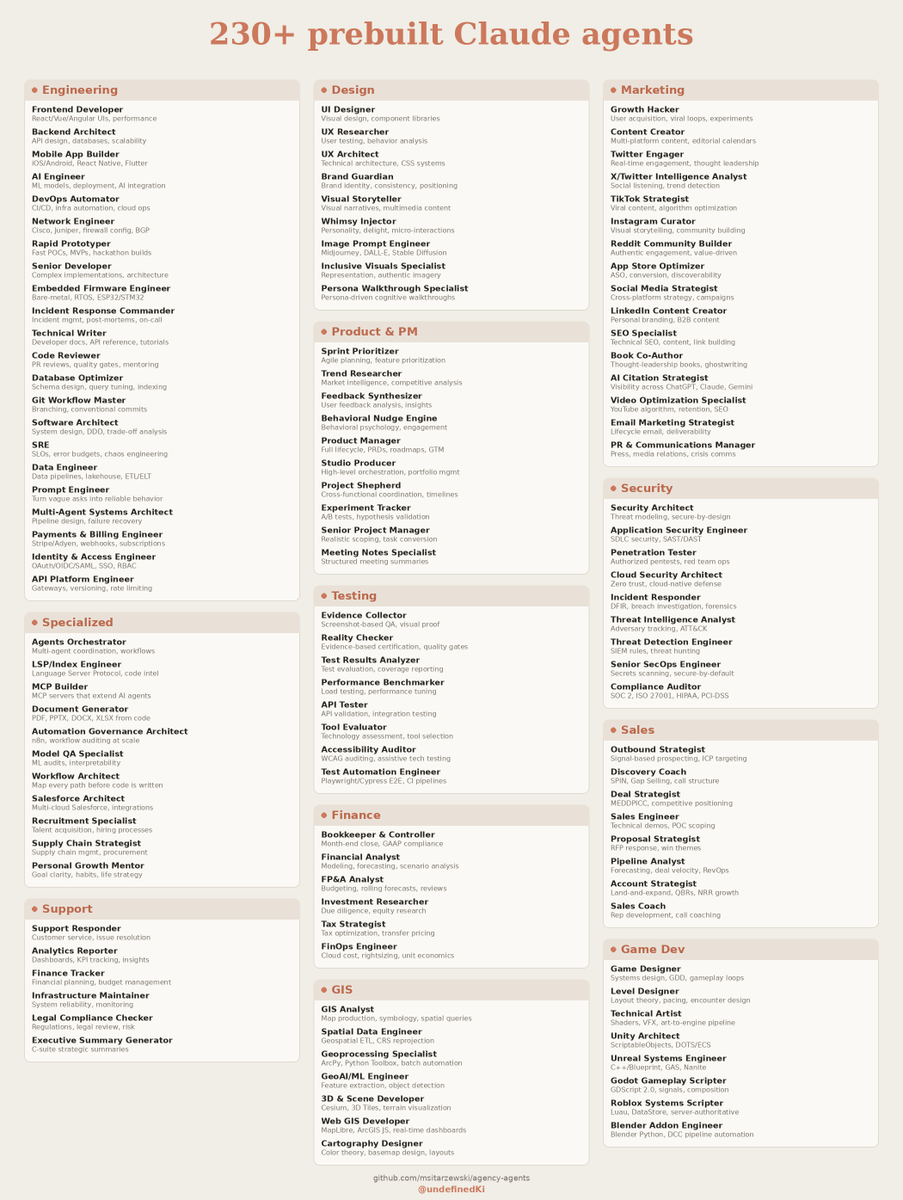
I found a repo with 230+ prebuilt AI agents for basically any task
It's called Agency Agents. 129k stars. A full AI agency of specialized agents you drop into Claude Code, each with its own role, workflow, and deliverables, instead of generic prompts.
There's an agent for almost anything: Backend Architect, Frontend Developer, Security Engineer, UI Designer, SEO Specialist, Content Creator, even a Twitter Engager and a Reddit community agent.
How to set it up:
In your terminal (not Claude Code):
1. Clone the /msitarzewski/agency-agents repo from GitHub.
2. Go into the folder and run the installer: cd agency-agents then ./scripts/install.sh --tool claude-code. A checkbox menu pops up where you pick which agents or whole divisions (engineering, marketing, etc.) to install. They get copied into Claude Code automatically.
Then in Claude Code:
3. Just tell Claude "activate Frontend Developer mode" and it takes on that agent's role, voice, and process.
Bookmark this.
Jensen Huang, CEO of Nvidia:
"Every engineer is going to have and manage hundreds of agents."
The most valuable engineering skill of 2026 is not taught in any university.
No CS program teaches harness engineering.
No bootcamp teaches agent memory architecture.
No degree prepares you to build systems that survive production.
One builder mapped the entire thing out — free, step by step, no degree required.
This is the roadmap ↓
Bookmark this for the weekend.
anthropic didn’t kill prompt engineering.
claude code did.
because once your agent can read files, edit code, run tests, and recover from errors…
the bottleneck is no longer the prompt.
it’s the loop.
inspect → patch → test → verify → repeat
right now this is still alpha.
soon every AI coding tool will package it, rename it, and sell it back to you.
bookmark before that happens.
This is OpenPaper. Claude Code for research.
I gave it one question. Minutes later it returned a complete research paper with real citations and working DOIs.
It searches across 500M papers, writes the draft, and rejects hallucinated sources.
Open source, MIT.
https://t.co/g9ysdBjdpr
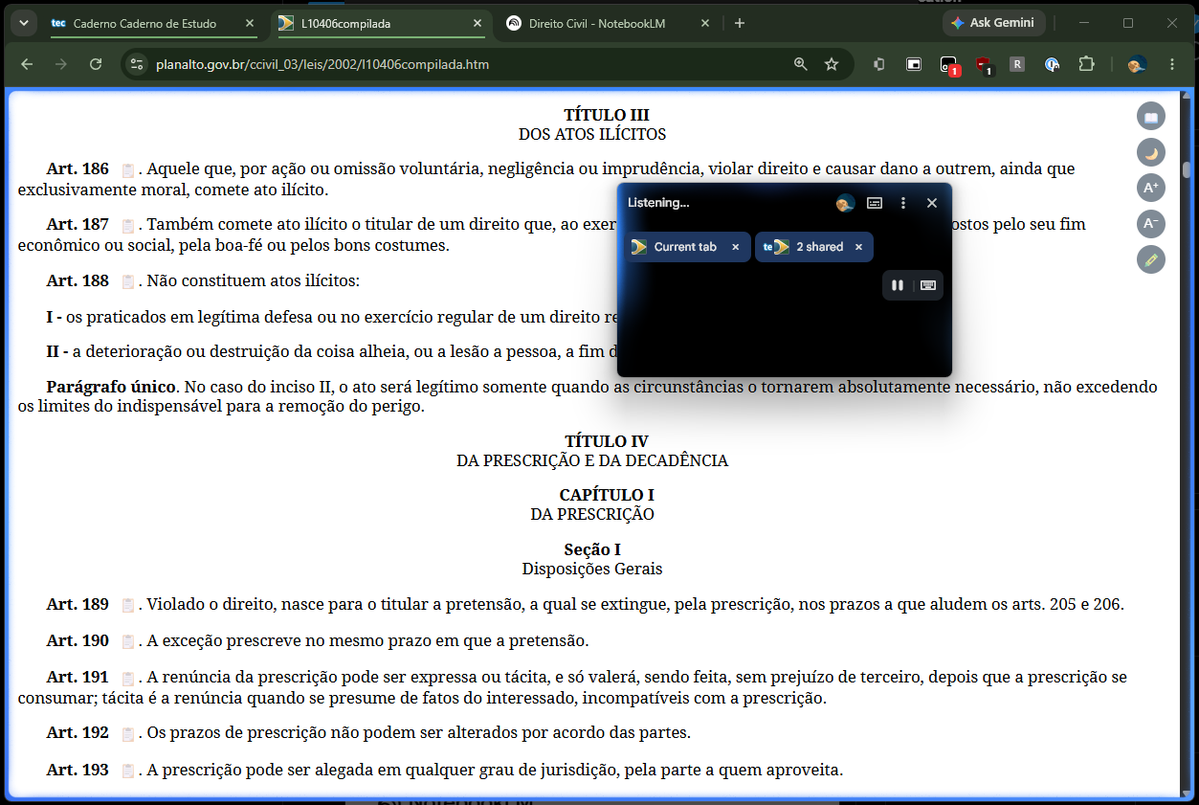
O Google Chrome atualizou e agora permite que o gemini 'veja' nativamente as abas. Você pode inclusive usar o modo voz pra entender algum conceito, estudar através de outros estímulos etc. Se estiver atualizado, vai aparecer no canto superior esquerdo do chrome 'Ask Gemini'. Se não aparecer, só seguir o tutorial abaixo:
10 GitHub repos that will level up your AI Agent skills (SAVE THIS)🔖
1. Hands-On Large Language Models
Complete code notebooks from basics to advanced fine-tuning.
🔗 https://t.co/J2nJaTA6YG
2. AI Agents for Beginners
A free 11-part intro course to build your first agents.
🔗 https://t.co/4VwE6blKcU
3. GenAI Agents
Tutorials and code for building generative AI agents.
🔗 https://t.co/y8bMa4KNc7
4. Made with ML
Learn to design, build, and deploy real ML apps.
🔗 https://t.co/9pbvT8BZLf
5. Prompt Engineering Guide
Learn to write powerful and effective prompts.
🔗 https://t.co/bsrHmG3cQ6
6. Hands-On AI Engineering
Practical LLM-powered apps and agent examples.
🔗 https://t.co/sT1HceCg9T
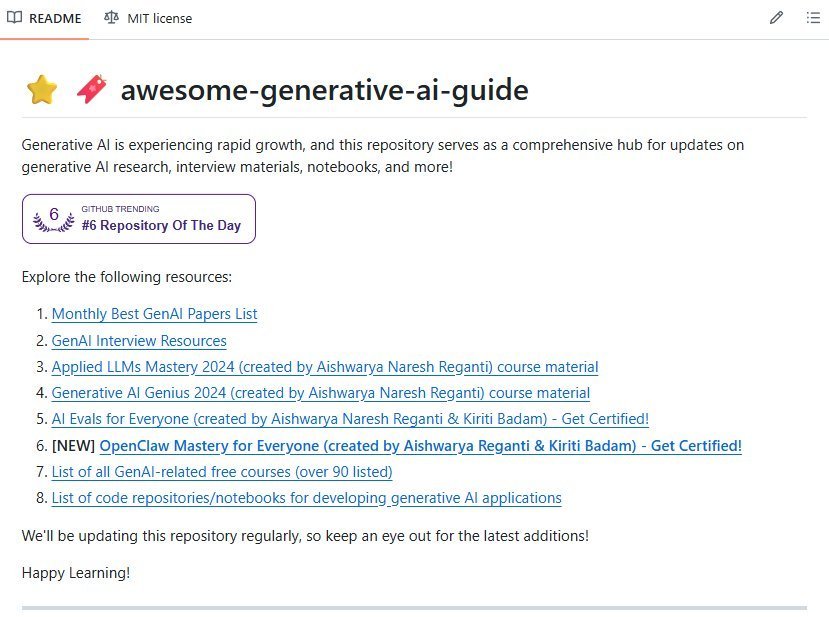
7. Awesome Generative AI Guide
Curated hub for genAI research and tools.
🔗 https://t.co/IkARsandcg
8. Designing Machine Learning Systems
Summaries and resources from the popular ML systems book.
🔗 https://t.co/1e0NqbFiXK
9. ML for Beginners (Microsoft)
Free beginner-friendly ML curriculum.
🔗 https://t.co/q354N2uHIR
10. LLM Course
Roadmaps and hands-on notebooks to build LLM apps.
🔗 https://t.co/xMv0jwqSFw
I'm curating 50+ AI Agent resources on my profile worth checking out 👋
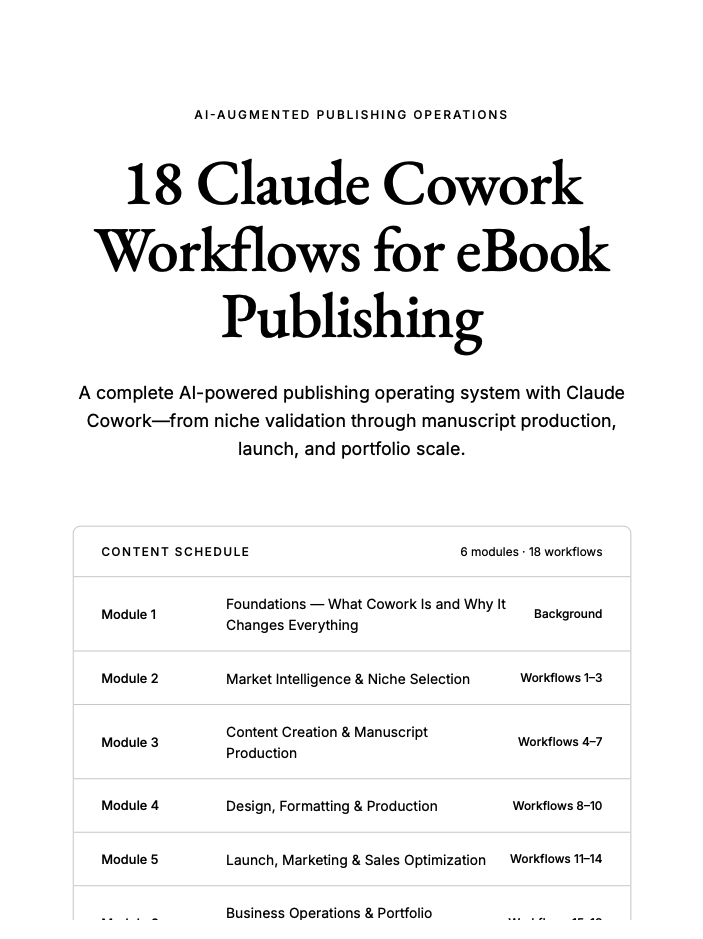
R.I.P. 9-to-5. Claude is your free employee now.
I compiled every workflow I use to create and publish AI eBooks into one playbook.
They're the same workflows behind my $50,000/month publishing business.
Like this post + comment "Claude" and I'll DM it to you for FREE.
(Must follow to receive.)
⏳ Available for the next 48 hours.
Anthropic just released 3 workshops on how to actually use Fable 5 to its full potential:
00:00 - Full guide to Fable 5
19:02 - How Anthropic uses Fable 5 internally
44:46 - How to build effective agents with Fable
those 3 stages replaced 20 articles on Fable 5 for me.
give it 1-hour today and read how to build self-improving agents with Fable 5 in the article below.
How to build a 1-person AI company that:
- Runs locally
- 100% open-source
- No human employees, all agents
- Real-time collaboration via email
Multi-agent orchestration is not new. Plenty of frameworks already let agents hand off tasks, run in parallel, and talk to each other.
So the interesting question is not whether agents can collaborate. It is what structure you use to make them collaborate.
The common approach is to wire a graph of nodes and edges and reason about the plumbing yourself. It works, but you are learning a new abstraction just to describe who does what.
There is a coordination structure we have trusted for a hundred years already: an organization.
Every company runs the same way. People have roles, roles have reporting lines, and work moves up and down that chart without anyone relaying each message by hand.
Map that onto agents and the whole thing gets intuitive. You lay out an org chart, each agent fills one role, you talk to the person at the top, and the org sorts out the work between them.
You already know how a company works, so you already know how to run one here. There is no new abstraction to learn.
That is exactly what Alook does. Each agent is a live Claude Code or OpenCode session with a defined role, a reporting line, and its own email inbox.
The agents coordinate over email, the same way a team would. And it all runs locally through a runtime on your own machine, so nothing leaves your setup.
You bring your own agent too. Claude Code and Codex both work, and if you would rather stay fully open source and local, OpenCode works the same way.
To show how this feels in practice, I set up three agents as a small sales team.
Vi is the one I talk to. I hand Vi a goal, and Vi routes the work down the chart.
Neile runs prospect research. Vi passes the target criteria, and Neile reports back a ranked list of names, roles, and companies, each with a suggested angle and a confidence score.
Lliane runs outreach. Vi hands over the messaging angle and follow-up cadence, and Lliane reports back on emails sent, responses received, and any deal that needs escalation.
I never relay a message between them. Neile and Lliane report to Vi, and Vi updates me in one place.
The whole thing is open source and self-hosted, so it runs on your machine with your own agents. Give the repo a star if you want to follow where it goes: https://t.co/vpAb0dy7AD
I also wrote a full walkthrough on building your own AI company with it, from a blank org chart to a running job. The article is quoted below.
Cheers! :)