𝗠𝗼𝘀𝘁 𝗽𝗲𝗼𝗽𝗹𝗲 𝘁𝗵𝗶𝗻𝗸 𝗔𝗜 = 𝗖𝗵𝗮𝘁𝗚𝗣𝗧.
Not even close.
ChatGPT is what you see.
The real AI revolution is the massive ecosystem being built underneath it.
This AI Stack Map captures 100+ tools powering modern AI applications.
𝗧𝗵𝗲 𝗺𝗼𝗱𝗲𝗿𝗻 𝗔𝗜 𝘀𝘁𝗮𝗰𝗸 𝗹𝗼𝗼𝗸𝘀 𝘀𝗼𝗺𝗲𝘁𝗵𝗶𝗻𝗴 𝗹𝗶𝗸𝗲 𝘁𝗵𝗶𝘀:
LLMs → OpenAI, Claude, Gemini, Llama, Mistral
Agentic AI → LangGraph, CrewAI, AutoGen, CAMEL, Agno
RAG → LangChain, LlamaIndex, Haystack, GraphRAG
Embeddings → OpenAI, Voyage, Cohere, BGE
MCP → Connecting models with tools, data and systems
AI Security → Guardrails, Presidio, Lakera, Prompt Security
Observability & Evals → LangSmith, Langfuse, Phoenix, Ragas
Memory → Redis, Mem0, Zep, Neo4j, Chroma
Agent Frameworks → OpenAI SDK, Semantic Kernel, Google ADK, Bedrock
Automation → n8n, Zapier, Make, Airflow, Prefect
Vector Databases → Pinecone, Weaviate, Qdrant, Milvus, pgvector
But here’s the part that matters more than the logos.
𝗧𝗵𝗶𝘀 𝗶𝘀 𝗻𝗼𝘁 𝗮 𝘀𝗵𝗼𝗽𝗽𝗶𝗻𝗴 𝗹𝗶𝘀𝘁.
It’s a dependency graph.
Your RAG is only as good as your retrieval + embeddings.
Your agent is only as reliable as its tools + evaluations + guardrails.
Your memory is useless if you can’t observe when context becomes stale or wrong.
Your MCP layer becomes dangerous if permissions and governance are an afterthought.
And a “best-in-class” stack can still become a terrible production system.
Why?
Because AI systems rarely fail only inside one component.
𝗧𝗵𝗲𝘆 𝗳𝗮𝗶𝗹 𝗮𝘁 𝘁𝗵𝗲 𝗵𝗮𝗻𝗱𝗼𝗳𝗳𝘀.
Model → Retrieval
Retrieval → Context
Context → Agent
Agent → Tool
Tool → Memory
Memory → Evaluation
That’s where latency compounds, context gets lost, permissions leak, hallucinations propagate and reliability starts falling apart.
𝗧𝗵𝗲 𝗿𝗲𝗮𝗹 𝗺𝗼𝗮𝘁 𝗶𝘀𝗻’𝘁 𝗵𝗮𝘃𝗶𝗻𝗴 𝗺𝗼𝗿𝗲 𝗔𝗜 𝘁𝗼𝗼𝗹𝘀.
It’s designing how they work together.
A stack map tells you 𝗪𝗛𝗔𝗧 exists.
Production engineering decides 𝗛𝗢𝗪 it all survives contact with reality.
Which tool in your AI stack has become indispensable?
Save this map for your next AI build.
Repost it for someone designing an AI architecture.
#AI #ArtificialIntelligence #GenAI
You can earn $9,000 per month if you have ChatGPT, a laptop, and 60 mins a day.
Usually, I'd charge $97 for this proven guide, but today it's yours 100% FREE.
Like + reply 'Money' & I'll send you my complete guide for FREE.
Must follow me
@triptitips
to get DM.
FREE for 48 hrs only.
You can earn $9,000 per month if you have ChatGPT, a laptop, and 60 mins a day.
Usually, I'd charge $97 for this proven guide, but today it's yours 100% FREE.
Like + reply 'Money' & I'll send you my complete guide for FREE.
Must follow me
@triptitips
to get DM.
FREE for 48 hrs only.
🚀 𝟭𝟲 𝗖𝗵𝗿𝗼𝗺𝗲 𝗘𝘅𝘁𝗲𝗻𝘀𝗶𝗼𝗻𝘀 𝗧𝗵𝗮𝘁 𝗔𝘂𝘁𝗼𝗺𝗮𝘁𝗲 𝗬𝗼𝘂𝗿 𝗪𝗼𝗿𝗸 𝗜𝗻 𝟮𝟬𝟮𝟲
If you're spending hours in Chrome every day, the right extensions can save you time, reduce repetitive work, and make your workflow much smoother.
1. 𝗧𝗼𝗱𝗼𝗶𝘀𝘁 ✅
Task management, project tracking, reminders, and team collaboration.
2. 𝗖𝗹𝗼𝗰𝗸𝗶𝗳𝘆 ⏱️
Time tracking, project timers, and productivity reporting.
3. 𝗠𝗲𝗿𝗹𝗶𝗻 𝗔𝗜 🤖
Use AI on any webpage, summarize content, and reply to emails with one click.
4. 𝗚𝗿𝗮𝗺𝗺𝗮𝗿𝗹𝘆 ✍️
Grammar checking, writing improvement, and vocabulary suggestions.
5. 𝗘𝘃𝗲𝗿𝗻𝗼𝘁𝗲 𝗪𝗲𝗯 𝗖𝗹𝗶𝗽𝗽𝗲𝗿 📌
Note-taking, webpage saving, and article annotation.
6. 𝗣𝗼𝗰𝗸𝗲𝘁 ❤️
Save articles for later, read offline, and get personalized content suggestions.
7. 𝗦𝗰𝗿𝗶𝗯𝗲 📝
Auto-generate step-by-step guides from any workflow you perform on screen.
8. 𝗙𝗼𝗿𝗲𝘀𝘁 🌱
Focus timer with gamification, website blocking, and virtual tree planting.
9. 𝗟𝗼𝗼𝗺 🎥
Record your screen, send video messages, and collaborate with teams.
10. 𝗣𝗲𝗿𝗽𝗹𝗲𝘅𝗶𝘁𝘆 𝗔𝗜 🔍
Search the web with AI, get cited answers, and research any topic quickly.
11. 𝗟𝗶𝗴𝗵𝘁𝘀𝗵𝗼𝘁 📷
Fast and easy screenshot capture tool.
12. 𝗦𝗶𝗱𝗲𝗿 𝗔𝗜 💬
Chat with AI on any webpage, summarize PDFs, and translate text instantly.
13. 𝗧𝗼𝗴𝗴𝗹 𝗧𝗿𝗮𝗰𝗸 📊
Track time, generate project reports, and manage team workloads.
14. 𝗭𝗮𝗽𝗶𝗲𝗿 ⚡
Automate workflows, connect apps, and eliminate repetitive tasks.
15. 𝗔𝘀𝗮𝗻𝗮 📋
Manage tasks, track projects, and keep teams aligned.
16. 𝗡𝗼𝘁𝗶𝗼𝗻 𝗪𝗲𝗯 𝗖𝗹𝗶𝗽𝗽𝗲𝗿 📚
Save any webpage directly into your Notion workspace with one click.
💡 𝗕𝗼𝗻𝘂𝘀:
The best productivity stack for most professionals:
📝 Todoist or Asana → Task management
⚡ Zapier → Automation
🤖 Perplexity AI + Merlin AI → Research & AI assistance
✍️ Grammarly → Better writing
🎥 Loom → Faster communication
📌 Notion Web Clipper → Save valuable resources
Which Chrome extension do you use the most? 👇
❤️ Like
🔁 Retweet
🔖 Bookmark
Follow
@triptitips
for more such posts
Today, we're launching Typeless for Linux.
Typeless is now available on Mac, Windows, iOS, Android — and Linux.
The Linux app brings the full Typeless desktop experience, with all the core features available on Mac.
But this launch is about more than adding another platform.
For us, every new platform is another step toward a bigger goal: making voice the default way for people to interact with computers — wherever they think, create, and work.
For decades, the keyboard has been the default interface between our thoughts and computers.
And we've gotten so used to it that we rarely question the friction.
Thoughts come fast, messy, and nonlinear.
Before you communicate them, you normally have to turn them into sentences in your head first.
Then you slow everything down again to type.
We built Typeless to remove both layers of friction.
With Typeless, you can just think out loud.
Follow your thoughts wherever they go. Change your mind halfway through. Add context later. Repeat yourself. Speak imperfectly.
Typeless turns that messy stream of thought into clear, polished writing in real time.
It removes filler words and repetition, structures your ideas, adapts to your writing style, understands your personal vocabulary, and gives you writing that fits the app you're working in.
You can:
• Dictate — turn messy thoughts into clear writing, 4x faster than typing
• Translate — speak in your language and write naturally in another
• Ask anything — use your voice to write from scratch, or select text to edit it, ask questions, and take actions
• Build your dictionary — names, acronyms, and specialized terms get recognized correctly
• Personalize your style — Typeless learns how you write and adapts to where you're writing
• Speak 100+ languages — including naturally mixing languages while you talk
And it's private by design.
Linux users tend to be some of the people who spend the most time interacting deeply with computers.
Developers. Engineers. Researchers. Builders.
They should be able to use voice as naturally on Linux as anywhere else.
Our long-term belief is simple:
Voice will become the default way people interact with computers.
Not because speaking is merely faster than typing.
But because voice gives us a way to communicate with computers much closer to the speed and form in which thoughts actually happen.
To us, that's what real freedom in computing looks like: expressing what you mean without adapting how you think.
And for that future to happen, it can't belong to one device, one operating system, or one workflow.
It has to be available wherever you work.
Linux. Mac. Windows. iOS. Android.
One interface, wherever you work.
Typeless for Linux is here.
🚀 𝟭𝟲 𝗖𝗵𝗿𝗼𝗺𝗲 𝗘𝘅𝘁𝗲𝗻𝘀𝗶𝗼𝗻𝘀 𝗧𝗵𝗮𝘁 𝗔𝘂𝘁𝗼𝗺𝗮𝘁𝗲 𝗬𝗼𝘂𝗿 𝗪𝗼𝗿𝗸 𝗜𝗻 𝟮𝟬𝟮𝟲
If you're spending hours in Chrome every day, the right extensions can save you time, reduce repetitive work, and make your workflow much smoother.
1. 𝗧𝗼𝗱𝗼𝗶𝘀𝘁 ✅
Task management, project tracking, reminders, and team collaboration.
2. 𝗖𝗹𝗼𝗰𝗸𝗶𝗳𝘆 ⏱️
Time tracking, project timers, and productivity reporting.
3. 𝗠𝗲𝗿𝗹𝗶𝗻 𝗔𝗜 🤖
Use AI on any webpage, summarize content, and reply to emails with one click.
4. 𝗚𝗿𝗮𝗺𝗺𝗮𝗿𝗹𝘆 ✍️
Grammar checking, writing improvement, and vocabulary suggestions.
5. 𝗘𝘃𝗲𝗿𝗻𝗼𝘁𝗲 𝗪𝗲𝗯 𝗖𝗹𝗶𝗽𝗽𝗲𝗿 📌
Note-taking, webpage saving, and article annotation.
6. 𝗣𝗼𝗰𝗸𝗲𝘁 ❤️
Save articles for later, read offline, and get personalized content suggestions.
7. 𝗦𝗰𝗿𝗶𝗯𝗲 📝
Auto-generate step-by-step guides from any workflow you perform on screen.
8. 𝗙𝗼𝗿𝗲𝘀𝘁 🌱
Focus timer with gamification, website blocking, and virtual tree planting.
9. 𝗟𝗼𝗼𝗺 🎥
Record your screen, send video messages, and collaborate with teams.
10. 𝗣𝗲𝗿𝗽𝗹𝗲𝘅𝗶𝘁𝘆 𝗔𝗜 🔍
Search the web with AI, get cited answers, and research any topic quickly.
11. 𝗟𝗶𝗴𝗵𝘁𝘀𝗵𝗼𝘁 📷
Fast and easy screenshot capture tool.
12. 𝗦𝗶𝗱𝗲𝗿 𝗔𝗜 💬
Chat with AI on any webpage, summarize PDFs, and translate text instantly.
13. 𝗧𝗼𝗴𝗴𝗹 𝗧𝗿𝗮𝗰𝗸 📊
Track time, generate project reports, and manage team workloads.
14. 𝗭𝗮𝗽𝗶𝗲𝗿 ⚡
Automate workflows, connect apps, and eliminate repetitive tasks.
15. 𝗔𝘀𝗮𝗻𝗮 📋
Manage tasks, track projects, and keep teams aligned.
16. 𝗡𝗼𝘁𝗶𝗼𝗻 𝗪𝗲𝗯 𝗖𝗹𝗶𝗽𝗽𝗲𝗿 📚
Save any webpage directly into your Notion workspace with one click.
💡 𝗕𝗼𝗻𝘂𝘀:
The best productivity stack for most professionals:
📝 Todoist or Asana → Task management
⚡ Zapier → Automation
🤖 Perplexity AI + Merlin AI → Research & AI assistance
✍️ Grammarly → Better writing
🎥 Loom → Faster communication
📌 Notion Web Clipper → Save valuable resources
Which Chrome extension do you use the most? 👇
❤️ Like
🔁 Retweet
🔖 Bookmark
Follow
@triptitips
for more such posts
50 websites you’ll wish you knew about sooner 🔖
The internet has way more useful corners than the usual Google search results.
Here are 50 genuinely useful websites for research, productivity, creativity, entertainment, coding, security and everyday tasks. Save this list you’ll probably come back to it. 👀
1. https://t.co/7s0rMqRwZQ — Access research papers for free
2. https://t.co/iXksONadUy — Borrow books online
3. https://t.co/xhdC95bx1O — Explore free academic journals
4. https://t.co/01leKsb4GZ — Discover alternatives to apps
5. https://t.co/boTb7YoAfw — Find where to stream content
6. https://t.co/Uxnq5e9qjJ — Explore the internet’s archives
7. https://t.co/Z0k00Ufyc6 — 70K+ free books
8. https://t.co/XCR4UkLp2e — Free digital textbooks
9. https://t.co/u9A9TJWNP6 — Free courses and learning resources
10. https://t.co/XQDVFjxGnr — Get answers to complex problems
11. https://t.co/1fOPubp6cE — Edit photos like Photoshop
12. https://t.co/uUXzL1Lt27 — Compress images easily
13. https://t.co/D3Kr4Sk0NS — Remove image backgrounds
14. https://t.co/0TUj7ejx97 — Remove unwanted objects from photos
15. https://t.co/IrHK79Mogn — Remove video backgrounds
16. https://t.co/ILaWfi07uJ — Turn code into beautiful images
17. https://t.co/FU0p5VEttd — Create stylish code screenshots
18. https://t.co/HNYYi3HrYG — Create product mockups
19. https://t.co/IQD6BX99ve — Make mockups without Photoshop
20. https://t.co/EewDlU4203 — Check for data breaches
21. https://t.co/E9AE20mw7u — Scan files and URLs for threats
22. https://t.co/lc1H0zeZ9K — Send self-destructing notes
23. https://t.co/bnECUz7mNY — Create temporary email addresses
24. https://t.co/rOaxcHpo7t — Share files temporarily
25. https://t.co/0BiUJo4VGH — Save webpages for later
26. https://t.co/77mBSA2XTp — Discover similar websites
27. https://t.co/4Ol2uT7E0J — Explore radio stations worldwide
28. https://t.co/Gjg7d1TqEJ — Discover music genres
29. https://t.co/TAlobsPxFP — Find songs from movies and shows
30. https://t.co/j7TLdIvkT3 — Music for focused work
31. https://t.co/6iiuWA8ba3 — Create custom background sounds
32. https://t.co/VqEwDfbfAh — Bring café ambience to your workspace
33. https://t.co/nIGhKJd1t2 — AI-powered research assistance
34. https://t.co/CLIu2l4L82 — Find research-backed answers
35. https://t.co/bYpS9DTvcg — Discover research connections
36. https://t.co/m1TrAEOQk3 — Search academic papers
37. https://t.co/hibLBWvrM3 — Make research papers easier to understand
38. https://t.co/4cncMBWfw3 — Get summaries of YouTube videos
39. https://t.co/XYQeouJ8BD — AI search for developers
40. https://t.co/LBxq9AQij9 — Test and debug regex
41. https://t.co/8yQmCxC2ID — Format and beautify code
42. https://t.co/Ff9YSg5b3Z — Format JSON instantly
43. https://t.co/g6ZOfqG96O — Understand terminal commands
44. https://t.co/hchmoOe6fX — Organize your bookmarks
45. https://t.co/CLj8aXFGs5 — Check if services are down
46. https://t.co/8EOketkrAb — Reverse image search
47. https://t.co/5s49Chx6QL — Check your internet speed
48. https://t.co/qffrddJzXy — Work with PDFs online
49. https://t.co/QXsYB9dNNw — Merge, split and edit PDFs
50. https://t.co/TjzebCTtlg — Get a temporary email
Save this list 🔖
You never know which one might solve a problem you have next week.
❤️ Like
🔁 Retweet
🔖 Bookmark
Follow
@triptitips
for more such posts
One of the features our users love most is Speak to edit.
Select some text and just say:
"Make it friendlier."
"Turn this into a professional email."
"Rewrite this as a viral post."
"Translate this."
But we kept hearing one request:
What if I don't have anything written yet?
So we built Help me write.
Now you can simply tell Typeless what you want to say, and it'll write it from scratch.
We believe voice will become the next major interface between people and technology.
But the real promise of voice isn't just saving time. It's helping us express ourselves better.
Our goal with Typeless is to make voice the most natural way to express what you mean and get things done.
For writing, that means turning your thoughts or intent into clear, polished writing.
Sometimes that means speaking your thoughts and letting Typeless shape them. Other times, it's better to simply express your intent and let Typeless do the writing for you.
Help me write is another step toward a world where you focus on what you mean, and Typeless helps you say it better.
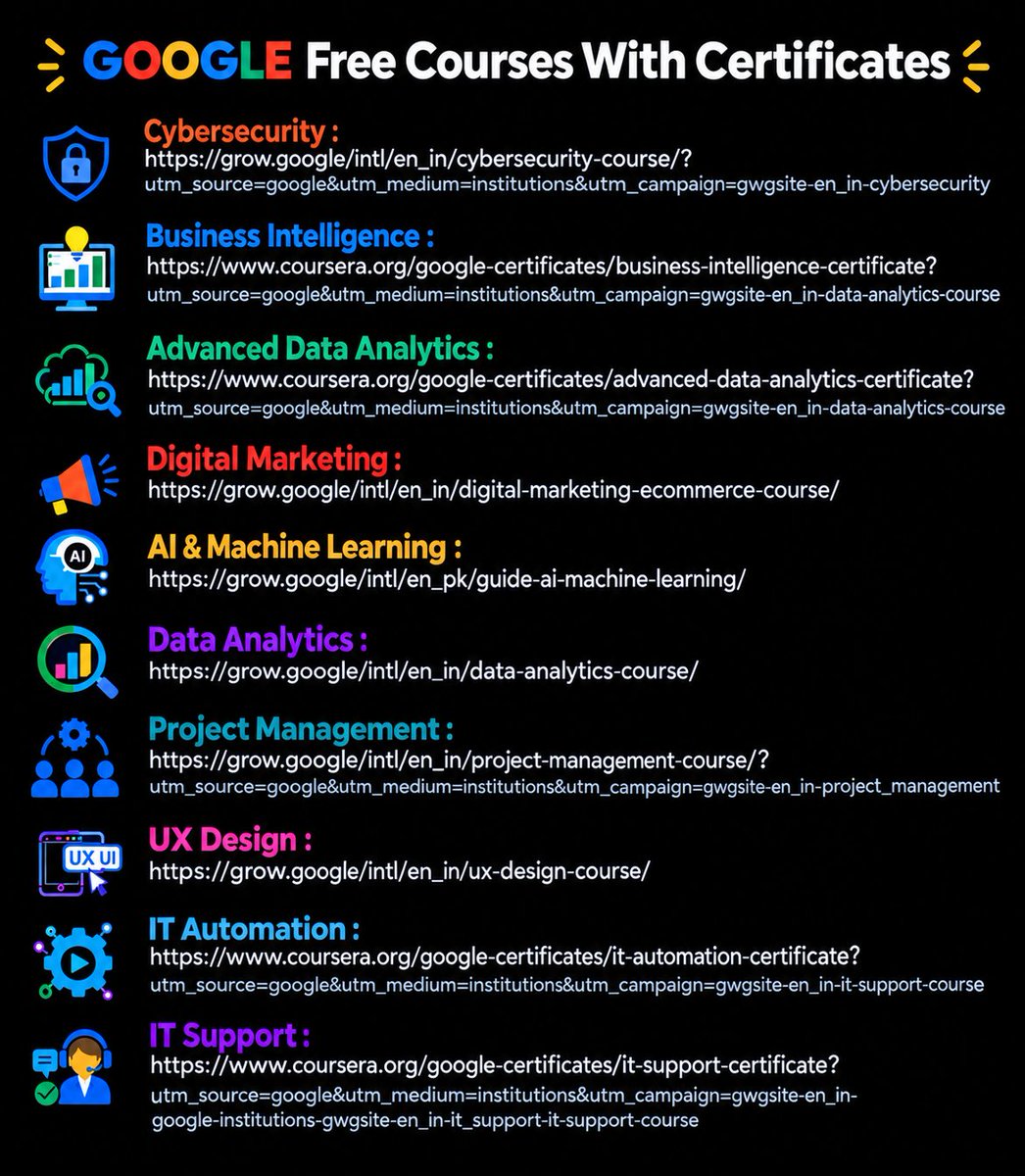
🎓 GOOGLE FREE COURSES WITH CERTIFICATES
Looking to learn new skills without spending a fortune?
Here are 10 Google courses you can explore across AI, data, marketing, cybersecurity, UX and more:
🔐 Cybersecurity
https://t.co/dOlZpGrWiF
📊 Business Intelligence
https://t.co/LuTBzog4n2
📈 Advanced Data Analytics
https://t.co/fXkcDqJQCW
📣 Digital Marketing
https://t.co/2BaAfjQH7c
🤖 AI & Machine Learning
https://t.co/dK80nrcsXW
📊 Data Analytics
https://t.co/lQZyHNnXIa
📋 Project Management
https://t.co/l6G2QEsiTg
🎨 UX Design
https://t.co/4RazAWefWB
⚙️ IT Automation
https://t.co/rY5Sdu6WHQ
💻 IT Support
https://t.co/deRxONX7JA
📌 Save this post for later.
Share it with someone who is looking to upskill or build a new career path.
❤️ Like
🔁 Retweet
🔖 Bookmark
Follow
@triptitips
for more such posts
#Google #FreeCourses #OnlineLearning
🎓 GOOGLE FREE COURSES WITH CERTIFICATES
Looking to learn new skills without spending a fortune?
Here are 10 Google courses you can explore across AI, data, marketing, cybersecurity, UX and more:
🔐 Cybersecurity
https://t.co/dOlZpGrWiF
📊 Business Intelligence
https://t.co/LuTBzog4n2
📈 Advanced Data Analytics
https://t.co/fXkcDqJQCW
📣 Digital Marketing
https://t.co/2BaAfjQH7c
🤖 AI & Machine Learning
https://t.co/dK80nrcsXW
📊 Data Analytics
https://t.co/lQZyHNnXIa
📋 Project Management
https://t.co/l6G2QEsiTg
🎨 UX Design
https://t.co/4RazAWefWB
⚙️ IT Automation
https://t.co/rY5Sdu6WHQ
💻 IT Support
https://t.co/deRxONX7JA
📌 Save this post for later.
Share it with someone who is looking to upskill or build a new career path.
❤️ Like
🔁 Retweet
🔖 Bookmark
Follow
@triptitips
for more such posts
#Google #FreeCourses #OnlineLearning
Can’t believe people still don’t know how to profit from ChatGPT!
Earn $1,000/Day with ChatGPT 💰
[100% GUARANTEED]
Here’s all you need:
📱 A smartphone
🌐 WiFi
⏳ 60 minutes a day
👉 Like and Comment "Send" to get it via DM – FREE for the next 24 hours! 🕒
(Make sure you’re following
@triptitips
to receive the DM)
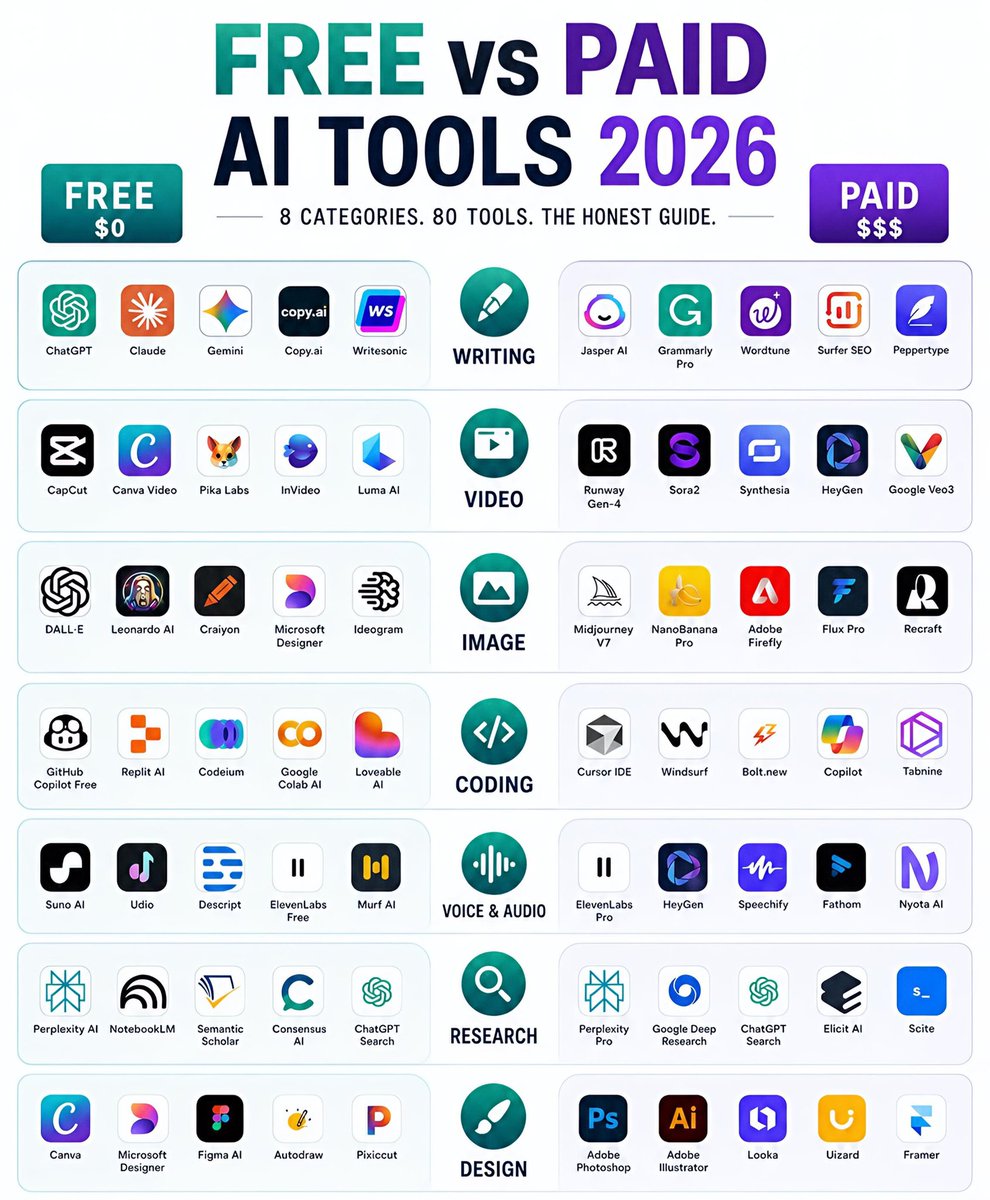
𝗣𝗔𝗜𝗗 𝗔𝗜 𝗧𝗼𝗼𝗹𝘀 → 𝗙𝗥𝗘𝗘 𝗔𝗜 𝗧𝗼𝗼𝗹𝘀 🤖
AI tools are everywhere, but not every great tool needs a paid subscription.
Here’s a simple list of AI tools you should know in 2026 with a free alternative for each paid tool 👇
💰 𝗖𝗹𝗮𝘂𝗱𝗲 𝗖𝗼𝗱𝗲 → 🆓 𝗢𝗽𝗲𝗻 𝗖𝗼𝗱𝗲
🎨 𝗖𝗹𝗮𝘂𝗱𝗲 𝗗𝗲𝘀𝗶𝗴𝗻 → 🆓 𝗢𝗽𝗲𝗻 𝗗𝗲𝘀𝗶𝗴𝗻
🖼️ 𝗠𝗶𝗱𝗷𝗼𝘂𝗿𝗻𝗲𝘆 → 🆓 𝗡𝗮𝗻𝗼 𝗕𝗮𝗻𝗮𝗻𝗮
🔎 𝗣𝗲𝗿𝗽𝗹𝗲𝘅𝗶𝘁𝘆 → 🆓 𝗖𝗼𝗻𝘀𝗲𝗻𝘀𝘂𝘀
🎥 𝗛𝗲𝘆𝗚𝗲𝗻 → 🆓 𝗛𝗲𝗱𝗿𝗮
💻 𝗖𝘂𝗿𝘀𝗼𝗿 → 🆓 𝗞𝗶𝗹𝗼 𝗖𝗼𝗱𝗲
🎙️ 𝗘𝗹𝗲𝘃𝗲𝗻𝗟𝗮𝗯𝘀 → 🆓 𝗠𝗶𝗻𝗶 𝗠𝗮𝘅
✨ 𝗛𝗶𝗴𝗴𝘀𝗳𝗶𝗲𝗹𝗱 → 🆓 𝗛𝗮𝗶𝗹𝘂𝗼
🎨 𝗖𝗮𝗻𝘃𝗮 → 🆓 𝗟𝗼𝘃𝗮𝗿𝘁
📝 𝗡𝗼𝘁𝗶𝗼𝗻 → 🆓 𝗢𝗯𝘀𝗶𝗱𝗶𝗮𝗻
Save this list for later. 📌
❤️ Like
🔁 Retweet
🔖 Bookmark
Follow
@triptitips
for more such posts
#AI #ArtificialIntelligence #AITools #GenerativeAI #Tech #Productivity #AITools2026 #FutureOfWork #TechTools #Innovation
Can’t believe people still don’t know how to profit from ChatGPT!
Earn $1,000/Day with ChatGPT 💰
[100% GUARANTEED]
Here’s all you need:
📱 A smartphone
🌐 WiFi
⏳ 60 minutes a day
👉 Like and Comment "Send" to get it via DM – FREE for the next 24 hours! 🕒
(Make sure you’re following
@triptitips
to receive the DM)
𝗣𝗔𝗜𝗗 𝗔𝗜 𝗧𝗼𝗼𝗹𝘀 → 𝗙𝗥𝗘𝗘 𝗔𝗜 𝗧𝗼𝗼𝗹𝘀 🤖
AI tools are everywhere, but not every great tool needs a paid subscription.
Here’s a simple list of AI tools you should know in 2026 with a free alternative for each paid tool 👇
💰 𝗖𝗹𝗮𝘂𝗱𝗲 𝗖𝗼𝗱𝗲 → 🆓 𝗢𝗽𝗲𝗻 𝗖𝗼𝗱𝗲
🎨 𝗖𝗹𝗮𝘂𝗱𝗲 𝗗𝗲𝘀𝗶𝗴𝗻 → 🆓 𝗢𝗽𝗲𝗻 𝗗𝗲𝘀𝗶𝗴𝗻
🖼️ 𝗠𝗶𝗱𝗷𝗼𝘂𝗿𝗻𝗲𝘆 → 🆓 𝗡𝗮𝗻𝗼 𝗕𝗮𝗻𝗮𝗻𝗮
🔎 𝗣𝗲𝗿𝗽𝗹𝗲𝘅𝗶𝘁𝘆 → 🆓 𝗖𝗼𝗻𝘀𝗲𝗻𝘀𝘂𝘀
🎥 𝗛𝗲𝘆𝗚𝗲𝗻 → 🆓 𝗛𝗲𝗱𝗿𝗮
💻 𝗖𝘂𝗿𝘀𝗼𝗿 → 🆓 𝗞𝗶𝗹𝗼 𝗖𝗼𝗱𝗲
🎙️ 𝗘𝗹𝗲𝘃𝗲𝗻𝗟𝗮𝗯𝘀 → 🆓 𝗠𝗶𝗻𝗶 𝗠𝗮𝘅
✨ 𝗛𝗶𝗴𝗴𝘀𝗳𝗶𝗲𝗹𝗱 → 🆓 𝗛𝗮𝗶𝗹𝘂𝗼
🎨 𝗖𝗮𝗻𝘃𝗮 → 🆓 𝗟𝗼𝘃𝗮𝗿𝘁
📝 𝗡𝗼𝘁𝗶𝗼𝗻 → 🆓 𝗢𝗯𝘀𝗶𝗱𝗶𝗮𝗻
Save this list for later. 📌
❤️ Like
🔁 Retweet
🔖 Bookmark
Follow
@triptitips
for more such posts
#AI #ArtificialIntelligence #AITools #GenerativeAI #Tech #Productivity #AITools2026 #FutureOfWork #TechTools #Innovation
𝗠𝗼𝘀𝘁 𝗽𝗲𝗼𝗽𝗹𝗲 𝘁𝗵𝗶𝗻𝗸 𝗔𝗜 = 𝗖𝗵𝗮𝘁𝗚𝗣𝗧.
Not even close.
ChatGPT is what you see.
The real AI revolution is the massive ecosystem being built underneath it.
This AI Stack Map captures 100+ tools powering modern AI applications.
𝗧𝗵𝗲 𝗺𝗼𝗱𝗲𝗿𝗻 𝗔𝗜 𝘀𝘁𝗮𝗰𝗸 𝗹𝗼𝗼𝗸𝘀 𝘀𝗼𝗺𝗲𝘁𝗵𝗶𝗻𝗴 𝗹𝗶𝗸𝗲 𝘁𝗵𝗶𝘀:
LLMs → OpenAI, Claude, Gemini, Llama, Mistral
Agentic AI → LangGraph, CrewAI, AutoGen, CAMEL, Agno
RAG → LangChain, LlamaIndex, Haystack, GraphRAG
Embeddings → OpenAI, Voyage, Cohere, BGE
MCP → Connecting models with tools, data and systems
AI Security → Guardrails, Presidio, Lakera, Prompt Security
Observability & Evals → LangSmith, Langfuse, Phoenix, Ragas
Memory → Redis, Mem0, Zep, Neo4j, Chroma
Agent Frameworks → OpenAI SDK, Semantic Kernel, Google ADK, Bedrock
Automation → n8n, Zapier, Make, Airflow, Prefect
Vector Databases → Pinecone, Weaviate, Qdrant, Milvus, pgvector
But here’s the part that matters more than the logos.
𝗧𝗵𝗶𝘀 𝗶𝘀 𝗻𝗼𝘁 𝗮 𝘀𝗵𝗼𝗽𝗽𝗶𝗻𝗴 𝗹𝗶𝘀𝘁.
It’s a dependency graph.
Your RAG is only as good as your retrieval + embeddings.
Your agent is only as reliable as its tools + evaluations + guardrails.
Your memory is useless if you can’t observe when context becomes stale or wrong.
Your MCP layer becomes dangerous if permissions and governance are an afterthought.
And a “best-in-class” stack can still become a terrible production system.
Why?
Because AI systems rarely fail only inside one component.
𝗧𝗵𝗲𝘆 𝗳𝗮𝗶𝗹 𝗮𝘁 𝘁𝗵𝗲 𝗵𝗮𝗻𝗱𝗼𝗳𝗳𝘀.
Model → Retrieval
Retrieval → Context
Context → Agent
Agent → Tool
Tool → Memory
Memory → Evaluation
That’s where latency compounds, context gets lost, permissions leak, hallucinations propagate and reliability starts falling apart.
𝗧𝗵𝗲 𝗿𝗲𝗮𝗹 𝗺𝗼𝗮𝘁 𝗶𝘀𝗻’𝘁 𝗵𝗮𝘃𝗶𝗻𝗴 𝗺𝗼𝗿𝗲 𝗔𝗜 𝘁𝗼𝗼𝗹𝘀.
It’s designing how they work together.
A stack map tells you 𝗪𝗛𝗔𝗧 exists.
Production engineering decides 𝗛𝗢𝗪 it all survives contact with reality.
Which tool in your AI stack has become indispensable?
Save this map for your next AI build.
Repost it for someone designing an AI architecture.
#AI #ArtificialIntelligence #GenAI





![triptitips's tweet photo. Can’t believe people still don’t know how to profit from ChatGPT!
Earn $1,000/Day with ChatGPT 💰
[100% GUARANTEED]
Here’s all you need:
📱 A smartphone
🌐 WiFi
⏳ 60 minutes a day
👉 Like and Comment "Send" to get it via DM – FREE for the next 24 hours! 🕒
(Make sure you’re following
@triptitips
to receive the DM)](https://pbs.twimg.com/media/HSu7ap7bUAADyNv.jpg)





