New: Prospecting & Pipeline agents are available for everyone. Plus a new dashboard, a jobs tracker, and referral program.
Your agent finds leads in your network, then works each deal end to end: drafts the outreach, advances the stage, turns a contact into a client.
More details (W20 '26):
🧲 Add Google + LinkedIn contacts. Every surfaces leads with tailored sales plans.
📊 Pipeline visualized from lead → opportunity → qualified → won → lost.
✉️ One-click proposals, emails, invoices from any deal.
New: Sales Pipeline is now in beta.
Full prospecting and deal management with agents on every deal — find leads from your Google and LinkedIn network and get to work with our sales plans.
Beta access by request: [email protected] 🧲
More updates (W16 '26):
🧱 Drag-and-drop editor — Build from modular blocks (cover, text, estimate, media) with flexible layouts, live preview, and reusable templates.
✨ AI writing & image tools — Rewrite any text block with the agent, plus generate or refine images inline.
New: Every's proposals got a full overhaul — with an AI Proposal Agent that drafts everything with you.
Tell it what you're pitching, answer a few questions, and it drafts every section using your client context, past deals, and voice.
Works in Every or via @claudeai, @ChatGPTapp, or any MCP client. 🤖
More updates (W14 '26):
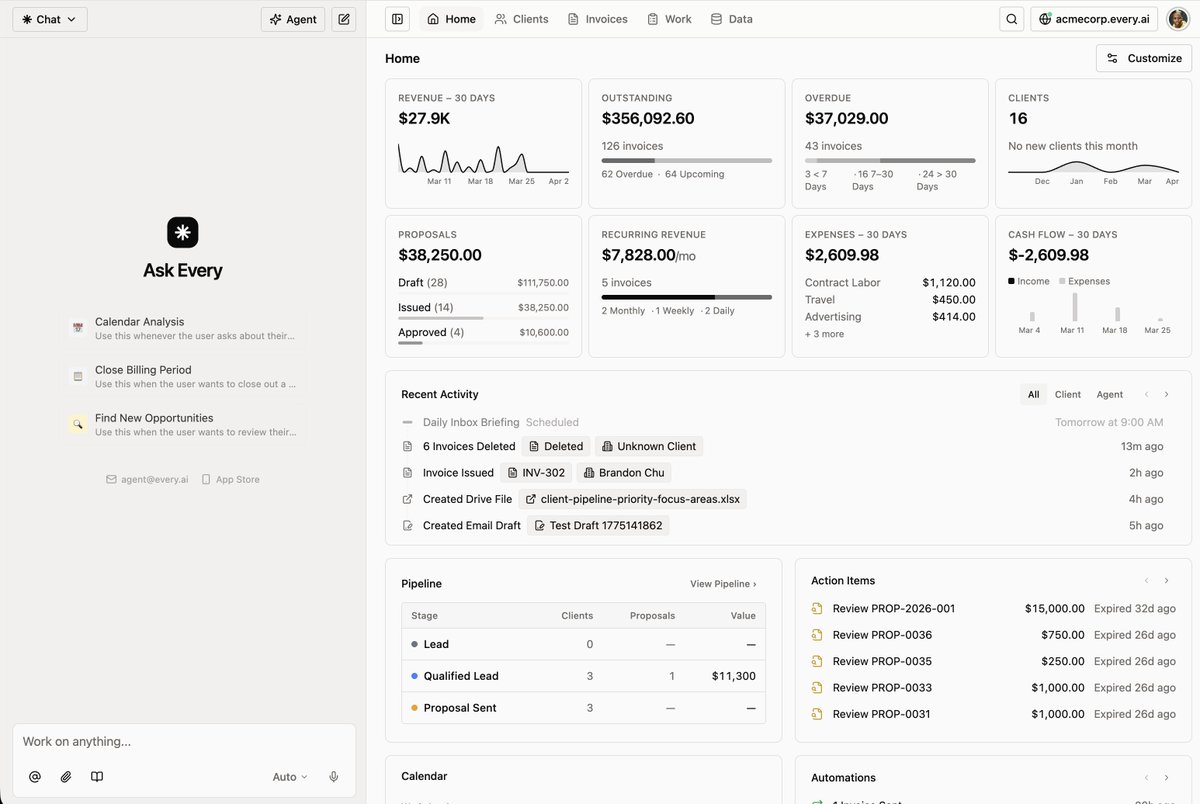
📊 New customizable dashboard — Your homepage is now a command center with widgets for key metrics, pipeline stages, client activity, and more. Show, hide, and rearrange to match how you work.
🎨 Redesigned interface — Cleaner layouts, better information density, and an expanded agent chat with easier access to all your data throughout the app.
New: Every now plugs into @claudeai and @ChatGPTapp.
Your AI assistant can now work with Every to run your business — invoices, clients, proposals, payments, expenses, bookings.
🔌 Works with Claude Cowork or Code, ChatGPT in Developer Mode, or any MCP-compatible client.
New in Every (W13 '26)
🎙️ Brand voice and tone — Tell your agent how to sound across clients, teammates, and external contacts. Set it yourself or let the agent auto-generate it by analyzing your past emails.
Update: the agent now watches how you work and learns from it. Eg. Every remembers if you always exclude tax on a certain client's invoices, or prefer a specific tone in proposals
We call these Business Preferences.