So, let’s not wait anymore and learn all the steps to transfer Microsoft Authenticator data on your new phone.
Read the full article: How to Transfer Microsoft Authenticator to New Phone?
▸ https://t.co/YxsxSAEnTY
#Microsoft#EasyGuide
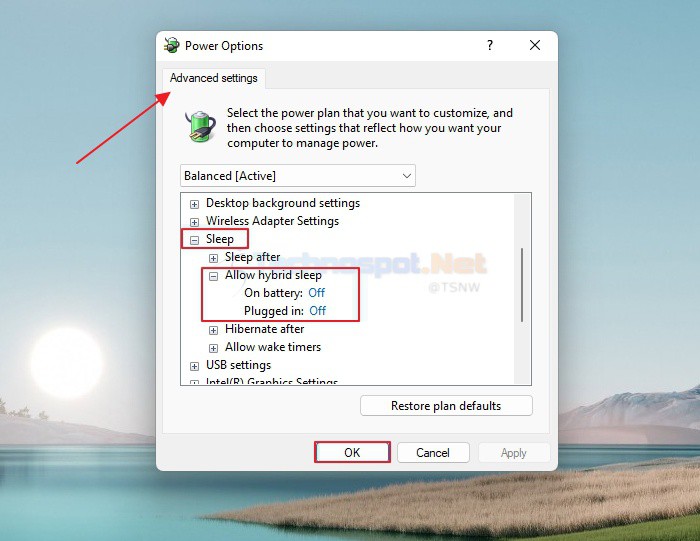
Hybrid sleep is another power option linked to the monitor turning off during boot issues.
Read more 👉 https://t.co/VduQMXQOtP
#EasyGuide#Windows10#Windows11
Your monitor might not turn on after a boot because of a loose or damaged cable connection between your monitor and computer.
Read the full article: Fix: Monitors Turning Off After Boot on Windows
▸ https://t.co/TCzZJG52c7
#EasyGuide#Windows10#Windows11
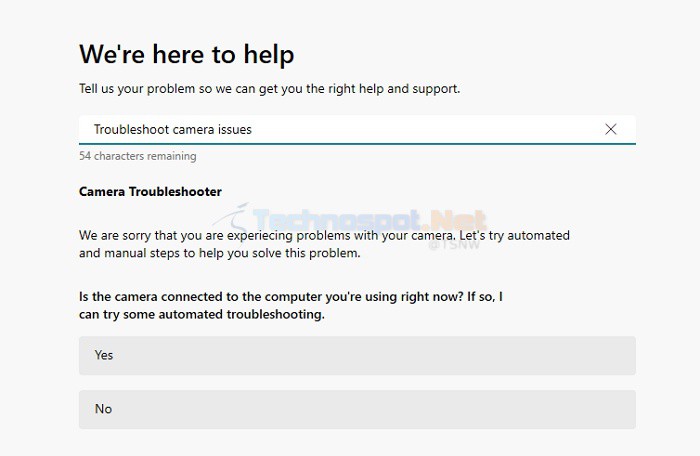
How to Use Camera Troubleshooter in the Get Help App on Windows
Read the full article: How to Use Camera Troubleshooter in the Get Help App on Windows
▸ https://t.co/oY5vVxrfab
#EasyGuide#Windows10#Windows11
You need to adjust your microphone volume from your device or your PC’s settings menu to ensure that voice typing can hear you.
Read the full article: Fix: Voice Typing Not Working on Windows PC
▸ https://t.co/YWVZxsXYDz
#EasyGuide#Windows10#Windows11
Editing Facebook comments is quite a simple task; the best part is you don’t need any add-ons to do the same.
Read the full article: How to Edit Your Facebook Comment
▸ https://t.co/ic1vORhkgF
#EasyGuide#Windows10#Windows11
Now that you know how exactly the Program compatibility troubleshooter works, let’s learn how to use the new program compatibility troubleshooter in the Get Help app of Windows.
Read more 👉 https://t.co/Tz2hcXJ59x
#EasyGuide#Windows10#Windows11
One of the proposed techniques ought to resolve the VLC input file error, allowing you to resume enjoying seamless playback in VLC Media Player.
Read more 👉 https://t.co/JCEsbNiyNF
#EasyGuide#Windows10#Windows11
In this article, we learned how to use the Camera Troubleshooter in the Get Help app for Windows.
Read the full article: How to Use Camera Troubleshooter in the Get Help App on Windows
▸ https://t.co/a0jTSGZNeS
#EasyGuide#Windows10#Windows11
In this section, we will look at some methods to fix the USB drive showing an unknown capacity cannot format error.
Read more 👉 https://t.co/xkhgCWoCwV
#EasyGuide#Windows10#Windows11
Once it restarts, fill in the login credentials and check whether the error code E8 reappears.
Read more 👉 https://t.co/9nZgIPQHmC
#EasyGuide#Windows10#Windows11
If a file’s signature is not present in the TrID database, the software may struggle to identify the file type accurately.
Read more 👉 https://t.co/LNFCRA93wo
#EasyGuide#Windows10#Windows11
In this article, we will learn how to use Camera Troubleshooter in the Get Help app on Windows.
Read more 👉 https://t.co/fJEtkUpCuy
#EasyGuide#Windows10#Windows11
Text Effects- For making flyers, banners, or social media posts, you can generate your preferred images and add word phrases with text effects.
Read the full article: Best AI Tools That Can Generate Image Based on Text
▸ https://t.co/6zyI66aTVa
#EasyGuide#Windows10
Please scroll down and locate Microsoft Edge from the list of programs, right-click on it, and choose the Disable option from the context menu.
Read the full article: Fix: Microsoft Edge Keep Opening Itself on Windows
▸ https://t.co/PBjBLP1nIa
#EasyGuide#Windows10