Interested in how the modern web works? Think #webperf is important? Then check out my book “HTTP/2 in Action” with @ManningBooks at https://t.co/YtMJCZsLMq
And if you’ve ever considered writing a book then check out the story behind the book at https://t.co/qKpeRS3Dwn
#http2
@FirefoxWebDevs@fzorbie Last part of this (the streaming APIs) has just been merged into the HTML Living Standard so should all be fully specced now!!
And @hjanuschka started working on the first part (<template for>) in Firefox behind the `dom.template-for.enabled` flag!! (still WIP)
When a tab is hidden (& visibilitychange happens) you should take that as the last opportunity to reliably fire events (save state, fire analytics...) rather than assume unload will fire late (it often doesn't). APIs like fetchLater also help here.
Hit me up with any questions?
The `unload` event no longer fires in Chrome by default!
With the rise of the mobile web this has become increasingly unreliable and we think that's a footgun for devs who think it works.
We've spent the last 3 years carefully removing it from Chrome:
https://t.co/rdVNWOVPBp
People do not open a page read it, and then close it cleanly.
The modern web is more complex with pages backgrounded, often silently killed in the background (by the OS & by users) or navigated away from before being restored by going back.
Unload did not fire for those.
Experimental soft navigation data now available in CrUX!!
If your site is an SPA then see how your own Core Web Vitals data will change at: https://t.co/IYa9CTdkyB
And read this blog post for more details about how Core Web Vitals change in general:
https://t.co/6pDl07j8IB
@chrispholder@ChromeUXReport@bryanmcquade Saying that we 100% recommend sites use our thresholds as a starting point, and not the end goal!
Find the thresholds that matter to you and your users.
If you're a complex app maybe a slow initial load is acceptable (like desktop apps) and post-load soft navs should be faster.
@chrispholder@ChromeUXReport@bryanmcquade Different thresholds suggests "good" varies. Which is not really true.
It also complicates things. And CWV are complicated enough already.
It's the same reason we don't have different thresholds per country as I wrote about here (in my pre-Google days!):
https://t.co/v71CyiO06A
@Toufeeq86531438@ChromiumDev Testing https://t.co/8BFlsV8w0n on Chrome Canary 13.3.0 Lighthouse in DevTools doesn't show the CSS as render-blocking for me.
I agree it does show on PageSpeed Insights but, as that runs slower machines, it's entirely possible it will show different as it loads differently.
Track exactly when blocks of content load in our new origin trial → https://t.co/eDQyzZEIUs
Container Timing extends Element Timing so you can measure when entire components like widgets or sidebars are available to your users.
@xopek59 FYI, we (Chrome) are changing the values of this and this will start to be rolled out to users from next week:
https://t.co/tR0sfik6bj
If you are blocking based on values of 16 or 32, then this will block real users going forward!
Don't suppose anyone in my circle knows anyone working at X engineering? Need to discuss a potential issue preventing some users from Chrome 146 logging in. @XDevelopers@engineering
Is there anything more frustrating in the world that trying to create a child's @EA games account? Inconsistent login options (Google sometimes appears, sometimes doesn't), you need a desktop app not a mobile app, you can't login using EA ID online, but can't set an email. Sigh…
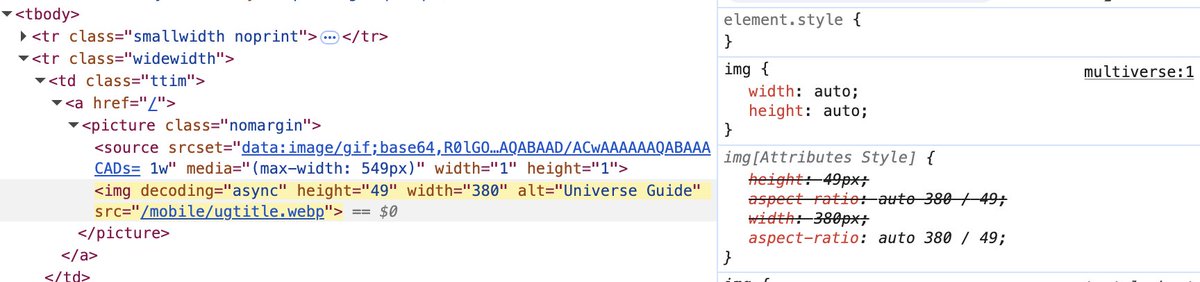
@NigelWhitworth You have both `height` and `width` set to `auto`, meaning the browser doesn't know how to use those supplied dimensions.
You only need to use `auto` if setting a max-width (or max-height) and should only set `auto` to whichever you aren't setting a max value for.