⚡Forum you should join to become a good Developer in 2022⚡
I shared 5 communities where you can quickly get your issues fixed.
/ thread 🧵🧶
#web3#100DaysOfCode
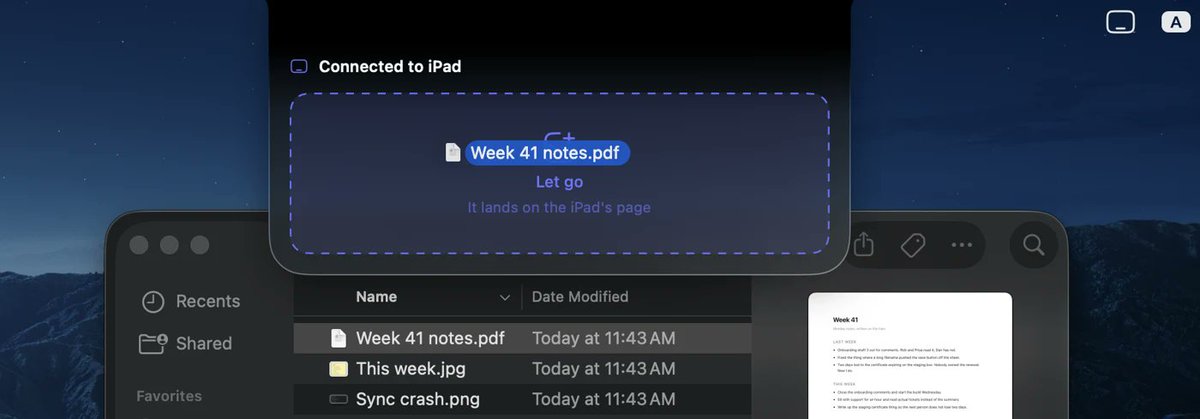
@thmsrx yeah a 139mb pdf did this to me, dropped it and nothing happened, no error, took me a while to work out it was just the size. it should say so before you let go
two strangers told me i'd built the wrong half of my app.
grad students, a day apart, both mid paper, both asking the same thing. can it open PDFs. it could not.
now: drop it on the mac, mark it up on the ipad, flick it back.
#buildinpublic#iPad
both free, no login, notes stay in your own iCloud
ipad https://t.co/9uUOnVl2Rd
mac https://t.co/T2zPc9Ofrk
i built this because two people asked. tell me what breaks your day.
limits, before anyone downloads it.
no android, the whole thing leans on PencilKit. mac side needs macOS 15. the link between the machines carries about 48MB so a big scanned PDF gets refused.
if you only own an ipad, half of it does nothing for you.
the mac half has no window and no menu bar icon. it is an island that drops out of the notch.
screenshots fly up into it, pages land in it, and the rest of the time it is not there.
i was fairly sure this was a bad idea when i built it.
what worked is embarrassing. cut each page at the gaps between text lines, keep the pieces as they are, put every piece back where it sat.
nothing gets redrawn. you just get the real page with room opened between its lines, and you write in the gaps.
the PDF part took three goes.
first i tried redrawing the text as pen strokes, so the document would be handwriting too. looked bad at every zoom and i could not say why.
then Hershey fonts, the single stroke ones plotters use. lost two days, mostly to the lowercase i.
I stopped using Apple Notes and GoodNotes on my iPad.
Built my own: a handwriting notebook where a Mac screenshot lands on the page a second later, you write around it, and one flick pastes the whole page back on the Mac.
Pen Friend [In Store Review]
#buildinpublic#indiedev
@aigame_lab you're right that it was a 沼. the one-flick-whole-page part took the longest, mostly keeping the Mac link live so it never feels like a sync step.
out now if you want to actually touch it:
iPad: https://t.co/9uUOnVl2Rd
Mac (free): https://t.co/UqseZU5U9l
@AppLauncher_App you named the exact loop I built it for. screenshot in, annotate, flick back out.
live as of this morning, both halves:
iPad: https://t.co/9uUOnVl2Rd
Mac (free): https://t.co/UqseZU5U9l
built supermcp: a mac app + MCP server that lets claude/cursor/windsurf read reddit, x, linkedin and more, no API keys. it uses your own logged-in chrome session locally, read-only, nothing leaves your machine. mac apple silicon only, free up to 100/day.
https://t.co/teveZEDa4w
Reddit API: $0.40 per 1K requests
Twitter API: $100/month minimum just to READ
Google Trends: no official API at all
I got tired of paying for data I can already see in my browser. So I built SuperMCP.
🧵
It's on PyPI now.
If you use Claude Code or Cursor and want Reddit/Twitter/Trends data without API bills:
https://t.co/e2fCgdIeRU
What data sources do you wish your AI tools had access to?
I tried doing this the "right way" first.
Registered a Reddit OAuth app. Got rate limited after 10 requests. Realized my AI agent would burn through the paid tier in one conversation.
Then I thought: why not just use the Chrome session I already have?