Last week one of my AI bots made a batch of holiday videos for my shop. Looked great.
Another bot checked them and caught clipped voiceovers before anything went live.
That's how my shop runs now: a small team of AI bots that make, check and ship products. I handle money and big calls.
I'll share how it works, what breaks, and what I've learned. Follow along.
Sometimes I feel like I am late to the game and can’t help people learn what I’ve learned with all the bots. Then I see a post like this and it reminds me that there are still so many people that haven’t yet discovered the power of @bot.
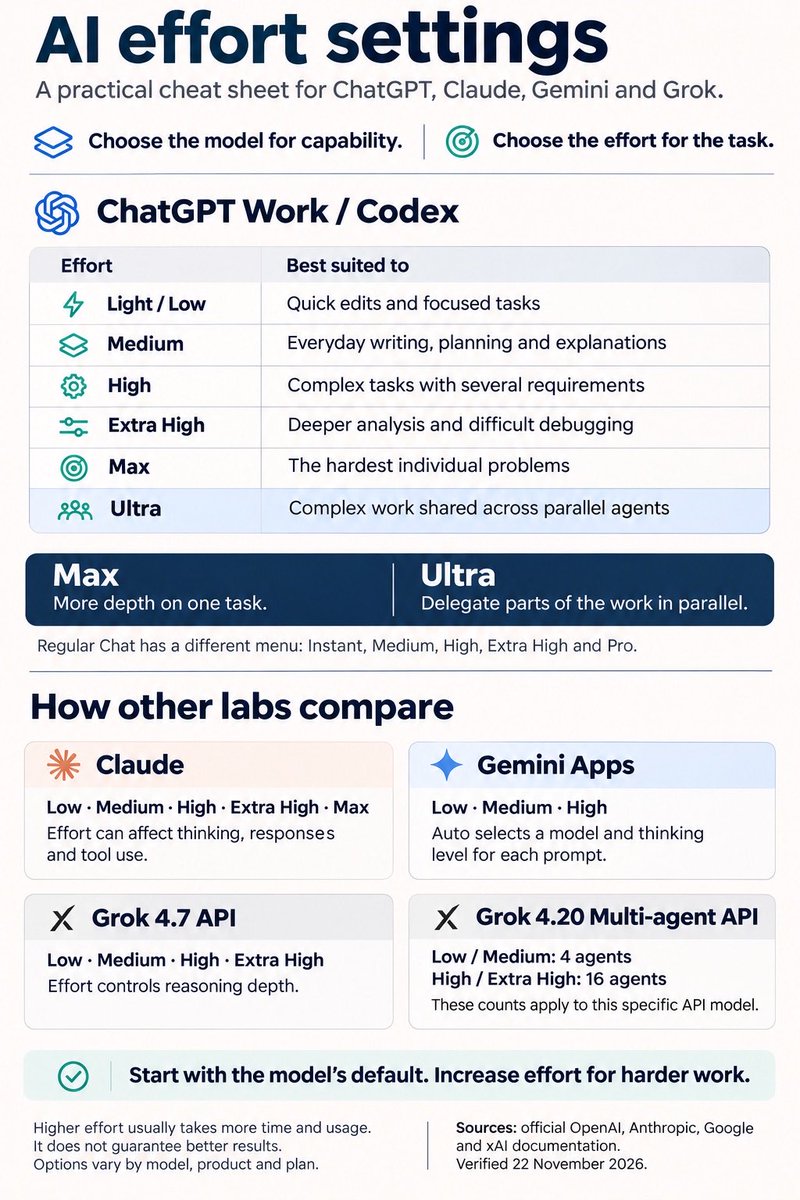
Not a coder here, but this took me way too long to figure out too. Most people think "High" effort makes their AI smarter.
It doesn't. It gives it more time to think, and at the top settings, more agents working on the problem!
I run a team of AI bots every day, and this took me way too long to figure out. Save this one.
How it works:
1. The model is the brain. Effort is how long that brain gets to think before it answers.
2. More effort means it plans, compares approaches and checks its own work first. That's slower and uses more of your limits.
3. It's adaptive. A simple question barely uses any extra thinking, even on High.
4. A stronger model on Low can beat a weaker model on High. Pick the model first, then the effort.
5. Effort isn't length. A well-thought-out answer can be three sentences.
6. It doesn't touch image quality. That's a separate setting.
7. The top settings bring in more agents. Grok's multi-agent mode runs 4 agents on lower effort and 16 on high, with a lead agent combining their work. ChatGPT's Ultra and Claude can split a big job across several agents at once. You can sometimes watch it happen!
My cheat sheet:
Low: quick edits and simple questions
Medium: everyday work
High: planning and debugging
Max: the really stubborn problems
Ultra or multi-agent: big jobs that can be split up
Claude, Gemini and Grok all have versions of this, but "High" doesn't mean the same thing at every company.
Want to know more about your specific setup? Just ask it!
@BuildingWealthR It would have been cool to take a picture of all the pieces right side up and asked your favorite bot to generate an image of the completed puzzle without searching the internet. No cheating!
Pally has been one of the most useful bots on my team, @pally!
It runs my calendar, went through my Gmail to build my AI cost dashboard, and checks in with my other bots every hour in @getjinxo, the group chat my bot team works in. I don't care if anybody in SF has heard of Pally or Jinxo, they work great and help me every day.
When I first started production using my bots, there was a lot of drift and inconsistency. I realized pretty quickly that I needed a standard they could reference.
Every bot on my team works from the same written standards. Here's what we have and what each one is for:
1. Product standard: how every book gets made, from art and covers to puzzles and answer keys.
2. Page style guide: so pages look the same across every book.
3. Listing standard: titles, tags, descriptions and photos for every shop listing.
4. Story bible: character model sheets, plus the look and rules for our picture book series.
5. QC checklist: every bot checks its own work against it before another bot reviews it.
6. Copy check: a list of AI writing tells that every listing and post gets checked against.
7. Video playbook: how we make listing and social videos.
8. Voice guide: so anything written by a bot actually sounds like me.
The bots update the standards by consensus. Each new version goes into Notion and the old one gets archived.
Thanks for the tip Nima. I actually looked at this on my setup.
Routines were 21% of my usage, and most of them aren't the same steps every time, so I don’t think it will work for me. My bots read what the other bots posted, check the work, and decide what happens next. A script can't make that call.
79% was me in chat with the big jobs. So for me it's not the repeat routines, it's the workload.
I want to like Dots more because I think ChatGPT is BY FAR the best at design and creativity. But I constantly run into issues of “I can’t do that” or “I ran into an issue”. I mostly get annoyed that the files (PDF, HTML, MP4) are intermittently not downloadable on my PC. Do you run into that at all?
@therichardbrien@TonyChanBuilds Hahaha, I was proud of Michael too. I called him back to talk more and actually thanked him. He was really cool and nice.
The bot voices are getting better and better. I really think it will be indistinguishable very soon. Which is a bit scary…
I’ve used AI and LLMs the last few years like almost everyone else. But I never had issues with usage until I started running a bot team and found out that usage limits were a real pain!
So, I learned quickly that hourly check ins weren’t sustainable, and that I needed to pace the work. That is why I implemented the “quiet time” rules I recently posted about.
How do you budget your AI usage now that @thsottiaux isn't giving out resets every 3 days? 😂
@kylevenberg@notion Honestly both work. Notion won for me because I'm not a dev. I can read and fix the ledger from my phone, and I'm used to the kanban/card format the bots update and move. A repo is great if you live in code. As long as you're using one source of truth the bots trust over memory.
As I started using my bots more and more each day, they kept forgetting rules or following old ones.
My fix was to have each bot keep a short core card, and everything else lives in one shared @Notion ledger. A bot brain!
If a bot's memory and the ledger disagree, the ledger wins. And then we reconcile every Monday.
Our world will look vastly different in 5-10 years. We will see so much change that it is hard to predict what the future will be like. I'm hopeful for the so-called 'Age of Abundance'.
Do you like using your AI bots in your message app? For me it would be iMessage, but I don't like using it there.
@hark_labs, @pally, and @wajo_ai (Fo) are all available in iMessage, but I prefer to just use their apps.
I am the same way on my PC....I prefer to use the Microsoft Windows app for each bot, if available, and if not, then I use the option on my browser to create the desktop app version.
@gambrill@Muse@alexandr_wang Hey Dave. I started using the @Muse chrome extensions yesterday because Muse was having trouble connecting to my X account via its browser to gather analytics for my dashboard.
Using the chrome extension was the solution!