Want 100+ tested Windows optimizations without doing them manually?
Download Ultimate Tweaks and use code ULTW50k for 25% OFF.
🔗 https://t.co/5wtHcVfywB
🚨 This Windows setting could be costing you FPS
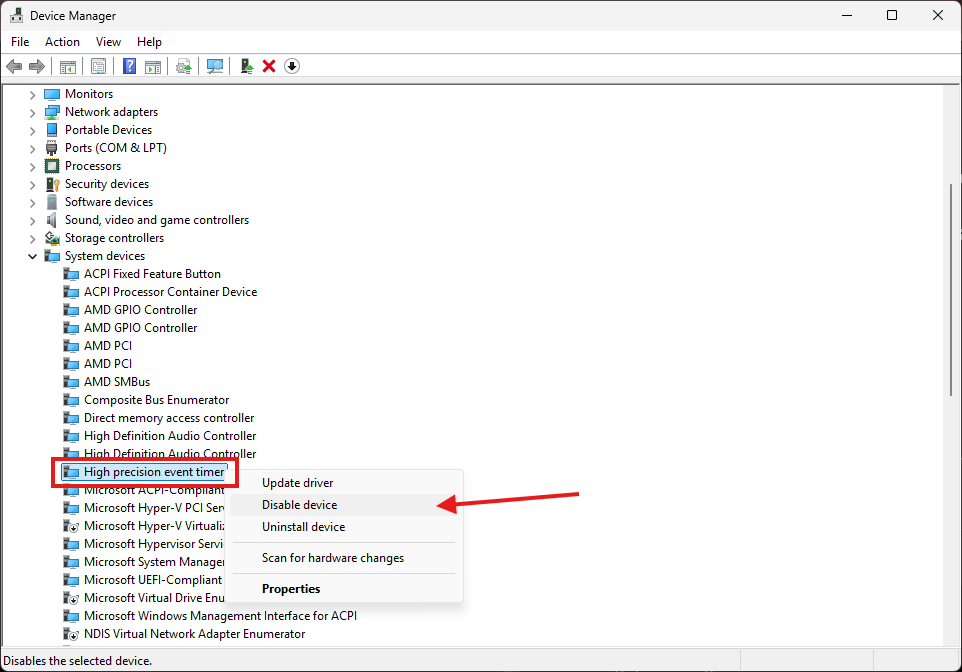
Most gamers never disable High Precision Event Timer (HPET).
📍Open Device Manager
→ System Devices
→ High Precision Event Timer
→ Disable Device
Restart your PC and compare your FPS.
🚀 Hidden Windows Setting for Smoother Gaming
Windows puts some CPU cores to sleep to save power.
Waking those cores takes time.
By lowering the Core Parking Overutilization Threshold, Windows can wake them up sooner during gameplay, which may reduce micro stutters on some PCs.
1️⃣ Unlock it
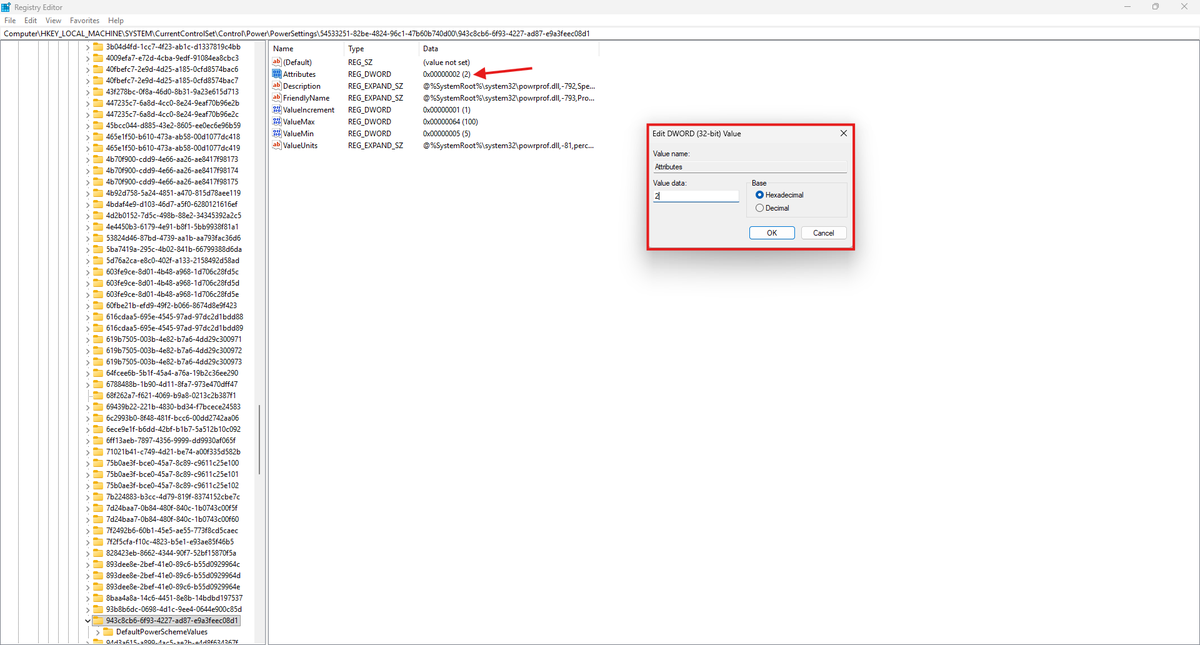
📍 Regedit:
HKEY_LOCAL_MACHINE\SYSTEM\CurrentControlSet\Control\Power\PowerSettings\54533251-82be-4824-96c1-47b60b740d00\943c8cb6-6f93-4227-ad87-e9a3feec08d1
Change:
Attributes = 2
2️⃣ Change the value
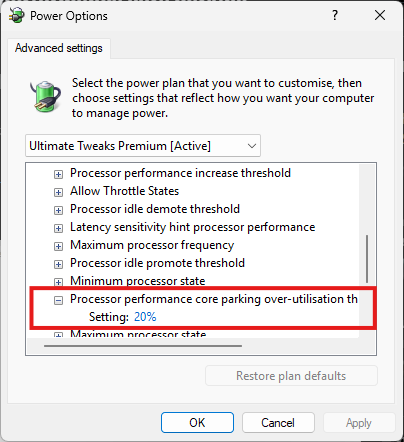
Control Panel → Power Options → Change plan settings → Advanced power settings → Processor power management
Set Processor performance core parking overutilization threshold to 20%.
🚨It won't magically increase FPS, but it can help Windows react faster to sudden CPU load and may reduce stutters on some systems.
Follow @ultimatetweakk for more Windows gaming tips. 🚀
🚨 Your Windows Security could be stealing FPS.
Memory Integrity is enabled by default on many PCs.
While it improves security, it can also increase CPU overhead and reduce gaming performance on some systems.
✅Check it in 10 seconds:
Open Windows Security
→ Device Security
→ Core Isolation
→ Turn Memory Integrity OFF
→ Restart your PC
⚠️ This reduces Windows security, but many competitive gamers choose to disable it for maximum performance.
THIS HAS GOT TO BE THE BEST TWEAKING AI EVER!
In 10 seconds he analyzed my PC and gave me the best tweaks for more FPS & lower delay!
(Not clickbait) Ultimate Tweaks 🚀
🚨 Fortnite feels worse after the update?
Copy these launch options:
-USEALLAVAILABLECORES -NOSPLASH -NOTEXTURESTREAMING -LANPLAY
Then open Ultimate Tweaks → Game Library → Fortnite for even more optimizations.
Let me know if it helped 👇
🚨 HIDDEN NVIDIA TWEAK
Most gamers don't know about this hidden NVIDIA driver setting.
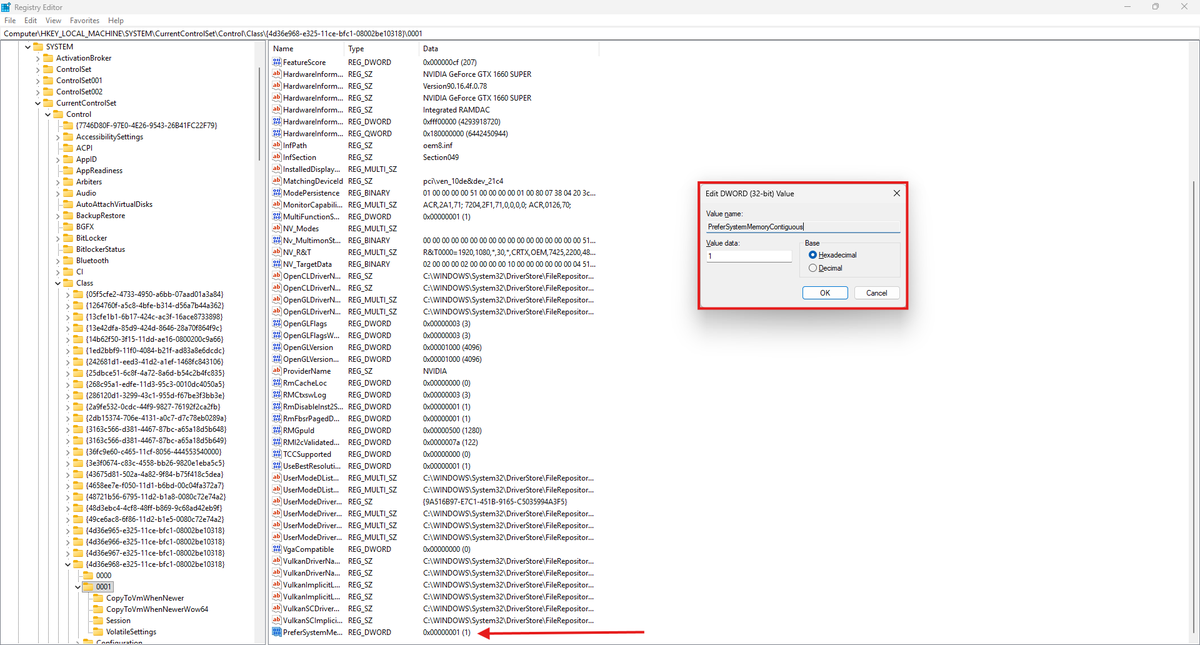
It tells the driver to prefer contiguous system memory, which may improve frame consistency and reduce stuttering on some PCs.
🛠️ How to apply:
1. Press Win + R, type regedit, and press Enter.
2. Go to:
Computer\HKEY_LOCAL_MACHINE\SYSTEM\CurrentControlSet\Control\Class\{4d36e968-e325-11ce-bfc1-08002be10318}
3. Open the folder (0000, 0001, etc.) that contains your NVIDIA GPU (look for HardwareInformation.AdapterString).
4. Right-click → New → DWORD (32-bit) Value and name it: PreferSystemMemoryContiguous
5. Set the value to 1 and restart your PC.
@derkbrian You're right that it's mainly aimed at frame consistency, not boosting average FPS. We've seen it reduce stuttering on some systems, especially in games that stream lots of assets, but results vary depending on hardware and workload.
🚨 Fortnite feels worse after the update?
Copy these launch options:
-USEALLAVAILABLECORES -NOSPLASH -NOTEXTURESTREAMING -LANPLAY
Then open Ultimate Tweaks → Game Library → Fortnite for even more optimizations.
Let me know if it helped 👇
THIS HAS GOT TO BE THE BEST TWEAKING AI EVER!
In 10 seconds he analyzed my PC and gave me the best tweaks for more FPS & lower delay!
(Not clickbait) Ultimate Tweaks 🚀
Hidden Windows Tip 👀
Most gamers have never tried this.
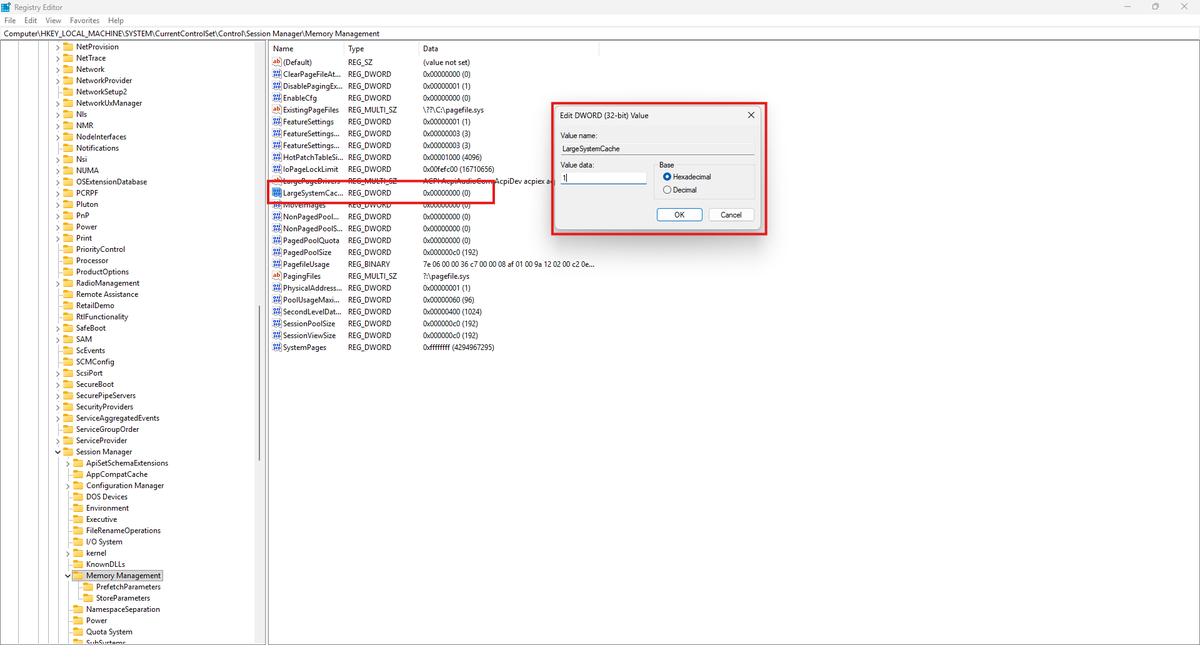
Enable LargeSystemCache to allow Windows to use a larger system file cache, which may help reduce microstuttering in games.
📍 Registry:
HKEY_LOCAL_MACHINE\SYSTEM\CurrentControlSet\Control\Session Manager\Memory Management
Change:
LargeSystemCache = 1
Results vary depending on your hardware and workload, so benchmark before and after.
🚨 Windows is wasting CPU power compressing your RAM while you game.
If you have 16GB+ RAM, disable Memory Compression for smoother gameplay and better 1% lows.
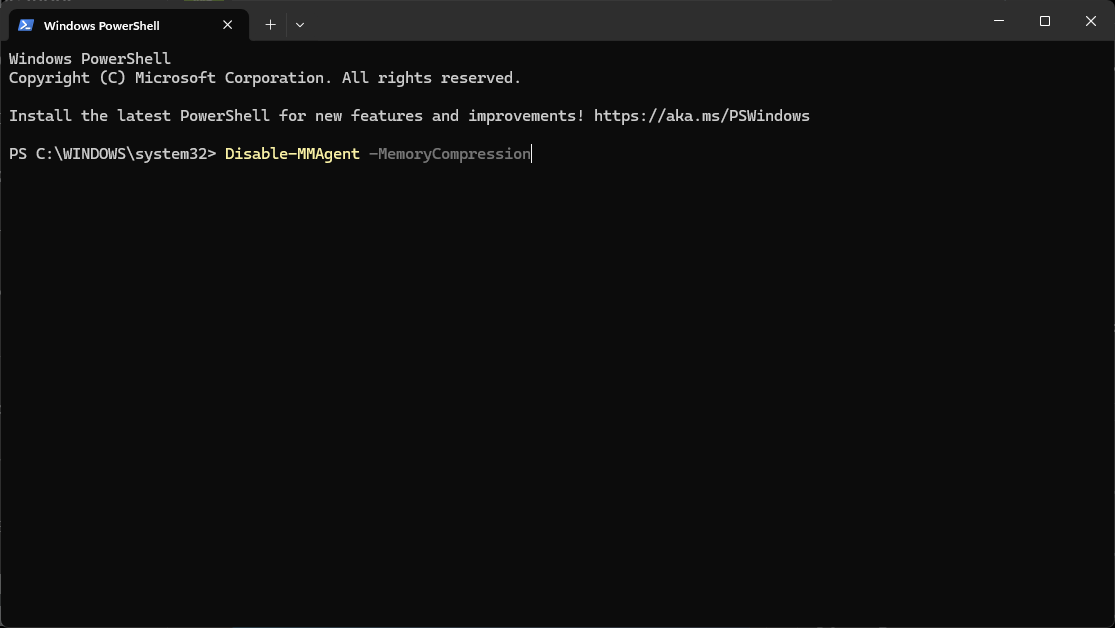
🛠️ Open PowerShell (Admin) and run:
Disable-MMAgent -MemoryCompression
🔄 Restart your PC.
Follow for more hidden Windows optimization tips.
Follow @ultimatetweakk for more FPS & Windows optimization tips.
🚀 Join 200,000+ gamers who have optimized their PC for FREE in seconds: https://t.co/xNQ1MwwIyX
🚨 Windows is wasting CPU power compressing your RAM while you game.
If you have 16GB+ RAM, disable Memory Compression for smoother gameplay and better 1% lows.
🛠️ Open PowerShell (Admin) and run:
Disable-MMAgent -MemoryCompression
🔄 Restart your PC.
Follow for more hidden Windows optimization tips.
If 0000 isn't your GPU, check the other folders (0001, 0002...) until you find it.
For more tweaks check out our software, +200k already tried it! https://t.co/xNQ1MwwIyX
Follow @ultimatetweakk for more FPS & Windows optimization tips. 🚀
Join 200,000+ gamers who have optimized their PC for FREE in seconds:
https://t.co/Vlyw4ynOmc
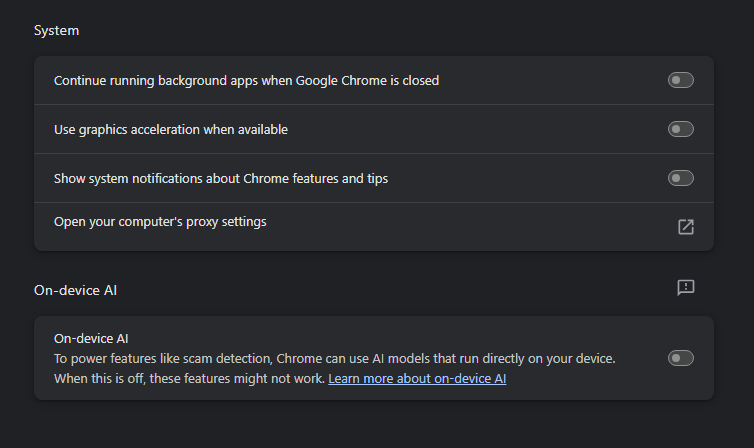
🚨 Your browser could be STEALING your FPS.
Disable these 4 settings, then restart your browser.
✅ Stops your browser from running in the background after you close it.
✅ Frees up CPU & RAM for gaming.
Works on Chrome, Edge, Opera, Brave, and most Chromium browsers.