New COLMAP version out today. There's a lot to be excited about with it. Faster across the board and you can now reconstruct directly from panoramic images
Release: LichtFeld Studio v0.5.3 is out!
With 316 commits merged into master, this release is a huge step forward for LichtFeld Studio.
What's new in v0.5.3
• Vulkan viewer/rendering migration: New Vulkan viewport pipeline, pass graph, VkSplat renderer, Vulkan point-cloud renderer, 3DGUT/VkSplat support, improved alpha/depth composition, tighter CUDA/Vulkan interoperability, and device matching on multi-GPU systems.
• RAD + LOD workflow: Added RAD file export/import, RAD LOD viewer, Spark-style GPU LOD selection, GPU-driven page prefetching, a bounded VRAM pool, out-of-core PLY-to-RAD LOD conversion, and RAD import/export speedups of approximately 3–5×.
• HiGS / macro-tile inference: Added a macro-tile inference path for the Vulkan viewer, including macro sorting, batched rasterization, composition, and capacity management.
• Asset Manager: Added and significantly enhanced the Asset Manager with thumbnails, SH information, faster synchronization, import-from-URL support, docked mode, data-loading popup integration, and general UI cleanup.
• Viewport export: Integrated viewport export directly into the application as a toolbar/overlay tool, added fast render_view_u8-style readback paths, fixed high-resolution clipping issues, improved orthographic export parity, resolved 32K image/video export problems, and added post-export GPU resource cleanup.
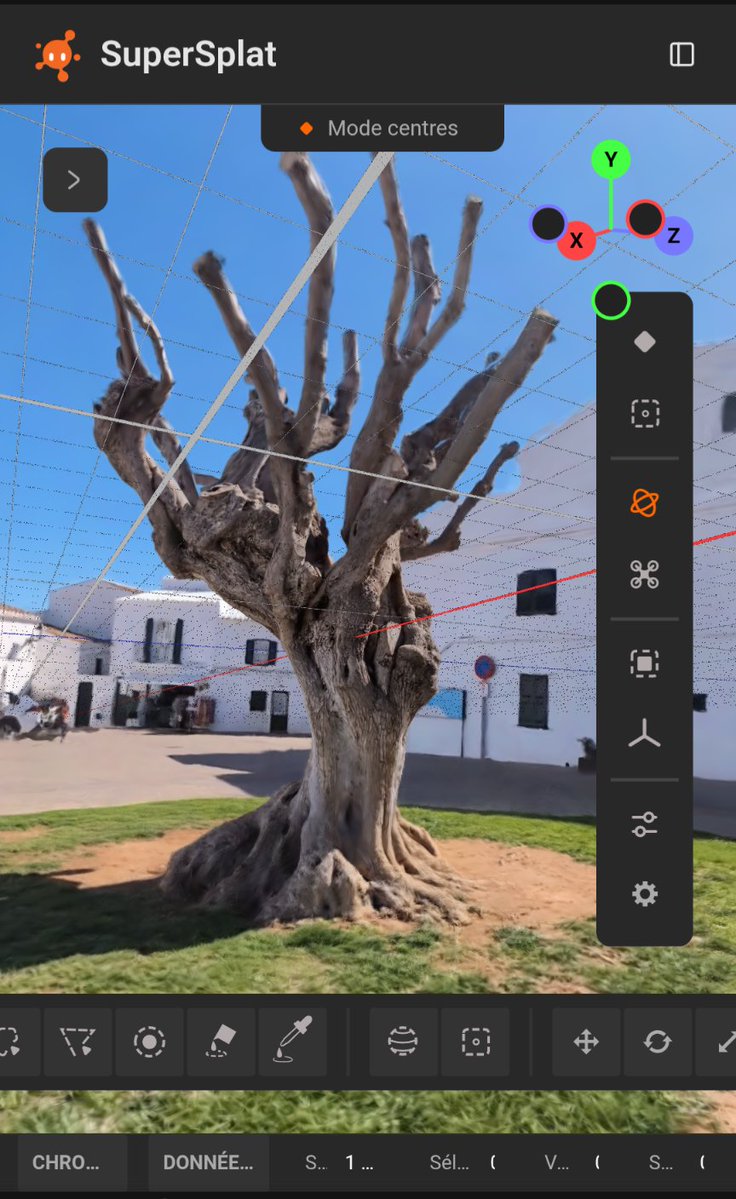
• Selection and tooling: Added and reworked selection toolbar controls, the Select menu, ring selection, color eyedropper, distance-from-center selection, faster point-cloud and zoomed-out selection paths, Vulkan measurement tool fixes, and drag-and-drop scene graph improvements.
• UI/RmlUi platform work: Major RmlUi redesign efforts, hot reloading for RML/RCSS/Python UI files, reactive UI/store integration, viewport toolbar flyouts, improved histogram interactions, input settings enhancements, custom TRS gizmos, and numerous panel, tooltip, and localization fixes.
• Windowing and UX: Added borderless window support, title bar drag/maximize/restore behavior, work-area-aware maximize functionality, resize responsiveness and performance improvements, and DPI/UI scaling fixes.
• Training and data features: Added adaptive depth loss and depth gradients for the EWA rasterizer, mask loading/application fixes, a new combined Ignore+Segment mask mode, --add-splat, --freeze, improved checkpoint and training state handling, and training speed and VRAM optimizations.
• COLMAP/equirectangular support: Added SPHERICAL/equirectangular camera model support and canonical EQUIRECTANGULAR handling, along with fixes for undistortion and camera export.
This release will be available to all supporters as a Windows binary via https://t.co/mdGITFOGVQ approximately in about an hour.
At the same time, LichtFeld Studio remains committed to being free and open source under GPLv3 and can also be built directly from source.
Please consider supporting the ongoing development of LichtFeld Studio through a donation via the portal or the supporters page.
Thank you to everyone who supports this project financially, contributes code, reports bugs, provides datasets, helps with the website, and contributes in countless other ways.
A special thank you to our foundational sponsor Core11 and our Gold Sponsor Volinga, whose support has helped make the current state of the software possible. Thank you as well to every donor and to all of our new Bronze Sponsors.
Looking ahead to v0.6
For the next major release, work will focus primarily on stability and user experience. This includes improved cleanup workflows and the ability to modify training parameters while training is in progress. I would also like to introduce a native .licht project format that allows users to save and restore their complete editor state.
You can find links to our main sponsors below. Please also visit our website to discover all our Bronze Sponsors.
Hint: We do not yet have a Silver Sponsor or Platinum 😉
1 Billion Gaussians (1,035,804,128 exactly) streaming to the viewer at 60fps (vsync) and 5GB VRAM.
There is no limit anymore to how much it can do.
Some need a billion dollar corp to make similar things happen, others need paid pseudo influencers without skills and knowledge to make your software look bad because someone is shitting his pants.
LichtFeld Studio is a product of love and passion. So help support this project by donating to it.
1B training on a single RTX 4090 will fall next.
Ply -> rad took 28min which is not optimized yet. There is in general some more room for optimization.
The dataset is just a 2x2 tile provided by:
3D scanning data created and provided by Andrii Shramko, TELEPORTOUR.
Links in comment to the dataset provider!
It's live now, everyone can create a dedicated event page with shopping cart, period, tags, rules, admins ... exactly as I was configuring each event when you used to ask me an event page.
YOU are in charge now :-)
https://t.co/z9sL91t4F6
I'm excited to share the Geo Register Plugin for LichtFeld Studio from the LichtFeld community!
This plugin helps bring Gaussian splat scenes into real-world geographic space. It registers a scene to WGS-84 and ECEF coordinates, so you can click any point on the model and get its latitude, longitude and altitude.
It supports multiple georeferencing sources, including EXIF GPS data, image position CSVs, RealityScan camera parameters and saved similarity transforms. Once the scene is registered, you can export geo-referenced splat models as LAS, LAZ or 3D Tiles datasets for use in GIS and 3D mapping workflows.
Built for anyone working with drone data, photogrammetry, Gaussian splatting, GIS, ArcGIS or CesiumJS.
Link in the comment below!
LichtFeld Studio v0.5.1 released!
Upgrading is highly recommended!
Highlights:
- MRNF densification strategy
- NanoGS sparsification
- Native File Dialogs on Linux, too
- 3DGS USD format import and export support
- Depth Mode selection
- Viewport Splitting
- Make LichtFeld optionally default for 3DGS file formats (ply, sogs, spz, etc) :)
- Many Bugfixes (weird edge cases, stability, UI quirks, sparsification, etc)
Thanks to every contributor. Special thanks to Core11 GmbH for continuous financial and non-financial support!
If you’re thinking of trying Gaussian Splatting with 360 images, I’d recommend this app called 360 Gaussian. It lets you combine alignment and training workflows through a UI, making it easy to experiment and find the best tools for your setup.
https://t.co/yRKqO0kTDU