Your AI can now check your Shipmail calendar before replying to an email, then create the meeting if needed.
Same mailbox, same permissions. This is the calendar it uses.
cool tip from one of our users.
you can install @useShipmail as an app with chrome, so it shows up directly in your dock (or the windows/linux equivalent).
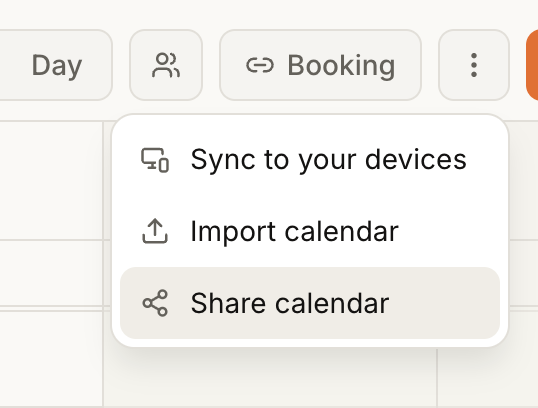
- user: "Is there a public link for calendars? I’d like my wife to be able to view mine without using my login."
- me: "give me 1h"
you can now share your calendar on shipmail
a user told me he spent 10 minutes setting up the shipmail mcp.
so i built connectors for chatgpt, claude, and the other ai tools instead.
30 seconds to install, and your ai gets access to your emails, calendars, booking pages, newsletters, team, etc.
you can now add your own branding to calendar invites in shipmail.
just go to domains → manage → overview and upload your logo.
your calendar invites will then look like this.
in shipmail, you can now send emails directly from an alias.
before, aliases were only for receiving.
now you can create an alias and both receive and send emails with it.
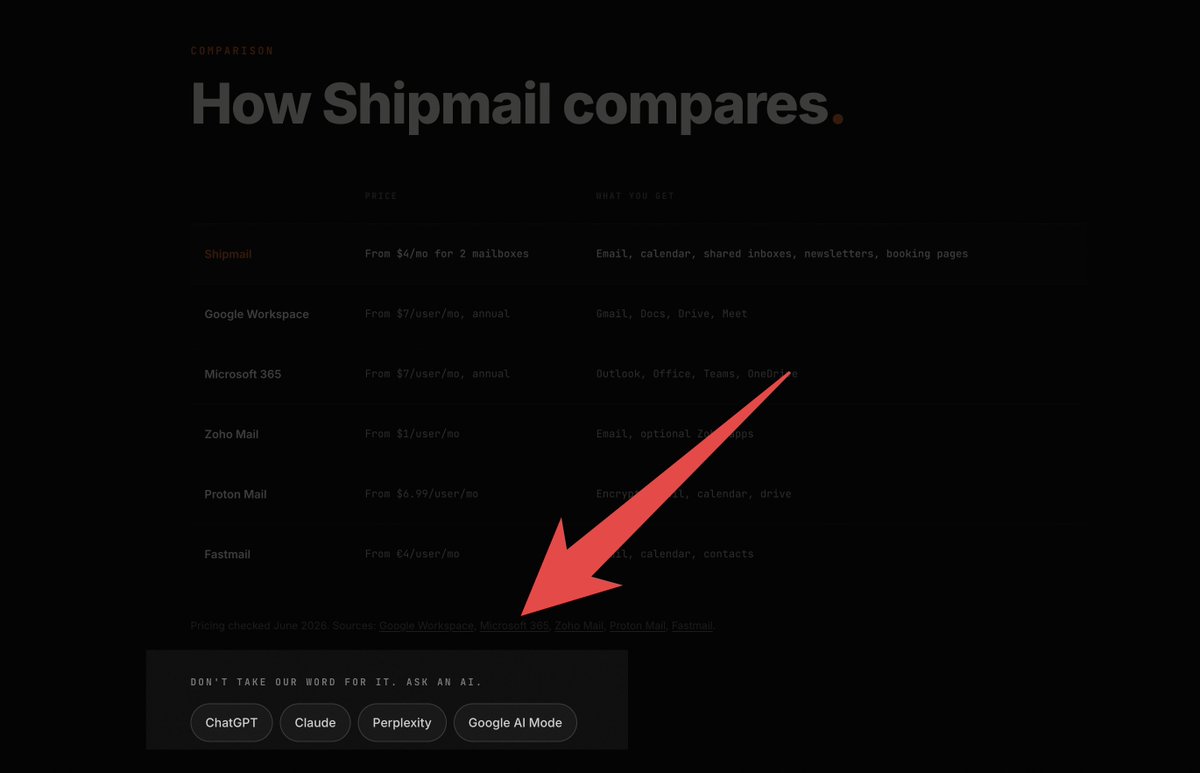
you can now directly see what your ai is saying about shipmail on our pricing page.
don't blindly trust what we say. verify it directly with chatgpt, claude, google, or whatever ai you use.
calendar is now built into shipmail.
you can create events, invite people, see your teammates' availability, recurring meetings, all the usual stuff.
it also syncs with apple calendar, fantastical, google calendar, etc. you can also import an existing calendar.
customize the views you like, save them in your preferences, and collaborate with your team.
it's also fully available through the shipmail api.
so claude, chatgpt, or whatever agent you use can check availability and create meetings for you.
slowly getting to the point where everything around email just lives inside shipmail.
one place for your email, calendar, and ai agents.
currently integrating google meet and zoom into shipmail's calendar.
normally this means creating apps in google cloud and the zoom marketplace, generating api keys, setting redirect urls, verifying emails, saving secrets…
so i just asked my ai to do it.
it has access to my shipmail mailbox, 1password, and browserbase.
it created both apps, registered everything, handled the verification emails through shipmail, and saved all the credentials in my 1password vault.
how can you not love this era?
some users were trying to import hundreds of thousands of emails from their previous mailbox and were hitting the 30GB storage limit included with each shipmail mailbox.
so now you can upgrade storage for a specific mailbox if you need more space.
shipmail is becoming so good.
i just asked claude to check my changelog and create this newsletter for me.
it used shipmail's api, created an audience with my users, drafted the newsletter, and scheduled it automatically.
don't pay $40/month for a separate newsletter tool. it's included in every shipmail plan, starting at $4/month.
my goal is simple: if it's related to email, it should be in shipmail.
right now you get an email provider, a modern inbox, newsletter sending, automations, team inboxes, contacts, calendars, and full ai agent support with your claude/chatgpt subscription, and much more.
i'm currently building the equivalent of calendly too, and a proper calendar with events, rsvps, and everything around scheduling.
i'm honestly not even trying to oversell it.
it's becoming the all-in-one email platform i always wanted to use.
you can now send newsletters directly from shipmail!
and yes, there's a real drag-and-drop editor. buttons, images, columns, callouts, and pretty much everything you'd expect from a newsletter builder.
you can also sync subscribers directly from your app. for example, add a "subscribe to my newsletter" button and it’ll automatically sync contacts to your shipmail audience.
the fun part is that your ai agents can handle everything too.
- want a newsletter based on your latest changelog? just ask it.
- want it to send automatically? it can do that too.
i actually sent the first shipmail newsletter today by asking my ai to read the changelog and generate the whole email for me.
before sending, shipmail also runs a bunch of checks to help avoid landing in spam. you'll get a readiness score with around 10 to 15 checks, so you know if your newsletter is ready or if something should be fixed first.
still a lot more coming, but i'm already really happy with how it turned out.
new "undo send" feature available in shipmail.
choose how long you want shipmail to keep an email before actually sending it, so you have a few seconds to undo it if you sent it by mistake :)