First look at my digital twin.
I built this with AI, but the work was learning the details until it felt like me.
New tools always show up. The ones who win are the ones who learn them.
Does this feel real to you?
#DigitalTwin#AI#Innovation
#ESPOLenlasNoticias
La decana de la escuela de negocios de la #ESPOL, @ESPAE, María Luisa Granda, fue entrevistada en el programa Contacto Directo, sobre las oportunidades y desafíos del empleo en Ecuador para el 2025. Durante su intervención, mencionó la importancia de alinear la oferta académica con las exigencias del mercado laboral. Revisa la entrevista en este enlace: https://t.co/b061JFjLn8
Adding statistical metrics to your plots can transform your visualizations from basic to highly informative. With ggplot2 in R and its versatile extensions, incorporating features like p-values, confidence intervals, and regression lines becomes both straightforward and visually appealing.
These are my top 5 packages for adding statistical metrics in ggplot2:
1️⃣ ggstatsplot: Combines statistical analysis and visualizations, displaying p-values, confidence intervals, and effect sizes directly on your plots.
2️⃣ ggpubr: Simplifies the process of adding p-values, statistical comparisons, and summaries to boxplots, bar charts, and more.
3️⃣ ggsignif: Adds significance brackets with p-values to plots like boxplots and bar charts, making statistical comparisons easy to interpret.
4️⃣ stat_poly_eq: Annotates regression equations, R² values, and p-values on scatter plots, ideal for showcasing relationships in linear models.
5️⃣ gghighlight: Highlights specific data points or groups in plots, drawing attention to key statistical trends or outliers while maintaining context.
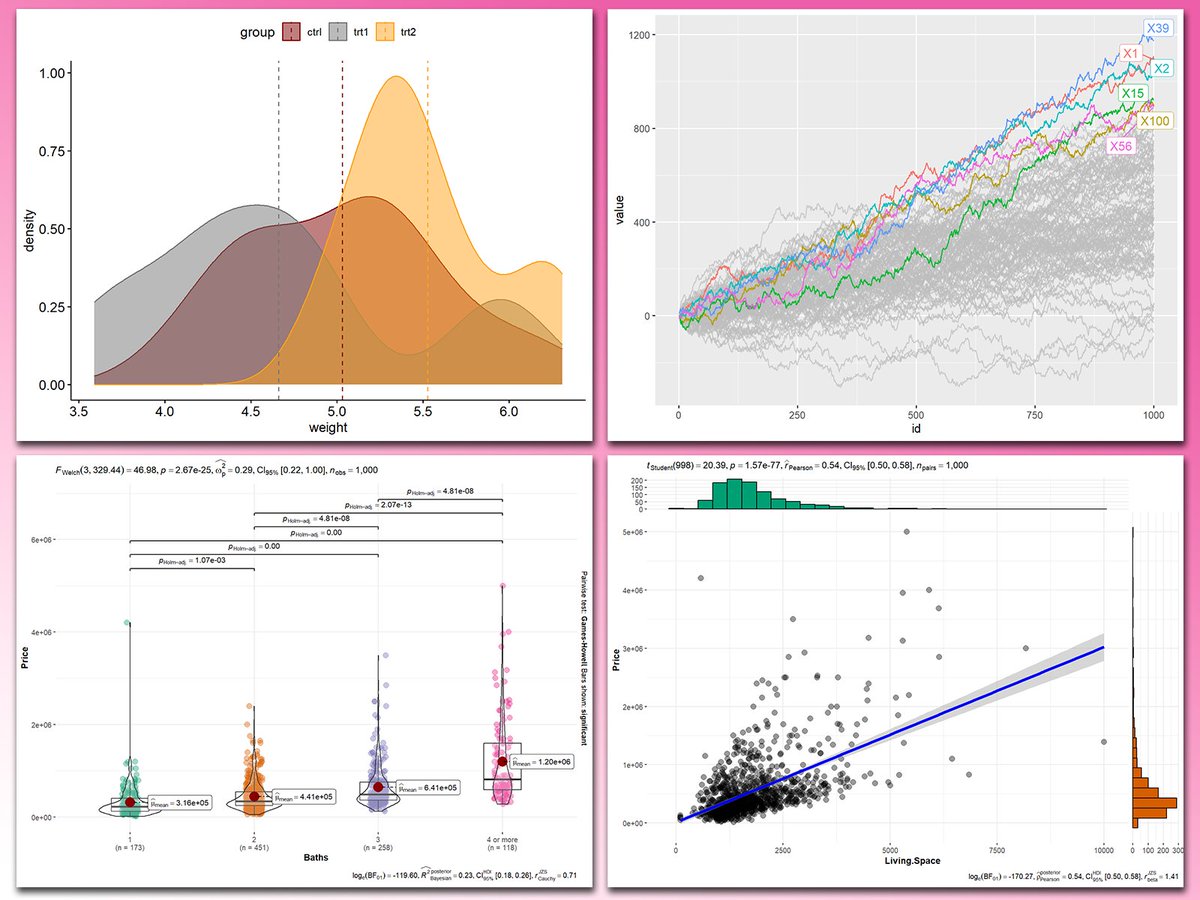
With these tools, integrating statistical insights into your ggplot2 visualizations becomes both effective and effortless. In the graph shown here, you can see examples of how these packages enhance your plots: a density plot with group means marked by vertical lines, a crowded line plot with selected series highlighted for clarity, a violin-boxplot hybrid with p-values annotated for group comparisons, and a scatter plot featuring a regression line, confidence intervals, and marginal histograms for added context. These enhancements demonstrate the power of ggplot2 extensions for making statistical insights visually accessible.
If you’d like to learn how to use ggplot2 and these extensions, join my online course, Data Visualization in R Using ggplot2 & Friends, starting November 25, 2024. I’ll guide you step-by-step to create visualizations packed with statistical insights!
Take a look here for more details: https://t.co/ztlEzoEDWv
#Rpackage #statisticsclass #DataAnalytics #datavis #tidyverse #RStats #R4DS #ggplot2 #coding #datastructure #DataVisualization
Understanding the difference between Standard Deviation (SD) and Standard Error (SE) is crucial for accurate data interpretation. SD measures the variability within your data, indicating how spread out the individual data points are from the mean.
In contrast, SE measures the uncertainty around the sample mean as an estimate of the population mean. It reflects the precision of the mean, with SE decreasing as the sample size increases, making your estimate more reliable.
The relationship between SD and SE is given by the formula: SE = SD / √(sample size). While SD remains relatively constant with larger samples, SE diminishes, highlighting the reduced uncertainty in the mean estimate.
A common mistake in research is using the “±” notation without specifying whether it refers to SD or SE, leading to potential misinterpretation of the data. Clear distinction is essential for transparency and accuracy in reporting.
Key Takeaways:
• Use SD to describe data variability.
• Use SE to indicate the precision of the mean.
• Always specify which measure you are reporting.
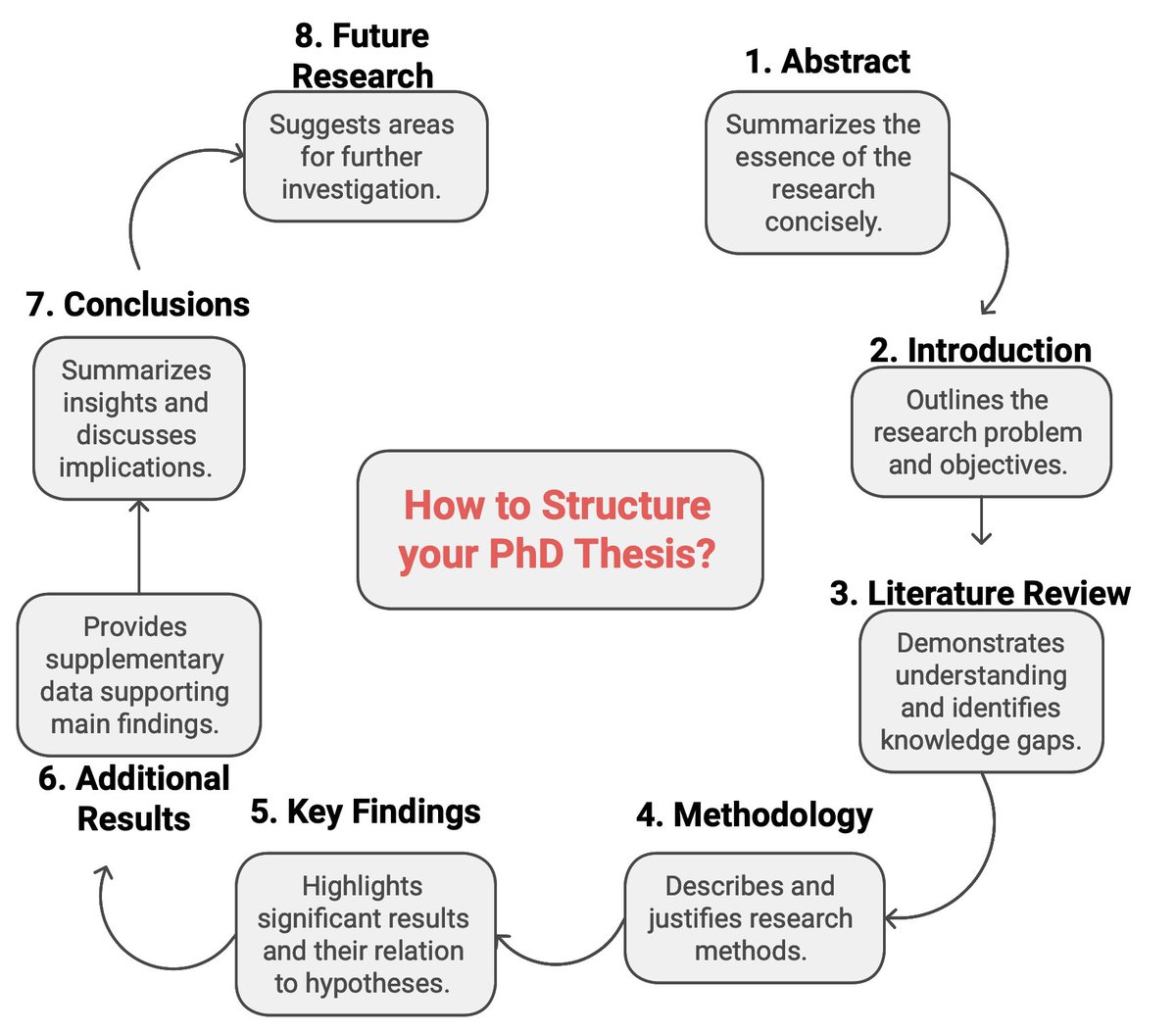
PhD Students — How to structure your PhD Thesis?
Here is a step-by-step guide for structuring your PhD thesis.
𝟏. 𝐀𝐛𝐬𝐭𝐫𝐚𝐜𝐭
➝ Summarize the essence of your research
➝ Keep it concise and informative
𝟐. 𝐈𝐧𝐭𝐫𝐨𝐝𝐮𝐜𝐭𝐢𝐨𝐧
➝ Set the stage by outlining the research problem.
➝ Clearly state your research objectives and their significance.
𝟑. 𝐋𝐢𝐭𝐞𝐫𝐚𝐭𝐮𝐫𝐞 𝐑𝐞𝐯𝐢𝐞𝐰
➝ Demonstrate your understanding of the field.
➝ Identify gaps in the current knowledge.
𝟒. 𝐌𝐞𝐭𝐡𝐨𝐝𝐨𝐥𝐨𝐠𝐲
➝ Describe the research methods, techniques, and processes.
➝ Explain why these methods are suitable.
𝟓. 𝐊𝐞𝐲 𝐅𝐢𝐧𝐝𝐢𝐧𝐠𝐬
➝ Highlight the most significant results of your research.
➝ Discuss how these findings relate to your original hypotheses.
𝟔. 𝐀𝐝𝐝𝐢𝐭𝐢𝐨𝐧𝐚𝐥 𝐑𝐞𝐬𝐮𝐥𝐭𝐬
➝ Provide supplementary data that supports your main findings.
➝ Organize this data coherently to complement the key results.
𝟕. 𝐂𝐨𝐧𝐜𝐥𝐮𝐬𝐢𝐨𝐧𝐬
➝ Summarize the main insights and contributions of your research.
➝ Discuss the implications of your findings.
𝟖. 𝐅𝐮𝐭𝐮𝐫𝐞 𝐑𝐞𝐬𝐞𝐚𝐫𝐜𝐡
➝ Suggest areas for further investigation.
➝ Highlight the potential for new questions in the field.
For more, please subscribe to my newsletter.
Newsletter link: https://t.co/5t7Z1AIuh9