Now this is interesting: AWS has just open-sourced their own JavaScript runtime, called LLRT (low-latency runtime). 10x faster startup than Node. Aiming to be WinterCG and Node compatible. https://t.co/IlUqUDEzTt
I've open sourced the script I use to index my pages on Google. It's free to use, no tricks or hacks, just a simple script that uses Google APIs #seo
Your pages will usually get indexed in less than 48 hours
Link to the script below 👇
The only ChatGPT prompting sheet you'll ever need.
Save 100s of hours & get more done.
Sign up to Superhuman AI & get more AI resources like this for free.
𝗪𝗵𝗮𝘁 𝗶𝘀 𝘁𝗵𝗲 𝘀𝗶𝗻��𝗹𝗲 𝗺𝗼𝘀𝘁 𝗵𝗲𝗹𝗽𝗳𝘂𝗹 𝘀𝘁𝗿𝗮𝘁𝗲𝗴𝘆 𝘁𝗼 𝗶𝗺𝗽𝗿𝗼𝘃𝗲 𝘆𝗼𝘂𝗿 𝗮𝗽𝗽'𝘀 𝗽𝗲𝗿𝗳𝗼𝗿𝗺𝗮𝗻𝗰𝗲?
It is to 𝗰𝗮𝗰𝗵𝗲 (𝗮𝗹𝗺𝗼𝘀𝘁) 𝗲𝘃𝗲𝗿𝘆𝘁𝗵𝗶𝗻𝗴! Caching stores copies of frequently accessed data in a readily accessible location, reducing access time and offloading primary data sources.
Advantages of caching are faster data retrieval, reduced load on primary data stores, and improved user experience.
Don't cache only database queries, as reading for cache is much faster than an API call.
How do you 𝗱𝗲𝗰𝗶𝗱𝗲 to cache something? The better question is, why not cache something?
Adding a cache comes with costs, so for each candidate, we need to 𝗲𝘃𝗮𝗹𝘂𝗮𝘁𝗲 the following:
🔹 Is it faster to hit cache?
🔹 Is it worth to store?
🔹 How often do we need to validate?
🔹 How many hits per cache entry will we get?
🔹 Is it local or shared cache?
Yet, cached data is stale, so there can be situations in which it is inappropriate.
To determine how successful your cache is, you can keep an eye on metrics like cache misses.
There are 𝗰𝗮𝗰𝗵𝗶𝗻𝗴 𝘀𝘁𝗿𝗮𝘁𝗲𝗴𝗶𝗲𝘀:
𝟭. 𝗖𝗮𝗰𝗵𝗲-𝗔𝘀𝗶𝗱𝗲: The application manually manages data storage and retrieval from the cache. Data is fetched from the primary storage on a cache miss and then added to the cache.
𝟮. 𝗥𝗲𝗮𝗱-𝗧𝗵𝗿𝗼��𝗴𝗵: When a cache miss occurs, the cache automatically loads data from the primary storage. It simplifies data retrieval by handling cache misses internally.
𝟯. 𝗪𝗿𝗶𝘁𝗲-𝗔𝗿𝗼𝘂𝗻𝗱: Data is written directly to the primary storage, bypassing the cache. This strategy is effective when writes are frequent, and reads are less common.
𝟰. 𝗪𝗿𝗶𝘁𝗲-𝗕𝗮𝗰𝗸: Data is first written to the cache and later synchronized with the primary storage. This reduces the number of write operations but risks data loss if the stock fails before syncing.
𝟱. 𝗪𝗿𝗶𝘁𝗲-𝗧𝗵𝗿𝗼𝘂𝗴𝗵: Data is simultaneously written to both the cache and the primary storage, ensuring consistency but potentially increasing write latency. Ideal for scenarios where data integrity is crucial.
Do you use caching?
#softwaredesign
𝗙𝗥𝗘𝗘 𝗘-𝗕𝗢𝗢𝗞: 𝗦𝗼𝗳𝘁𝘄𝗮𝗿𝗲 𝗘𝗻𝗴𝗶𝗻𝗲𝗲𝗿𝗶𝗻𝗴 𝗮𝘁 𝗚𝗼𝗼𝗴𝗹𝗲
The Software Engineering at Google book is not about programming, per se, but about the engineering practices utilized at Google to make their codebase sustainable and healthy.
What you can learn from this book:
𝟭. 𝗪𝗵𝗮𝘁 𝗶𝘀 𝘁𝗵𝗲 𝗱𝗶𝗳𝗳𝗲𝗿𝗲𝗻𝗰𝗲 𝗯𝗲𝘁𝘄𝗲𝗲𝗻 𝗦𝗼𝗳𝘁𝘄𝗮𝗿𝗲 𝗘𝗻𝗴𝗶𝗻𝗲𝗲𝗿𝗶𝗻𝗴 𝗮𝗻𝗱 𝗣𝗿𝗼𝗴𝗿𝗮𝗺𝗺𝗶𝗻𝗴
Programming is about writing code. You take a task and write code to solve it. Software engineering is when you take that piece of code and consider how this task will grow, how you can understand this code in the future, what happens if the business becomes more extensive, how it scales, etc.
𝟮. 𝗕𝗲𝘆𝗼𝗻𝗰𝗲 𝗿𝘂𝗹𝗲 𝗮𝗻𝗱 𝗛𝘆𝗿𝘂𝗺'𝘀 𝗹𝗮𝘄
Hyrum's Law says that with a sufficient number of users of an API,
it does not matter what you promise in the contract: all observable behaviors of your system will be depended on by somebody.
The Beyonce rule says that if Joe liked that bug, he should put a test on it. When you fix the bug, his test breaks, and you say, "Oh shit, gotta fix Joe's code too."
𝟯. 𝗦𝗵𝗶𝗳𝘁 𝗹𝗲𝗳𝘁
The earlier you find a mistake, the easier it is to fix:
✅ Run static analysis in your editor.
✅ Write fast unit tests.
✅ Write integration tests; they can catch edge cases.
✅ Code review is a great way to share knowledge and learn from others.
✅ QA takes a few hours or days to ensure everything works together as expected.
𝟰. 𝗔𝘂𝘁𝗼𝗺𝗮𝘁𝗲 𝗰𝗼𝗺𝗺𝗼𝗻 𝘁𝗮𝘀𝗸𝘀
When your team grows, it is similar to scaling a software system. So we need to automate Code formatters, linters, codemods, continuous integration pipelines, and anything you can use to take work off people's plates.
𝟱. 𝗦𝘁𝘂𝗯𝘀 𝗮𝗻𝗱 𝗺𝗼𝗰𝗸𝘀 𝗺𝗮𝗸𝗲 𝗯𝗮𝗱 𝘁𝗲𝘀𝘁𝘀
Your tests are only as good as your mocks. They hide the actual behavior of your system, drift away from reality, and take much effort to maintain. Google recommends using fakes instead.
𝟲. 𝗦𝗺𝗮𝗹𝗹 𝗳𝗿𝗲𝗾𝘂𝗲𝗻𝘁 𝗿𝗲𝗹𝗲𝗮𝘀𝗲𝘀
A minor release is easier to manage. A minor release is more accessible to revert. A minor release is easier to understand.
𝟳. 𝗨𝗽𝗴𝗿𝗮𝗱𝗲 𝗱𝗲𝗽𝗲𝗻𝗱𝗲𝗻𝗰𝗶𝗲𝘀 𝗲𝗮𝗿𝗹𝘆, 𝗳𝗮𝘀𝘁, 𝗮𝗻𝗱 𝗼𝗳𝘁𝗲𝗻
It's the same deal as releases. The smaller the change, the easier to manage. Upgrading from 4.5.8 to 4.5.9 is no big deal. Going from 4.5.8 to 4.8.0 might require a few changes. You can run around and update.
Read more in the book (find the link in the comments).
#softwareengineering #programming #learning #book #programming
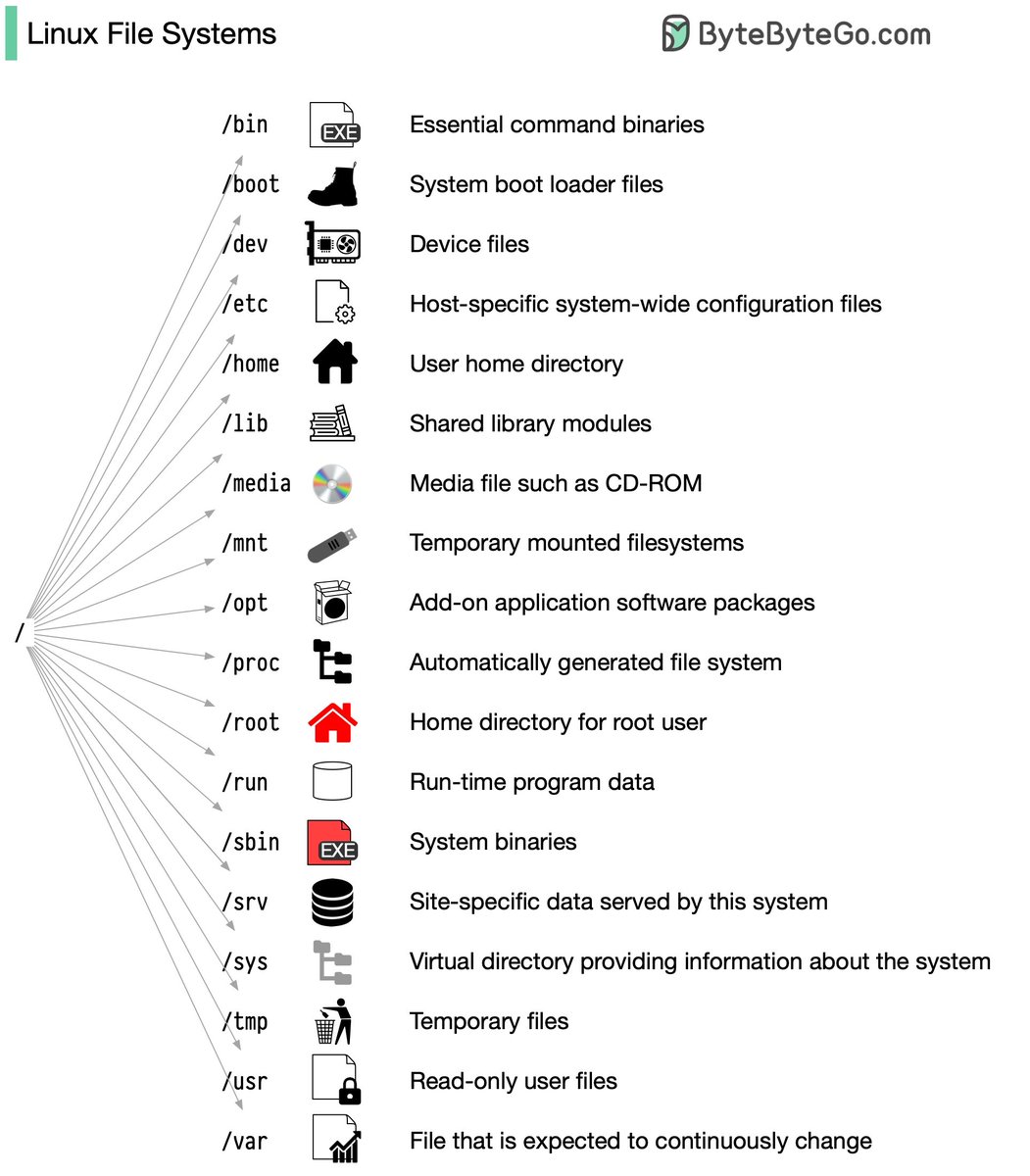
Linux file system explained
Ever wonder how Linux keeps all its files organized behind the scenes? In the early days, every distribution had its own approach - talk about confusing!
I remember the first time I tried finding a config file in Red Hat Linux - that maze had me so lost! To fix the chaos, the Filesystem Hierarchy Standard (FHS) was introduced.
FHS was like a library classification system for Linux. It provided a consistent structure across distributions, so developers and admins could find things. But does every distro follow it exactly? Not always. Some add custom tweaks for specific user needs.
Want to get good at navigating the standard Linux layout? Use commands like "cd" to move around and "ls" to see what's inside directories. Picture the file system like a tree with a root folder "/" at the base. Before you know it, you'll intuitively understand the Linux file system organization.
–
Subscribe to our weekly newsletter to get a Free System Design PDF (158 pages): https://t.co/kNfv0DVDdf
Google has released 7 free courses that helps you learn AI from scratch!
- Generative AI & LLMs fundamentals
- Diffusion Models
- Transformer and BERT Models
- Attention Mechanism
- Image Captioning Models
Thread:🧵 ⬇️
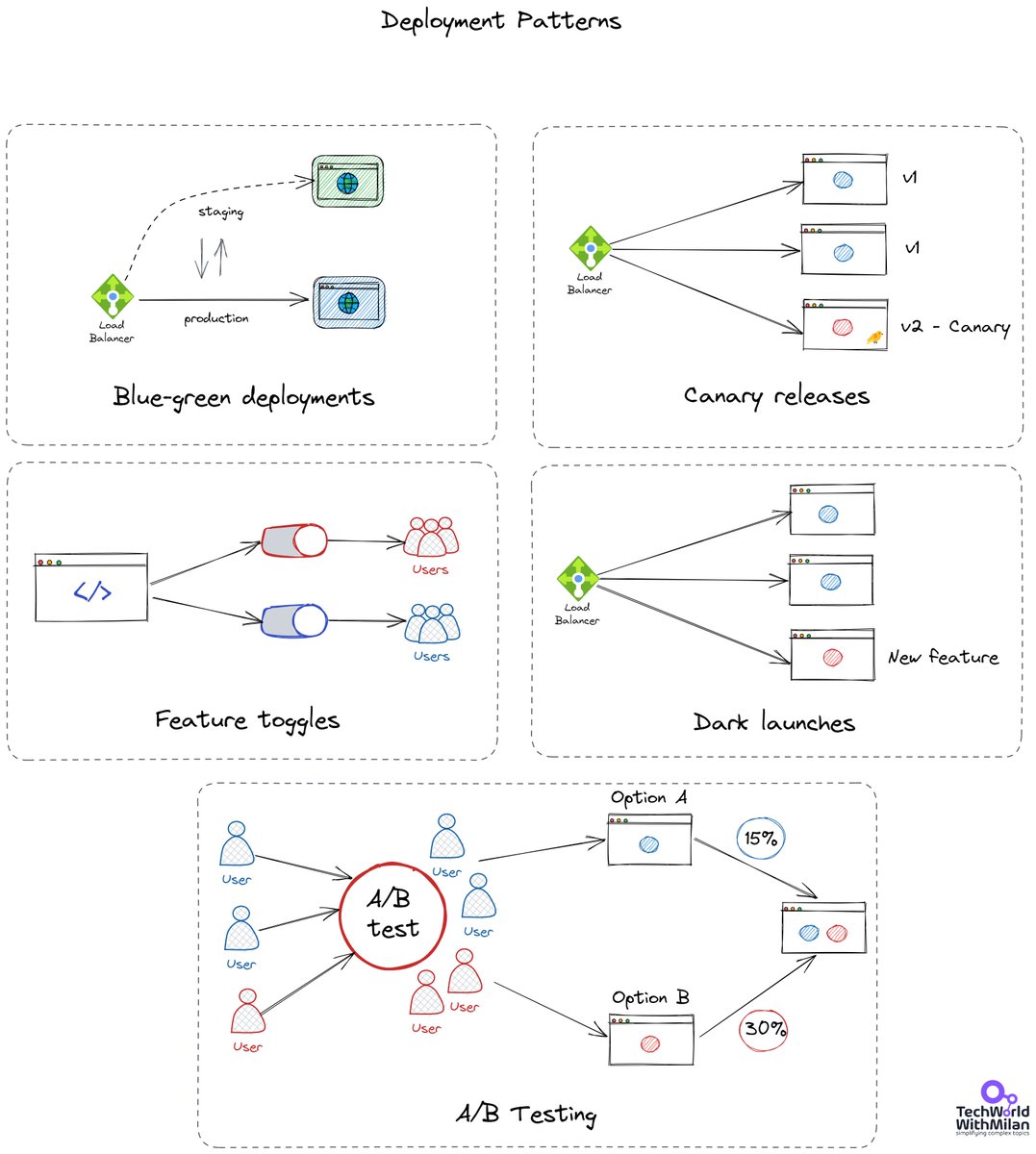
𝗪𝗵𝗮𝘁 𝗮𝗿𝗲 𝗗𝗲𝗽𝗹𝗼𝘆𝗺𝗲𝗻𝘁 𝗣𝗮𝘁𝘁𝗲𝗿𝗻𝘀?
Deployment patterns are automated methods of introducing new application features to your users. Your ability to cut downtime depends on the deployment style you use. Some patterns also let you roll out extra functionality. Doing this allows you to test new features with a small group of users before making them available to everyone.
We have different options for deployment patterns:
𝟭. 𝗖𝗮𝗻𝗮𝗿𝘆 𝗿𝗲𝗹𝗲𝗮𝘀𝗲𝘀
A canary release is a method of spotting possible issues before they affect all consumers. Before making a new feature available to everyone, the plan is to only show it to a select group of users. We monitor what transpires after the feature is made available in a canary release. If there are issues with the release, we fix them. We transfer the canary release to the actual production environment once its stability has been established.
𝟮. 𝗕𝗹𝘂𝗲/𝗴𝗿𝗲𝗲𝗻 𝗱𝗲𝗽𝗹𝗼𝘆𝗺𝗲𝗻𝘁𝘀
We have run two similar environments simultaneously, lowering risk and downtime. These surroundings are referred to be blue and green. Only one of the environments is active at any given moment. A router or load balancer that aids in traffic control is used in a blue-green implementation. The blue-green deployment also provides a quick means of performing a rollback. We switch the router back to the blue environment if anything goes wrong in the green environment.
𝟯. 𝗙𝗲𝗮𝘁𝘂𝗿𝗲 𝘁𝗼𝗴𝗴𝗹𝗲𝘀
Here we can turn a switch on/off with feature toggles at runtime. We may roll out new software without exposing our users to any other brand-new or modified functionality. When we build new functionality, we can use feature toggles to enable continuous deployments by splitting releases from deployments.
𝟰. 𝗔/𝗕 𝘁𝗲𝘀𝘁𝗶𝗻𝗴
Two versions of an app are compared using A/B testing to see which one performs better. An experiment is like A/B testing. In A/B testing, we randomly present users with two or more page versions. Then, we use statistical analysis to determine which variant is more effective in achieving our objectives.
��. 𝗗𝗮𝗿𝗸 𝗹𝗮𝘂𝗻𝗰𝗵𝗲𝘀
In a "dark launch," we introduce a new feature to a select group of users rather than the general public. These users are unaware that they are helping us test the functionality. We don't even point out the new functionality to them. It is nicknamed a "dark launch" for this reason. Users are introduced to the program to get feedback and test its effectiveness.
#technology #softwareengineering #programming #techworldwithmilan #devops






![hasantoxr's tweet photo. ChatGPT is now dethroned.
This new alternative is limitless.
(Use it for coding, generating images, and content creation)
[🧵Bookmark to use later] https://t.co/6Hu2VMNkRZ](https://pbs.twimg.com/media/GEnQaqQasAAFSi2.jpg)