obsession with zero-detection setups leads here.
update from a few weeks back when we first tested this idea, and it's already coming to fruition. 10 phones, one camera, no replay kit, no screen broadcasting.
one of the final pillars to conquer in the zero-detection setup phase.
right now 10 phones fit, the other 40 are still running on replay kit. a few more weeks and our custom racks arrive, then we put it all into a server rack and scale this bad boy up.
we've been testing how AI voice detectors make their call, and the biggest lever turned out to be re-recording.
play the clip out of a speaker and record it again with a mic across a room. you don't even need the speaker or the mic, the room can be simulated in code.
what we learned:
- a clean, close-up voice still gets caught
- the room's echo changes the reading
- bigger rooms read more real but sound blurrier
we tried 109 simulated rooms on 1407 AI clips, ~98% read as AI when uploaded and after the rerecording only ~7% read as AI audio through different audits.
macros are the wrong tool for a multiple phone farm
a macro is a fixed list of taps. 1 pop-up it didn't expect and it stops
we run an AI agent instead. it looks at the screen like you would and picks the next tap
the full run is in the video
@BorisBaikal7444 In terms of detection all the same, ai just uses the same methods you would use.
It just does it in parallel faster.
If you are already doing automatic warmup or posting, this here touches the exact same levers, just independent of macros or hardcoded rules
@BorisBaikal7444 Broadcast is done through replaykit with a custom app
And yes its a lot of bandwidth, above around 30 phones if they are to close to each other or not properly isolated with aluminium foil it can get problematic
@Elite_sth this a video or a slideshow?
I cover how to do it on images here:
https://t.co/YHzW0fs0ys
if you replicate everything exactly, the probability to get flagged as AI goes down to near 0.
everyone says screenshot your AI images and the AI fingerprint is gone
it isn't...
every AI image carries 3 fingerprints. we removed all 3 and our TT slideshows did ~10x the views https://t.co/JkCtql561f
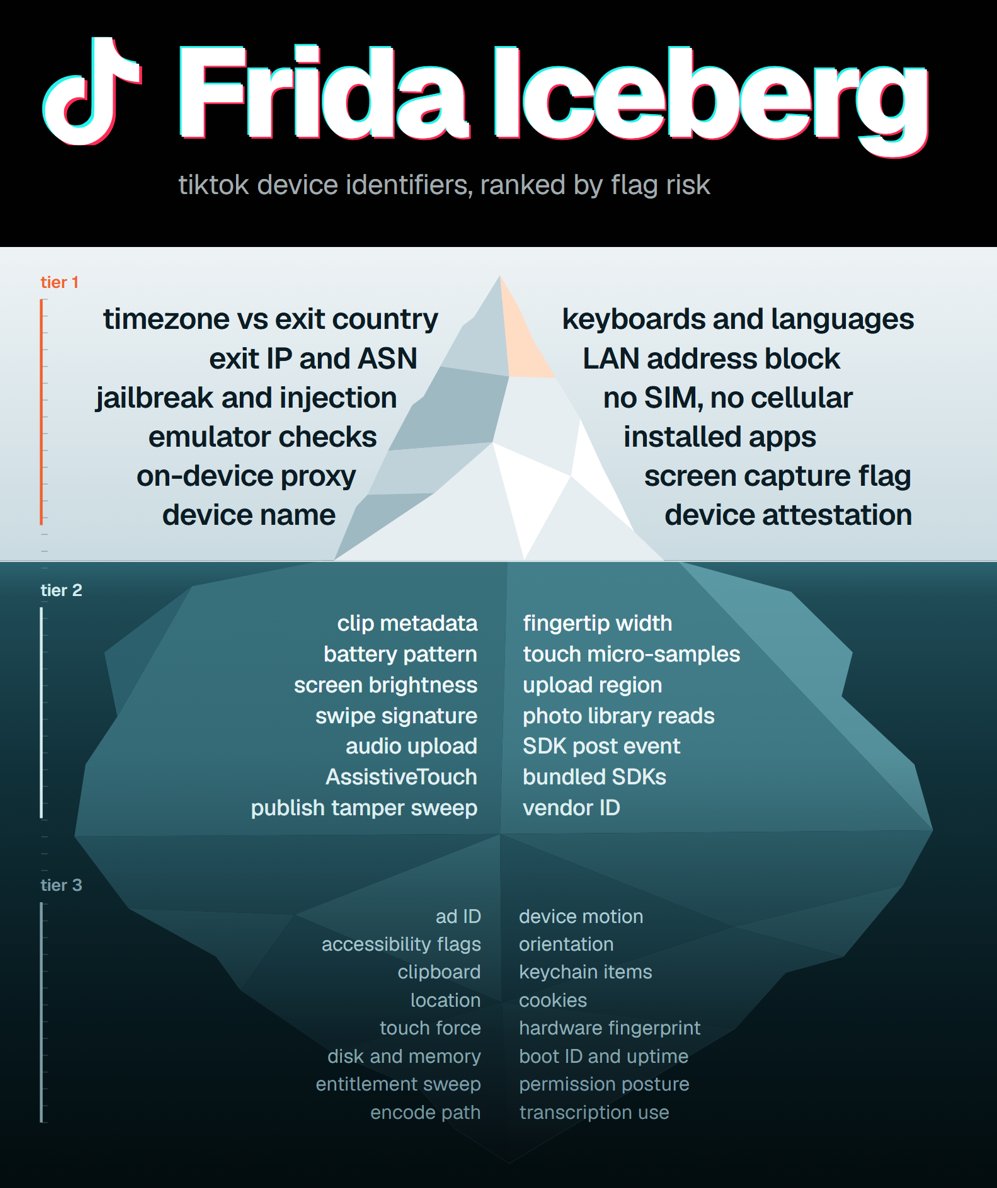
TikTok Frida Iceberg
we hooked tiktok with frida on a real iphone, and logged every device API it calls through login, scrolling and publishing, and counted the reads per session.
the thing it asks about most is not a jailbreak or emulator check. it is whether your timezone, locale and GMT offset agree with your proxy exit country, ~2,600 reads a session. the jailbreak scan gets ~426.
we sorted 32 most important identifiers into 3 tiers by flag or link risk:
1. tier 1 can flag a phone as automated, or link your accounts to each other, on its own. MOST IMPORTANT TO GET RIGHT
2. tier 2 adds to your trust score. IMPORTANT TO FIX
3. tier 3 is either weak, unfixable or carries no signal. good if you have it, but overkill to chase it further
TIER 1 (12)
- locale, timezone and GMT offset vs exit country: ~2,600 reads a session, the most asked question in the capture. all three have to agree with where your proxy exits
- exit IP and its ASN: recorded on their side, invisible to the phone. a datacenter ASN or a bad reputation can't be fixed on the device, it is pure proxy quality
- no jailbreak or injection: a dyld scan runs from 0.0s and walks every loaded library, ~426 reads, plus the DYLD env vars. one hit is game over
- real hardware: kern.hv_vmm_present, the simulator flag and kernel integrity checks rule out every emulator route
- no proxy client on the phone: an on-device VPN shows up as a utun interface holding 198.18.x addresses, seen on all ~48 interface scans. that range is never routed publicly, so it proves the tunnel is local.
- device name: read ~43 times a session with no permission. phone-01 to phone-20 hands over the whole fleet in one string
- keyboards and preferred languages: ~359 reads a session. a set that contradicts the claimed country IP is a flag
- LAN address block: the wifi address comes back in full ~48 times a session. twenty phones on adjacent addresses of one subnet says one operation
- no SIM, never on cellular: carrier and MCC/MNC read empty, and cellular vs wifi is asked 15 to 54 times a session.
- installed apps: ~19 to 21 URL scheme probes fire the moment you publish and ~13 get a real answer, ios refuses the rest because the app never declared them. identical app sets cluster, so vary a believable subset per phone (there is specific apps they check for if you have installed, lmk if you need the whole list)
- screen capture flag: true whenever anything mirrors or records, read from 0.3s. no software fix on stock ios. airplay reads as casting to a second screen, replaykit reads as one captured screen, the exact shape apps are told to block
- device ID: apple hands them signed per-device bits that survive uninstall and factory reset. a marked phone stays markable for life
TIER 2 (10)
- clip metadata: the geotag is read ~18 times straight out of the video file with no prompt, so strip it before it reaches the phone
- battery: ~130 reads a session, and pinned at 100% and charging forever looks like no real phone
- screen brightness: ~145 reads a session, and one fixed value forever stands out against auto-brightness drift
- swipe signature: ~57 reads a session, and never swiping down with a hard 1.9s dwell floor is pure behaviour you can change
- audio upload: captions send the clip's audio to a speech endpoint, so background speech becomes text on their side
- assistivetouch: read with no permission, but real disabled users turn it on too, so it scores risk instead of blocking
- fingertip contact width: a real thumb reads ~35pt wide and a synthetic touch reads 0
- touch micro-samples: a real drag carries 1 to 5 sub-samples per frame that only a real digitizer fills
- photo gallery read: with limited photo access the app reads the permitted assets, but with full access it can see how much images you have in total
- vendor install ID: stable until every app from that publisher is gone, so two accounts on one phone are one device to them
TIER 3 (10)
- accessibility flags: all off, like normal phones
- clipboard: never read, even typing captions
- location: zero calls, permission reads denied
- touch force: dead field on iphone <12, starts to become detectible on iphones 13+ that have the 3d touch mechanics
- disk, memory, thermal, low power: ~300 reads, separates nothing
- device motion: frozen on a phone that never moves, physical fix only
- orientation: portrait forever, same root as motion
- keychain, 21 items: survive reinstall, only erase resets
- cookies: ~168, same story, lower stakes
- hardware fingerprint: ~2,500 reads, only mixed hardware fixes
In short the read count tells you what they care about, the tier tells you what can hurt on your automated tiktok setup.
@devmelv@wbyanme we have a whole local copy version of higgsfield customly built
also its mostly free per slideshow. we use 5 codex $200 subscriptions
so we can pump out crazy amount of images while its subsidized
what process are you guys using?
@wbyanme amazing numbers. we are currently at 5K MRR with 50 phones, started 4 months ago
when you mention 1K slideshows, I imagine you mean also 1K iPhones? or you are going to use multiple accounts per phone?
custom build
1. wan 3.0 (we run it on openlux), ~$0.035 a second at 480p, great for testing and iteration
2. pull 3 frames from the real clip: start, middle, end
3. edit each frame into a still of your character in the exact same pose, camera and crop (we use gpt image via subscription). give it a full body character sheet, not just a face
4. send WAN the real clip as a greyed out depth map reference video plus the 3 stills and the character sheet. the clip carries the motion, the stills carry the look.
6. check the stills before you pay for the video, when happy with gpt images then generate
~$0.40 for a 7s 480p swap (it would be around $1.5 - $3 on higgsfield) so you save 4-8 times the money plus fully control the setup
@stand1sko Theoretically, it should. But that is mostly overkill. I made a recent post about all of the things that Frida checks and what is mostly overkill.
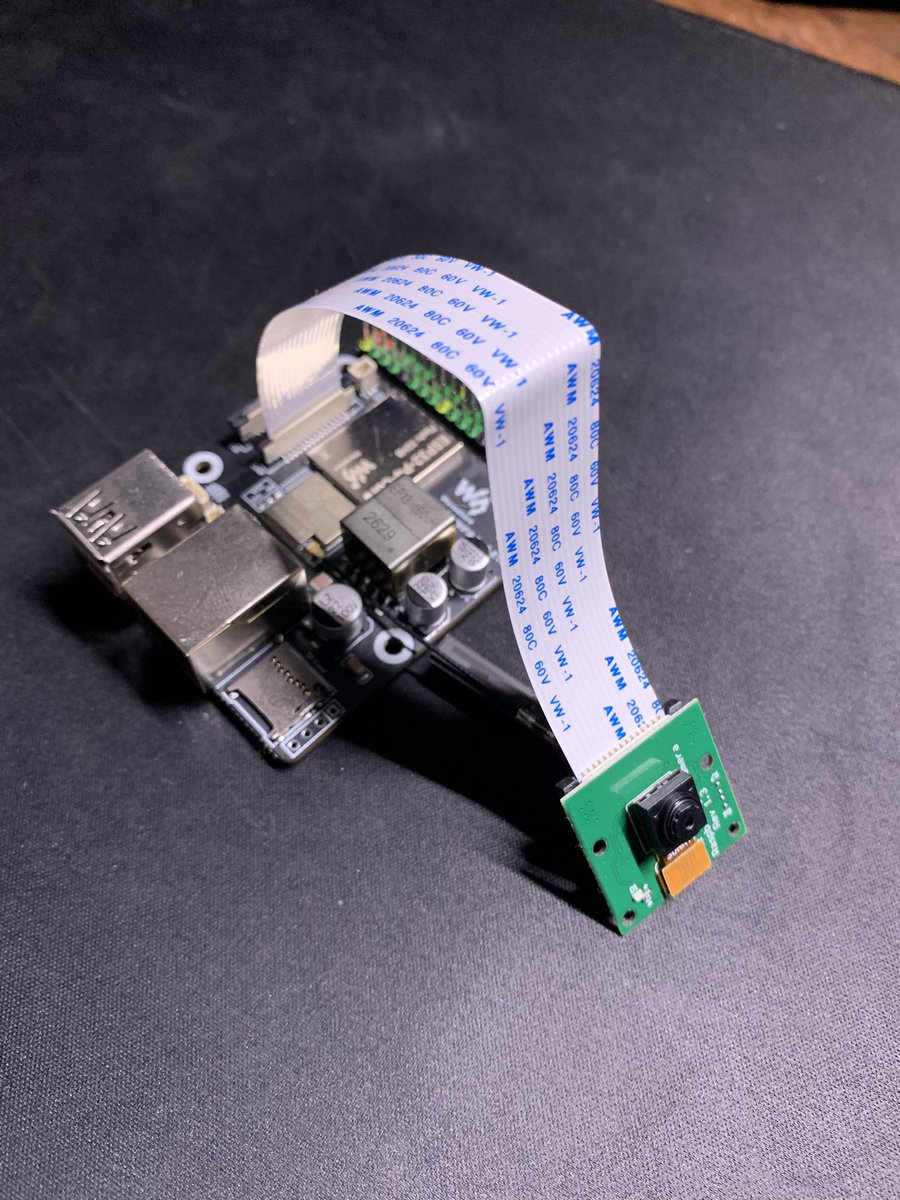
for anyone interested how the esp32 camera iphone control thing is going
so far so good, the proof of concept is here and coordinate tapping is very accurate.
3 things we learned so far:
1. a 5MP raspberry pi camera per phone is too low quality. on the chip it tops out at 1080p, drops to ~9 fps in normal room light, and small text comes out soft
2. a gopro on the same rig reads clean at ~25 fps. screen text is still a bit blurry compared to direct phone broadcasting, but nothing an LLM couldn't read spotted for now
3. so one better camera that oversees ~20 phones at once is the direction I lean towards. cheaper than 20 small cameras, and one thing to mount, focus and maintain instead of 20
still to solve:
1. video quality
2. efficiency, many phones through 1 camera
3. a custom rack around this build
https://t.co/eMEhwYYLtz
the last real flag left on our setup is how we see the screen of the iphone.
iOS tells every app when its screen is being captured, and all of that comes from the 4 main methods:
1. screen recording (screen recording, broadcast apps, facetime screen share)
2. screen mirroring (airplay, HDMI adapter, quicktime over cable)
3. developer tools (webdriveragent, instruments, screenshotr, coredevice), all need developer mode
4. screenshots (system screenshots, shortcuts screenshots, jailbreak tweaks)
every normal way of getting a phone screen onto a computer is on that list. so any app that checks can see the phone is being watched, the whole session, on every account.
so we're taking capture off the phone entirely. an ESP32 board with a cheap camera (we use a raspberry pi camera, OV5647) films the glass and shows up on the computer as a plain webcam, 1080p at 15 fps. software warps the picture flat back to the phone's resolution.
to the phone, nothing is capturing it. it's just being looked at, like real human eyes look at the screen
testing it now, will post how it goes.
have the best possible undetectable setup for all of these social media automations
the current state of the market is getting saturated every day, and it's a question of time when TikTok starts adding new identifiers to their shadow ban list
so the more of these harder steps you can take right now, the more future proof you are
the last real flag left on our setup is how we see the screen of the iphone.
iOS tells every app when its screen is being captured, and all of that comes from the 4 main methods:
1. screen recording (screen recording, broadcast apps, facetime screen share)
2. screen mirroring (airplay, HDMI adapter, quicktime over cable)
3. developer tools (webdriveragent, instruments, screenshotr, coredevice), all need developer mode
4. screenshots (system screenshots, shortcuts screenshots, jailbreak tweaks)
every normal way of getting a phone screen onto a computer is on that list. so any app that checks can see the phone is being watched, the whole session, on every account.
so we're taking capture off the phone entirely. an ESP32 board with a cheap camera (we use a raspberry pi camera, OV5647) films the glass and shows up on the computer as a plain webcam, 1080p at 15 fps. software warps the picture flat back to the phone's resolution.
to the phone, nothing is capturing it. it's just being looked at, like real human eyes look at the screen
testing it now, will post how it goes.