$17B was invested into robotics and physical AI in Q1 2026.
That's nearly 10× more than in 2020.
These 16 companies will benefit the most:
1. $OUST – $42.02 52wk: $16.40–$51.50
Ouster's lidar sensors give robots and autonomous vehicles 3D spatial awareness for safe navigation.
2. $SYM – $41.24 (52wk: $23.59–$87.88, 1yr: +16.0%)
Symbotic's AI robots automate warehouse logistics, replacing manual labor with autonomous pallet/case handling.
3. $AEVA – $20.04 (52wk: $8.83–$38.80)
Aeva's FMCW 4D lidar detects velocity and position instantly, key for autonomous driving perception.
4. $RRX – $221.56 (52wk: $127.96–$236.35)
Regal Rexnord's motors and motion control components are the muscle inside industrial automation systems.
5. $SERV – $6.02 (52wk: $5.78–$18.64)
Serve Robotics builds autonomous sidewalk delivery robots, scaling embodied AI into everyday last-mile logistics.
6. $VPG – $135.40 (52wk: $25.49–$148.39)
Vishay Precision's sensors enable force/weight feedback critical for humanoid robot grip and balance.
7. $AMBA – $62.16 (52wk: $40.81–$96.69)
Ambarella's edge AI chips give cameras and robots on-device computer vision without cloud latency.
8. $ISRG – $404.70 (52wk: $414.30–$610.45)
Intuitive Surgical's da Vinci robots pioneer robotic-assisted surgery, the gold standard in medical automation.
9. $TSLA – $379.71 (52wk: $288.77–$498.83)
Tesla's Optimus humanoid and FSD stack apply real-world AI training data at massive vehicle scale.
10. $QCOM – $220.71 (52wk: $121.99–$259.92)
Qualcomm's edge AI chips power robotics, drones, and AI data centers beyond its core smartphone business.
11. $FFAI – $0.26 (52wk: $0.21–$3.61)
Faraday Future pivots into embodied AI humanoid robots, though execution risk remains extremely high.
12. $RR – $1.94 (52wk: $1.73–$7.43)
Richtech Robotics builds AI-powered service robots and a humanoid (DEX) for hospitality and industrial use.
13. $NNDM – $1.40 (52wk: $1.19–$2.32)
Nano Dimension makes additive manufacturing printers for electronics, enabling rapid robotics hardware prototyping.
14. $NVDA – $192.71 (52wk: $151.49–$236.54)
Nvidia's GPUs and Jetson/Isaac platforms are the compute backbone training every major physical AI system.
15. $PATH – $10.55 (52wk: $9.20–$19.84)
UiPath's software robots automate enterprise workflows, the digital-labor counterpart to physical robotics.
16. $KSCP – $1.91 (52wk: $1.78–$10.14)
Knightscope's autonomous security robots patrol real-world sites, an early commercial physical-AI deployment.
The robotics supercycle is starting already $OUST exploding and $MU says in their Q3 earnings the next 2 years will be massive for robots.
♻️ RESHARE this post and write 1 comment, I'll DM you my top 3 plays for robotics.
Its 2040, regular person who bought these 6 ETF's right now are millionaires doing nothing...
Here's 6 steps to follow:
1. Open a tax-free investing account like a Roth IRA.
2. Put in $5,000 and buy one (or all) of these ETFs.
3. Contribute $500–$2,500 every month into them, no matter what.
4. Say no to going out, no to impulse spending, let it compound instead.
5. Don't touch it. Don't panic sell. Let 2026-you trust 2040-you.
6. Check back in 14 years. You're a millionaire.
6 GOLDEN ETF's to buy:
1. $DRAM — Memory chips power every AI server; this cycle is structurally undersupplied.
$MU $WDC $STX
2. $GRID — Electricity grid buildout is the bottleneck behind every AI infrastructure dollar spent.
$NEE $DUK $SO $AEP $XEL
3. $AIPO — Exposure to AI IPOs captures the next decade's biggest public market wealth creation.
$AMT $VRT $SBAC $DLR
4. $SOXX — Semiconductors are the foundation layer; nothing in tech ships without chips.
$NVDA $AVGO $TSM $QCOM $AMD $INTC
5. $QQQM — Cheap, broad exposure to the innovation economy's biggest compounding winners long-term.
$AAPL $MSFT $AMZN $GOOG $META $TSLA
6. $VOO — The $SPY is the simplest proven path to long-term, market-matching wealth.
$JPM $UNH $BE $NBIS $ARM $IBM
♻️ RESHARE this post and write 1 comment, I'll share 3 stocks to buy and hold until 2040 I like most.
I will start off by wishing you well in these challenging times and by saying that the picture I paint in the following observations is not the picture I wish to be true; it is the picture that I believe to be true based on what I have learned and what the indicators I use to objectively see things now suggest is true.
You can’t miss the best trades. Period. Full stop.
And as a trader, you don’t have time to be an analyst.
Traders need to trade.
And wouldn’t it be awesome to cut your AM prep time?
Do you want to learn how a pro SMB trader, @SperoTrades, uses AI to ensure he doesn’t miss the best trades?
In this video, you will learn how to automate an AM prep system using AI. The core lesson is how to build an "AI Trading Assistant" using Claude to build an actionable dashboard before the opening bell.
Here is what you will learn:
1. The Strategy: Stock Selection
Traders often spend over an hour every morning manually scanning emails and newsletters, creating a "bottleneck" where daily stock selection occurs too late for the market open [00:00]. You will learn how to solve this by creating an automated workflow that extracts:
Macro Tone & Snapshots: Summarizing the Fed stance, geopolitical developments, and overnight sentiment [01:02].
Structured Economic Calendars: Prioritizing data releases by their potential to create volatility [01:45].
Earnings & Top Movers: Identifying Stocks In Play with clear catalysts like upgrades, downgrades, or guidance shifts [02:45].
Sector Themes: Recognizing broader narratives (e.g., AI infrastructure spending) that connect multiple tickers [03:30].
2. Building your stock list with zero coding
Even with zero coding background, you can learn the step-by-step process to build this system yourself [00:43]:
Connecting Data Sources: Linking Claude to your Gmail to automatically scan professional research emails [08:34].
Framework Prompting: Defining a clear structure so the AI prioritizes the specific information traders care about most [09:12].
Dashboard Creation: Transforming raw text into a clean, "dark theme" HTML dashboard that is easy to scan in minutes [13:39].
Unattended Automation: Scheduling the workflow to run every weekday morning at 8:00 a.m. so your research is ready by 8:30 a.m. [15:30].
3. The Professional Shift
The most important takeaway is the shift in mindset from being a "researcher" to being a "trader." By automating AM prep, you gain the same infrastructure advantage used by billion-dollar hedge funds [17:10]. This allows you to spend your mental capital on decision-making and execution rather than data entry. It lets traders be traders. It let’s you trade at your best.
The Bottom Line: Strive to be the very best trader you can be; and that begins with building a process that scales. By leveraging these tools, you can ensure you never miss a big trade again and enter every trading day with professional-level preparation.
#proptrading #proptrader #trader #AI
I Automated My Pre-Market Research With AI (Here's How) https://t.co/SxgO8uD3Wt via @YouTube
Claude can now code @TradingView indicators for you!
I've always wanted an indicator with all my key intraday levels in one place, the way I wanted to see them.
I won't stop until my entire system is coded.
Learn how to start creating yours here👇
Free Claude Course
Save 1000s of dollars 👇
Comment "Claude" if you want to receive the links.
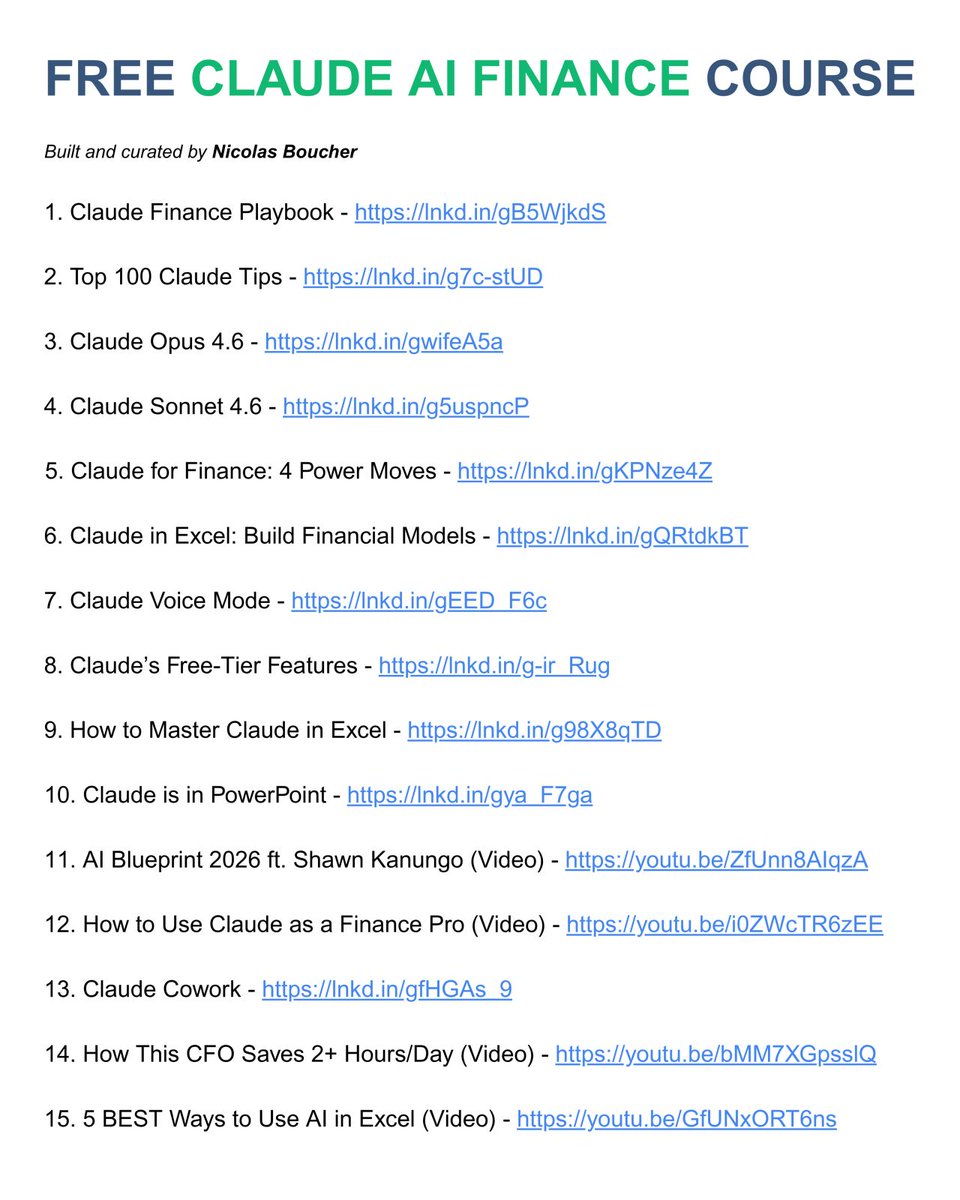
You want to learn how to use Claude for Finance?
I have built and curated a free course for you
15 free lessons to make you better at Claude than 90% of finance professionals
🙏 Help me spread this free course: like, share and comment!
I used Claude's Cowork to do my bookkeeping and tax prep this year. First time I didn't dread the process.
Wanted to share how I set it up because I think a lot of people could do this.
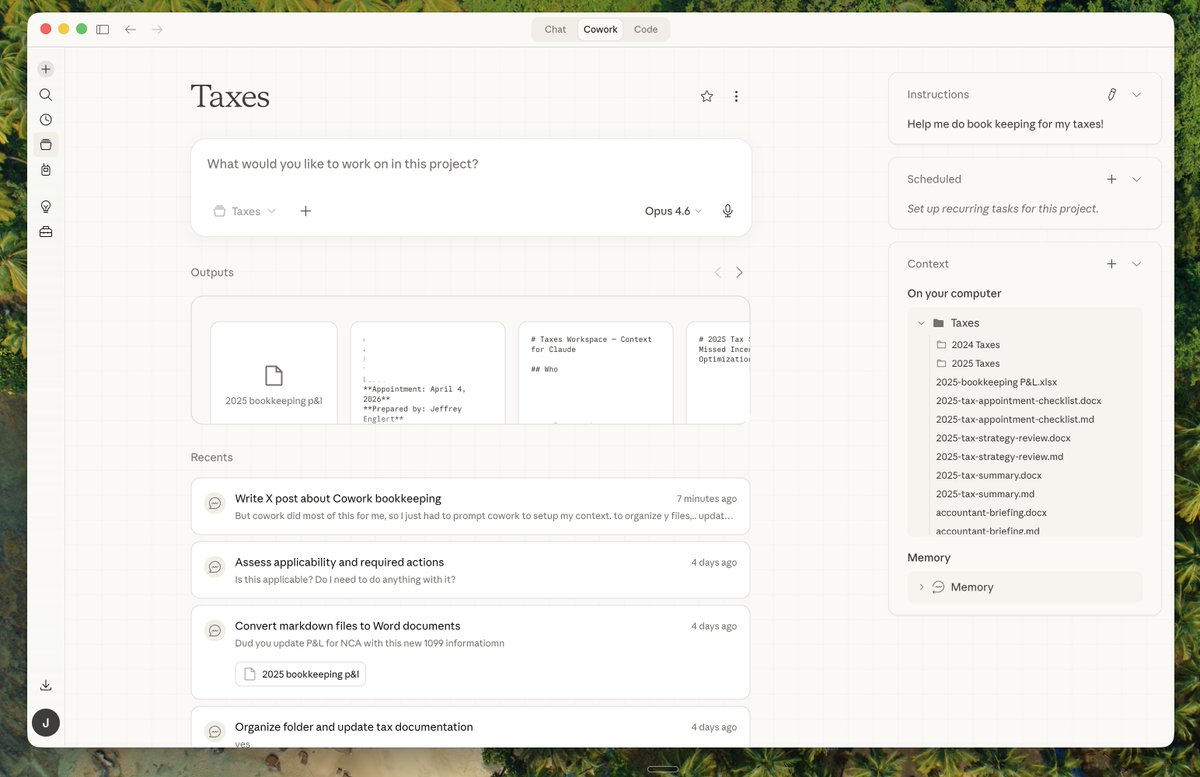
The setup is simple. Cowork lets you point Claude at a folder on your computer. So I created a "Taxes" folder, dumped in all my source documents (W-2s, 1099s, bank statements, mortgage docs, business P&L), and told Cowork to organize everything. It sorted my documents into subfolders by year and category without me having to think about a filing system.
Then I had Cowork create a Context.md file. It's a briefing doc that lives inside the folder and gives Claude everything it needs to know to help you more efficently.
I also added my final taxes from last year so Cowork could see what a successful example looked like, and pulled in that data for YoY comparisons.
From there, Cowork built out everything I needed. It read and organized my raw bank CSVs and created a master bookkeeping spreadsheet with tabs for income, expenses, write-off analysis, and home office deductions.
It put together a full tax summary with estimated refund projections and credit calculations. It flagged deductions I was missing and wrote up a strategy review with optimization opportunities for next year.
It even generated a one-page accountant briefing so when I walked into my appointment, my tax preparer had a clean summary of everything instead of me handing over a pile of papers.
The part that surprised me most was how it handled the messy stuff. Documents scattered across different formats. PDFs, CSVs, spreadsheets. Some things were missing. Some numbers didn't match. Cowork caught discrepancies, flagged what I still needed to track down, and built a checklist for my appointment so nothing fell through the cracks.
The whole thing probably saved me 6-8 hours of manual work. And the output was more organized than anything I've given to my accountant previously. I basically just pointed Cowork at a pile of documents and told it what I needed. It did the rest while I multitasked on other things.
If you want to try this yourself, here's a prompt you can use to get started in Cowork:
"Help me set up a bookkeeping workspace for my taxes. Organize the documents I've uploaded into a logical folder structure. Then create a Context.md file by reading through my documents and pulling out my filing status, income sources, business entities, tax preparer info, key numbers, and open questions. After that, help me build a plan for what documents I still need to gather and what working documents we should create together to prepare for filing. Make sure to include a CSV file showing my P&L for the year, with an expenses tab to categorizing all of my write offs, and an income tab showing my various sources of income"
And yes, I then told Cowork to analyze my Taxes project and help me write this X post to share my learnings with you all. The meta is real.