Main current thesis; AI is a lasting narrative with higher potential than most markets. Bittensor is the most interesting project to me with the biggest implications.
From an importance perspective, it could be a top 3 coin.
I'll focus my learning on this field for now.
AI is becoming insanely powerful every week.
Use AI to your advantage in 2023.
Here are 10 secret websites to finish hours of work in minutes:
[🔖 Bookmark for later]
Just found that DALL-E 3 is really good at making sticker designs.
You can generate an entire pack of stickers at once!
Here's the prompt:
9 different stickers featuring [objects] with vibrant colors and white borders on a minimal background.
3 extra tips:
1. Sometimes the sticker borders are square.
If you want the border to be cut around the edge of the design instead, add the words "die cut" to the prompt.
2. You can feature multiple objects inside the prompt.
For example:
- crazy ninja cats fighting chickens
- christmas trees, reindeer, baubles and snowflakes
More examples in the ALT of the images below.
3. To turn them into WA stickers:
a) Remove the background with Clipdrop.
b) Crop each sticker out.
c) Use a free tool like WA Sticker Maker.
That's all for now. I hope you found this useful!
Follow me at @chaseleantj for more practical ways to use DALL-E 3.
PROMPTING IN MIDJOURNEY
Recently, I participated in the competition from Hive3.
Spoiler: I didn't win, but it wasn't the goal. I challenged myself to recreate the apparel style as close to the example as possible.
Let's dive into creating the prompt step by step.
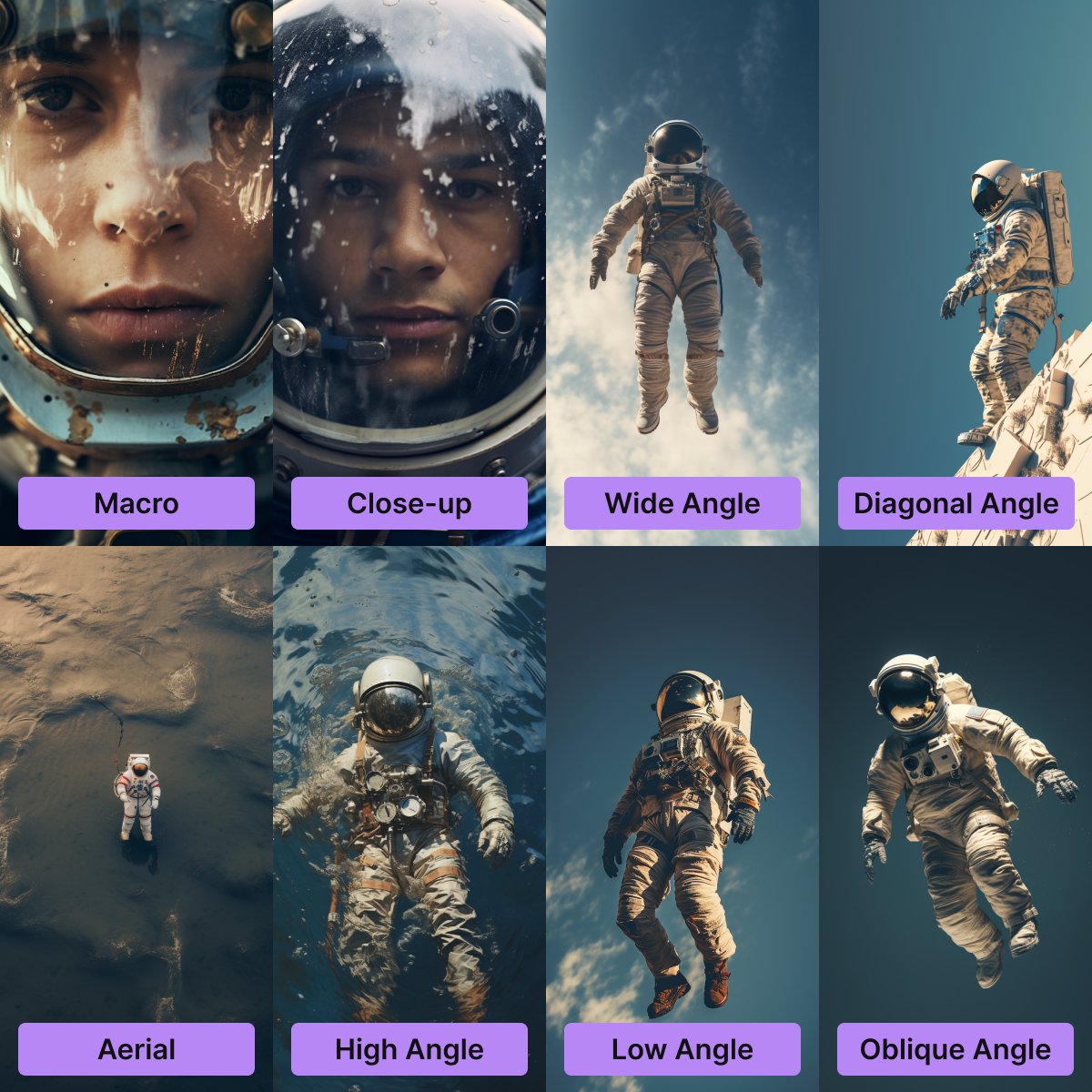
CONTROL THE COMPOSITION IN MIDJOURNEY WITH CAMERA ANGLES
When I need a specific composition, I often use the following tokens:
- Macro
- Close-up
- Wide Angle
- Diagonal Angle
- Aerial
- High Angle
- Low Angle
- Oblique Angle
These techniques are derived from photography and work best with objects typically found in photos. They may be less effective with more exotic subjects, but they work well for me.
Our Newsly thread competition is heating up a treat
Two sumptuous reads from @TyrogueD and @beracap
Time is money and money is in the threads, don't miss the $NEWS
https://t.co/nKWBqwsftD
https://t.co/JccOGi79pB
Yesterday, I asked the community for the most useful Midjourney tips they've learned.
Here are the top 10 tips people have shared.
Check them out below.
They could save you months of figuring things out on your own!
Just a year ago a trader with a custom well-written sniper bot was a king of the streets. Nowadays every single degen has a free access to tons of tools helping them to gamble on chain.
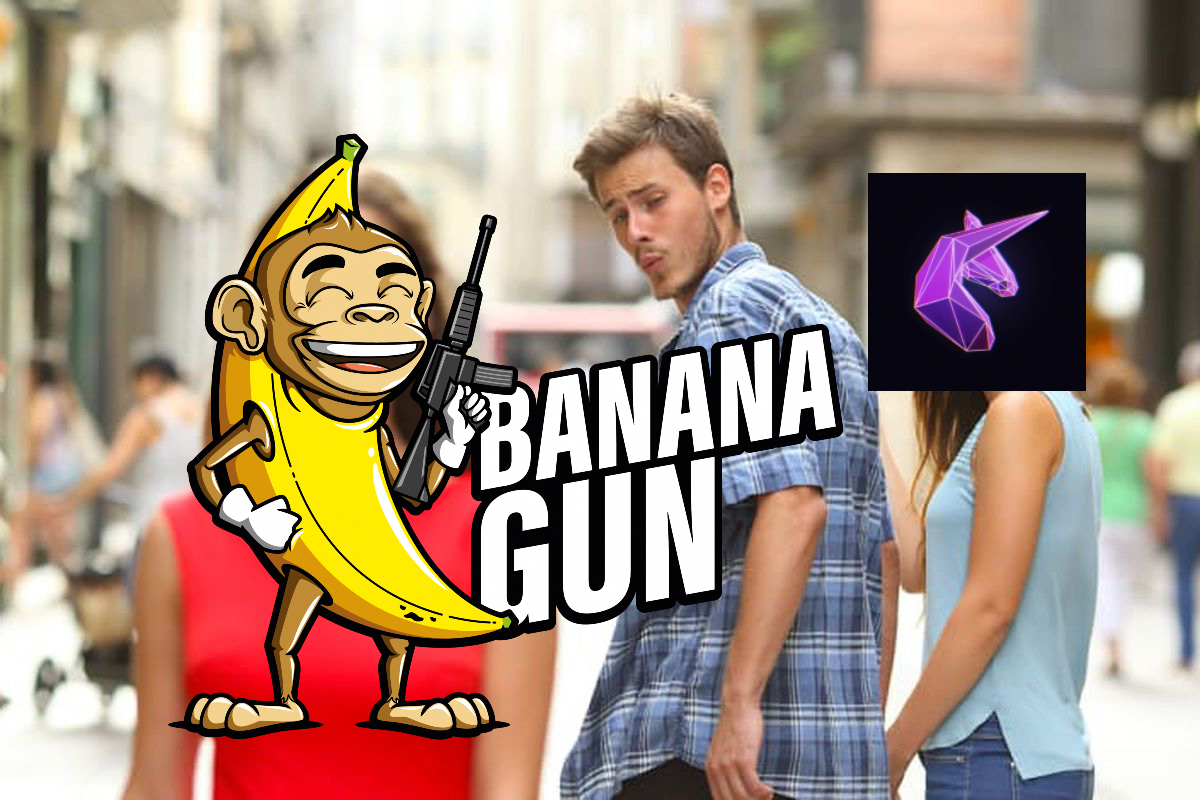
Recently @bananagun announced their token drop which is designed to bring stronger revenue generation and new users to their eco-system. We can talk about the coin the other day, the interesting part lies in details.
@bananagun ran a campaigns which were based on completing different tasks with the mission to collect their soulbound NFTs. Most of these NFTs were easy to get and it wasn’t really interesting to look into details.
But one of the tasks made me wonder - «What are their top users?». The criteria - «Have more than 10k$ in volume during a dedicated period». What is 10k$ for us, unchain defenders? Huh, nothing, but here is what I found and conclusions I have made. For this tweet I have used two dune tables:
1) https://t.co/x25awW7NJE by @whale_hunter
2) https://t.co/Bepr9Wi8OM by @sevenofclubsnft (He has some good dune tables in his portfolio regarding wallets tracking)
Let’s take a closer look at top 10 TOP volume banana users together:
1) 0xaff9c638dcb4d2b351b052d4ae42a9083ed98789 Buy Volume: 2362789k$ Sell Volume: 2245510k$ Total Profit using BananaGun: -117279$ Number of Trades: 2017 Note: This is some weird wallet, it’s active only for 57 days and has 3x amount of trades than the user behind him. Will assume this is some kind of volume bot.
2) 0x1fb8dd0ab9608bd5f9e709b6b85c0eec96997066 Buy Volume: 1157918k$ Sell Volume: 1161961k$ Total Profit using BananaGun: 4043$ Number of Trades: 667 Note: Wallet made money on most of popular coins, considered to be worthy to track.
3) 0x340ba2bf7ac31f01b03a08720a1366b00658021b Buy Volume: 998698k$ Sell Volume: 1120950k$ Total Profit using BananaGun: 122252$ Number of Trades: 437 Note: Good to note, @pedrigavifrenki owns this wallet and he profited more than 250k$ on his $BALD play, overall wallet is profitable and most likely worth following.
4) 0xb60b0ada4c9ac97cffc84c46d49a0f423c7d181a Buy Volume: 853846$ Sell Volume: 1144243$ Total Profit using BananaGun: 290397$ Number of Trades: 951
5) 0xb3951196958019a654d978619070585a57d8ddaa Buy Volume: 603136$ Sell Volume: 963262$ Total Profit using BananaGun: 360126$ Number of Trades: 546 Note: Wallet is cashed out, by ehterscan it leads to 0x17D359c569e63877a215690b557Ded877aA12bE3 which might be his owner. So far it was most profitable wallet in this top 10.
6) 0x22e7df9fffcda6e4fc9d133901054630515aacd6 Buy Volume: 637566$ Sell Volume: 865389$ Total Profit using BananaGun: 227823$ Number of Trades: 1900 Note: Seems like this is just one of many multi-wallets owned by Chad @jcakcrypto. Pay respect and copy-trade carefully.
7) 0xc68bff79073939c96c8edb1c539b5362be1f64d1 Buy Volume: 663949$ Sell Volume: 683454$ Total Profit using BananaGun: 19505$ Number of Trades: 3951 Note: ENS - putthepumponthecoin.eth. By its Number of Trades I will assume this is a volume Bot and move further.
8) 0xb42fbb5b728ab57576fc9696ba7f6620846616a0 Buy Volume: 646684$ Sell Volume: 682265$ Total Profit using BananaGun: 35581$ Number of Trades: 1328 Note: Considering wallet overall profit (57k$) and Total Trades made (1411) I can’t say this is going to be a good follow.
9) 0x9b38dfd2e3341880c0983fc2d2a37fb43beee483 Buy Volume: 545795$ Sell Volume: 727052$ Total Profit using BananaGun: 181257$ Number of Trades: 841
10)0xbdf59d84e393cc0728409144512d2cd62c3278f3 Buy Volume: 549772$ Sell Volume: 698907$ Total Profit using BananaGun: 149135$ Number of Trades: 2277
These were top 10 wallets but I generously ask you to check whole top 50 list, there are good wallets which are worth following. What conclusion can be made? Public trading bots made on-chain game more easier and accessible to masses, which definitely brings more competition and puts everyone in the same position, no superior advantages anymore. Your DD, info you collect and people you are surrounded - these are current winning factors, work on it and increase your field of view. GL!
Ghibli x AI
Quiet Moments
Let these scenes reflecting quiet moments inspired by Studio Ghibli be a gentle reminder of life's peaceful pauses.
As the week winds down, let's embrace the serenity of the coming days, finding joy in the simple pleasures that await.
Prompt:
Retro Ghibli scene, [scene description], minimal shading, bold, lined, 2D, flat, low detail, animated film pioneer, vray, rtx on, charming character design --ar 16:9 --style raw --c 20
Support with a like & share if you enjoyed this post. 🫶
CREATING DIFFERENT SCENES WITH CONSISTENT CHARACTERS IN MIDJOURNEY. PART 2
Another approach <image URL>::<text prompt>
1. Generate a close-up shot of your character.
2. Blend this image with another one so that you can obtain the link, which you will use with your prompt. Alternatively, upload the image to your hosting to obtain the link.
3. Generate the image using this structure <image URL>::<text prompt describing the scene>.
I recommend including a token that describes your main character in the text prompt. For example, if your main character is a man, add it to the prompt: https://t.co/1ZcN33k040:: man, fire, muted tones, cinematic --s 250 --c 10 --ar 21:9.
4. Use Very (Subtle) to get more options.
5. Correct the colors in Photoshop or Lightroom if needed.
6. Done. Repeat all steps with the same character and another scene.
How to make consistent scenes in Midjourney
If you want to make a comic book with Midjourney, you'll need both consistent characters and scenes.
I've shown you how to make consistent characters (see below).
Here's a new prompt to make consistent scenes:
3 wide images of [subject & location], multiple angles --niji --style scenic
There are 3 important elements to the prompt:
1. 3 wide images
Scenes are usually shot in landscape mode.
Specifying "3 wide images" tells Midjourney to make 3 frames of the same scene in a SINGLE generation.
Since the frames are generated together, the scene will be consistent.
2. [subject & location]
You can insert any subject and location you like.
But make sure to give a longer description of the location compared to the subject.
This is because we want to emphasize the location, not the subject.
Here's an example:
3 wide images of [a boy surfing at the beach, blue waves, palm trees, 3d, unreal engine], multiple angles --niji --style scenic
Subject: a boy surfing
Location: at the beach, blue waves, palm trees
Notice how the description for the location is longer than the description for the subject.
Also, the subject does not have to be a person - it can be a house, or a windmill.
3. --niji --style scenic
The Niji mode is good for making comic illustrations.
Meanwhile, the scenic style is best for making consistent scenes - especially those in landscape format.
This is because unlike other Midjourney models, this style emphasizes the surroundings instead of the person inside the prompt.
That's all for now.
I hope you enjoyed this post!
Follow me at @chaseleantj for more high quality Midjourney prompts and guides.
Month/Quarterly/Half-year end, and summer is here.
It's been about 6 months since I've started trading for a prop.
Lots of experimenting, but it's time to focus and work on that pnl.
Here's my personal do's and don'ts going forward:
1/x


![ProperPrompter's tweet photo. Ghibli x AI
Quiet Moments
Let these scenes reflecting quiet moments inspired by Studio Ghibli be a gentle reminder of life's peaceful pauses.
As the week winds down, let's embrace the serenity of the coming days, finding joy in the simple pleasures that await.
Prompt:
Retro Ghibli scene, [scene description], minimal shading, bold, lined, 2D, flat, low detail, animated film pioneer, vray, rtx on, charming character design --ar 16:9 --style raw --c 20
Support with a like & share if you enjoyed this post. 🫶](https://pbs.twimg.com/media/F5gfnZaXsAA7jrV.jpg)
![ProperPrompter's tweet photo. Ghibli x AI
Quiet Moments
Let these scenes reflecting quiet moments inspired by Studio Ghibli be a gentle reminder of life's peaceful pauses.
As the week winds down, let's embrace the serenity of the coming days, finding joy in the simple pleasures that await.
Prompt:
Retro Ghibli scene, [scene description], minimal shading, bold, lined, 2D, flat, low detail, animated film pioneer, vray, rtx on, charming character design --ar 16:9 --style raw --c 20
Support with a like & share if you enjoyed this post. 🫶](https://pbs.twimg.com/media/F5gfU8XWkAAQ3UV.jpg)
![ProperPrompter's tweet photo. Ghibli x AI
Quiet Moments
Let these scenes reflecting quiet moments inspired by Studio Ghibli be a gentle reminder of life's peaceful pauses.
As the week winds down, let's embrace the serenity of the coming days, finding joy in the simple pleasures that await.
Prompt:
Retro Ghibli scene, [scene description], minimal shading, bold, lined, 2D, flat, low detail, animated film pioneer, vray, rtx on, charming character design --ar 16:9 --style raw --c 20
Support with a like & share if you enjoyed this post. 🫶](https://pbs.twimg.com/media/F5gfM7TWMAAUUti.jpg)


![CodeByPoonam's tweet photo. AI is becoming insanely powerful every week.
Use AI to your advantage in 2023.
Here are 10 secret websites to finish hours of work in minutes:
[🔖 Bookmark for later] https://t.co/vv23EkBTRV](https://pbs.twimg.com/media/F8OaJ4abcAAjOBC.jpg)
![chaseleantj's tweet photo. Just found that DALL-E 3 is really good at making sticker designs.
You can generate an entire pack of stickers at once!
Here's the prompt:
9 different stickers featuring [objects] with vibrant colors and white borders on a minimal background.
3 extra tips:
1. Sometimes the sticker borders are square.
If you want the border to be cut around the edge of the design instead, add the words "die cut" to the prompt.
2. You can feature multiple objects inside the prompt.
For example:
- crazy ninja cats fighting chickens
- christmas trees, reindeer, baubles and snowflakes
More examples in the ALT of the images below.
3. To turn them into WA stickers:
a) Remove the background with Clipdrop.
b) Crop each sticker out.
c) Use a free tool like WA Sticker Maker.
That's all for now. I hope you found this useful!
Follow me at @chaseleantj for more practical ways to use DALL-E 3.](https://pbs.twimg.com/media/F76aZsiawAAbh_z.jpg)


![ProperPrompter's tweet photo. Ghibli x AI
Quiet Moments
Let these scenes reflecting quiet moments inspired by Studio Ghibli be a gentle reminder of life's peaceful pauses.
As the week winds down, let's embrace the serenity of the coming days, finding joy in the simple pleasures that await.
Prompt:
Retro Ghibli scene, [scene description], minimal shading, bold, lined, 2D, flat, low detail, animated film pioneer, vray, rtx on, charming character design --ar 16:9 --style raw --c 20
Support with a like & share if you enjoyed this post. 🫶](https://pbs.twimg.com/media/F5gf68hWYAAoMxk.jpg)

![chaseleantj's tweet photo. How to make consistent scenes in Midjourney
If you want to make a comic book with Midjourney, you'll need both consistent characters and scenes.
I've shown you how to make consistent characters (see below).
Here's a new prompt to make consistent scenes:
3 wide images of [subject & location], multiple angles --niji --style scenic
There are 3 important elements to the prompt:
1. 3 wide images
Scenes are usually shot in landscape mode.
Specifying "3 wide images" tells Midjourney to make 3 frames of the same scene in a SINGLE generation.
Since the frames are generated together, the scene will be consistent.
2. [subject & location]
You can insert any subject and location you like.
But make sure to give a longer description of the location compared to the subject.
This is because we want to emphasize the location, not the subject.
Here's an example:
3 wide images of [a boy surfing at the beach, blue waves, palm trees, 3d, unreal engine], multiple angles --niji --style scenic
Subject: a boy surfing
Location: at the beach, blue waves, palm trees
Notice how the description for the location is longer than the description for the subject.
Also, the subject does not have to be a person - it can be a house, or a windmill.
3. --niji --style scenic
The Niji mode is good for making comic illustrations.
Meanwhile, the scenic style is best for making consistent scenes - especially those in landscape format.
This is because unlike other Midjourney models, this style emphasizes the surroundings instead of the person inside the prompt.
That's all for now.
I hope you enjoyed this post!
Follow me at @chaseleantj for more high quality Midjourney prompts and guides.](https://pbs.twimg.com/media/F5ljVLpbYAAMoWJ.jpg)