The marketers paying attention right now are already reverse-engineering this. Mapping their content strategy to cluster themes, not just keywords.
Those who aren't will be left wondering why their traffic is dropping in 6 months when this rolls out.
Here's why...
Instead of a wall of blue links, Google gives you:
1. High-intent results that match your search
2. AI summary or overview of the topic
3. Clustered guides for further exploration
I love this for SEO because Google is literally telling you the content categories it values for a given query.
Web Guide is just one piece of it:
- AI Overviews = Answers
- AI Mode = Conversations
- Web Guide = Exploration
Even more ways to get visibility and traffic.
But it won't be for every query.
Transactional or navigational searches might not have Web Guide. But for informational, research-heavy topics, this is where Google is heading.
Transactional and navigational searches may stick with Web Guide. But for research-heavy queries, Google is going somewhere else.
Start here: Adapt your content architecture now and build for clusters, not just individual keyword rankings.
What do you think about this direction for Google?
97 DR dofollow backlink (v3):
1. Create a public repository on GitHub.
2. Add an index.html file with your link.
3. Enable GitHub Pages in the settings.
4. Get a high-quality indexable link.
Your website DR will increase, too.
A win-win arrangement...
Claude + GSC SEO Hack:
1. Go to Google Search Console
2. Pick 1 page thats doing well in the last 90 days
3. Filter and download all the queries data for that page
4. Upload this CSV to Claude with the following prompt:
"I wrote this article, its getting some traffic - [LINK]
im attaching gsc data for this page..
Suggest new content sections to add to the page or new pages that can be created based on the queries data in gsc"
Claude will analyze your page + your queries
will find content gaps in the page to improve its quality
will find ideas for new pages to create based on the adjacent queries you're getting impressions for
Apply the changes Claude suggest..
Repeat for 1 article every day..
See your SEO shoot up 🚀
Pro tip: Use claude code to actually create these pages - no manual grunt work + super fast execution..
How to set up the Claude completely in just 1 day:
(Save this. Send it to your team. Thank me later.)
Tool 1: Cowork
Download Claude (claude .com/download).
Open the Cowork tab.
Select a folder from your computer.
Now build your brain file. Create "about-me .md."
To download mine, go here: https://t.co/psB7XxAv8w.
Don't pay anything. It's free in the welcome email.
Then, start every chat with this prompt:
"Read the files first. Then ask me questions before doing anything."
Tool 2: Model
Pick Opus 4.6 (it's the best model right now).
Turn on Extended Thinking.
Most skip this & wonder why Claude feels generic.
Then go to Settings > Connectors.
Link Slack, Google Drive, Notion.
Claude now reads your actual workspace.
Tool 3: Excel
Open Excel. Go to Insert > Get Add-ins.
Search "Claude by Anthropic." Install.
Open any spreadsheet. Ask: "Give me a summary of each tab." Claude lives inside the spreadsheet. It knows what D14 actually contains.
Tool 4: Plugins
Go to claude .com/plugins.
Pick the one as per your job.
Marketing. Sales. Legal. Finance. Data.
Click install. Type / in your next chat.
Legal software companies lost $285B in market cap when these dropped. That's a signal.
Tool 5: Artifacts
Nothing to install. Ask Claude to build something.
"Create an interactive HTML calculator for [thing]."
You get a working tool inside the chat. Not text. Not a suggestion. A thing you click and use.
Tool 6: Projects
Go to claude .ai. Click Projects. Create one. Upload your files and add instructions. Every chat inside the project remembers your context.
Honest take: Cowork replaced this for me.
But for teams, it still works.
Where Claude falls short:
No image generation. Use Gemini.
Not the best at real-time search. Use Grok.
Not the best at everything. No tool is.
But for writing, thinking, analyzing, and working with your files? It's the best.
The real difference:
Most people open Claude, type one prompt, get a mid response, and leave.
Because they set up one tool out of six.
Set up all six. It takes 1 day.
Then you'll understand why everyone switched.
Full setup guide + features: https://t.co/jw2qdIbLxJ
Full Claude cowork set up: https://t.co/uWTpOI3oyE
Follow for more @rubenhassid
This AI Agent does full-stack SEO 🤯
Built in n8n:
📊 Analyzes GA4 + Rank + SERP
🧠 Crawls + Cleans FAQ
🔍 Tracks Competitor Keywords
✍️ Auto-rewrites articles
📈 Saves reports & performance
🔁 Like + RT
✅ Reply “AI”
🤝 Follow me & I’ll DM you the full workflow FREE
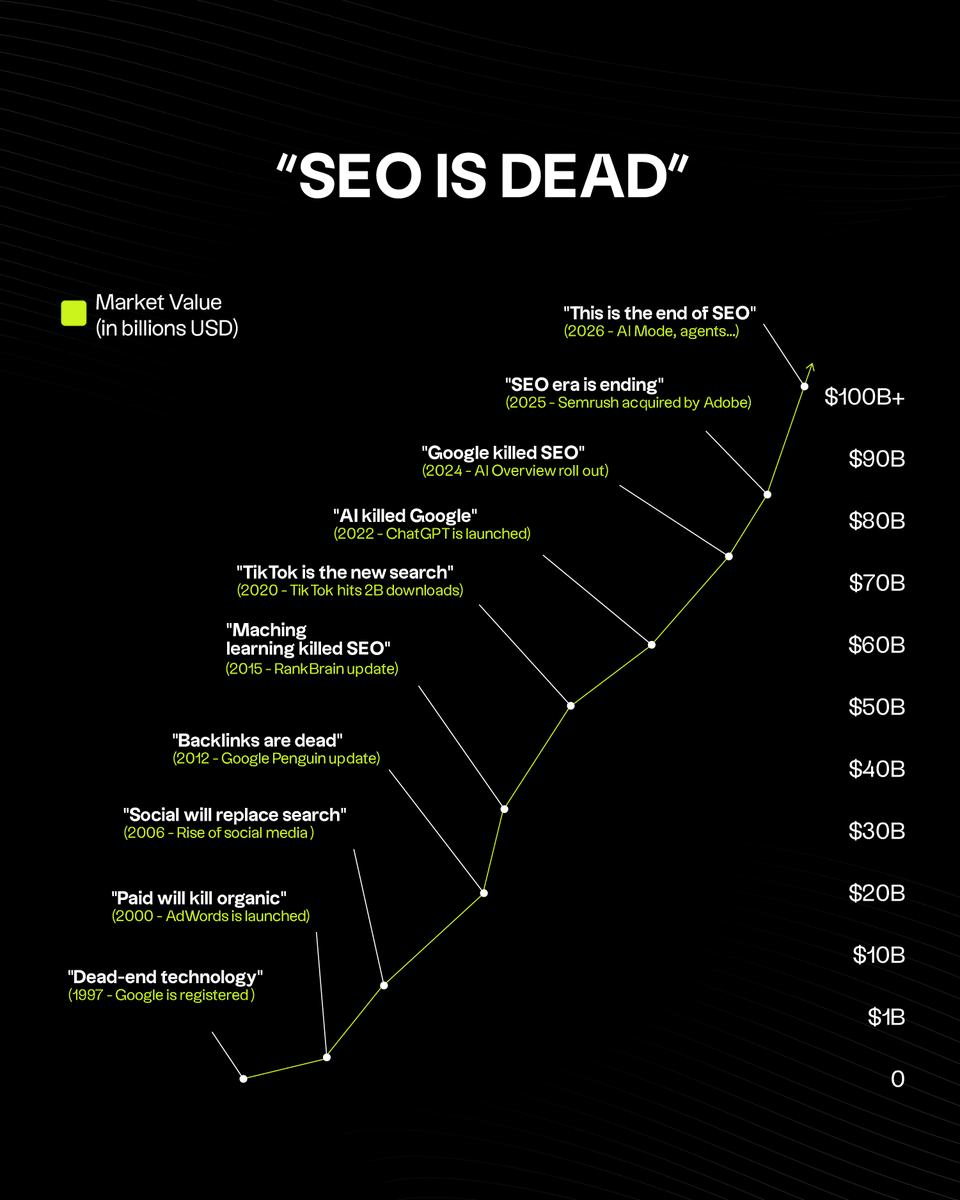
SEO has been dying since 1997.
- Google Ads
- Social media
- TikTok search
- Voice assistants
- Featured snippets
- Zero-click searches
- Every Google update
- AI Overviews in Google
- GEO/AEO as the new SEO
- ChatGPT replacing Google
And now... AI agents?
Here’s the reality:
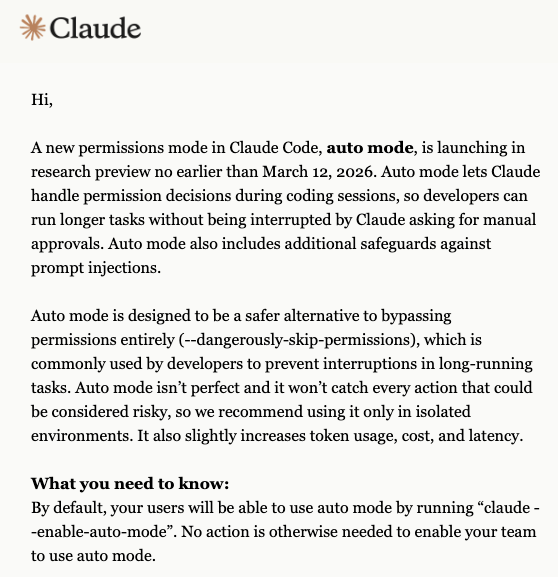
Claude seems to be fixing a super annoying developer problem.
Anthropic announced a research preview feature called Auto Mode for Claude Code, expected to roll out by March 12, 2026.
The idea is simple: let Claude automatically handle permission prompts during coding so developers don’t have to constantly approve every action.
Sstops those annoying permission prompts during long coding sessions.
Before this, you had to use `--dangerously-skip-permissions` to work without interruptions.
That method worked fine but took away all your safety nets. This new auto mode gives us a smarter option.
Claude will take care of the specific permission choices on its own while still blocking threats like prompt injections.
You can finally let long tasks run without watching your screen the whole time.
Since it is still a research preview, you should run it inside isolated setups like sandboxes or containers for safety.
Expect a small jump in token usage and delay, because the model needs extra time to process the security checks.
Once available, you just type `claude --enable-auto-mode` to start.
If you manage a team and need people to manually approve actions, you can restrict this feature using Mobile Device Management tools like Jamf and Intune or through configuration files.








![ayushtweetshere's tweet photo. Claude + GSC SEO Hack:
1. Go to Google Search Console
2. Pick 1 page thats doing well in the last 90 days
3. Filter and download all the queries data for that page
4. Upload this CSV to Claude with the following prompt:
"I wrote this article, its getting some traffic - [LINK]
im attaching gsc data for this page..
Suggest new content sections to add to the page or new pages that can be created based on the queries data in gsc"
Claude will analyze your page + your queries
will find content gaps in the page to improve its quality
will find ideas for new pages to create based on the adjacent queries you're getting impressions for
Apply the changes Claude suggest..
Repeat for 1 article every day..
See your SEO shoot up 🚀
Pro tip: Use claude code to actually create these pages - no manual grunt work + super fast execution..](https://pbs.twimg.com/media/HDYUXMZbQAANY_N.jpg)
![rubenhassid's tweet photo. How to set up the Claude completely in just 1 day:
(Save this. Send it to your team. Thank me later.)
Tool 1: Cowork
Download Claude (claude .com/download).
Open the Cowork tab.
Select a folder from your computer.
Now build your brain file. Create "about-me .md."
To download mine, go here: https://t.co/psB7XxAv8w.
Don't pay anything. It's free in the welcome email.
Then, start every chat with this prompt:
"Read the files first. Then ask me questions before doing anything."
Tool 2: Model
Pick Opus 4.6 (it's the best model right now).
Turn on Extended Thinking.
Most skip this & wonder why Claude feels generic.
Then go to Settings > Connectors.
Link Slack, Google Drive, Notion.
Claude now reads your actual workspace.
Tool 3: Excel
Open Excel. Go to Insert > Get Add-ins.
Search "Claude by Anthropic." Install.
Open any spreadsheet. Ask: "Give me a summary of each tab." Claude lives inside the spreadsheet. It knows what D14 actually contains.
Tool 4: Plugins
Go to claude .com/plugins.
Pick the one as per your job.
Marketing. Sales. Legal. Finance. Data.
Click install. Type / in your next chat.
Legal software companies lost $285B in market cap when these dropped. That's a signal.
Tool 5: Artifacts
Nothing to install. Ask Claude to build something.
"Create an interactive HTML calculator for [thing]."
You get a working tool inside the chat. Not text. Not a suggestion. A thing you click and use.
Tool 6: Projects
Go to claude .ai. Click Projects. Create one. Upload your files and add instructions. Every chat inside the project remembers your context.
Honest take: Cowork replaced this for me.
But for teams, it still works.
Where Claude falls short:
No image generation. Use Gemini.
Not the best at real-time search. Use Grok.
Not the best at everything. No tool is.
But for writing, thinking, analyzing, and working with your files? It's the best.
The real difference:
Most people open Claude, type one prompt, get a mid response, and leave.
Because they set up one tool out of six.
Set up all six. It takes 1 day.
Then you'll understand why everyone switched.
Full setup guide + features: https://t.co/jw2qdIbLxJ
Full Claude cowork set up: https://t.co/uWTpOI3oyE
Follow for more @rubenhassid](https://pbs.twimg.com/media/HDHuZ3iWUAEvEMY.jpg)