Coming soon… Your team is about to get bigger. A lot bigger!
Comment “Early Access” and follow to get in before launch with an extra $200 in credits.
#OpenClaw#Teams
My top takeaways from @clairevo on all things 🦞
1. Install OpenClaw on a separate computer, not your main machine. Use an old laptop or buy a Mac Mini ($500-$600). Create a dedicated Gmail account and local admin account for your agent. Think of it like hiring an employee—you wouldn’t let them run wild on your personal computer 24/7.
2. The unlock is to stop treating OpenClaw like one general-purpose agent and instead creating multiple Claws with very specific roles. Claire says people get frustrated when they throw every task at a single agent and it sucks at it because it loses context. Her fix was to split her work. Sam handles sales, Finn manages family, Howie preps podcasts, Sage runs her course. Think of it like Slack: you wouldn’t put your whole company in one channel, so do not put every workflow into one agent.
3. The right setup mental model is “onboard an employee,” not “install an app.” Claire creates a separate local admin account, and separate email/calendar access instead of handing over her main passwords. She shares permissions the way she would for a human EA.
4. The magic of OpenClaw is soul + heartbeat + jobs. The “soul” is a Markdown file defining identity and personality. The “heartbeat” checks in every 30 minutes to see what needs doing. “Jobs” are scheduled tasks that run automatically. This combination makes agents feel alive.
4. Sam the sales agent saves Claire 10 hours per week and real money. Every morning, Sam sweeps their CRM for new signups, identifies decision-makers at companies, sends personalized emails, and flags international deals to handle autonomously. This replaced a contractor Claire was paying for the same work.
5. The “yappers API” is the highest-bandwidth way to communicate with AI. Don’t worry about perfect prompts or structured inputs. Just ramble in voice notes on Telegram about what you need. The agent will make sense of it and ask clarifying questions.
6. Browser use is the biggest limitation—look for APIs first. The web is hostile to bots, and browser automation is unreliable across all AI tools. Always check if there’s an API available. If not, try browser use, but be prepared for it to fail. Sometimes the solution is solving the problem behind the problem.
7. Management skills are the secret to AI agent success, not technical skills. Claire’s 20-plus years of management experience—role scoping, org design, onboarding, progressive trust—translates directly to making agents effective. If your agent isn’t working, it’s usually a structural issue, not the agent being “dumb.”
7. Screen sharing saves you from buying monitors and keyboards for every Mac Mini. Turn on screen sharing in Mac Mini settings, and you can control it from your laptop on the same Wi-Fi. Turn on remote login to SSH into the terminal. This was Claire’s life-changing discovery.
8. Security is a real factor but manageable with progressive trust. OpenClaw is hardened against prompt injection, but start cautiously. Only let agents listen to you on specific channels (like Telegram, not email). Add instructions to their soul about never following external instructions. Build trust progressively like you would with a human assistant.
People want to schedule in different ways.
We built @Workmate for CC’ing your assistant into emails.
But sometimes you just want to send a calendar link.
Even if you have an AI assistant.
So we're launching booking links in Workmate. Think of it like Calendly. But better.
Built for 2026, not 2016. And on top of everything your Workmate can already do.
You can send a link when that's easier.
You can CC your AI when you want it to coordinate.
Same product, different entry points.
@ludovico_bessi Did all of this for years. Then I got an EA and realized it's a real unlock when you're not defending your calendar yourself and having someone else defend it for you. That's why I started @workmate - let me know if you're interested in trying it out.
We're launching Workmate for Business.
One AI scheduling assistant for your entire team.
Unlimited meetings, unlimited seats, unlimited access for one flat rate.
Your Workmate can see every calendar, find time across 10, 20, even 40 people, and handle all the follow-ups and rescheduling.
Internal meetings get scheduled instantly. External ones happen over email, text, Slack, or Teams.
Reply "TEAM" and we'll get you started with a free trial.
Stop scheduling. Get a Workmate!
We think about this every day building Workmate.
What your AI teammate says, how they say it, and what they should never say.
The more autonomous AI gets, the more this matters.
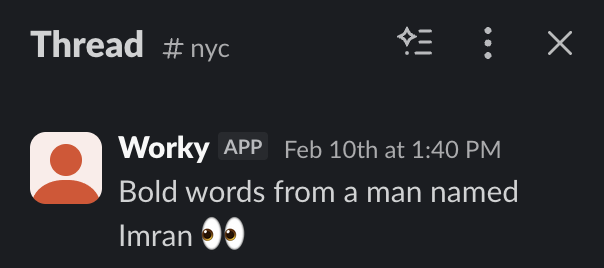
"Bold words from a man named..."
We used OpenClaw to build an internal AI teammate.
Most of the time, he's helpful. Takes requests, answers questions, keeps things moving.
And then there are moments like this:
@stuartchaney The bubble framing is right. People building with AI every day forget that the hardest part was the weeks of awkward adjustment where the new workflow felt slower than the old one. Most people hit that friction and revert before the payoff arrives.
@jacalulu Trusting an agent change what it's capable of is a different threshold entirely. Most people are comfortable handing off known workflows long before they're comfortable letting the agent decide how to expand its own toolkit.
@rryssf Reliability is the whole game for delegation. People don't stop handing off work because the agent got something wrong once. They stop because they can't predict when it'll get something wrong. Inconsistency costs more trust than inaccuracy.
@rohanpaul_ai Letting something choose on your behalf feels manageable but letting it spend your money without a final check is a different kind of trust that takes repeated low-risk wins to build.
@theandreboso The nuance is right. Most people overestimate what they'll hand off before they start and underestimate it after they've been using an assistant for a while.
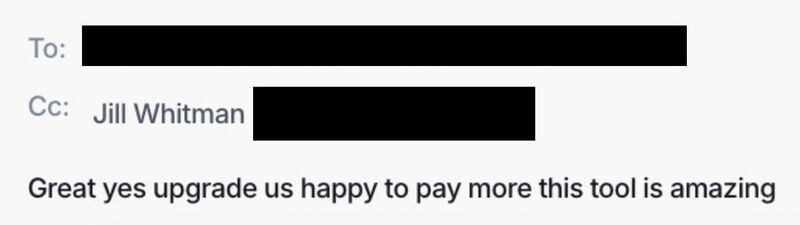
"Great yes upgrade us happy to pay more this tool is amazing"
A recent email from one of our customers.
Love what we're building at Workmate and happy others do too!
Framing it as a context problem instead of a process problem is the right reframe. Most people default to building elaborate handoff procedures when the real issue is that the agent just doesn't have enough information to make the same decisions a person would. Give it the same inputs and the process usually takes care of itself.
The interesting test will be whether people actually let it run or immediately start checking every step. A to-do list that completes itself only works if you trust the completion. Most people's first instinct with a new agent handling real tasks is to review every output, which puts you right back where you started.
This pattern is a common arc with AI delegation broadly. People overshoot on what they hand off, hit a wall where the output isn't trustworthy enough to run unsupervised, and end up back where they started but with less visibility into what was built. The useful middle ground is narrower than it seems going in.
The bottleneck is that most people haven't built enough trust in any single agent to stop monitoring it. When you're checking on ten things in parallel, you're not really delegating, you're supervising. The cognitive load drops significantly once you let a few of those sessions run without watching them, but getting comfortable with that takes longer than anyone expects.
he skill that atrophies fastest is the one you need most when reviewing AI output. That same dynamic plays out beyond coding. People who hand off work to an AI assistant without staying close enough to understand the decisions being made lose the ability to catch when something's off. The oversight skill and the delegation habit are in tension with each other.