Sharing WP-CLI tips, plugin update gotchas, and what I learned shipping a maintenance tool for 50+ WordPress sites. Builder of WP Maintenance Manager. 🇯🇵 #bui
I run WordPress sites professionally —
obsessed with what makes maintenance
actually reliable at scale.
What you'll get here:
WP-CLI quirks. Plugin update gotchas.
SSH update strategies. DB backup tactics.
If WP ops is your day job, follow along.
One of my favorites 👇
Our blog posts on X were all showing the same sales image as the OGP card.
Fix: a PHP GD generator that renders 1200×630 cards from each WP post title + disk cache.
The card on this post is what we wrote about:
https://t.co/Gz91XsLcum
#WordPress#PHP
`home_url('/')` and `site_url('/')` return different values
when WP is installed in a subdirectory.
home_url = the front page URL
site_url = the WP install URL
Took me an hour to find this bug once.
#WordPress
paramiko's connect() defaults to look_for_keys=True + allow_agent=True.
It tries every key in ~/.ssh/ + ssh-agent — failed attempts trip fail2ban and silently get your IP banned.
Fix: look_for_keys=False, allow_agent=False.
Full story:
https://t.co/IOt01jvS5V
#SSH#Python
Cross-site WordPress dashboards block on cold SSH fetches across 30+ sites.
Our design: show the cache first, fetch on click, keep the worker running if the user closes the modal.
Cache-first + closes-but-keeps-running.
Full story:
https://t.co/hilv2moJG9
#WordPress
Every 6 months WordPress shows admins an "Is this email correct?" screen.
It silently breaks wp-admin automation — auto-updates for ACF Pro / Yoast / WP Rocket drop.
Selector: `input[name="correct-admin-email"]`.
Full story:
https://t.co/IffsJ080YJ
#WordPress
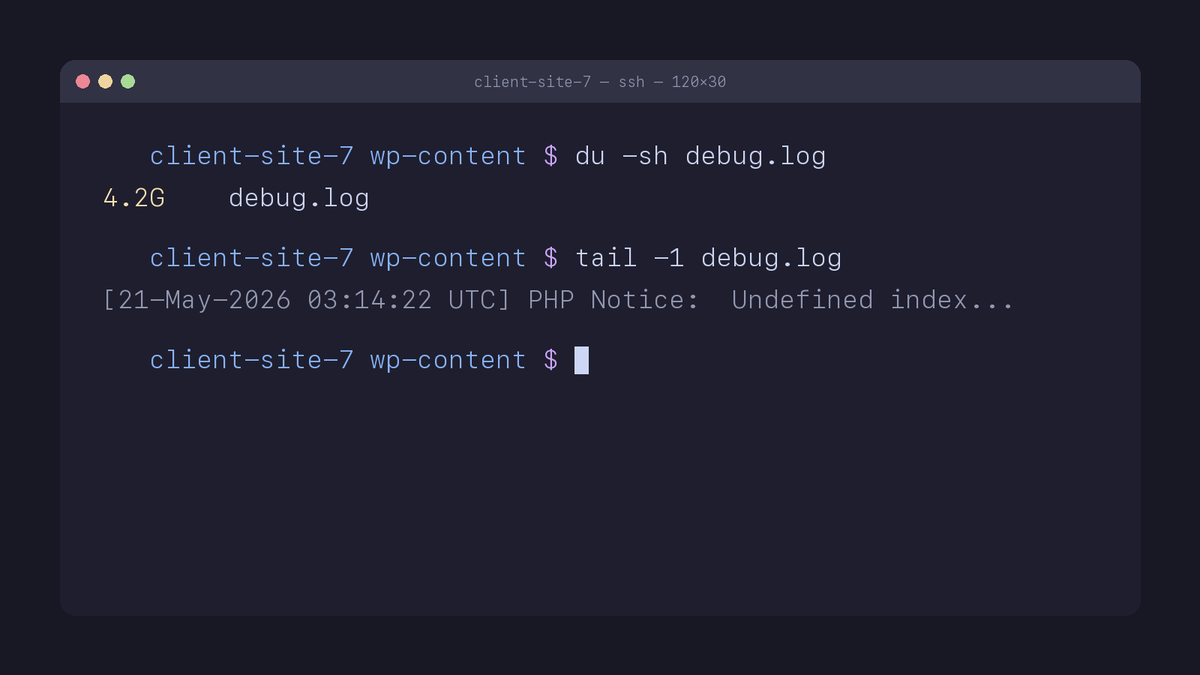
`wp-content/debug.log` keeps growing forever
when WP_DEBUG_LOG=true. No rotation. No size limit.
Multi-GB files I've found in client setups: more than I'd like to admit.
`logrotate` it. Or symlink to /dev/null on dev.
#WordPress
If your site shows "Briefly unavailable for scheduled maintenance"
forever after an update — WP probably crashed mid-update
and left a `.maintenance` file in the WP root.
`rm .maintenance` over SSH. Site comes back.
#WordPress#WPCLI
Surveyed ManageWP, MainWP, WP Umbrella, InfiniteWP.
Three things none of them do:
→ Per-plugin updates with HTTP checks
→ Pinpoint rollback (only the broken one)
→ No Worker plugin on the client site
Structural choices, not feature gaps.
https://t.co/xoJGSNOdKf
#WordPress
WP-CLI's worst irony:
You opened it to fix a broken plugin. WP-CLI booted WordPress. WordPress loaded the broken plugin. WP-CLI fataled.
`--skip-plugins --skip-themes` skips that load. File ops still run.
https://t.co/kuhkI5EncI
#WordPress#WPCLI
"wp-cli not working" usually isn't a bug.
It's a setup mismatch with your host.
No php on PATH. No ~/bin on PATH. No wp at all.
4 hosts, 4 architectures.
`wp --info` is the only health check that doesn't lie.
https://t.co/RTFjnZbfRf
#WordPress#WPCLI
Every WordPress maintenance tool fits a different operating style.
ManageWP wins if your team needs:
→ Cloud dashboard, any device
→ 60-second uptime monitoring
→ Integrated SEO + analytics
→ Role-based team permissions
→ https://t.co/Xb2jijNlsR
#WordPress
Most rollbacks revert the whole site.
Real rollback is per-plugin: keep safe updates, undo only what broke.
`wp plugin install X --version=Y --force --skip-plugins --skip-themes`
Hosts covered: WP Engine/Kinsta/SiteGround/Cloudways.
https://t.co/TrqN5vZC6j
#WordPress#WPCLI
`wp plugin install --version=X --force` doesn't
just downgrade — it overwrites the entire plugin dir.
Custom translations? Gone.
.htaccess in the plugin folder? Gone.
Backup `wp-content/plugins/<slug>` first
when you really care.
#WordPress#WPCLI
If `WP_DEBUG=false` but you still see PHP notices in prod,
check `php.ini` → `display_errors`.
WP can't override that one. Server config wins.
#WordPress
HTTP 200 doesn't mean WordPress is healthy.
Some plugins catch fatals, return "200 OK".
Monitoring green. Site broken.
What works:
→ `wp option get blogname` over SSH
→ Visual diff before/after
→ WP_DEBUG in HTTP headers
Status codes lie. WP-CLI doesn't.
#WordPress#WPCLI
Most "rollback" scripts break when a plugin fatals.
Why: `wp plugin install --version=X --force`
boots WP, loads the broken plugin, fatals.
Fix: `--skip-plugins --skip-themes`
File ops still run. Site recovers from any broken state.
#WordPress#WPCLI
I run WordPress sites professionally —
obsessed with what makes maintenance
actually reliable at scale.
What you'll get here:
WP-CLI quirks. Plugin update gotchas.
SSH update strategies. DB backup tactics.
If WP ops is your day job, follow along.
One of my favorites 👇
HTTP 200 doesn't mean your site looks fine.
A plugin update can break the layout
and still return a 200.
WP Maintenance Manager takes screenshots
before and after every update.
If the pages look different, it flags it.
#buildinpublic#WordPress