Our @youtube teams are on 🔥 this week. We’re shipping new tools to help @youtubecreators connect with their communities:
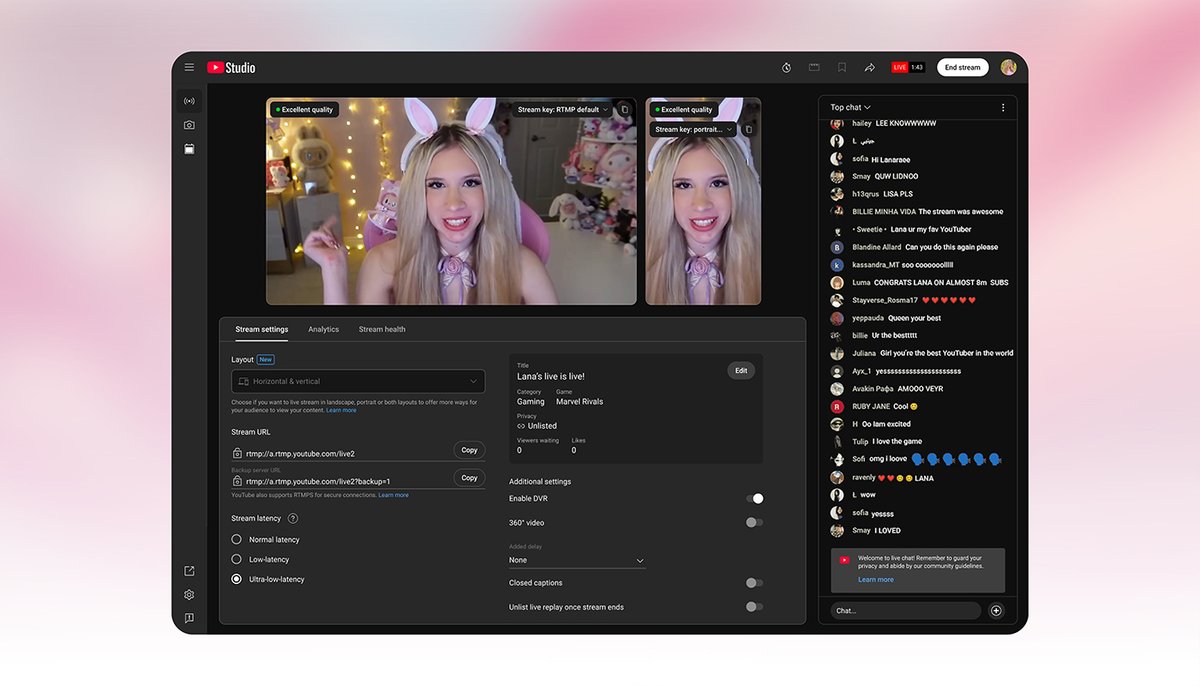
📹 Stream across formats now allows you to simultaneously go live with a horizontal stream and a vertical stream, with a single chat for all viewers. (We know you want more control and customizable vertical layouts - they’re coming soon).
🤗 We heard you: we brought our Communities feature to desktop. Plus, on mobile, you can now 📌 a post to the top, ❤️ posts, and easily share links to your Community 🔗
📺 We updated our watch page on TVs to make your viewing experience better, with simpler navigation, a more prominent Subscribe button, and more.
💡Ask Studio, your creative companion in YouTube Studio, is now available in English to most creators in 🇺🇸🇨🇦🇳🇿🇮🇳
we’re expanding access to Communities 🎉
Communities are dedicated spaces to connect with your audience, start conversations, & build a stronger community!
+ the Community tab is now called the Posts tab. more about the changes 👇 https://t.co/54DRbmITET
We're expanding access to Communities!
Communities are our new, dedicated spaces for viewers & creators to interact, share updates, & build connections 🫂
+ The "Community" tab is being renamed to the "Posts" tab for clarity
All the info: https://t.co/aOq0XLi8oY
📣 heads up, creators: posts are rolling out to more channels! once you get access…
1️⃣ tap the “+” button on mobile or “Create Post” on desktop
2️⃣ play around with text, images, GIFs, & more
3️⃣ share & connect with your audience on a ~deeper level~
learn more: https://t.co/UwxNhwusoY
🥳 big news for creators: posts are rolling out to all eligible channels 🥳
get creative with polls, text, images, + video posts & engage w/ viewers like never before 🌟
all the info: https://t.co/PeXxqmKy3y
📣 the YouTube Create beta is now available in 13 more regions!
creators in 🇦🇷 Argentina, 🇦🇺 Australia, 🇧🇷 Brazil, 🇨🇦 Canada, & others can download here: https://t.co/1fkleFVFnZ
🛠️ subscribe for updates when we add features & expand to more countries: https://t.co/TnLE9SyHa5
Announced! We’re starting to roll out a new YouTube Q&A sticker in Shorts, so you can ask your audience questions and get responses right in your comments. Check it out: https://t.co/goWboPTtPY
ever posted about upcoming live streams or premieres to your Community tab?
your fans can now turn on notifications for streams/premieres that you’re promoting via a new “Notify me” button at the bottom of the post!
see how it works ⬇️
https://t.co/8SivlVYRrO
☎️ calling all creators who use the Community tab!! 📞
to encourage more in-the-moment engagement w/ your audience, we’re making it possible to set your Community posts to expire after 24h 🕒
watch to learn more: https://t.co/2GmVosgO1g
we’re making it even easier to participate in live streams & engage w/ the Live community!!
if you watch live streams on mobile (desktop coming soon), you can now use the ❤️, 😊, 🎉, 😳, & 💯 reactions to interact w/ your fave creators when they’re live: https://t.co/zn2DspmXww