Docs here. Still requires tinygrad master, but no SIP bypass or anything like that. AMD compiler is native, NVIDIA compiler runs in Docker. https://t.co/uEECNafEOc
The March 2026 release of the Azure SDK is now available. Here are all the links and resources you need to take advantage of this latest release. 📖 https://t.co/sFdyECI75M
Flutter 3.38 is here! 🩵 ✨
This release cleans up your UI code with new Dot Shorthands, making development faster and more readable.
Get the details of all that’s new → https://t.co/kWuLvFZRTQ
𝗥𝗮𝘄 𝗦𝗤𝗟 𝗶𝗻 𝗘𝗙 𝗖𝗼𝗿𝗲 𝟴
EF Core 8 now supports raw SQL queries for unmapped types — no more entity-only limits!
Key highlights:
- Safe from SQL injection (uses FormattableString with parameters)
- Works with stored procedures, functions, views
- Lets you compose raw SQL + LINQ
I break it all down here: https://t.co/JV2ZqDFj4Q
What’s your take on this new feature?
How do you migrate to Microservices?
Let's say you're starting from a monolith.
You'll probably use some form of the Strangler Fig pattern.
What you should've done is build a Modular Monolith.
Modules are perfect candidates for extraction.
When I'm evaluating modules, I look for these characteristics:
- Low coupling with other modules
- High cohesion within the module
- A distinct business function
- Potential performance or scalability gains from separation
The migration process should be straightforward.
Extract the module, fix communication, and migrate data.
I explained the entire process here: https://t.co/dbmzMrvB8h
EF Core added some amazing features.
JSON Columns, primitive collections, raw SQL...
The highlight?
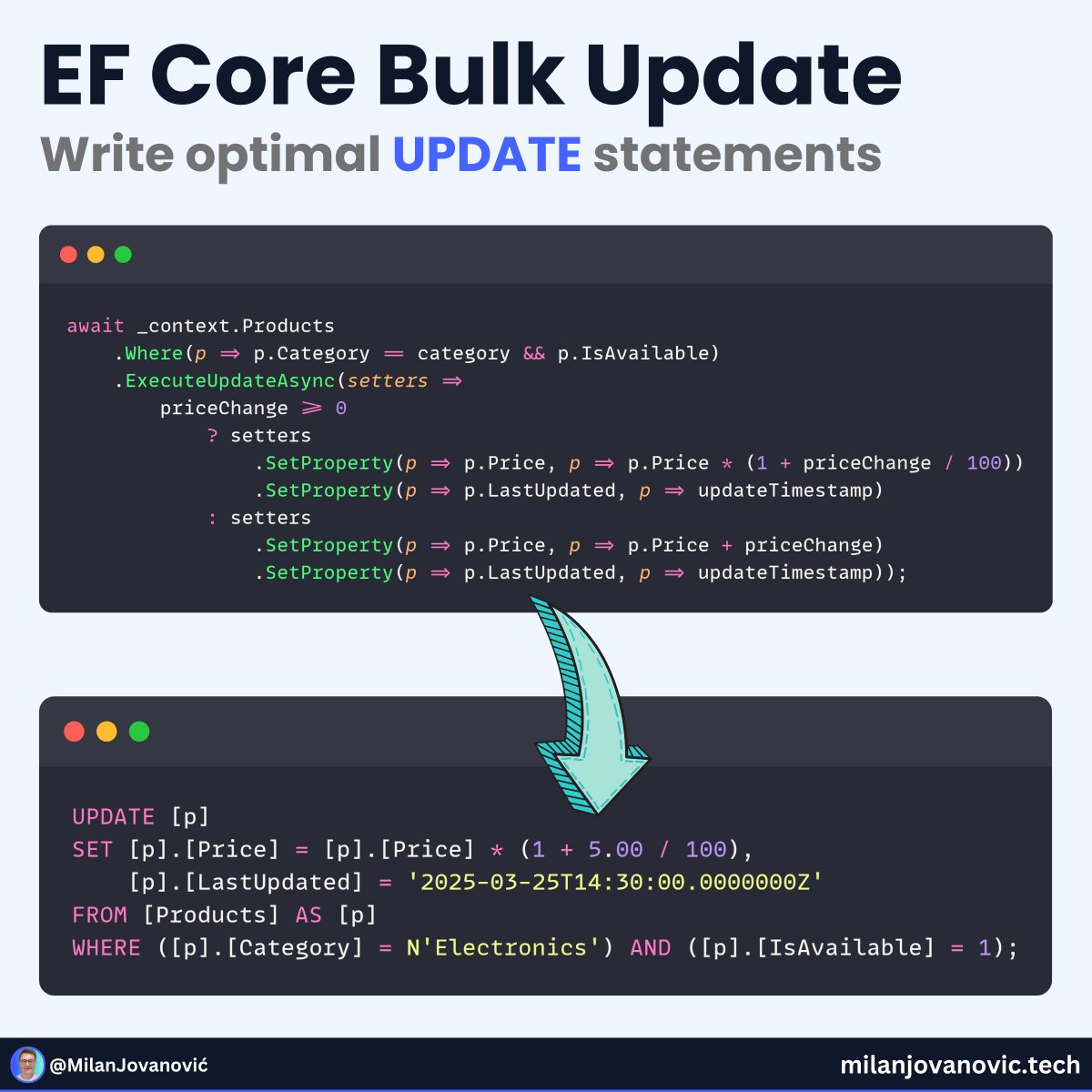
I think it's the bulk update APIs:
- ExecuteUpdate/ExecuteUpdateAsync
- ExecuteDelete/ExecuteDeleteAsync
Why should you care?
Performance.
You can write optimal UPDATE and DELETE queries.
Here's how: https://t.co/OzbQfkTKsw
The January 2024 release of the Azure SDK is now available. Here are all the links and resources you need to take advantage of this latest release. 📖 https://t.co/UeN9tych9K
In this .NET Foundation Solution2 session replay, we learn everything about plugin architecture in C#; working through various scenarios where this form of architecture will help you improve your code as well as your application overall. 🎥 https://t.co/87pwT0ynXV
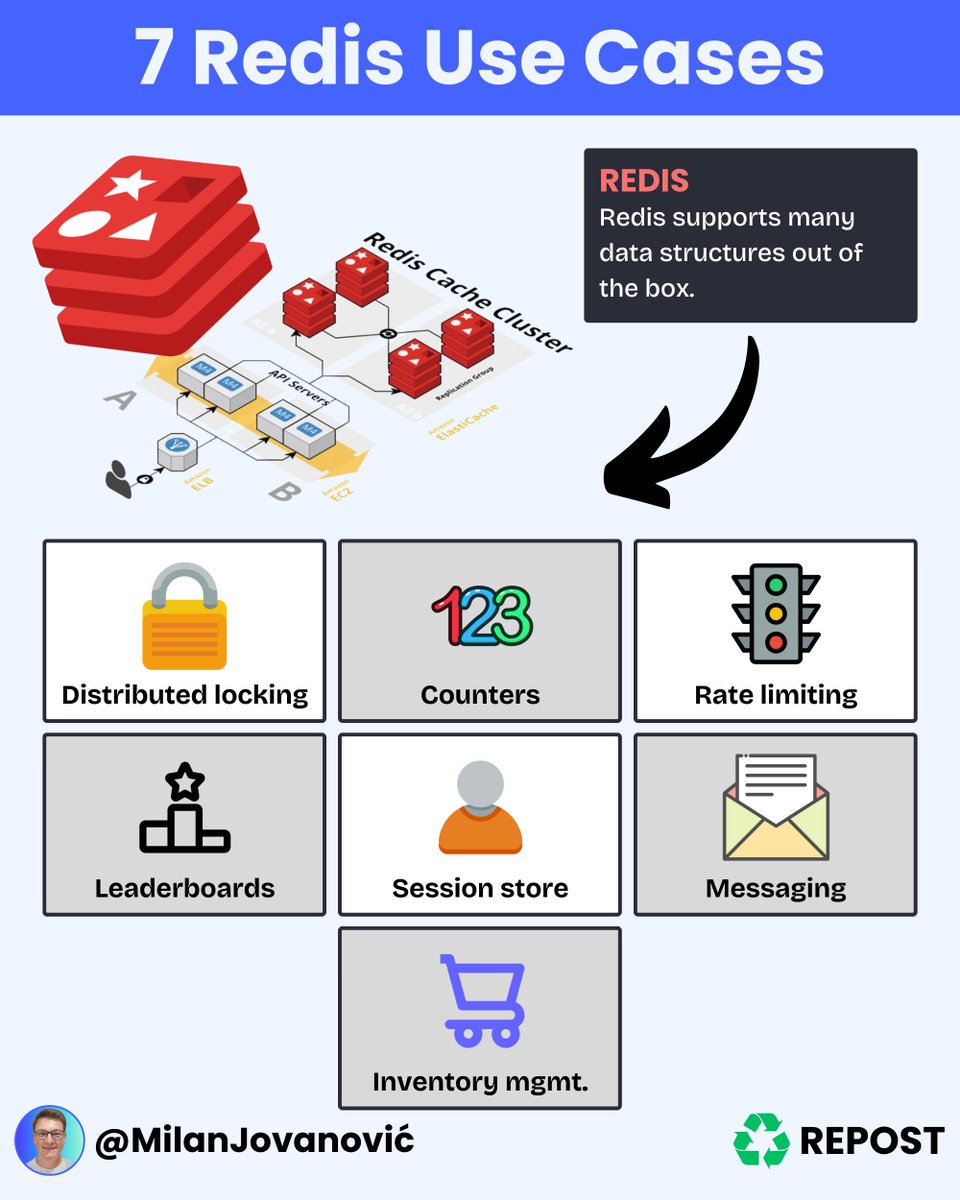
Most people think Redis is just used for caching.
But it can do so much more!
Here are a few use cases for Redis:
🔐 Distributed locks
Redis can be used as a distributed lock to ensure that only one process can access a resource. This is useful in distributed systems where many processes try to access the same resource simultaneously.
📈 Counters
Redis can be used to maintain counters, such as the number of times a particular event occurs. This can be useful in various applications, such as tracking the number of page views on a website.
🚦 Rate limiting
Redis can be used to implement rate limiting, which can help prevent abuse of APIs or other resources. For example, you could limit the requests a particular IP address can make in a given period.
🏆 Leaderboards
Redis can be used to implement leaderboards or rankings, such as those found in gaming applications. This can be useful for tracking high scores or other metrics.
💻 Session store
Redis can be used as a session store, which can help improve web application performance. Storing sessions in Redis reduces the need to access the database on every request.
🗃️ Message queue
Redis can be used as a message queue, allowing processes to communicate asynchronously. This can be useful for decoupling components in a distributed system. However, it's not a reliable messaging system.
📦 Inventory management
Redis can manage inventory in an e-commerce application. This allows you to track available quantities of items and update them in real time as orders are placed.
These are just a few examples of the many use cases for Redis.
Here's how you can use caching with Redis to improve performance: https://t.co/CAUpLc7f08
What are some other creative ways you've used Redis in your applications?
---
Do you want to simplify your development process? Grab my free Clean Architecture template here: https://t.co/XTocuG4Fdi
In this second post in the series on GraphQL and .NET, we see how to fill a Blazor QuickGrid component with data fetched with GraphQL. ➕, we look over the virtualization feature of using QuickGrid to improve performance. 📖 https://t.co/DaMvTUA0jQ
Testing is a crucial part of software development.
In his latest #dotNET Blog post, @jfversluis gives us everything we need to know to get started with UI testing .NET MAUI apps using Appium (UI testing framework). 📖 https://t.co/BsIW1wcjUM
Walk through making C# programs run on a 1985 game console with a 6502 microprocessor. In this #MSBuild session replay, we reverse engineer, and work with opcodes, MSIL, binary formats, and tons more! 🎥 https://t.co/Gso3rvDh6P
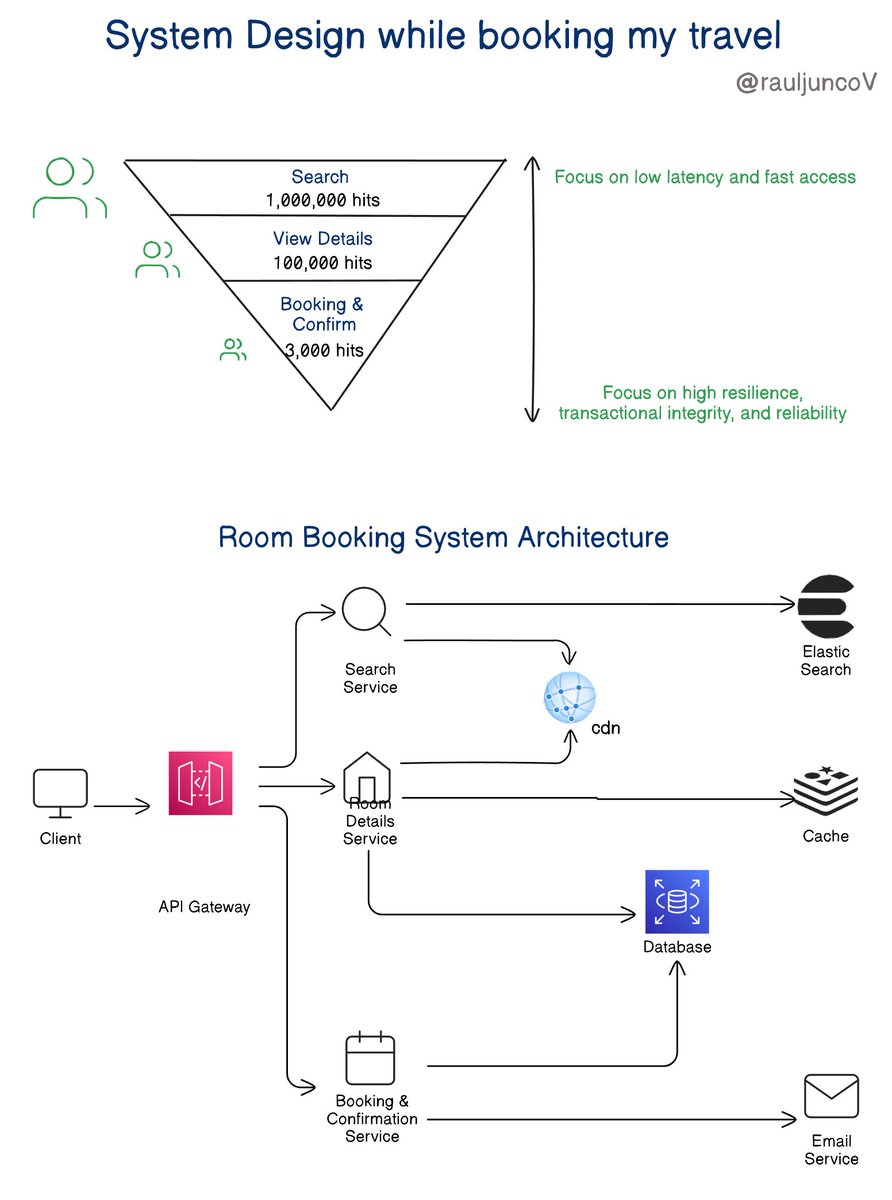
Hotel reservation is not a joke.
Let’s build an example.
Your system needs to support:
• Search for rooms
• View room details
• Booking a room
• View confirmation details
Do all four features need the same response time?
The answer is NO. The search should be faster, but only about 10% of users will click on view details after a search.
And from there, we can assume that only 3% will reach the next page and book a room.
Search and Details services need low latency, which should be their priority.
On the other hand, your priority for the booking service is resilience, availability, and transactional.
Here is how I would design something like this:
API Gateway
• Acts as a single entry point for all client requests.
• Routes requests to the appropriate service.
Search Service
• Handles room search queries.
• Interfaces with a specialized search index.
Room Details Service
• Retrieves detailed information about a room.
• Uses caching and CDNs for static content.
Booking & Confirmation Service
• Manages room booking transactions and provides booking confirmation details.
• Sends confirmation emails and stores confirmation data reliably.
TL;DR
Search and View Details: Focus on low latency and fast access using caching and indexing.
Booking and Confirmation: Focus on high resilience, transactional integrity, and reliability.
What will you add to make this design better?
What is SSO (Single Sign-On)?
Basically, Single Sign-On (SSO) is an authentication scheme. It allows a user to log in to different systems using a single ID.
The diagram below illustrates how SSO works.
Step 1: A user visits Gmail, or any email service. Gmail finds the user is not logged in and so redirects them to the SSO authentication server, which also finds the user is not logged in. As a result, the user is redirected to the SSO login page, where they enter their login credentials.
Steps 2-3: The SSO authentication server validates the credentials, creates the global session for the user, and creates a token.
Steps 4-7: Gmail validates the token in the SSO authentication server. The authentication server registers the Gmail system, and returns “valid.” Gmail returns the protected resource to the user.
Step 8: From Gmail, the user navigates to another Google-owned website, for example, YouTube.
Steps 9-10: YouTube finds the user is not logged in, and then requests authentication. The SSO authentication server finds the user is already logged in and returns the token.
Step 11-14: YouTube validates the token in the SSO authentication server. The authentication server registers the YouTube system, and returns “valid.” YouTube returns the protected resource to the user.
The process is complete and the user gets back access to their account.
Over to you:
Question 1: have you implemented SSO in your projects? What is the most difficult part?
Question 2: what’s your favorite sign-in method and why?
–
Subscribe to our weekly newsletter to get a Free System Design PDF (158 pages): https://t.co/uc5M7CdXXC
1/ @nubit_org:
Nubit is a scalable, budget-friendly data layer powered by Bitcoin, designed for the Bitcoin community.
It has secured $11M in funding from Polychain Capital, The Spartan Group, OKX Ventures, and other key investors.