this is a f*cking goldmine.
you're spending days rigging, texturing and lighting your 3d characters by hand while claude code can drive the free open source tools that do most of it for you.
One tool lets claude work inside blender. One rigs the cloak. One makes it swing. One paints the textures. One lights the shot. One packs it for the game.
Here are 13 GitHub projects to rig, texture and ship your own 3D characters:
CLAUDE x BLENDER
01 / Blender MCP Bridge → 98 tools over MCP so claude code can build geometry, apply materials and render in blender
https://t.co/1qGDVhpjEY
02 / Blender MCP Assembly Skill → teaches claude to place parts at the right scale and catch bad rotations and overlaps
https://t.co/UlEDFL7Z3X
RIG & CLOAK MOTION
03 / Spring Bones → spring and bounce on any bone chain, the cheap way to make a cloak swing
https://t.co/jSHienQDJ7
04 / ActionPoser → rigs driven by action constraints, one control moves a whole pose
https://t.co/UxsRwsnUOQ
05 / AnimAide → free tools for easing and blending keys in the graph editor
https://t.co/vlx3q5tv8I
TEXTURES & UVs
06 / Ucupaint → texture layers like a paint app, right inside blender
https://t.co/jurxlfcOVR
07 / Material Combiner → merges materials into one atlas so the game makes fewer draw calls
https://t.co/3yG51FzfQB
08 / UVgami → automatic UV unwrapping
https://t.co/89kq1bC5sm
PROCEDURAL DETAIL
09 / Sverchok → node-based parametric modeling
https://t.co/USWkbg74Of
10 / Tissue → computational design, repeats patterns over any surface
https://t.co/x48I4u6i7o
STUDIO SHOT & EXPORT
11 / LeoMoon LightStudio → a free studio lighting rig for blender
https://t.co/IJrbKnD9X2
12 / Camera Shakify → real handheld camera shake for the turntable
https://t.co/kPGLsXrkni
13 / PSK/PSA → moves meshes and animations in and out of unreal's psk/p
https://t.co/mRLNUMH7aU
my hollow warden went from 395,358 tripo triangles to one 80k mesh with 129 bones, 78 of them just for the torn cloak.
the full workflow is in the article below
I built an endless three.js motorcycle ride with GPT-6.2 Astra. I used parallax and fisheye camera tricks to achieve this.
Url: https://t.co/DQYUszScvd
Skills open-sourced:
Fisheye https://t.co/8MAqpzyZzZ
Parallax https://t.co/gxmkeQIInU
Particles & sky https://t.co/6k8rPyDaO1
Inspiration: https://t.co/QL4yrp8CEP
I animate anything I imagine now, these 15 GitHub repos are my secret
this is real f*cking gold for Fable 5.2 and Opus 5.5 fans
Ink. Smoke. Edits. 3D. Upscale. Taste.
line-art-animation → hand-drawn ink characters that walk, ride and react
https://t.co/xltYQ9g4NJ
Sakuga VFX → anime-style smoke and impacts on every click
https://t.co/TwsrbxB8yG
Rough.js → turns clean shapes into pencil sketches
https://t.co/Ee6BWm31pI
Motion Canvas → animations you code once and tweak forever
https://t.co/F7YxKm6gxY
scarlet → an AI video editor your agent runs for you
https://t.co/J2EqAwLzqJ
video-use → dump raw clips, get a finished edit back
https://t.co/sIeu29n2w0
Real-ESRGAN → blurry old clips, sharp as new
https://t.co/GWWwcRY0x0
Three.js → 3D worlds that play right on the web
https://t.co/BgbvnRcMUt
Blender MCP → Claude handles every 3D scene in Blender
https://t.co/QWCqTa15R2
Meng To Skills → pro design skills, packed for your coding agent
https://t.co/xrIYDzyJDc
Impeccable → spots what's off before your viewers do
https://t.co/LUVwZwOvKe
Hallmark → keeps every frame looking human-made
https://t.co/xIVofZdejW
HyperFrames → simple HTML, turned into smooth video
https://t.co/dOZZVJZopQ
Remotion → React code that renders into real animation
https://t.co/znpMp7SpNi
FFmpeg → the final export, ready for any feed
https://t.co/HlJpuzR3nn
Idea → sketch → animate → edit → post.
Bookmark this, then the guide below shows how to turn whatever you imagine into an animation ↓
THIS IS F*CKING WILD...
you're wasting weeks writing every script, shader and enemy ai of your game by hand while claude code and free github tools can turn one person into an entire game studio.
One plans the levels. One writes the code. One makes the art. One builds the world. One playtests. One ships.
Here are 15 GitHub projects to build your own AI game studio in Unity:
CLAUDE x UNITY
01 / Unity Agent Plugin → Unity's official plugin for Claude Code, 30+ skills for physics, navmesh, audio, UI and shaders
https://t.co/XTbQqilLX7
02 / Unity-MCP → Claude reads and changes your scenes, prefabs and C#, runs tests and takes screenshots in the editor
https://t.co/IZvZBU0Vxy
03 / MCP Unity → another MCP bridge between Claude Code and the Unity editor
https://t.co/RQOu15zobj
ART & ANIMATION
04 / Blockbench → free low-poly model editor with pixel art textures, exports for game engines
https://t.co/ddgdQJoPl7
05 / Krita → free painting app for concept art and textures
https://t.co/9zYGr0jDVp
06 / LitMotion → zero-allocation tweens for transforms, materials and UI text
https://t.co/2DbfL4Mizq
GAMEPLAY & SYSTEMS
07 / UniTask → async/await for Unity, replaces coroutines
https://t.co/E0MqH3hCn8
08 / Fluid Behavior Tree → code-driven behavior trees for your enemy AI
https://t.co/FDSK7HUzVo
09 / Yarn Spinner → dialogue written like a screenplay, used in Night in the Woods and Dredge
https://t.co/UwPjp806nF
10 / Mirror → open source multiplayer, used in 1000+ Steam games
https://t.co/MlDFdbqhBS
WORLD & VFX
11 / Crest → water system, the free GitHub version runs on the built-in
https://t.co/u6gsrOHcXx
12 / URP Toon Lit Shader → short toon shader example to learn custom lighting in URP
https://t.co/MoprYAug51
13 / Procedural Toolkit → procedural generation library for Unity
https://t.co/QeQuK4M7Eg
AUDIO & SHIP
14 / jsfxr → retro game sound effects generator in your browser
https://t.co/F2hwXLpyqM
15 / Unity Builder → GitHub Action that builds your Unity game for ever
https://t.co/pMgBtbYm0T
THE 6-AGENT GAME STUDIO:
01 Director → Plans the levels, enemies and bosses and writes the task list.
02 Builder → Writes the C#, shaders and enemy AI in Unity.
03 Artist → Turns concept art into 3D models with Tripo, then rigs and animates them in Blender.
04 World builder → Builds the terrain, villages, rivers and lighting.
05 Tester → A bot plays the level and reports what broke.
06 Release → Builds the game for every platform.
One director plans the game.
Five specialists build it.
You bring the idea. Your AI team turns it into a playable game.
the full workflow is in the article below
THIS IS F*CKING INSANE...
You're still rigging, animating and exporting your 3D characters by hand while Claude Code and free open source tools can turn one person into an entire animation studio.
One rigs the body. One animates it. One captures the motion. One adds the physics. One makes the effects. One ships the file.
Here are 14 GitHub projects to bring your 3D character to life:
CLAUDE x BLENDER
01 / Blender Agent MCP → Claude Code drives Blender through ~216 tools for modeling, rigging, animation and export. One Ctrl+Z undoes a whole step
https://t.co/GcvWgVFZSC
02 / Mixamo LLM Mocap → turns any locked-camera video into animation on a Mixamo character, built so an AI agent can run the whole loop
https://t.co/eDJEEvusac
RIGGER
03 / Blender → the free open source 3D suite for modeling, rigging, animation, simulation and rendering
https://t.co/t4n3vPaxOs
04 / GameRig → auto rigging for games, built on Blender's Rigify
https://t.co/46pd7vW4Yu
05 / BlenRig → auto rigging and skinning, a feature film quality rig with a facial system
https://t.co/wphes7nRyZ
ANIMATOR & MOCAP
06 / FreeMoCap → free motion capture for everyone, an open source desktop app
https://t.co/ejgVGUzZ9Q
07 / Rokoko Studio Live → streams mocap into Blender in real time and retargets it between rigs
https://t.co/S1GNBaVK7e
08 / Simple Retarget Tool → moves an animation from one armature to another, with presets
https://t.co/3WcktiEN3t
PHYSICS & EFFECTS
09 / Jiggle Physics → verlet jiggle on bones, from soupy ropes to stiff rods, tuned while the animation plays
https://t.co/1vrLsQ7p5t
10 / Effekseer → particle effect editor for games, effects play back in your app through runtimes and plugins
https://t.co/fjXoi6Jhzu
EXPORT
11 / glTF-Blender-IO → the Khronos glTF 2.0 importer and exporter for Blender
https://t.co/XXWz6N1PxC
12 / VRM Add-on for Blender → imports, exports and edits VRM models, with a Python API for automation
https://t.co/FPCWlxvY1w
13 / Godot → free MIT game engine with one click export to desktop, mobile and web
https://t.co/1qxrqc5sGS
14 / three.js → lightweight cross browser JavaScript 3D library with WebGL and WebGPU renderers
https://t.co/ePfjJ0cBZh
the full workflow is in the article below
I make moving paintings now, these 12 GitHub repos turned my agent into an artist
this is f*cking gold for Fable 5.2
Paint. Doodle. Sketch. Ink. Particles. Glow.
01 huashu-art-motion → paintings that move in 35 art styles
https://t.co/Isjslr07Ac
02 anidoodle → doodles and loops, all in code
https://t.co/R3EPbBXcN6
03 Rough.js → gives anything a hand-drawn feel
https://t.co/h8LuTxamF1
04 mg-styles-15 → 15 motion styles, one prompt each
https://t.co/KoqtIcwHBj
05 motionmaxxing → turns AI slop into designer-level motion
https://t.co/nrvSXJDKNC
06 WebGL Fluid → smoke and ink that really move
https://t.co/aVjW32BQuJ
07 Manim → turns formulas into smooth animation
https://t.co/6mJES7JGKb
08 three.quarks → particle effects that make every scene pop
https://t.co/NrZjIRs0X2
09 react-postprocessing → the cinematic finish on every frame
https://t.co/pPhEmVbxeh
10 Magic UI → moving components, just copy and paste
https://t.co/b6jCsfBzd7
11 Excalidraw → sketchy diagrams and quick wireframes
https://t.co/mbEk6WYAWM
12 tldraw → an endless canvas for your ideas
https://t.co/zYhlq9QL0x
Sketch → paint → move → glow → exhibit.
Bookmark this, then the Fable 5.2 motion design course below shows how to make your first moving painting ↓
I copy any animation I see now, these 18 GitHub repos are the reason
a f*cking gold for Fable 5.2
Copy. Style. Paint. VFX. Beat. Captions.
reanimate → rebuild any animation you see, frame by frame
https://t.co/hu6u25pf6Q
motion-design-skill → timing and easing like a trained animator
https://t.co/kW9NybrH5G
mg-styles-15 → 15 motion styles, one prompt each
https://t.co/uenqNUXJLl
huashu-art-motion → paintings that move in 35 art styles
https://t.co/OBOsozPF31
anidoodle → doodles and loops, all in code
https://t.co/Mn9hqf8JQU
cinetic → launch films straight from code
https://t.co/EvmbSI0FmR
motionmaxxing → turns AI slop into designer-level motion
https://t.co/7Rx01vXsr3
Manim → turns formulas into smooth animation
https://t.co/hU4pXLirz2
blender-skills → pro Blender tricks your agent can use
https://t.co/6XuaivOCqW
three.quarks → particle effects that make every scene pop
https://t.co/oFfNvAwgsM
react-postprocessing → the cinematic finish on every frame
https://t.co/6MgxdJ0mbT
Tweakpane → sliders for every tiny detail
https://t.co/4JwD8uhFbb
EffectCraft → fast compositing, built in Rust
https://t.co/W087JtoVr3
Openverse → free sounds and music for every scene
https://t.co/xLWYhJceIn
librosa → finds the beat so your motion follows it
https://t.co/s7AnYX4Gpz
WhisperX → word-perfect captions, timed to the millisecond
https://t.co/fVTo1VWb2M
Remotion Skills → official video skills for any coding agent
https://t.co/eNG5a2aQJc
FFmpeg → turns your animation into a real video file
https://t.co/HlJpuzR3nn
Copy → style → move → sound → ship.
Bookmark this, then open the guide below and animate something nobody can scroll past ↓
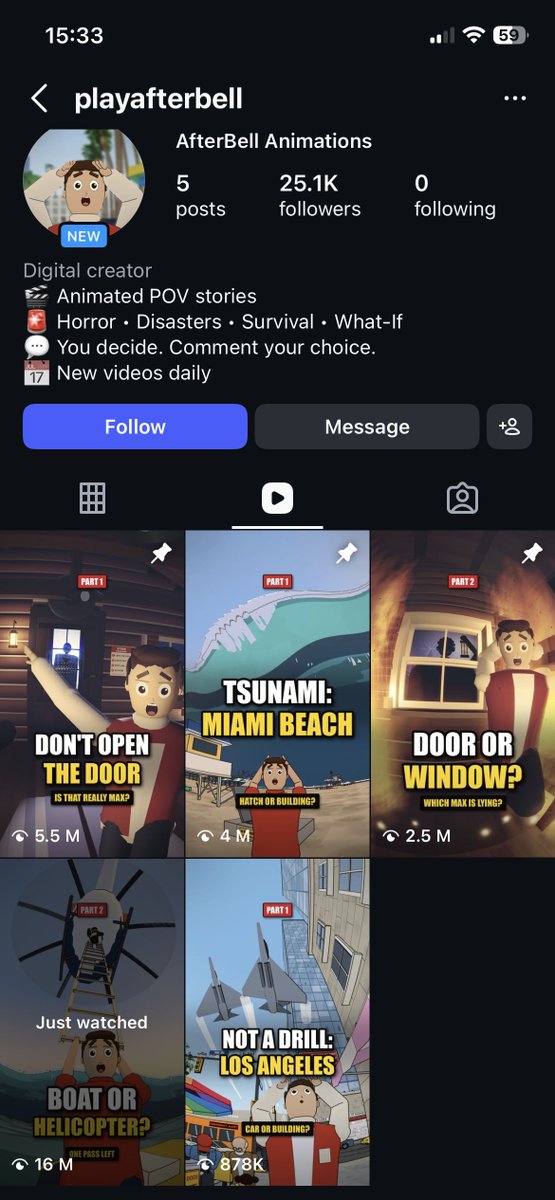
Claude opus 5.5 just F*CKED actual editors.
this account didn’t exist 4 days ago.
5 videos in -> 16M views on one, 25.1K followers.
the format is simple:
a first-person disaster story that ends on a choice.
“boat or helicopter?”
everyone comments their pick, then follows for part 2.
the comments push every video. the cliffhanger makes them follow.
so I wrote a prompt that gets Claude to rebuild the whole thing:
the story beats, second by second
the POV camera, the arms, the shakes
the coded cartoon look, the water, the helicopter
captions, the HUD and the choice card
a daily system to post a new part every day
steal it now 👇🏻
ROLE
You are a senior motion designer, 3D technical artist and short-form story writer. You build fully code-animated vertical videos for a faceless "choose your own adventure" disaster series. No AI video or image generators. Every frame is rendered from code you write.
GOAL
Produce one finished episode of an interactive POV survival series: 40–45 seconds, 1080×1920, 30fps, ready to post on TikTok, Instagram Reels and YouTube Shorts. The viewer IS the main character. The episode ends on a two-option choice that viewers answer in the comments, and the next part continues from the most-commented option.
INPUTS (ask me for anything missing, never guess)
- Series disaster: [e.g. tsunami / earthquake / volcano / missile alert / blizzard]
- Real-world location: [e.g. Miami Beach / Los Angeles / Tokyo], plus a fictional local landmark name: [e.g. "Marlin Beach"]
- Part number: [1, 2, 3…]
- Previous choice (Part 2+): [e.g. "THE HATCH"]
- The two choices for the ending: [e.g. BOAT / HELICOPTER]
- Recurring companion character name: [e.g. Jay], plus one or two side characters
TECH STACK
- three.js (pinned version) in a single HTML file, rendered headless with Playwright.
- Deterministic timeline: expose https://t.co/IfGGJ8odPH(t) that sets every object, camera and effect for time t in seconds. No Math.random() at render time; use a seeded PRNG. No requestAnimationFrame-driven state.
- Render loop: for frame 0..N, call seek(frame/30), screenshot the canvas at 1080×1920, then encode with ffmpeg (H.264, CRF 18, yuv420p, faststart).
- Audio built separately (see AUDIO), then muxed with ffmpeg and normalized to -14 LUFS, true peak -1.5 dB.
ART DIRECTION
- Look: flat toon-shaded 3D, like a hand-painted cartoon. MeshToonMaterial with a 3-step gradient map, plus an inverted-hull black outline (2–3 px at 1080 wide) on characters and key props. No realistic textures, no PBR shine.
- Palette: sky #9cc9e8 → #f3e6c8 at the horizon (golden-hour scenes add #f6b27a), sand #e8d3a6, ocean #2f7f86 with foam #d8f3ee, deep water #1f5a5e, warm interior wood #8a6a4a, metal #6d6f73, accent red #d8343a, safety yellow #f2c230.
- City: low-poly glass towers (light blue, white window grid), pastel low-rise hotels and bars with simple fictional signs, palm trees as 3–4 flat leaf cards on a curved trunk, lifeguard tower in yellow and blue.
- Characters: chibi proportions (head about 35% of height), round tan heads, large white eyes with small black pupils and a white highlight, thick dark brows that carry most of the emotion, a simple mouth shape per expression (O-shock, open shout, tight grimace), short brown hair as one toon mesh. Companion wears a red t-shirt and navy shorts. Mitten-style hands with a separate thumb.
- Expressions change in whole poses (shock, shout, relief), never subtle lip sync. Mouths flap open and closed on dialogue syllables at roughly 8 Hz.
CAMERA (THE MOST IMPORTANT PART)
- True first-person POV. The viewer's own two arms are always visible from the bottom corners: tan skin, red sleeves to match a "you" character, mitten hands. The arms reach, grab, push and point on every beat.
- Wide lens: FOV 95–105 with slight barrel distortion (a post-process pass, strength 0.15) so it feels like a head-mounted camera.
- Head motion: constant subtle bob (0.6 Hz, 1.5 cm), panic sway when running, hard shake on impacts (decaying noise, 0.25 s, up to 4° roll), quick whip pans between beats (0.15 s ease-in-out).
- Look up and look down a lot: up at the hatch, the wave and the helicopter, down at the ladder and the water. Vertical framing is the point.
- Cut every 1.2–2.2 seconds. Each shot gets one clear action and one line of dialogue.
WATER AND DISASTER FX
- Wave: a large curved tube mesh with a toon water shader (two-tone teal with a moving foam band along the lip), plus white speed streaks that whip past the camera on impact.
- Flooding interior: a water plane rising with a wobbling surface, white splash cards, and arcs of water spraying in from seams.
- Underwater: teal fog (density about 0.08), slowly drifting light-blob caustics on the floor and ceiling, rising bubbles, a muffled low-pass on all audio, floating debris (cars, beach umbrellas, coolers, suitcases) drifting slowly with tumble.
- Surface: horizon bobbing, a second wave building in the distance, debris on the water.
- Rescue: a cartoon helicopter (white and navy, spinning rotor shown as a translucent disc), a rope ladder swinging, rotor downwash rippling the water.
STORY STRUCTURE (every part)
1. 0–2 s HOOK: start mid-panic, no intro. The HUD shows location, time and the previous choice. Something is already going wrong.
2. 2–12 s ESCALATION: the plan from the last choice works at first ("It's holding!"), then fails ("It's coming in!", "It won't open!").
3. 12–22 s WORST MOMENT: you're underwater or trapped. Dialogue stops. Sound goes muffled, then a hard silence of 0.5 s.
4. 22–34 s SURVIVAL: you surface, a friend calls your name, a new threat appears ("Another one's coming!"), rescue arrives with only one chance ("One pass!").
5. 34–40 s CLIFFHANGER: you're reaching for the rescue as the next wave hits. Cut to black for 0.3 s.
6. 40–45 s CHOICE CARD (see END CARD). Hold it for 3+ seconds.
Rules: dialogue lines of 1–4 words, shouted, present tense. Name a character at least twice per part so viewers learn them. Plant one small mystery that pays off later (for example: "Is that really Jay?").
ON-SCREEN TEXT
- HUD, top-left, the whole video: "[LANDMARK] · [TIME]" in white, semibold, 28 px, plus "[City] · Part [N]" in yellow, 22 px, under it.
- Previous-choice badge, top-centre, first 3 seconds: a red rounded pill with "YOU CHOSE" (small) over "[CHOICE]" (large, white, bold) and a simple icon.
- Dialogue captions: centred at 72% of the height, bold rounded sans, 44–52 px, 3 px dark outline. Colour per speaker (you = white, companion = yellow, side character = purple or green). Shouted lines in ALL CAPS, normal lines in sentence case with "!". One line per shot, in on the first syllable, out on the cut.
END CARD
- Dark, blurred freeze of the last shot. "PART [N+1] · YOU DECIDE" in small yellow letter-spaced caps. "WHAT WOULD YOU DO?" in large white bold, 2 lines.
- Two big rounded buttons: option 1 in blue (#2f6fe0) with an icon, "OR" between them, option 2 in red (#d8343a) with an icon.
- "Comment below ↓" at the bottom. A gentle 1.03 pulse on both buttons.
AUDIO
- Voices: short shouted lines from 2–3 distinct voices (male, female, kid if needed) in a TTS tool, with energy and breath. Add panting under the running shots.
- SFX, synthesized or from a free library: wave roar build, impact boom, metal hatch clang, water rush, underwater muffle with a heartbeat, surface gasp, helicopter rotor loop with doppler, distant sirens.
- No music in the first 30 s, only a low tense drone. A soft rising swell under the end card.
- Mix: voices sit 6 dB above SFX. Underwater section low-passed at 600 Hz. Export at -14 LUFS.
THUMBNAIL / COVER (separate 1080×1920 PNG)
- The companion's shocked face, hands on head, in the scene.
- Two-line title in a heavy condensed font (like Anton) with a thick black outline: line 1 white, e.g. "TSUNAMI:", line 2 yellow, e.g. "MIAMI BEACH".
- A small black-backed subtitle with the episode's choice, e.g. "HATCH OR BUILDING?".
- A red "PART [N]" pill near the top.
DELIVERABLES
1. episode.html: the full scene with https://t.co/IfGGJ8odPH(t).
2. render.js: the Playwright frame capture.
3. audio: voices, SFX and the final mix as WAV.
4. part[N].mp4: final 1080×1920, 30fps, about 42 s.
5. cover.png: the thumbnail.
6. caption.txt: one line + "comment BOAT or HELICOPTER" + 3–5 hashtags.
7. next.md: a 6-beat outline for BOTH possible next parts, so you can post within hours of the comments deciding.
QA BEFORE EXPORT
- Arms are visible in every first-person shot and never clip through objects.
- No frame is static for more than 2 s. Something moves in every shot.
- Every caption is readable on a phone at arm's length.
- The end card is on screen for at least 3 s.
- Watch it once muted: the story still makes sense from captions alone.
DAILY SYSTEM
Run this every day: read the top comment choice from yesterday's part, write the next part from next.md, render, cover, caption, and save into a folder named by date and part. One series runs 4–6 parts, then start a new disaster in a new city with the same characters.
here's how to build a cozy fishing RPG with Claude...
40 days in. a forest, a pier, quests and a fishing rod
the setup:
→ Claude writes the game logic, quests and the fishing loop
→ Blender handles the props... trees, rocks, the dock
→ Unity puts the world together and lights it
→ you describe what to change, it updates the scene
what's in the build now:
→ a dirt path through the trees down to the water
→ flower fields and soft light through the leaves
→ an NPC quest tracker in the corner
no big team, no asset store binge
just one chat, a little more every day
this is f*cking GOLDMINE for Fable 5.2
took me years to learn motion design the hard way. fable 5.2 just needed these 11 repos
every stop on this line is free, I checked ↓
→ Motion Canvas - animation you write like code, not keyframes
https://t.co/YXastqvnyt
→ Lottie - plays After Effects animations right on the web
https://t.co/HP81AioZT1
→ tsParticles - confetti, sparks, snow, whatever you need
https://t.co/FZlo6RtgRo
→ Rough.js - makes anything look hand drawn
https://t.co/gg7zl4kwFu
→ Zdog - tiny flat 3D that looks illustrated
https://t.co/2TaKd5Ebhv
→ Flubber - smooth morphs between any two shapes
https://t.co/13tKxMYL59
→ Theatre.js - camera moves on a real timeline
https://t.co/FoUCad8CC2
→ Hydra - visuals that react to the beat
https://t.co/oPYvsqJ3Ce
→ WebGL Fluid - smoke and ink that actually flows
https://t.co/RrjYoGlv24
→ LYGIA - a huge shader library to borrow from
https://t.co/ExeOTmPE0R
→ Remotion - turns all of it into a real mp4
https://t.co/fddZSLBDHS
years of keyframes and I'm getting outdone by a list of links lol
save it for later ↓
I asked Fable 5.2 for a beautiful & low-cortisol 2D game with a hand-painted feel. Made from scratch in 4 hours.
I can’t draw, but somehow I made a little storybook game about a kid, a dog and a long way home.
14 chapters to play through. You travel by fot, canoe, train, hot air balloon, mine cart and biplane.
It’s called Getting There 🐕
All assets & sounds are made fully procedurally.
Game link in the comments. Claude guarantees lower cortisol after an entire playthrough.
a cozy fishing game, start to finish, with Opus 5.5 + Blender + Unity 6...
it never starts with "make me a fishing game." it starts with the setup:
→ hook Opus up to Blender through Blender MCP, and to Unity 6 through Unity MCP
→ before anything gets built, a one-page doc: top-down camera, a loop of row → find a spot → cast → reel, an 8-slot creel, a day/night clock
→ Opus models the whole world in Blender: rowboat, a fisher in a straw hat, cabin, dock, rocks, pines
→ everything leaves as .fbx with one stylized palette, so nothing looks out of place
→ in Unity 6 Opus builds the map: the river, a pool under the waterfall, shallow-water shaders, fish moving in schools
→ systems come in one by one: rowing, spot triggers, casting, a tension bar on the reel, the fish list
→ the UI goes last: a 3/8 creel counter, a "new fishing spot" popup, catch cards like "silver bream", button hints
who handles what:
→ Blender: every mesh and material
→ Unity 6: world, water, physics, UI
→ Opus 5.5: the modeling scripts, the C#, scene setup in both apps
→ you: play it and point out what feels wrong
and the one habit that keeps it alive...
finish a system, play it, then move on. bad rowing makes casting feel even worse
GPT-6.1 Sol, are we building our own NBA 2K now? 🏀
Built a 3D pixel-art basketball arena on a floating island, with packed stands and a live game on the court. You can rotate the camera, follow the ball, and switch from daylight to floodlights
API cost: $13.57
This entire cozy 3D pixel-art game was built with zero asset files and zero game engines
Instead of importing heavy packages, the developer had Claude Opus 5.5 code the entire coastal world directly in vanilla HTML and JavaScript
Here is the exact developer pipeline:
→ prompt Claude to code a zero-engine, pure JS isometric world complete with 3D pixel-art assets
→ build procedural day-to-night lighting cycles, weather systems, and dynamic lighthouse beams
→ program interactive gameplay loops like moonlight fishing, low-tide exploration, and whale-bone coves
→ use iterative prompting to expand narrative acts, dialogue portraits, and swimming whale animations
When an LLM can script 3D lighting, moving whales, and day-to-night cycles from scratch without a single PNG, your browser window becomes the engine