一部の人は、2026年1月17日に配信された Windows アップデート以降、ゲームのパフォーマンスや VRChat の動作に問題が発生している可能性があります。
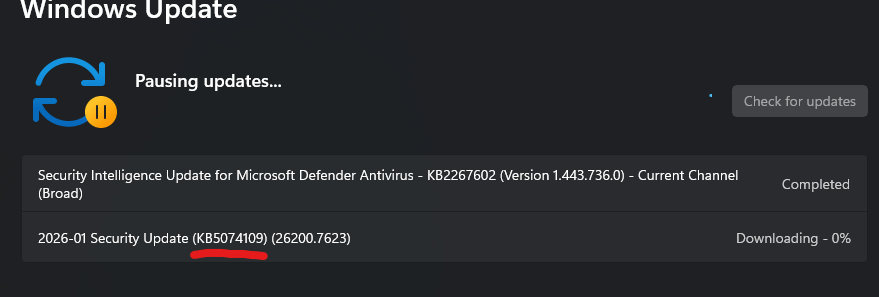
もし Windows セキュリティ更新プログラム 2026-01(KB5074109)(26200.7623) をインストールしている場合は、アンインストールしてください。現在、この更新は Nvidia GPU のパフォーマンスを大幅に低下させる ことが確認されています。
この更新プログラムは、
Windows Update > 下にスクロールして「更新プログラムのアンインストール」 > KB5074109 を検索
の手順でアンインストールできます。
問題が修正されるまで、1か月ほど更新を一時停止することをおすすめします。
I think some people may have been having issues with game performance and VRChat performance issues after a windows update which was released on the 17/01/2026.
If you installed windows security updates 2026-01 (KB5074109) (26200.7623) uninstall it. It currently reduces performance for Nvidia GPUs significantly.
You can uninstall said update by going to Windows update > Scrolling down to Uninstall Updates > and searching for KB5074109. I recommend pausing updates for a month until the issue is repaired.