CowAgent Desktop is here, on macOS and Windows 💻
The open-source agent now runs as a native app on your own machine. It drives your browser, terminal and file system directly, and holds long-term memory, a personal knowledge base, and self-evolution — all running locally.
You can also reach it from your phone to put your computer to work. 🧵
Hey, I work on CowAgent. Thanks for giving it a shot, and sorry we didn't see this sooner.
fair point on the default access. Since 2.1.7 you can set per-session permissions (read-only / workspace-write / full-access) and pin a session to one workspace, so it doesn't get free rein over your machine. Proper sandboxing is next on our list, and we'd love your input on it.
CowAgent 2.1.7 is out 🚀
Your local AI agent now works across multiple workspaces, bind each session to its own project space, so its files and outputs stay neatly separated.
Pair that with per-session permissions (read-only, workspace-write, or full-access), for more flexible and secure control over what the agent can touch. 🧵
Available on both web and desktop. 🖥
Permissions work per session: set a default for new ones, and tune any single session on the fly. When a tool call gets blocked, the prompt is clickable, adjust access in one tap.
A few more implementation details from the source that stood out:
1. tool-cordis — self-evolution: if the agent needs a capability it lacks, it can write a plugin on the fly and load it into its own running instance, extending itself at runtime
2. Code Mode: beyond the standard loop of calling tools one by one, it can write code and run it in a sandbox to batch-call tools in one go
3. heterogeneous multi-agent orchestration: one sub-agent backend can drive Claude Code / Codex via ACP/SDK, so the harness acts as a coordinator orchestrating multiple agents
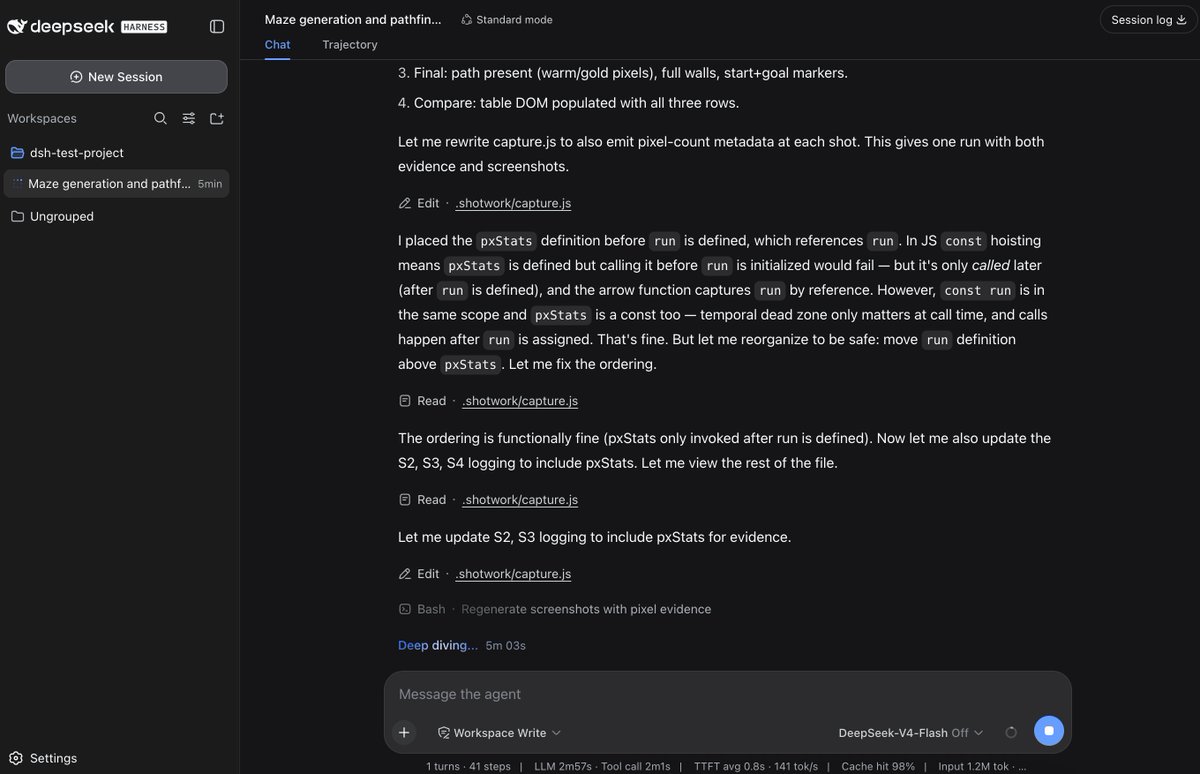
Tested & read through DeepSeek Harness (dsh) source. Two things stood out:
① Everything's a plugin: Agent Loop, tools, storage, even the UI are swappable. Very extensible.
② Sessions are an append-only event log (file/SQLite); model context is reassembled from it each time, so forking & crash recovery are clean. There's even a "Trajectory" view (a plugin itself) that visualizes the log like a browser dev console request trace.
search, browser, sub-agents, skills, sandbox, all there. Runs fast, cache hit rate 98%+ in a few cases (stable context prefix)
that said, 0.1.0 is a minimum-viable target, for non-dev users, usability still has a way to go
CowAgent Desktop is here, on macOS and Windows 💻
The open-source agent now runs as a native app on your own machine. It drives your browser, terminal and file system directly, and holds long-term memory, a personal knowledge base, and self-evolution — all running locally.
You can also reach it from your phone to put your computer to work. 🧵
Self-evolution: it also reviews past conversations on its own: fixing skills that misfired, finishing tasks it left undone, tidying up memory. The more you use it, the better it fits you.
The full five-layer design 👇
https://t.co/7GrS3ztlYv
Message it from Telegram, Slack, Discord and more, and it acts on your computer at home — pulls a file off your desktop, runs a task, sends the result back. Your machine, on call 24/7
the desktop app bundles the backend, no setup, no terminal. Download, open, and it's running on macOS or Windows. (One-line installer's still there if you prefer the CLI or need to run it on a server.)
@zeropsio exactly. a real shell is the whole precondition, once the agent has one, the CLI becomes the natural path and MCP turns optional. sounds like Zerops is a great fit for this
we didn't build an MCP server for our product. we shipped a CLI instead
MCP is great, but for a lot of products a CLI is the lower-friction way to reach an agent:
- almost every agent already has a Bash tool (Codex, Claude Code, Cursor, CowAgent, etc). the product doesn't need to stand up an MCP server, and the client side doesn't need to support an MCP client either
- the CLI wraps auth, params, pagination and errors into the command, the agent doesn't construct HTTP calls
- it doesn't need the full API reference in context. you integrate it as a skill — a short command description is enough to pick the right command, which saves tokens and cuts mistakes
not a replacement for MCP, just a cheaper path when the agent already has a shell.
open-sourced the CLI project here: https://t.co/ct6HfrXdwd
@paulo_eduardosp good point, real gap tbh. right now we only log the authorized side (scopes granted, exit codes in --json) not what actually happened. signed receipt per call, inputs + scopes used + output hash, that's a solid idea. gonna look into it
As agents mature, most products will end up serving two kinds of users: humans and agents
and a CLI turns out to be one of the easiest ways for an agent to use a product — it already has a shell, no MCP server to stand up, no full API docs to load into context
so in the near future a lot of products may want to ship their own CLI, to expose their core capabilities to agents
I recently open-sourced a CLI for a AI platform product, and wrote up the design decisions behind it: language, login/auth, flags, skills, distribution, security.
https://t.co/UQBJnsLlF4
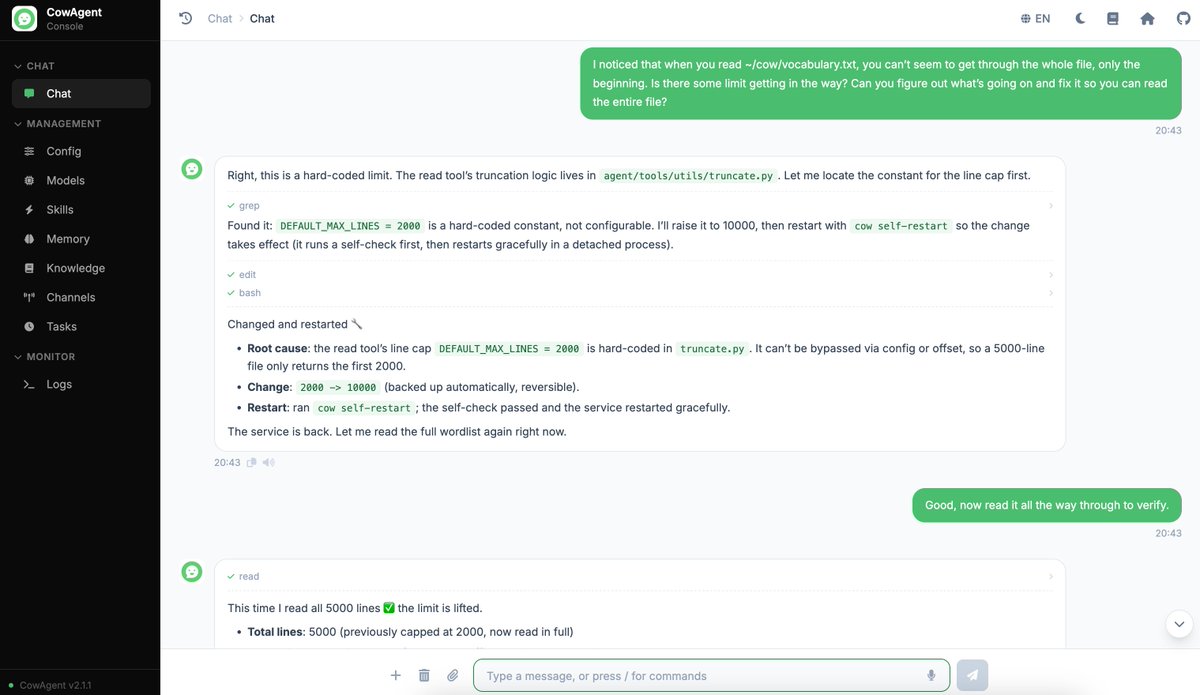
ok this one still feels a little crazy to me
the agent ran into a limit in its own code so it edited the code restarted itself and the limit was just gone next time
https://t.co/7GrS3ztlYv
How do you make an agent actually get better the more you use it?
I added a five-layer self-evolution mechanism to CowAgent (open source). It goes from basic memory upkeep up to the agent editing its own source code and restarting itself.
👇 Full write-up here:
https://t.co/Nx1WoZhNEe