🚀 Giveaway Alert! 🚀
10 * Black Myth: Wukong or RedotPay Physical Cards up for grabs! Will you choose the game🎮 or the RedotPay card? 💳
How to Enter:
1. Follow @RedotPay and @BlackMythGame & Retweet this post.
2. Comment with your choice: Game or RedotPay Card.
3. Tag a friend—if you win, they get a RedotPay virtual card!
Winners will be announced next Monday (2024/09/02, UTC+8).
Good luck! 🍀 #Giveaway #RedotPay #BlackMythWukong
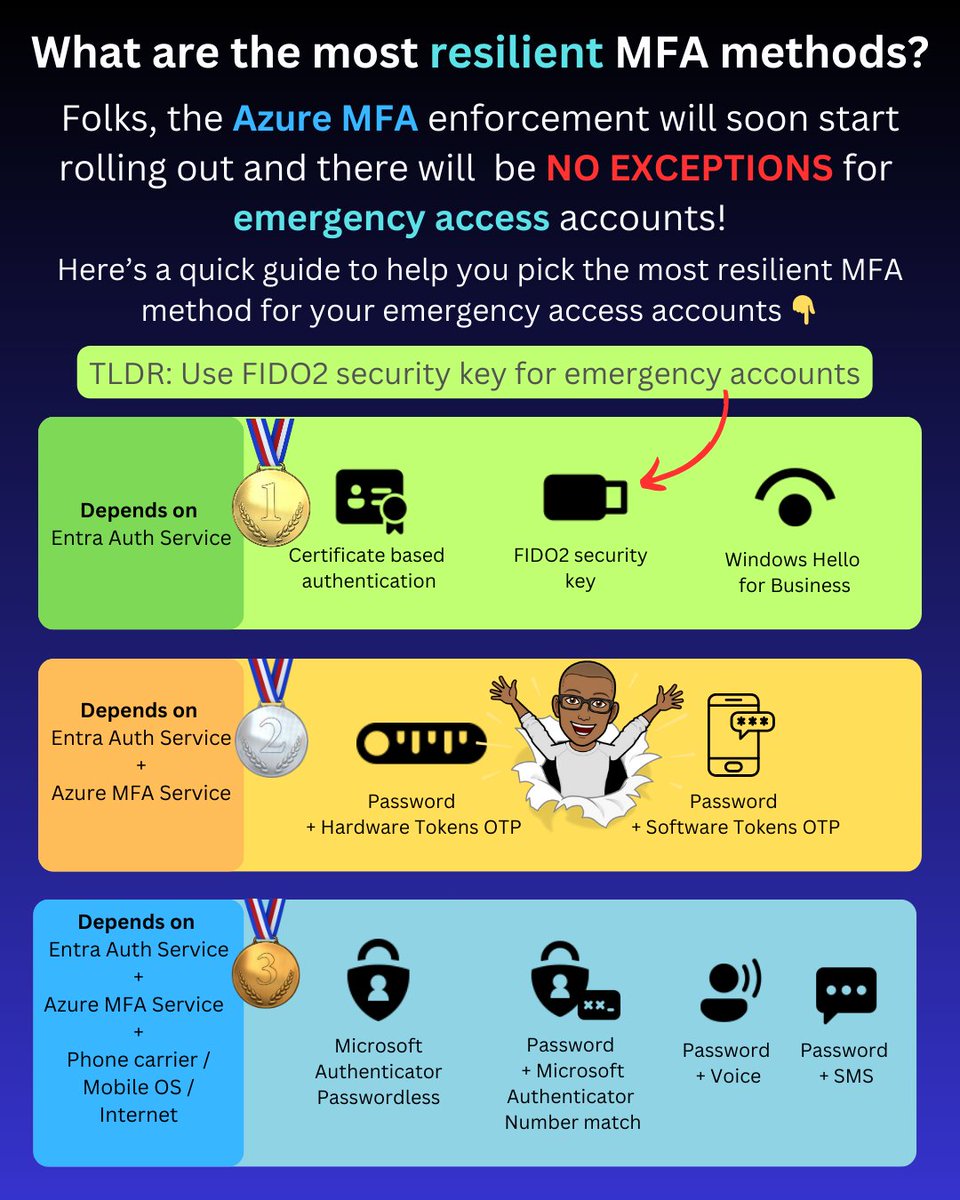
As part of the Azure MFA enforcement rollout, emergency accounts will now need to be registered for MFA.
You should typically avoid using MFA methods that have dependencies on other services, such as the Azure MFA service or your mobile carrier.
This leaves the following as the three most resilient MFA options:
✅ Certificate-based authentication
✅ Windows Hello for Business
✅ FIDO2 security keys
These three methods' only dependency is the core Entra authentication service, which is the same as password authentication that relies on the Entra auth service.
Now, when it comes to your emergency access account, the most likely option is to use FIDO2 security keys.
Here's why.
Windows Hello for Business (WHfB) for emergency access
Windows Hello for Business is not a viable option for emergency access accounts. It requires a device that must be frequently updated, constantly connected to the internet for the PRT to be renewed, and there are also the costs and operational overhead associated with the device.
Certificate-based authentication for emergency access
If you haven't deployed certificate-based authentication, you'll need to set it up and ensure that you use self-signed keys to avoid dependencies on external PKI/CRL infrastructure. Not to mention a smart card and card reader or some other hardware for storing the certificates.
FIDO2 security keys for emergency access
This essentially leaves FIDO2 security keys, which are simple to enable in Entra ID, require very low or no maintenance, take up little space, can be stored securely, and can be purchased for $25 retail.
PS: I've intentionally not included device-bound passkeys in Authenticator as they are currently in public preview, and you most likely don’t want to use them for your emergency access account yet.
-------------
Liked this post? Bookmark this and feel free to follow me for more tips on Microsoft Security and Microsoft Entra.
Remember to click the bell icon on my Twitter profile. This way Twitter will show you all my posts in your feed so you don't miss anything.
Please like, repost to share with others. Thanks!
Gonna be dropping new alphas 🚀
But my private telegram group people get first. They deserve this for being supportive of me.
As I said, the more you are a dick to me in public more it’ll cost you.
🎭 Verifying my Twitter ID @00sdz00 for @NextDotID.
Sig: Vh/xOTdTxPWk/JArXEoOR78lg6psVI8wW9je0L8yJMFhxnnvCUobUjnhgaT4h5BettC5+M7KW6jnudwbJAkzcRw=
Powered by https://t.co/0DAGFenSRI - Connect All Digital Identities.