Congrats to my old coworkers at @permisosecurity! Thrilled that Okta is acquiring them to extend their identity security platform. Identity security is even more relevant in an agentic and non-human landscape; excited for what's next!
https://t.co/Yqj906HqCL
Is secret management expensive for anyone? For example, using AWS Secrets Manager can become a major cost at scale.
I spoke with a friend in big tech-one of their top FinOps cost optimization ideas was for AWS Secrets Manager. They used distinct secrets for each service on each node; that added up.
Each AWS Secrets Manager costs $0.40/month, plus $0.05 per 10,000 API calls. I forget their scale, but I'm guessing it's on the order of 20,000+ secrets. It's not a global expense per se, but it can be a sizable spend with clear optimization potential.
I imagine there are both unit economics, scale, and developer experience concerns as well. And this was pre-agents; with agents, I imagine isolation becomes more important.
But this is for major scale and not applicable for everyone. What kinds of secrets management problems have you run into, and how have you solved them?
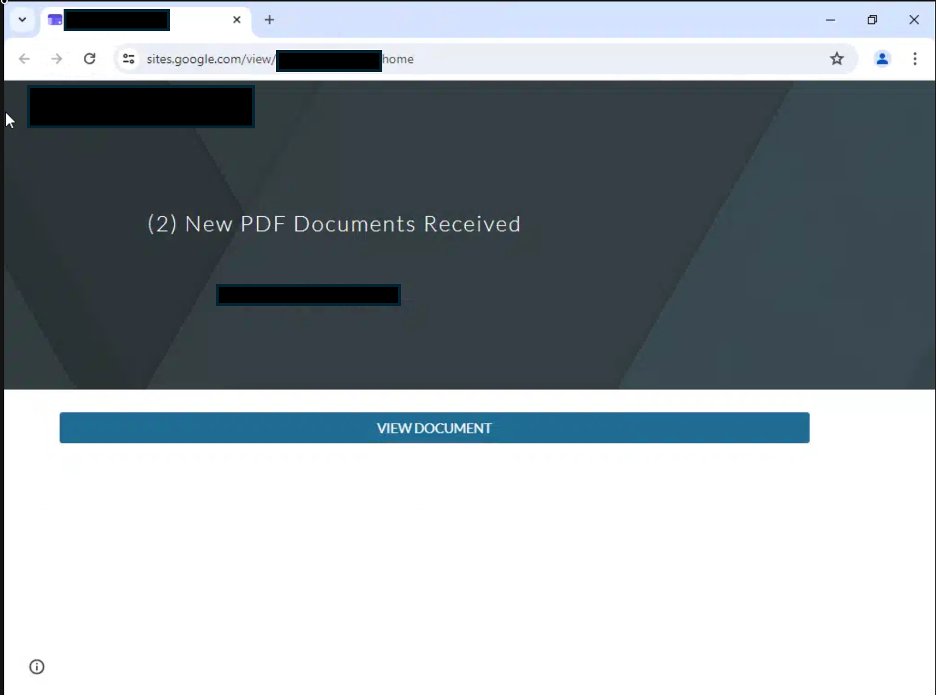
Interesting attack vector: a fake Google Site linking to real Microsoft login. But the login actually grants the attacker unexpected access, instead of a simple page view.
FYI: phishing by email is still an active & common path for your systems to get breached.
In a recent engagement, we saw device code phishing arrive from a partner’s legitimate mailbox.
The lure used Google Sites and led to a real Microsoft sign-in page, tricking users into authorising attacker access.
A reminder of why supply chain security matters: your partners’ compromised identities can become your entry point.
We’re tackling supply chain threats by bringing identity into email security, helping employees spot suspicious requests from trusted accounts. Happy to chat if you’re interested.
#CyberSecurity #Phishing #Microsoft365 #SupplyChainSecurity #DeviceCodePhishing #IdentitySecurity #EmailSecurity #Breach #Microsoft
A useful hard barrier for agents: expiring agents' access to secrets and resources.
For example, when I log into my 1Password CLI, it's important that vault access expires soon. This is default behavior but an example of useful expiry.
This is subtly different from expiration dates on API token refreshes. API tokens typically expire on the 30d/60d/etc scale. This typically involves CLI access, usually on an hourly or daily basis.
But consider the CLI access you may have open on your computer. If you made login access long-lived so you can access services 24/7, that means your agent has open doors to all your accounts 24/7.
It's always a balance between convenience and safety.
If you lock down more of your services so they expire and require you to manually log in periodically, your agents have a smaller blast radius by default.
Maybe 30 minutes at a time, one service at a time. Compare that to 24/7, with all of your services fully available to them.
Speaking of hard barriers, network/VPN is an interesting way to block agents.
It's easy to think primarily about filesystems and secrets, but network access is also important.
On your workstation, you will need to access production. That's gated primarily through secrets. But it's often helpful to create a hard barrier by network as well.
There can be a few problems from open network access:
- Unencrypted SSH key, and your agent can use it freely
- You ran an SSH agent (ssh-add) to load an encrypted secret, and your agent can use your socket file freely (/tmp/ssh-XXXX/agent.PID)
- Your cloud CLI (e.g., aws, az, gcp) has admin privileges
- And simply, the open Internet - not all agents need the open Internet
Here are a few ideas on how you can deal with it:
- Always encrypt your SSH keys
- Use `ssh-add -t 4h` to load the keys for 4 hours
- Reduce your cloud CLI permissions or move your agents to a different sandbox than where you have admin permissions
- Use old-school firewalls to limit access
- Use Tailscale conditional access API to essentially do "just in time" network access for a short period of time.
Do you run into this problem? What do you recommend?
Key point abt secrets management & isolation: use hard barriers, not soft barriers.
Ex hard barriers: requires human password input or MFA approval. Expiring access.
Ex soft barriers: you have a separate dev key (or IAM role), but they live on the same filesystem or auth session.
Why? I spoke with someone who said they created an AWS IAM role just for their agent. But they share the same computer as the agent, and they use the same AWS CLI login session. And the session uses a session token that lives on disk.
That's not a hard barrier. Yes, the agent is instructed to use their limited permission role. But when they need access to production, they will sometimes be persistent enough to disregard the soft barrier and simply break your rules. They will hunt down all resources available to them, including production secrets in other directories or network locations.
So hard barriers like isolated filesystems are important (e.g., using agents in their own sandbox/container).
For a hard barrier, I'd want:
- Agents to be physically unable to get the secret/resource...
- ...unless I manually approve with an explicit action I take (PW, MFA)
- And for the access to expire soon after it's not needed
There are a few categories of secret management
- Infrastructure vault: like AWS Secrets Manager, Hashicorp Vault, or Infisical. Used by apps and infrastructures.
- Password manager: like 1Password, Bitwarden. Used by people in their day to day work.
- CLI secret loading tools: like fnox. Pulls secrets from various backends. Like a reader adapter to simplify access.
You know mixing secrets with agents is risky, but what do you do about it?
1. Create dev environments; try to use dev and not prod secrets
2. If agents need to handle secrets, don't let them read them in a way that outputs them for you to read. Use pipes or scripts to load/move/search without reading the actual values.
3. Use secret managers - there are different flavors, like remote vaults (Vault, Secrets Manager, Infisical), password managers (1Password), CLI's that load secrets (fnox)
4. Gate your secrets behind physical blocks. EG using the 1Password CLI, make sure access is temporary, and you have to do something physical like type in a password or do MFA
5. Cluster your secrets so the agent can't read everything. Instead of storing everything in 1 vault or namespace, split them into groups. And set up permissions so the agent can only read one slice of secrets.
6. Prefer to use short-lived secrets instead of long-lived secrets, whether that's OAuth tokens that expire. Set up expirations on keys, and document how to rotate them simply.
7. Set least privilege keys so a leaked key can only access so much.
8. Set up usage limits so a leaked key can only use cost you so much money.
I'm sure there's more, but that's what comes to mind on a first pass. What do you recommend?
@cagatay_dev Very cool - Isola looks useful! Add in some secure secrets / env var management, and that's a solid dev setup. We do like docker compose, bc we have multiple services to bring up/down.
Coding with multiple agents, file edits start colliding. So you use worktrees.
Then ports collide, so you extract configs to env vars.
Then it's a pain to clone env files manually, so you create a `create_worktree[.]sh` script to clone env vars.
But you're using random ports, so you create a numbering convention. Every worktree gets its own numerical ID (1, 2...):
- Frontend is ":5000 + N"
- Backend is ":4000 + N"
A numbering/naming convention means you don't have to remember random ports across many worktrees.
And scripting the adding/removing of worktrees means you do a lot less manual provisioning.
When you use .env files with multiple worktrees, you should start asking yourself if you have too many secrets floating around.
So what are the risks of having too many secrets?
1. Accidentally pushing to Github, CloudFlare, etc.
2. Agents reading secrets all over your computer, accessing permissions and services they shouldn't have
3. Leaking secrets into chat transcripts, application logs, commit messages
Did I miss anything?
Cool tool! This space is something I'm interested in exploring.
I use a combination of AWS Parameter Store + AWS Secrets Manager + 1Password, and shell scripts to add/rm worktrees. The provisioning scripts provision customize env files (eg every worktree gets a custom ID which is used to customize all their ports consistently), plus do things like provision docker.
@M_Decoherence RE "handoff to a new session is just a summary by another name." Yes and no - I work with plan files, and the plan file has a "work log" section that it appends to.
So between the work log, git commit history, and raw session logs as a fallback, I don't need explicit handoff.
If you notice your coding agent pause to "compact", you've likely gone too long. You've paid high tokens, endured lower quality thinking.
What's compaction? LLMs have token limits (context windows). So when it's nearly full, agents pause to condense the chat by summarizing.
Thanks for the rec. Thinking through it: reloading the rules from a file does solve the problem of losing rules.
I wonder, though, whether it's helpful to simply start a new session. The rationale is -- by this point, the compacted summary will have digested the rules twice. And it has lost a bit of context from the original session, and it has paid the time and token cost of compaction.
@vibeguardrails Yup yup, solid recommendations for the .env.example.
- Then gitignore the wildcard `.env.*`
- Maybe add a block permission on Read agent tool calls (but this doesn't cover bash tool calls)
- Supplement with a pre-tool call use to escalate any tool call with `.env*`
As you extract more env vars for more agents (for collisions on ports, urls, configs), we face interesting questions:
- I want to run multiple agents: should I build it local or in the cloud? (Or local servers?)
- How do I manage more env vars and secrets for my agents?
What happens when you're spinning up worktrees for multiple agents, not only do you get file collisions, there are also collisions on:
- network ports
- auth (urls/redirects)
- config files
So: less hard coding, extract env vars so each agent gets their own set.
Reconfigure the repo so multiple agents can run multiple copies of an app.
Ex. problem: multiple web apps can't all listen to port :8080.
Extracting ports to env vars is helpful to run multiple locally. But you could also run multiple remotely.
How do folks run multiple apps?