@BeastModeTech82 Good list. If the lab has AD and Intune, try breaking a Group Policy or a device enrollment on purpose and fixing it from the logs. That's exactly the kind of thing help desk and sysadmin interviews love to dig into.
@joelcomm For a lot of people I think it's choice overload, not fear. Picking one boring daily task, like cleaning up meeting notes, and using AI only for that for a week gets people through the door faster than trying ten tools at once.
@Avidityrecruit A simple habit that makes this easy: keep a running notes file while you build, with every error message and what fixed it. The "what broke" section basically writes itself, and that's the story you end up telling in the interview.
@0x0SojalSec The "verifies its own output" part is what I'd want to see in action. Does it re-check loudness and aspect ratio after every step, or only at export? That's usually where automated edits quietly drift.
@jimgoetz The shift that matters is where the check runs. If findings only show up at PR review, the agent has already built three more things on top of the bug. Curious whether agents actually fix what the scanner flags or just hand it back to the human.
@sattyyouneed Before renewing I'd look at where you actually hit limits in a normal week. If it's mid-task caps, one plan plus a bring-your-own-key agent like Cline or Aider as a backup can beat paying for the bigger tier. What do you mostly use it for?
Microsoft's outage today hit Outlook and Teams for a lot of people. For help desk and SOC folks: what's your playbook when the queue fills up with "email is down" and it's the vendor, not you? Pinned status page, a canned reply, a quick all-staff note, something else?
@pcshipp Honestly the slop comes more from the setup than the tool. Both get a lot cleaner with a short rules file (no new dependencies, reuse existing components, delete dead code) and a "show me the diff first" step. Which one are you seeing it from more?
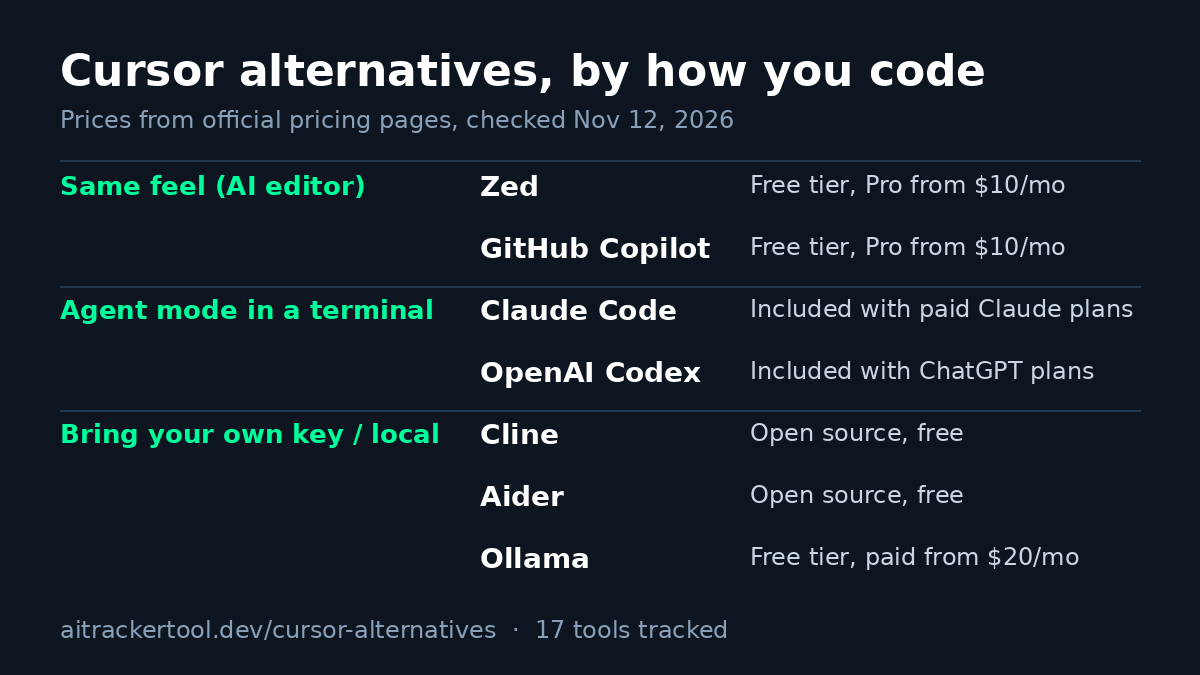
Cursor is still a solid editor. But if your plan stopped fitting how you work, here's how I'd pick an alternative, based on how you actually code:
Want the same feel? Zed or GitHub Copilot (both have a free tier, paid from $10/mo).
Mostly use agent mode? Claude Code or OpenAI Codex in a terminal, next to the editor you already like.
Worried about quota changes? Cline or Aider with your own API key, or Ollama to run models locally.
Try one on a real task for a week before you switch everything.
All 17 we track, prices checked today: https://t.co/Yd2FtDN4ed
Did you switch, or stay?
@HackingLZ Makes sense: a model that follows instructions better also follows injected ones better. Treating anything the agent reads from a page or file as data, and putting real actions behind an approval step, matters more than which model you pick.
@uctodaynews Writing processes in plain language is the easy part. The questions IT will ask: who reviews those skills when a policy changes, and is there a log of which skill an agent followed for each action?
@SANSDefense The "challenge the output" part is the skill I'd want juniors practicing. Easy drill: have an AI summarize an alert, then check every claim against the raw logs before you trust its verdict, and write down what it got wrong.
Hot take: the AI coworker that wins at work won't be the smartest one. It'll be the one IT can audit: it asks before it acts and keeps a log of what it did.
Would your IT team sign off on an agent with no audit trail? Reply 1 yes, 2 no way.
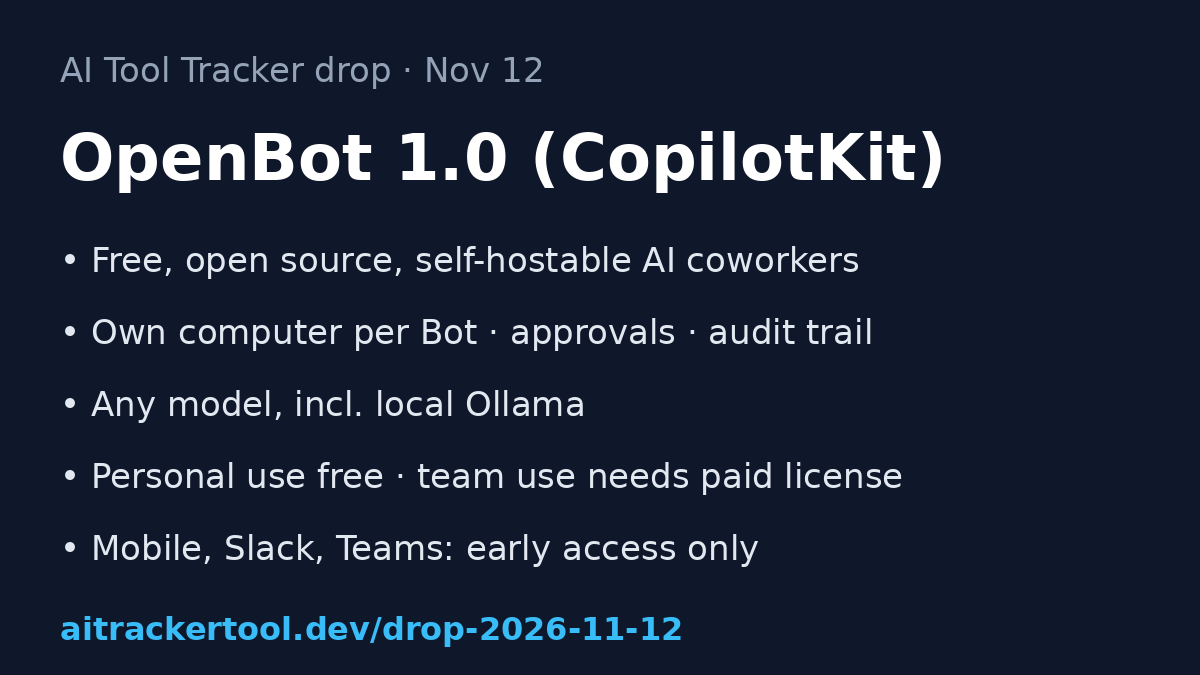
We also retired Writesonic, so the tracker stays at 150 tools. Full drop: https://t.co/zZ51hBlQus Which would your IT team approve for an AI coworker: self-hosted OpenBot, Claude Duet, or OpenAI dots? Reply 1, 2 or 3.
New on AI Tool Tracker today: OpenBot 1.0 by CopilotKit, a free, open-source workspace for AI coworkers. Each Bot gets its own computer, asks approval before acting, and keeps an audit trail. Works with any model, even local Ollama. https://t.co/uu2Yj7har3