Here's a teaser of our Mac-1 model.
> 6.6B model
> runs locally (on any Mac)
> requires 7GB RAM (12GB ideal)
> can use 487 MacOS native tools
> perform multi-tool chained tasks
> reasoning: ON
> output: ~65 tok/s
We built a robust application layer around the model to make UI/UX MacOS native. The "model-focused" SaaS era is here.
Stay tuned for more.
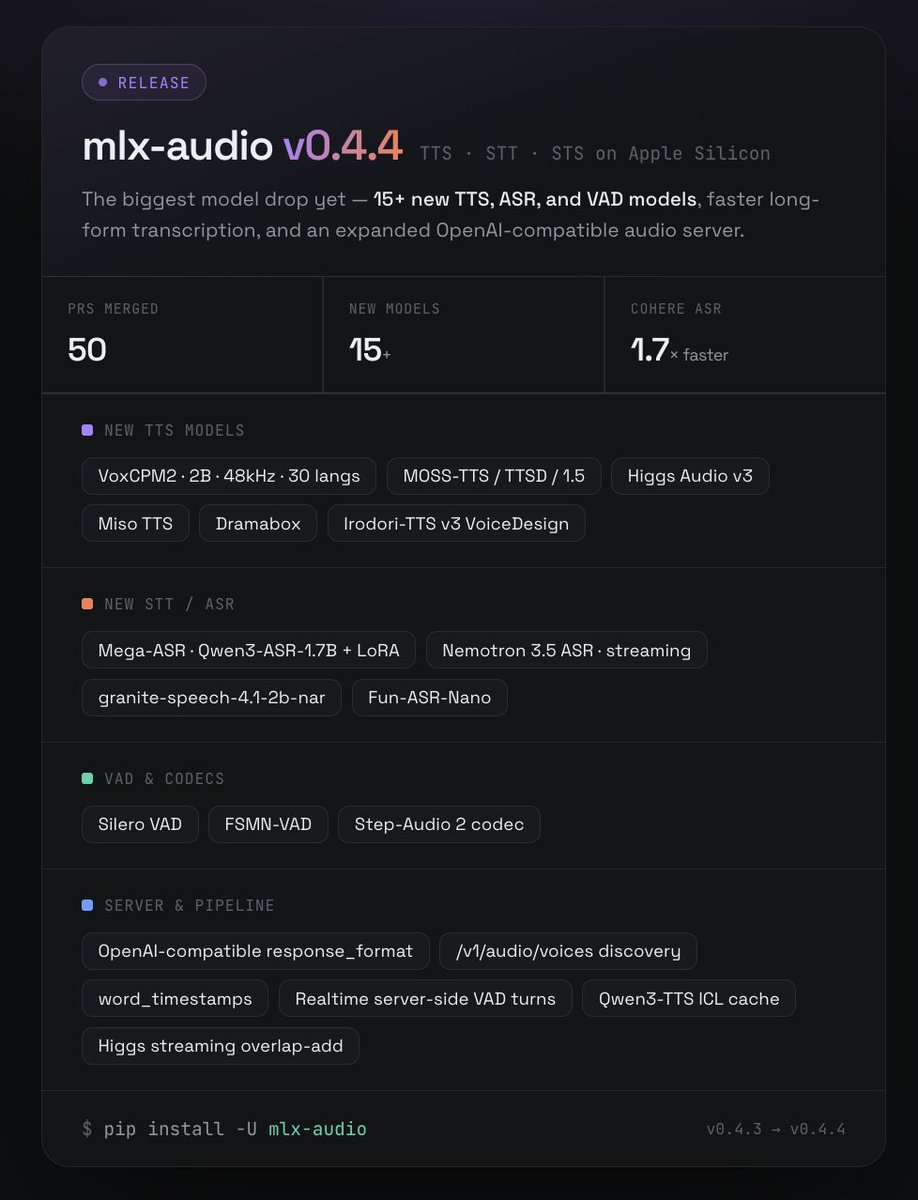
🚀 mlx-audio v0.4.4 is out — our biggest model drop yet.
15+ new TTS, ASR & VAD models, faster long-form transcription, and an expanded OpenAI-compatible audio server. All running local on Apple Silicon.
🎤 New TTS
• VoxCPM2 — 2B, 48kHz, 30 languages
• MOSS-TTS / TTSD / 1.5
• Higgs Audio v3
• Miso, Dramabox, Irodori-TTS v3 VoiceDesign
📝 New STT/ASR
• Mega-ASR (Qwen3-ASR-1.7B + LoRA routing)
• Nemotron 3.5 ASR (streaming)
• granite-speech-4.1-2b-nar, Fun-ASR-Nano
• Cohere ASR — 1.7× faster long-form
🔊 VAD & codecs: Silero VAD, FSMN-VAD, Step-Audio 2
⚙️ Server: OpenAI-compatible response_format, /v1/audio/voices, word timestamps, realtime server-side VAD turns h/t @lllucas
Huge thanks to all the contributors 🙏
> uv pip install -U mlx-audio
https://t.co/muDYzy10FA
Holy sht.. Hackers are going to love this.
Someone open sourced an all-in-one hacking toolkit that bundles every major pentesting tool into a Single CLI menu.
You install it once and get instant access to tools across every category from anonymity, info gathering, wireless attacks, password cracking, web scanning, exploit frameworks, payload GENERATION, and more.
It's called HackingTool.
→ One menu launches Tor, Anonsurf, Macchanger, and proxy chains in seconds
→ Bundles Nmap, Dracnmap, RED HAWK, and ReconSpider for full network recon
→ Ships SQLMap, XSStrike, WPScan, and SecretFinder for web exploitation
→ Includes John the Ripper, Hashbuster, and BruteX for password attacks
51K stars. Runs on any Linux distro.
100% open source.
Run Gemma 4 26B MoE on 8GB VRAM with 250k context at 20+ tokens/sec
If you own any 8GB VRAM graphics card, stop what you are doing. Local AI just had its absolute "Holy Shit" moment for budget hardware.
Yesterday, I benchmarked Unsloth Gemma 4 12B Q4_K_XL on an 8GB card.
The community went wild but immediately demanded more: "Can we run a 25B+ model on budget GPUs?"
Today, I’m delivering exactly that.
I am running a massive 26B parameter Mixture of Experts (MoE) model locally on a standard 8GB VRAM setup with 250k full native context!.
If you own an RTX 3060, 3070, 4060, or any budget GPU with 8GB of VRAM, the local AI paradigm has completely changed.
The performance metrics are astonishing:
- 20 tokens/sec flat decode throughput.
- Stable, flat decode speed even with massive prompts.
- I threw a 60k token prompt at it, and it still clocked in at 20 TPS without dropping a single frame.
# What about prefill?
Yes, Time To First Token (TTFT) is slightly high when swallowing massive contexts. But with a solid 200 tokens/sec prefill speed, the wait is barely noticeable and highly usable.
And this is running completely without Multi Token Prediction (MTP) active.
How is this possible? It’s the magic of Google's new QAT (Quantization Aware Training) quants for Gemma 4.
The model weight file (unsloth gemma-4-26B-A4B-it-qat-UD-Q4_K_XL.gguf) is only 13.2 GB, making it the ultimate local powerhouse.
# The Test Setup:
CPU: Intel Core i7
RAM: 16GB System RAM
GPU: NVIDIA GeForce RTX 4060 Laptop GPU (8GB VRAM)
# The Secret Sauce (The -cmoe Flag)
To make this work properly on any 8GB card, you must use the -cmoe (CPU MoE) flag in llama.cpp.
This flag isolates the heavy MoE expert weights directly to system memory (CPU/RAM) while letting your GPU focus strictly on the Attention layers and the KV Cache.
It prevents VRAM spillage and holds the throughput rock solid.
# The flags:
-m "gemma-4-26B-A4B-it-qat-UD-Q4_K_XL.gguf" -cmoe -c 248000 -v
Once running, just open the UI on localhost and toggle the new reasoning lightbulb icon in the text input box to watch the model perform multi step thinking.
Are you still running smaller models, or are you ready to scale up your budget local setups? Let's discuss in the replies
You don't need Google to use Android.
My favorite FOSS Android stack:
• Vanadium → Hardened browser
• SimpleX → Private messaging
• KeePassDX → Password manager
• Aegis → 2FA authenticator
• Rethink DNS → Firewall + DNS control
• Organic Maps → Offline navigation
• NewPipe → YouTube client
• Syncthing → File synchronization
• HeliBoard → Open-source keyboard
• Obtainium → App updates
• Material Files → File manager
• Joplin → Notes
• Fossify Gallery → Photo gallery
The result?
• No Google Play Services
• No Google account required
• No ads
• No trackers
• No subscriptions
• No vendor bloat
Just a private, lightweight, open-source Android experience.
Most people have never experienced Android like this.
The anti-Google, self-hosted and privacy-focused alternative to Google Timeline (Google Location History) for tracking your location history, with heat maps, stats and imports. Encrypted and EU-Hosted. No ads. No data selling
🧩 اداة Mephisto
اداة لفحص واستغلال الثغرات في مواقع ووردبريس واستغلال الثغرات المعروفة (CVE) في WordPress
الميزات:
✅️ دعم استغلال ثغرات الإضافات plugin والقوالب
✅️ إنشاء تقارير حول الثغرات المكتشفة والمستغلة
✅️ واجهة CLI مع خيارات لإعداد اختبار الاختراق وتخصيصه
على عكس أدوات مثل WPScan و CMSmap التي تركز فقط على جمع المعلومات اداة Mephisto تمكنك استغلال ثغرات CVE عمليا
رابط الأداة 🔗🔗
https://t.co/X1rVTEB4Dl
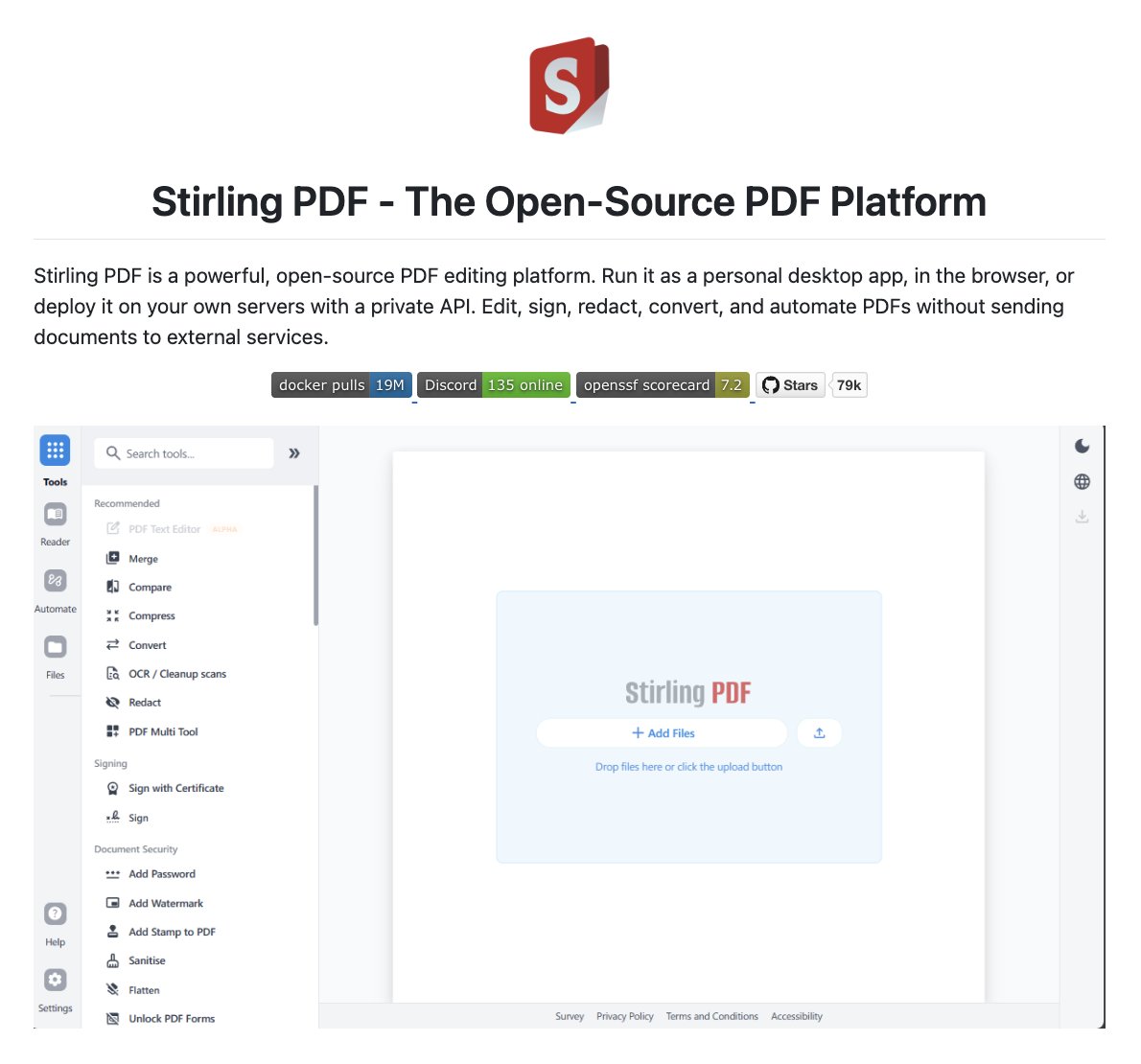
Adobe Acrobat Pro costs $239/year.
Someone open-sourced a full PDF suite with 50+ tools. Merge, split, sign, redact, OCR, compress, convert, everything Acrobat charges for.
Runs 100% locally. Your files never leave your machine.
78k stars. 100% open source
I built a GitHub repo that lets you run Claude Code for free, forever.
It takes just 5 minutes to set up, reroutes your traffic to 10 free providers like DeepSeek and Kimi, and it’s already being used by over 20,000 developers.
The fact that Syncthing is FREE still blows my mind.
It already gives you:
• encrypted device-to-device sync
• cross-platform support
• no storage limits
• no subscriptions
• no ads
• no vendor lock-in
• direct peer-to-peer transfers
• self-hosted file syncing
• offline LAN syncing
• Docker + NAS support
• automatic syncing between devices
Unlike Google Drive, Dropbox, or OneDrive:
your files don’t have to live on someone else’s server.
Everything syncs directly between YOUR devices.
And after 467 releases with 350+ contributors, Syncthing 2.1 keeps improving.
New in Syncthing 2.1:
• HTTP/HTTPS CONNECT proxy support
• configurable block indexing
• GUI folder grouping
• customizable login session duration
• reduced database overhead
• smarter sync handling
• improved rename tracking
• multiple security fixes
The project is also:
• fully open-source
• end-to-end encrypted
• available on Windows, Linux, macOS, Android, Docker, BSD, NAS systems, and more
• GPG-signed for verified releases
Honestly one of the best examples of what open-source software can achieve.





![VivekIntel's tweet photo. CVE MCP Server — AI-Powered Vulnerability Intelligence Through MCP 🤖💀
CVE MCP Server transforms Claude into a security analyst by connecting 27 security tools and 21 intelligence sources through a single MCP interface.
Key Features:
• CVE lookup, EPSS, CVSS, KEV & CWE intelligence
• Composite risk scoring and prioritization
• Exploit & PoC discovery
• MITRE ATT&CK and CAPEC mapping
• IP reputation, GreyNoise & Shodan integration
• VirusTotal, ThreatFox & MalwareBazaar support
• Dependency vulnerability scanning via OSV[.]dev
• Executive risk report generation
Built with Python, FastMCP, httpx, aiosqlite, and Pydantic v2.
🔗 https://t.co/1upveIkkJV
#CyberSecurity #ThreatIntelligence #MCP #OpenSource #VulnerabilityManagement](https://pbs.twimg.com/media/HKGmrASaoAAbjC4.jpg)